Can I make default langauge option for sites not my native language?

flashist

New member
Member
Local time
3:43 AM
Messages
54
I've got used to reading English on my computer, to the point where I prefer it over my native language in most situations. So it's annoying how many websites and programs detect my country and set language accordingly. While with programs it's not really that much of a concern, considering I just need to pay some attention during installation, the websites are more annoying.

So my question is rather simple, solution might not be. Is it possible to force me to be identified as an English computer?

Exactly how is this detected by the websites in general?

My OS language is English, as is my browser language on both IE and Opera, are many of these sites using IP to detect languages? I suppose in that case it would be hard to fix without using proxies which doesn't really sound worthwhile...

Just wondering in case there is some simple solution I have yet to discover, possibly browser setting? Or different browser all together.

Thanks in advance.
 

My Computer My Computer

At a glance

Windows 7 / VistaIntel Core Quad Processor i7-860Kingston DDR3 HyperX T1 2000MHz 6GBEVGA GeForce 9800GTX 512MB
OS
Windows 7 / Vista
CPU
Intel Core Quad Processor i7-860
Motherboard
Gigabyte GA-P55-UD4 Socket-1156
Memory
Kingston DDR3 HyperX T1 2000MHz 6GB
Graphics Card(s)
EVGA GeForce 9800GTX 512MB
Sound Card
Creative Sound Blaster X-Fi Platinum Fatal1ty
Monitor(s) Displays
Sony 21" + BENQ 24" LCD
Screen Resolution
1600x1200 + 1920x1080
Hard Drives
Corsair SSD P64 2,5" 64GB
Samsung SpinPoint T166 500GB
PSU
Thermaltake Toughpower 1200W
Case
Antec Nine Hundred
Cooling
Fans
Keyboard
Logitec G15
Mouse
Logitech G9
Internet Speed
20Mb/s
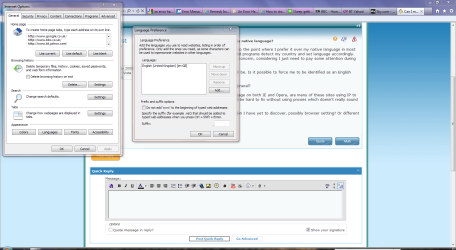
Not sure whether this would help, but if you navigate to Internet Explorer>Internet Options>General Tab>Appearance Section>Languages, you can add a website language from there.

Lang.PNG
 

My Computer My Computer

At a glance

Windows 7 Ultimate SP1 64-BitIntel Core i7 870 @ 2.93GHz8Gb Dual-Channel DDR3 @ 664MHznVidia GeForce GTX 460 1024MB dedicated RAM
Computer Manufacturer/Model Number
HP Pavilion Elite 495UK
OS
Windows 7 Ultimate SP1 64-Bit
CPU
Intel Core i7 870 @ 2.93GHz
Motherboard
MSI 2A9C (CPU1)
Memory
8Gb Dual-Channel DDR3 @ 664MHz
Graphics Card(s)
nVidia GeForce GTX 460 1024MB dedicated RAM
Sound Card
Realtek HD Audio
Monitor(s) Displays
HP2310i
Screen Resolution
1920 x 1080
Hard Drives
1x1954GB Hitachi HDS22020ALA 330 (RAID), 1x1954GB Hitachi External for backup and storage
PSU
460W
Case
HP Elite
Cooling
Air cooled
Keyboard
Logitech K750 solar-powered keyboard
Mouse
Logitech Wireless M180 mouse
Internet Speed
2Mb
Other Info
Pure Avanti Flow Internet Radio with iPod Dock, 64Gb iPod, HP USB Speakers, Sony MDR-V500 Headphones, Sony Vaio F-Series Laptop
I have the same problem. I'm an American, living in Norway, and I don't understand Norwegian. Around about 2005, the websites began to automatically detect that I'm in Norway, probably by IP address, so even though I would type in the .com address, they would default to the .no address, which is in Norwegian, and then I would have to look on their webpage for a "change region" setting to change it to the USA (.com). However not all websites have that option.

If seavixen32's solution doesn't work to your liking, I have found Google Toolbar to be quite useful for those stubborn websites that offer no option to change them. It has an option to automatically translate the websites from [any (or all)] language(s) into [any] language.

If you don't want to install Google Toolbar, you could try their Google Language Tools website (Language Tools) and try the same thing from there and use the option on the top of the webpage, "Translated Search". I don't use it myself, because I'm using the Google Toolbar method, but it looks like it works the same. It does say that it has an option to automatically translate the webpages into the language of your choice, which, in this case, is English.
 

My Computer My Computer

At a glance

Windows 7 Home Premium 64bit and on my other ...
OS
Windows 7 Home Premium 64bit and on my other computer Windows XP Pro 32bit
I don't think the language setting will help. The settings you get are a consequence of your IP address. You can try to get to these websites/downloads via a US based proxy website.
 

My Computer My Computer

At a glance

Vista, Windows7, Mint Mate, Zorin, Windows 8from 1.6GHz Duo to i7
Computer Manufacturer/Model Number
HP, Dell, Gateway, Toshiba - 4 laptops and 2 desktops
OS
Vista, Windows7, Mint Mate, Zorin, Windows 8
CPU
from 1.6GHz Duo to i7
Monitor(s) Displays
2x HP w2207
Hard Drives
5x HDD, 7x SSD, 12x Externals
Keyboard
with trackball - no mices
Mouse
Trackball mice
Internet Speed
DSL 6000
Back
Top