Can I make USB drive open Windows Explorer view?

Vortechs

New member
Member
Local time
11:54 PM
Messages
64
Can I make USB drive open Windows Explorer view?
I'm aware that aurorun has been disabled for usb drives in windows 7, Is there any way to make it just open the Windows Explorer view of the contents automatically when plugged in? I dont want it to run any programs just show me what's on it. If Win7 cant do it is there any 3rd party software that will enable this?
Thanks.
 

My Computer My Computer

Computer Manufacturer/Model Number
Me
OS
Windows 7 pro x64
CPU
Intel 3.3Ghz
Motherboard
Asus P8Z68-V LX
Memory
8 GB
Graphics Card(s)
On board
Sound Card
On board
Hard Drives
2 Samsung 256gb SSD
2 Seagate 3TB HDD
PSU
BeQuiet 350w
Case
Lian Li
Cooling
Err.. cant remember
Control Panel/Hardware & Sound/Auto Play, then choose open in Win explorer under other devises..
 

My Computer My Computer

Computer type
PC/Desktop
Computer Manufacturer/Model Number
Custom, Dell and Lenono LT's
OS
Win8/8.1,Win7-U64, Vista U64, uncounted Linux distor's
CPU
AMD and Intell, 9590, 8350, i5 3570k
Motherboard
CFVFZ, GA990FXA, Z77e-itx
Memory
Corsair G Skill
Graphics Card(s)
Crossfired Sapphire HD 7950 Vapor-X, ASUS R9 280X TOP
Sound Card
Realtek ALC889
Monitor(s) Displays
ViewSonic VX2770SMH 27" / ViewSonic VX2433 LCD 24"
Screen Resolution
1080i HD
Hard Drives
Samsung SSD 840 Pro
OCZ Agility 3's
OCZ Vector's
WD's Blue, red, green, Velociraptors
Seagate USB3 & Hybrid's
ASUS Blu-Ray
ASUS DVD
PSU
Corsair AX1200i, Seasonice 850 Gold
Case
Cooler Master HAF 922 & HAF 932, Lian Li Train case.
Cooling
Air, Glacer 240L expanded, custom EK loop with duel D5's
Keyboard
Microsoft SideWinder X4 USB Keyboard / Logitech 250 PS2
Mouse
Logitech G500 / MS wireless 5000
Internet Speed
Best of 5ms / 75+ dn / 12+ up More or less.
Antivirus
MS esentials-MalwareBytes
Browser
Firefox Chromebook
Thanks, but there is no 'Other Devices' category listed under 'Autoplay' in the 'Control Panel'.
 

My Computer My Computer

Computer Manufacturer/Model Number
Me
OS
Windows 7 pro x64
CPU
Intel 3.3Ghz
Motherboard
Asus P8Z68-V LX
Memory
8 GB
Graphics Card(s)
On board
Sound Card
On board
Hard Drives
2 Samsung 256gb SSD
2 Seagate 3TB HDD
PSU
BeQuiet 350w
Case
Lian Li
Cooling
Err.. cant remember
In autoplay, under mixed content choose open folder to view files. That's what I did...
 

My Computer My Computer

Computer type
PC/Desktop
Computer Manufacturer/Model Number
Custom Built
OS
Windows 10 Pro
CPU
AMD Ryzen 5 2400G Processor with Radeon RX Vega 11 Graphics
Motherboard
ASRock X470 Master SLI/AC AM4 AMD Promontory X470 SATA 6Gb/s
Memory
G.SKILL Ripjaws V Series 16GB (2 x 8GB) 288-Pin DDR4 SDRAM D
Graphics Card(s)
2047MB NVIDIA GeForce GTX 1060 6GB (EVGA)
Sound Card
Motherboard Built in
Monitor(s) Displays
Acer R240HY bidx 23.8-Inch IPS HDMI DVI VGA (1920 x 1080) Wi
Screen Resolution
1920 x 1080
Hard Drives
1TB Sandisk SSD PLUS (Main drive)
500 GB Seagate 7200 RPM (Games)
500 GB Western Digital 7200 RPM (Virtual Machines)
PSU
CORSAIR TX Series TX650M 650W 80+ Gold Modular Power Supply
Case
CORSAIR CARBIDE SPEC-02 Mid-Tower Gaming Case, Red LED Fan
Cooling
220mm, two 120mm, and four 60mm fans
Keyboard
Wired Dell keyboard
Mouse
Wireless Logitech mouse
Internet Speed
250mb down, 30mb up
Antivirus
Panda Cloud Antivirus
Browser
Chrome-ish x64
Other Info
Your awesome for reading this.
I already tried that, it doesn't work for me on either of my USB flash drives.
 

My Computer My Computer

Computer Manufacturer/Model Number
Me
OS
Windows 7 pro x64
CPU
Intel 3.3Ghz
Motherboard
Asus P8Z68-V LX
Memory
8 GB
Graphics Card(s)
On board
Sound Card
On board
Hard Drives
2 Samsung 256gb SSD
2 Seagate 3TB HDD
PSU
BeQuiet 350w
Case
Lian Li
Cooling
Err.. cant remember

My Computer My Computer

Computer type
PC/Desktop
Computer Manufacturer/Model Number
Custom Built
OS
Windows 10 Pro
CPU
AMD Ryzen 5 2400G Processor with Radeon RX Vega 11 Graphics
Motherboard
ASRock X470 Master SLI/AC AM4 AMD Promontory X470 SATA 6Gb/s
Memory
G.SKILL Ripjaws V Series 16GB (2 x 8GB) 288-Pin DDR4 SDRAM D
Graphics Card(s)
2047MB NVIDIA GeForce GTX 1060 6GB (EVGA)
Sound Card
Motherboard Built in
Monitor(s) Displays
Acer R240HY bidx 23.8-Inch IPS HDMI DVI VGA (1920 x 1080) Wi
Screen Resolution
1920 x 1080
Hard Drives
1TB Sandisk SSD PLUS (Main drive)
500 GB Seagate 7200 RPM (Games)
500 GB Western Digital 7200 RPM (Virtual Machines)
PSU
CORSAIR TX Series TX650M 650W 80+ Gold Modular Power Supply
Case
CORSAIR CARBIDE SPEC-02 Mid-Tower Gaming Case, Red LED Fan
Cooling
220mm, two 120mm, and four 60mm fans
Keyboard
Wired Dell keyboard
Mouse
Wireless Logitech mouse
Internet Speed
250mb down, 30mb up
Antivirus
Panda Cloud Antivirus
Browser
Chrome-ish x64
Other Info
Your awesome for reading this.
You can use Autoplay,
More options should be displayed,
View attachment 281958
But for the most part you can simply open windows explorer manually and Close autoplay and access the usb drive under the Computer section on the Navigation pane.
 
Last edited:

My Computer My Computer

Computer type
PC/Desktop
Computer Manufacturer/Model Number
Custom assembled by me :}
OS
Win-7-Pro64bit 7-H-Prem-64bit
CPU
i7-5930K 2nd i9-9940x both water blocked VRM's too
Motherboard
ASUS SABERTOOTH X99 2nd ASUS x299 Apex
Memory
Trident-z 3200C14 2nd Trident-z 3600C16
Graphics Card(s)
EVGA 1080ti ftw3 2nd Titan Xp both water blocked
Sound Card
Built-in Realtek
Monitor(s) Displays
1-AOC G2460PG 24"G-Sync 144Hz/ 2nd 1-ASUS VG248QE 24" 144Hz
Screen Resolution
1920 x 1080 144Hz
Hard Drives
2-Samsung M.2 Evo & Evo Plus
2-Samsung 850 EVO 500GB SSD's/ 3-2.5 W.D. Black 1tb-&3-1tb/3-3.5 WD Black 1tb hdd's
PSU
EVGA SuperNOVA 1000-P2 2nd 1200-P2
Case
2-Corsair Obsidian Series 450D Black ATX Mid Tower
Cooling
Custom water loops
Keyboard
Logitech G710+/ 2nd Logitech G910
Mouse
2-RedDragon M901 Perdition 16400 dpi Gaming mouse = wired
Internet Speed
Comcast Ping 19ms 89.31mbps download speed 6.12mbps upload
Antivirus
Malwarebytes Pro/ Superantispyware Pro
Browser
FireFox & Pale moon
Other Info
2nd ASUS X299 Apex/Intel i9-9940x with Custom water loop/7H-Prem-x64/Corsair 450D case/Ram Trident-z 3600C16 4x8gb / Samsung970Evo plus 500gb SSD/Dual ssd EZ swap evo/PSU EVGA SuperNova 1200w-P2 80+Platinum/GPU Titan Xp /8-ML-140 on push-pull on 2-280GTX rads
What USB are you using?
Is it a Sandisk USB with U3 software or a generic type?
 

My Computer My Computer

Computer type
PC/Desktop
OS
Windows 10
CPU
Intel Core i5 3570K
Motherboard
Asus P8Z77V-PRO
Memory
16GB 1600Mhz G.Skill
Graphics Card(s)
Gigabyte GTX 970 G1-Gaming
PSU
Seasonic 1000W Platinum
Case
Fractal Design Define R4
Cooling
Noctua NH-D14
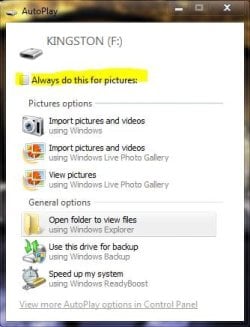
OK, so I'm now getting the autoplay dialog box when I insert my generic usb flash drives, it gives me 2 choices: Open in folder view and Use the drive for backup. I just want it to automatically open the USB drive folder view (no matter what's on it) - I have every option in 'Autoplay' set to: "Open folder to view files in windows explorer" but it still insists on asking me - didn't there used to be a tick box that said "do this action every time" or something like that?
Also is there any specific autorun.inf code that will simply open the folder view?
 

My Computer My Computer

Computer Manufacturer/Model Number
Me
OS
Windows 7 pro x64
CPU
Intel 3.3Ghz
Motherboard
Asus P8Z68-V LX
Memory
8 GB
Graphics Card(s)
On board
Sound Card
On board
Hard Drives
2 Samsung 256gb SSD
2 Seagate 3TB HDD
PSU
BeQuiet 350w
Case
Lian Li
Cooling
Err.. cant remember
didn't there used to be a tick box that said "do this action every time" or something like that?
Also is there any specific autorun.inf code that will simply open the folder view?

I get the "do this every time" for certain items,

autoplay.JPG

Microsoft removed the autorun.inf in windows 7 for safety reasons,

Windows 7 USB Autorun.inf
 

My Computer My Computer

Computer type
PC/Desktop
Computer Manufacturer/Model Number
Self Built
OS
Win 10 Pro x64
CPU
Intel I5-2500K @3.3GHz
Motherboard
Asrock P67 Extreme4
Memory
16GB G.Skill Ripjaws X (4x4GB)
Graphics Card(s)
EVGA GeForce 750 Ti SC 2GB
Sound Card
ASUS Xonar DG 5.1 Channels 24-bit 96KHz PCI Interface Sound
Monitor(s) Displays
auria eq2367
Screen Resolution
1920 x 1080
Hard Drives
250GB Samsung 850 EVO SSD
1TB WD Blue
1TB Hitachi
PSU
SeaSonic X 650W 80 Plus Gold
Case
Corsair Obsidian 750D
Cooling
Corsair H60, Three 140mm case fans
Keyboard
Logitech Wireless Keyboard K520
Mouse
Logitech Wireless Mouse M310
Internet Speed
Wave Broadband ~ 100 dn 5 up
Antivirus
Windows Defender, Malwarebytes Premium
Browser
Edge, IE11, Chrome
Other Info
Laptop specs: HP g7-1365dx /
CPU: AMD A6-3420M APU with Radeon(tm) HD Graphics /
RAM: Crucial 8Gb (2x4Gb) /
SSD: Crucial M4-CT128M4SSD2 ATA Device/ FW 000F /
GFX: AMD Radeon HD 6520G /
OS: Windows 10 Pro x64
It seems to depend on what types of files are on the USB drive, if I keep a video file on it then it will auto open to folder view. :rolleyes:
 

My Computer My Computer

Computer Manufacturer/Model Number
Me
OS
Windows 7 pro x64
CPU
Intel 3.3Ghz
Motherboard
Asus P8Z68-V LX
Memory
8 GB
Graphics Card(s)
On board
Sound Card
On board
Hard Drives
2 Samsung 256gb SSD
2 Seagate 3TB HDD
PSU
BeQuiet 350w
Case
Lian Li
Cooling
Err.. cant remember
It seems to depend on what types of files are on the USB drive, if I keep a video file on it then it will auto open to folder view. :rolleyes:

Exactly, which is what I was saying in my previous post. (Why the eyeroll?)

You want it to open explorer "No matter what is on it", and that option has been disabled in windows 7 for security reasons.

The link explaining that again is here,

Windows 7 USB Autorun.inf
 

My Computer My Computer

Computer type
PC/Desktop
Computer Manufacturer/Model Number
Self Built
OS
Win 10 Pro x64
CPU
Intel I5-2500K @3.3GHz
Motherboard
Asrock P67 Extreme4
Memory
16GB G.Skill Ripjaws X (4x4GB)
Graphics Card(s)
EVGA GeForce 750 Ti SC 2GB
Sound Card
ASUS Xonar DG 5.1 Channels 24-bit 96KHz PCI Interface Sound
Monitor(s) Displays
auria eq2367
Screen Resolution
1920 x 1080
Hard Drives
250GB Samsung 850 EVO SSD
1TB WD Blue
1TB Hitachi
PSU
SeaSonic X 650W 80 Plus Gold
Case
Corsair Obsidian 750D
Cooling
Corsair H60, Three 140mm case fans
Keyboard
Logitech Wireless Keyboard K520
Mouse
Logitech Wireless Mouse M310
Internet Speed
Wave Broadband ~ 100 dn 5 up
Antivirus
Windows Defender, Malwarebytes Premium
Browser
Edge, IE11, Chrome
Other Info
Laptop specs: HP g7-1365dx /
CPU: AMD A6-3420M APU with Radeon(tm) HD Graphics /
RAM: Crucial 8Gb (2x4Gb) /
SSD: Crucial M4-CT128M4SSD2 ATA Device/ FW 000F /
GFX: AMD Radeon HD 6520G /
OS: Windows 10 Pro x64
Back
Top