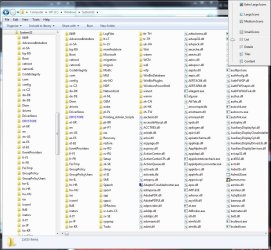
I want to move to 7 very soon (next week or so) but one thing that is putting me off is the standard version of Windows Explorer (W.E.)I have looked at "Classic Shell" but I can't seem to get it right to look the way i want it too, if you look below this is how i have my W.E. now in XP ro SP3.
Does anyone know how to make it look like my current version i don't mind if it's a third party app, hell i'll be happy to buy an app that can do what i want.
All1
Attachments
WinExp.jpg
104.1 KB
· Views: 63
My Computer
At a glance
Windows 7 64bit Ultimate (Retail)Intel Core 2 Duo 8400 @ 3Ghz8GB DDR3 @ 1333ATI 1GB 4350 (Passive)
Win7 will show it exactly that way by choosing the "List" display option.
Attachments
W7xplr.jpg
184.9 KB
· Views: 29
My Computer
At a glance
Microsoft Windows 7 Home Premium 64-bit 7601 ...Pentium(R) Dual-Core CPU E5300 @ 2.60GHz6.00 GBIntel(R) G33/G31 Express Chipset Family
Computer type
PC/Desktop
Computer Manufacturer/Model Number
HP (HP-P6212F)
OS
Microsoft Windows 7 Home Premium 64-bit 7601 Multiprocessor Free Service Pack 1
CPU
Pentium(R) Dual-Core CPU E5300 @ 2.60GHz
Motherboard
PEGATRON CORPORATION Benicia
Memory
6.00 GB
Graphics Card(s)
Intel(R) G33/G31 Express Chipset Family
Sound Card
Realtek High Definition Audio
Monitor(s) Displays
24'' HP WS LCD
Screen Resolution
1920 x 1080 x 32 bits (4294967296 colors) @ 60 Hz
Hard Drives
(1) ATA Hitachi HDT72106 SCSI Disk Device (2) Generic- Compact Flash USB Device (3) Generic- MS/MS-Pro USB Device (4) Generic- SD/MMC USB Device (5) Generic- SM/xD-Picture USB Device (6) Verbatim STORE N GO USB Device
Thanks for the reply MourningStar, that's one thing sorted so thx for that but what about the top row of buttons and the way windows seems to want to almost control me in how i use it i like the old classic way and dipping my toe into 7 a few times i've never found the fix i'm after, as i say i'm still on xp for now but have to move soon and want W.E. working the way i like it, am i making myself clear or just confusing the issue further?
All1
My Computer
At a glance
Windows 7 64bit Ultimate (Retail)Intel Core 2 Duo 8400 @ 3Ghz8GB DDR3 @ 1333ATI 1GB 4350 (Passive)
sorry I cannot be of more help. I went from WinME (still running strong btw) straight to Win7 so the whole gui-thing was a learning-curve for me. That top row of buttons? Those functions appear in the 'Organize' pull-down or you can right-clik on any file or folder and those functions will be available in the pop-up. I don't much care for that XP layout you have posted and find that space a waste of display real estate as well as seeming to require additional mouse operations. However, that's just me and you should be able to configure your system as you desire. I'm sure a guru will come on board soon enough to address your additional issue.
My Computer
At a glance
Microsoft Windows 7 Home Premium 64-bit 7601 ...Pentium(R) Dual-Core CPU E5300 @ 2.60GHz6.00 GBIntel(R) G33/G31 Express Chipset Family
Computer type
PC/Desktop
Computer Manufacturer/Model Number
HP (HP-P6212F)
OS
Microsoft Windows 7 Home Premium 64-bit 7601 Multiprocessor Free Service Pack 1
CPU
Pentium(R) Dual-Core CPU E5300 @ 2.60GHz
Motherboard
PEGATRON CORPORATION Benicia
Memory
6.00 GB
Graphics Card(s)
Intel(R) G33/G31 Express Chipset Family
Sound Card
Realtek High Definition Audio
Monitor(s) Displays
24'' HP WS LCD
Screen Resolution
1920 x 1080 x 32 bits (4294967296 colors) @ 60 Hz
Hard Drives
(1) ATA Hitachi HDT72106 SCSI Disk Device (2) Generic- Compact Flash USB Device (3) Generic- MS/MS-Pro USB Device (4) Generic- SD/MMC USB Device (5) Generic- SM/xD-Picture USB Device (6) Verbatim STORE N GO USB Device
You can customize Explorer toolbar with custom commands.
In Brink's tutorial above are only pre-selected buttons, but with this tutorial you can make real custom buttons.
You could use autohotkey scripts or vb scripts to emulate some of the buttons with key shortcuts. But that is quite a chunk of work and appearance would be different (far from you XP screenshot).
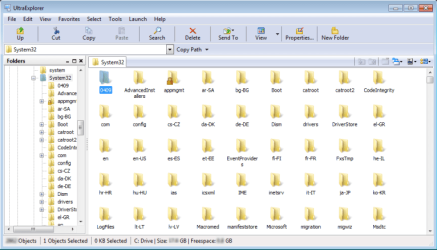
Easier and more graphically alike solution: Ultra Explorer.
Check attachment, I have tried to customize it in Win7 to look as your XP screenshot.
Attachments
ultraexplorer.png
38.1 KB
· Views: 20
My Computer
At a glance
Windows 8.1 ; Windows 7 x86 (Dec2008-Jan2013)
Computer type
PC/Desktop
OS
Windows 8.1 ; Windows 7 x86 (Dec2008-Jan2013)
Other Info
"The scale icon at the top right of a post or tutorial is how you can give rep to the member."
Thanks for the reply Brink I don't think StExBar is what i'm after but option looks more promising albeit a bit more complicated, but i'm going to give Neutron16 suggestion of "Explorer toolbar" a go first that looks to give me the customisation that i'm after.
Neutron16 many thanks for the suggestion of "Explorer toolbar" this looks to be the perfect fit for what i'll need, i'll do some testing on the laptop and post back as i say it's the only thing stopping me from moving over right now, but it may take a while as i have shed loads of stuff on right but i will post back for sure with thoughs on it so once again many thx m8
All1
My Computer
At a glance
Windows 7 64bit Ultimate (Retail)Intel Core 2 Duo 8400 @ 3Ghz8GB DDR3 @ 1333ATI 1GB 4350 (Passive)