
You are using an out of date browser. It may not display this or other websites correctly.
You should upgrade or use an alternative browser.
You should upgrade or use an alternative browser.
Can I move Win7 from recovery(C:) to OS(D:)?
- Thread starter smwebster
- Start date

- Local time
- 5:44 PM
- Messages
- 12,011
You can clone it to a new hard drive on the PC
You can image it to a partition on the existing hard drive and then restore that image to the same or another drive.
Cloning is copying without using an image.
Both work pretty well, neither perfectly in all cases. If it succeeds, you would not have to reinstall programs.
Acronis, Macrium Reflect, and Paragon are the applications of choice.
You can image it to a partition on the existing hard drive and then restore that image to the same or another drive.
Cloning is copying without using an image.
Both work pretty well, neither perfectly in all cases. If it succeeds, you would not have to reinstall programs.
Acronis, Macrium Reflect, and Paragon are the applications of choice.
My Computer
At a glance
Windows 7 Home Premium SP1, 64-bitIntel Skylake i5-6600K, not overclocked8 GB HyperX DDR4-2666 (2 x 4 GB)none; graphics are integrated on CPU
- Computer type
- PC/Desktop
- Computer Manufacturer/Model Number
- Ignatz Special; 4 speed manual gearbox; factory air conditioning; one of one
- OS
- Windows 7 Home Premium SP1, 64-bit
- CPU
- Intel Skylake i5-6600K, not overclocked
- Motherboard
- AsRock Z170M Extreme 4, micro ATX
- Memory
- 8 GB HyperX DDR4-2666 (2 x 4 GB)
- Graphics Card(s)
- none; graphics are integrated on CPU
- Sound Card
- onboard: Realtek ALC1150; external: USB Behringer UF0-202
- Monitor(s) Displays
- Dell S2340M 23 inch IPS
- Screen Resolution
- 1600 x 900
- Hard Drives
- System: Crucial MX100 series SSD, 128 GB;
Data: Samsung Spinpoint 103SJ, 1 TB;
Backup: WD Caviar Green WD30EZRX-00D8PB0, 3 TB
- PSU
- Rosewill SilentNight 500 watt fanless, semi-modular
- Case
- Antec Solo II
- Cooling
- Noctua NH-U12S; Noctua F12 intake, Noctua S12A exhaust
- Keyboard
- Microsoft 200 6JH-00001 USB
- Mouse
- Dell or Microsoft optical wired; USB
- Antivirus
- Microsoft Security Essentials and Malwarebytes Premium
- Browser
- Pale Moon
- Other Info
- All fans PWM; speeds at idle: CPU circa 500 rpm; intake circa 600 rpm; exhaust circa 600 rpm; CPU temps 27 idle and 47 C load in a warm room (27 C/81 F) when running Intel Extreme Tuning Utility stress test.
- Local time
- 5:44 PM
- Messages
- 12,011
After you copy it to the OS, I would disconnect the recovery drive and make sure the OS drive boots and functions properly by itself.
Once you have decided that the OS drive is in good shape as a single drive, then you could reconnect the recovery drive and have your way with it.
But be careful and take precautions--imaging and cloning can fail.
Once you have decided that the OS drive is in good shape as a single drive, then you could reconnect the recovery drive and have your way with it.
But be careful and take precautions--imaging and cloning can fail.
My Computer
At a glance
Windows 7 Home Premium SP1, 64-bitIntel Skylake i5-6600K, not overclocked8 GB HyperX DDR4-2666 (2 x 4 GB)none; graphics are integrated on CPU
- Computer type
- PC/Desktop
- Computer Manufacturer/Model Number
- Ignatz Special; 4 speed manual gearbox; factory air conditioning; one of one
- OS
- Windows 7 Home Premium SP1, 64-bit
- CPU
- Intel Skylake i5-6600K, not overclocked
- Motherboard
- AsRock Z170M Extreme 4, micro ATX
- Memory
- 8 GB HyperX DDR4-2666 (2 x 4 GB)
- Graphics Card(s)
- none; graphics are integrated on CPU
- Sound Card
- onboard: Realtek ALC1150; external: USB Behringer UF0-202
- Monitor(s) Displays
- Dell S2340M 23 inch IPS
- Screen Resolution
- 1600 x 900
- Hard Drives
- System: Crucial MX100 series SSD, 128 GB;
Data: Samsung Spinpoint 103SJ, 1 TB;
Backup: WD Caviar Green WD30EZRX-00D8PB0, 3 TB
- PSU
- Rosewill SilentNight 500 watt fanless, semi-modular
- Case
- Antec Solo II
- Cooling
- Noctua NH-U12S; Noctua F12 intake, Noctua S12A exhaust
- Keyboard
- Microsoft 200 6JH-00001 USB
- Mouse
- Dell or Microsoft optical wired; USB
- Antivirus
- Microsoft Security Essentials and Malwarebytes Premium
- Browser
- Pale Moon
- Other Info
- All fans PWM; speeds at idle: CPU circa 500 rpm; intake circa 600 rpm; exhaust circa 600 rpm; CPU temps 27 idle and 47 C load in a warm room (27 C/81 F) when running Intel Extreme Tuning Utility stress test.

- Local time
- 5:44 PM
- Messages
- 50,634
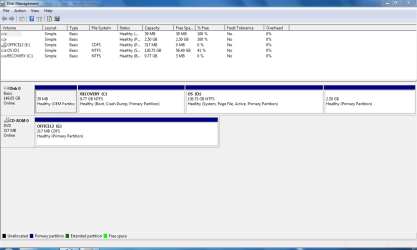
If you will post back a screenshot of your full DIsk Management map, we can tell you the exact steps to achieving what you want.
Use Snipping Tool in Start Menu, attach file using paper clip in reply box.
Use Snipping Tool in Start Menu, attach file using paper clip in reply box.
- Local time
- 5:44 PM
- Messages
- 12,011
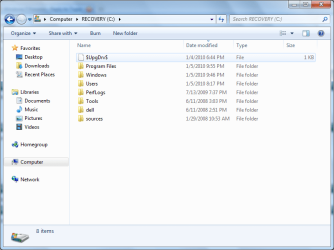
Looks like this was an upgrade install, not a clean install?
Were the dell and sources folders there before you installed Windows 7?
Why worry about deleting anything if you are going to move or copy this partition?
I am guessing all of your personal data is somewhere in the C Users directory? Wherever it is, it will copy over when you image or clone.
Post the Disk Management pic as Greg said.
Were the dell and sources folders there before you installed Windows 7?
Why worry about deleting anything if you are going to move or copy this partition?
I am guessing all of your personal data is somewhere in the C Users directory? Wherever it is, it will copy over when you image or clone.
Post the Disk Management pic as Greg said.
My Computer
At a glance
Windows 7 Home Premium SP1, 64-bitIntel Skylake i5-6600K, not overclocked8 GB HyperX DDR4-2666 (2 x 4 GB)none; graphics are integrated on CPU
- Computer type
- PC/Desktop
- Computer Manufacturer/Model Number
- Ignatz Special; 4 speed manual gearbox; factory air conditioning; one of one
- OS
- Windows 7 Home Premium SP1, 64-bit
- CPU
- Intel Skylake i5-6600K, not overclocked
- Motherboard
- AsRock Z170M Extreme 4, micro ATX
- Memory
- 8 GB HyperX DDR4-2666 (2 x 4 GB)
- Graphics Card(s)
- none; graphics are integrated on CPU
- Sound Card
- onboard: Realtek ALC1150; external: USB Behringer UF0-202
- Monitor(s) Displays
- Dell S2340M 23 inch IPS
- Screen Resolution
- 1600 x 900
- Hard Drives
- System: Crucial MX100 series SSD, 128 GB;
Data: Samsung Spinpoint 103SJ, 1 TB;
Backup: WD Caviar Green WD30EZRX-00D8PB0, 3 TB
- PSU
- Rosewill SilentNight 500 watt fanless, semi-modular
- Case
- Antec Solo II
- Cooling
- Noctua NH-U12S; Noctua F12 intake, Noctua S12A exhaust
- Keyboard
- Microsoft 200 6JH-00001 USB
- Mouse
- Dell or Microsoft optical wired; USB
- Antivirus
- Microsoft Security Essentials and Malwarebytes Premium
- Browser
- Pale Moon
- Other Info
- All fans PWM; speeds at idle: CPU circa 500 rpm; intake circa 600 rpm; exhaust circa 600 rpm; CPU temps 27 idle and 47 C load in a warm room (27 C/81 F) when running Intel Extreme Tuning Utility stress test.
- Local time
- 5:44 PM
- Messages
- 50,634
It isn't worth salvaging that Recov partition which you installed upon. You can try to make Vista Recovery Disks to see if it works, but unlikely.
http://www.sevenforums.com/tutorials/1649-clean-install-windows-7-a.html
http://www.sevenforums.com/tutorials/1649-clean-install-windows-7-a.html
I thought it was going to be a clean install because I didn't click upgrade.
The dell and sources where already there.
I have a back up of my original vista stuff on an external hard drive.
I tried doing the partition but the OS was locked and wouldn't let me move it there.
The dell and sources where already there.
I have a back up of my original vista stuff on an external hard drive.
I tried doing the partition but the OS was locked and wouldn't let me move it there.
Attachments
My Computer
At a glance
Windows 7
- OS
- Windows 7
- Local time
- 5:44 PM
- Messages
- 50,634
Back up your files, boot from the Win7 DVD, select CUstom Install, then use Drive Options to delete all partitions, create new one(s) as you wish, format and install Win7 to first partition.
If you have an Upgrade version it will scan DVD to see Vista and allow key.
http://www.sevenforums.com/tutorials/1649-clean-install-windows-7-a.html
If you have an Upgrade version it will scan DVD to see Vista and allow key.
http://www.sevenforums.com/tutorials/1649-clean-install-windows-7-a.html
- Local time
- 5:44 PM
- Messages
- 50,634
Yes