
Solved Can I re-initialize Windows 7 with Upgade DVD?

richierein

New member
Member
Local time
4:25 PM
Messages
38
Location
West Palm Beach, FL
When Microsoft had it's offer of upgrading Windows XP or Windows Vista to Windows 7 (3 CPUs for $150), I bought the DVD and upgraded from Windows Vista to Windows 7. Now I am having some difficulties with my current Windows 7 system and I am considering re-initializing back to factory settings. Can I use this upgrade DVD to do this?
 

My Computer My Computer

Computer Manufacturer/Model Number
Dell Inspiron 1720
OS
Windows 7 Home Premium 32 bit SP1
CPU
Intel T5250
Motherboard
Dell OUK437
Memory
4gb
Graphics Card(s)
Nvdia GeForce 8400M GS
Sound Card
Sigma Tel High Definition Audio CODEC
Hard Drives
2 3tb Seagate GoFlex Desktops
1 1tb Seagate Free Agent
Mouse
Logitech M305
Internet Speed
Free Wi-Fi provided to residents of building, too slow!
When Microsoft had it's offer of upgrading Windows XP or Windows Vista to Windows 7 (3 CPUs for $150), I bought the DVD and upgraded from Windows Vista to Windows 7. Now I am having some difficulties with my current Windows 7 system and I am considering re-initializing back to factory settings. Can I use this upgrade DVD to do this?

Is the following correct:

The PC originally had Vista.

You upgraded it to Win 7 and now want to return to Vista.

The upgrade DVD you refer to is a Win 7 disc.

If all of that is correct, I don't see how the upgrade DVD can help you return to Vista.

But you might be able to return to Vista if you have Vista install discs or have a set of recovery discs made when Vista was on the PC.
 

My Computer My Computer

Computer type
PC/Desktop
Computer Manufacturer/Model Number
Ignatz Special; 4 speed manual gearbox; factory air conditioning; one of one
OS
Windows 7 Home Premium SP1, 64-bit
CPU
Intel Skylake i5-6600K, not overclocked
Motherboard
AsRock Z170M Extreme 4, micro ATX
Memory
8 GB HyperX DDR4-2666 (2 x 4 GB)
Graphics Card(s)
none; graphics are integrated on CPU
Sound Card
onboard: Realtek ALC1150; external: USB Behringer UF0-202
Monitor(s) Displays
Dell S2340M 23 inch IPS
Screen Resolution
1600 x 900
Hard Drives
System: Crucial MX100 series SSD, 128 GB;
Data: Samsung Spinpoint 103SJ, 1 TB;
Backup: WD Caviar Green WD30EZRX-00D8PB0, 3 TB
PSU
Rosewill SilentNight 500 watt fanless, semi-modular
Case
Antec Solo II
Cooling
Noctua NH-U12S; Noctua F12 intake, Noctua S12A exhaust
Keyboard
Microsoft 200 6JH-00001 USB
Mouse
Dell or Microsoft optical wired; USB
Antivirus
Microsoft Security Essentials and Malwarebytes Premium
Browser
Pale Moon
Other Info
All fans PWM; speeds at idle: CPU circa 500 rpm; intake circa 600 rpm; exhaust circa 600 rpm; CPU temps 27 idle and 47 C load in a warm room (27 C/81 F) when running Intel Extreme Tuning Utility stress test.
God no, I don't want to return to Windows Vista. My D: partition on Windows 7 was clobbered and is now empty and approx. 59gb. Somehow the D: partition merged with the Windows 8 Consumer Preview when I was trying to remove it from my C: drive. I am considering a brand new fresh Windows 7 system. I am told that after several years, this can improve performance and I'm uncomfortable with a non-functioning D: partition. The DVD is labeled Windows 7 Home Premium Family Pack for 3 PCs Upgrade.
 

My Computer My Computer

Computer Manufacturer/Model Number
Dell Inspiron 1720
OS
Windows 7 Home Premium 32 bit SP1
CPU
Intel T5250
Motherboard
Dell OUK437
Memory
4gb
Graphics Card(s)
Nvdia GeForce 8400M GS
Sound Card
Sigma Tel High Definition Audio CODEC
Hard Drives
2 3tb Seagate GoFlex Desktops
1 1tb Seagate Free Agent
Mouse
Logitech M305
Internet Speed
Free Wi-Fi provided to residents of building, too slow!
I misunderstood you. When you said "back to factory settings", I assumed you meant return to its original "as manufactured" Vista state, not Windows 7.

You should certainly be able to reinstall Windows 7 with an ordinary Windows 7 upgrade disc, and validate with the existing Product Key. Or possibly repair the existing installation.
 

My Computer My Computer

Computer type
PC/Desktop
Computer Manufacturer/Model Number
Ignatz Special; 4 speed manual gearbox; factory air conditioning; one of one
OS
Windows 7 Home Premium SP1, 64-bit
CPU
Intel Skylake i5-6600K, not overclocked
Motherboard
AsRock Z170M Extreme 4, micro ATX
Memory
8 GB HyperX DDR4-2666 (2 x 4 GB)
Graphics Card(s)
none; graphics are integrated on CPU
Sound Card
onboard: Realtek ALC1150; external: USB Behringer UF0-202
Monitor(s) Displays
Dell S2340M 23 inch IPS
Screen Resolution
1600 x 900
Hard Drives
System: Crucial MX100 series SSD, 128 GB;
Data: Samsung Spinpoint 103SJ, 1 TB;
Backup: WD Caviar Green WD30EZRX-00D8PB0, 3 TB
PSU
Rosewill SilentNight 500 watt fanless, semi-modular
Case
Antec Solo II
Cooling
Noctua NH-U12S; Noctua F12 intake, Noctua S12A exhaust
Keyboard
Microsoft 200 6JH-00001 USB
Mouse
Dell or Microsoft optical wired; USB
Antivirus
Microsoft Security Essentials and Malwarebytes Premium
Browser
Pale Moon
Other Info
All fans PWM; speeds at idle: CPU circa 500 rpm; intake circa 600 rpm; exhaust circa 600 rpm; CPU temps 27 idle and 47 C load in a warm room (27 C/81 F) when running Intel Extreme Tuning Utility stress test.
My default profile had previously been re-located to an external drive and I have good backups of my C: partition. Unfortunately, I mis-read some of the instructions on the backup procedures and failed to backup my D: partition. I can easily restore 'Program Files' back to my C: partition. How will all of this affect the new D: partition? What does the D: partition do anyway and does it have any affect on the applications in 'Program Files' or the 'Appdata' folder in my default profile? I would not like to need to re-install and re-download all of applications presently installed. I would also like the registry to be un-affected.
 

My Computer My Computer

Computer Manufacturer/Model Number
Dell Inspiron 1720
OS
Windows 7 Home Premium 32 bit SP1
CPU
Intel T5250
Motherboard
Dell OUK437
Memory
4gb
Graphics Card(s)
Nvdia GeForce 8400M GS
Sound Card
Sigma Tel High Definition Audio CODEC
Hard Drives
2 3tb Seagate GoFlex Desktops
1 1tb Seagate Free Agent
Mouse
Logitech M305
Internet Speed
Free Wi-Fi provided to residents of building, too slow!
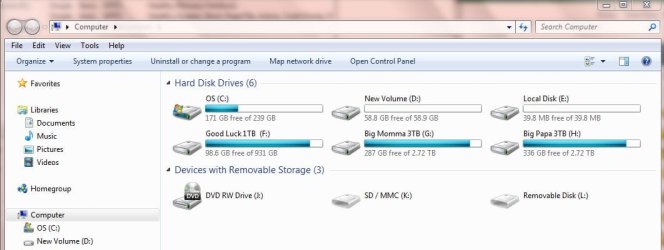
Post a screenshot of Windows Disk Management so we can see your partition setup.

You say "I can easily restore 'Program Files" back to my C partition". How do you propose to do that?

What is the purpose of your D partition? Why do you have a D partition?
 

My Computer My Computer

Computer type
PC/Desktop
Computer Manufacturer/Model Number
Ignatz Special; 4 speed manual gearbox; factory air conditioning; one of one
OS
Windows 7 Home Premium SP1, 64-bit
CPU
Intel Skylake i5-6600K, not overclocked
Motherboard
AsRock Z170M Extreme 4, micro ATX
Memory
8 GB HyperX DDR4-2666 (2 x 4 GB)
Graphics Card(s)
none; graphics are integrated on CPU
Sound Card
onboard: Realtek ALC1150; external: USB Behringer UF0-202
Monitor(s) Displays
Dell S2340M 23 inch IPS
Screen Resolution
1600 x 900
Hard Drives
System: Crucial MX100 series SSD, 128 GB;
Data: Samsung Spinpoint 103SJ, 1 TB;
Backup: WD Caviar Green WD30EZRX-00D8PB0, 3 TB
PSU
Rosewill SilentNight 500 watt fanless, semi-modular
Case
Antec Solo II
Cooling
Noctua NH-U12S; Noctua F12 intake, Noctua S12A exhaust
Keyboard
Microsoft 200 6JH-00001 USB
Mouse
Dell or Microsoft optical wired; USB
Antivirus
Microsoft Security Essentials and Malwarebytes Premium
Browser
Pale Moon
Other Info
All fans PWM; speeds at idle: CPU circa 500 rpm; intake circa 600 rpm; exhaust circa 600 rpm; CPU temps 27 idle and 47 C load in a warm room (27 C/81 F) when running Intel Extreme Tuning Utility stress test.
I have a good set of backups of my C: partition. That is where 'Program
Files' is located. Attached are two screenshots. 'Disk Management' and 'Computer > Open'.
 

Attachments

  • Screenshot_Disk_Management1.jpg
    Screenshot_Disk_Management1.jpg
    79.3 KB · Views: 15
  • Screenshot_Open_Computer1.jpg
    Screenshot_Open_Computer1.jpg
    47.4 KB · Views: 11

My Computer My Computer

Computer Manufacturer/Model Number
Dell Inspiron 1720
OS
Windows 7 Home Premium 32 bit SP1
CPU
Intel T5250
Motherboard
Dell OUK437
Memory
4gb
Graphics Card(s)
Nvdia GeForce 8400M GS
Sound Card
Sigma Tel High Definition Audio CODEC
Hard Drives
2 3tb Seagate GoFlex Desktops
1 1tb Seagate Free Agent
Mouse
Logitech M305
Internet Speed
Free Wi-Fi provided to residents of building, too slow!
What are the answers to the questions in post 6?

What is on drives E and H? They are marked active. Do they contain operating systems?
 

My Computer My Computer

Computer type
PC/Desktop
Computer Manufacturer/Model Number
Ignatz Special; 4 speed manual gearbox; factory air conditioning; one of one
OS
Windows 7 Home Premium SP1, 64-bit
CPU
Intel Skylake i5-6600K, not overclocked
Motherboard
AsRock Z170M Extreme 4, micro ATX
Memory
8 GB HyperX DDR4-2666 (2 x 4 GB)
Graphics Card(s)
none; graphics are integrated on CPU
Sound Card
onboard: Realtek ALC1150; external: USB Behringer UF0-202
Monitor(s) Displays
Dell S2340M 23 inch IPS
Screen Resolution
1600 x 900
Hard Drives
System: Crucial MX100 series SSD, 128 GB;
Data: Samsung Spinpoint 103SJ, 1 TB;
Backup: WD Caviar Green WD30EZRX-00D8PB0, 3 TB
PSU
Rosewill SilentNight 500 watt fanless, semi-modular
Case
Antec Solo II
Cooling
Noctua NH-U12S; Noctua F12 intake, Noctua S12A exhaust
Keyboard
Microsoft 200 6JH-00001 USB
Mouse
Dell or Microsoft optical wired; USB
Antivirus
Microsoft Security Essentials and Malwarebytes Premium
Browser
Pale Moon
Other Info
All fans PWM; speeds at idle: CPU circa 500 rpm; intake circa 600 rpm; exhaust circa 600 rpm; CPU temps 27 idle and 47 C load in a warm room (27 C/81 F) when running Intel Extreme Tuning Utility stress test.
You can Clean Reinstall using upgrade version, following the same steps as in the blue link. When you boot the installer it will see the underlying OS to allow use of Upgrade version key during install.

Since you have problems with a second data partition I would delete partitions on the target HD during install to create one large partition, or just delete and click Next and the installer will do it for you.

Unplug all other HD's during install.

The Best Practices for getting a perfect reinstall are in the blue link tutorial along with the latest installer with SP 1 if you're lacking that. I would not veer much away from those steps to get and maintain your install.
 
Regarding the E: partition, I have no idea where it came from. It just appeared a few months ago. Someone told me that it is actually part of the C: drive and is unique to Dell computers. The H: drive contains mostly my movie collection. I also use it for backing up my C: drive. Also, H: is where I relocated my default profile. I use the F: drive for backing up my default profile which resides on H:.

I recently had some conversations with 'computer experts'? and was told that the D: partition on Windows 7 is not vital to running a successful system and will not prevent me from running 'system restore' if it becomes necessary. With this in mind I am now rethinking the necessity of re-initializing and starting over from scratch, installing and downloading all of my applications. I was told that I can continue to function well without the D: partition. Please advise me if this is incorrect.
 

My Computer My Computer

Computer Manufacturer/Model Number
Dell Inspiron 1720
OS
Windows 7 Home Premium 32 bit SP1
CPU
Intel T5250
Motherboard
Dell OUK437
Memory
4gb
Graphics Card(s)
Nvdia GeForce 8400M GS
Sound Card
Sigma Tel High Definition Audio CODEC
Hard Drives
2 3tb Seagate GoFlex Desktops
1 1tb Seagate Free Agent
Mouse
Logitech M305
Internet Speed
Free Wi-Fi provided to residents of building, too slow!
One thing that I would like to add is that a windows 7 upgrade license will not automatically activate after a clean install. I've gone through this twice (forgetting about it the second time). In the first instance the activation people helped me with a work around and gave me the code for a manual activation. In the second instance they refused to help saying that I had to do a Vista install with my full license and then perform a Windows 7 upgrade. I wasn't very happy at all.
 

My Computers My Computers

System One System Two

To: towmsbg,

Do you mean it would not activate even with a valid Windows 7 product key?
 

My Computer My Computer

Computer Manufacturer/Model Number
Dell Inspiron 1720
OS
Windows 7 Home Premium 32 bit SP1
CPU
Intel T5250
Motherboard
Dell OUK437
Memory
4gb
Graphics Card(s)
Nvdia GeForce 8400M GS
Sound Card
Sigma Tel High Definition Audio CODEC
Hard Drives
2 3tb Seagate GoFlex Desktops
1 1tb Seagate Free Agent
Mouse
Logitech M305
Internet Speed
Free Wi-Fi provided to residents of building, too slow!
Yes I have a valid key and it wouldn't activate after a clean install. It expects an upgrade from Vista.
 

My Computers My Computers

System One System Two

How did you finally resolve this with Microsoft?
 

My Computer My Computer

Computer Manufacturer/Model Number
Dell Inspiron 1720
OS
Windows 7 Home Premium 32 bit SP1
CPU
Intel T5250
Motherboard
Dell OUK437
Memory
4gb
Graphics Card(s)
Nvdia GeForce 8400M GS
Sound Card
Sigma Tel High Definition Audio CODEC
Hard Drives
2 3tb Seagate GoFlex Desktops
1 1tb Seagate Free Agent
Mouse
Logitech M305
Internet Speed
Free Wi-Fi provided to residents of building, too slow!
As I explained, the installer when booted should have seen a previous OS to allow use of Upgrade version key during install - unless you're using a new or cleaned HD.

If not you need to do the quick registry workaround shown in option Three of Clean Install with a Upgrade Windows 7 Version to activate upgrade version on a new or cleaned HD.
 
I had to do a clean install of Vista, install SP1, & then run the 7 DVD from Vista performing an upgrade install. After that had to do a phone activation. It was a royal PITA since I had trouble getting the install to work for reasons that most people won't experience.
 

My Computers My Computers

System One System Two

You must have wiped or formatted the HD first. This is why I took the time to explain to you how the installer when booted looks for an OS and only if it sees it will it allow use of Upgrade version key.

You needed to let us know that you pre-formatted or wiped the HD if so because it requires special steps given in the second tutorial.
 
Yes I more or less did a wipe. It was Mac/7 dual boot and those I've discovered are very sensitive. I don't recommend them for the average user. It was in all about 8 aggravating hours about half of which was the 7 upgrade. Now I've backed up the activation token. The important thing is that I learned from this experience.
 

My Computers My Computers

System One System Two

The lesson is that there is no reason to wipe your HD unless there are installation problems requiring it.

When you boot the installer it will see an OS even if you go on to delete, repartition and format using the Custom drive options.

You could have saved hours had you read and understood what I wrote ahead.

You can mark the thread Solved at top.
 
To: gregrocker and townsbg,

Please re-read posting #10 (on page 1) and offer a comment.
 

My Computer My Computer

Computer Manufacturer/Model Number
Dell Inspiron 1720
OS
Windows 7 Home Premium 32 bit SP1
CPU
Intel T5250
Motherboard
Dell OUK437
Memory
4gb
Graphics Card(s)
Nvdia GeForce 8400M GS
Sound Card
Sigma Tel High Definition Audio CODEC
Hard Drives
2 3tb Seagate GoFlex Desktops
1 1tb Seagate Free Agent
Mouse
Logitech M305
Internet Speed
Free Wi-Fi provided to residents of building, too slow!
Back
Top