Solved Can I safely delete two old OS and their installed apps?

Racundra

New member
Local time
4:59 AM
Messages
7
I had a motherboard failure. I moved my 2 hard disks to a new computer, and installed a new OEM copy of Win 7 as drive C:, with new installation of apps.
The old computer had Win 7 and XP dual-booting in two drives on the same physical disk. Both of them, with all their installed apps, are redundant and dead as far as I’m concerned. They’re on a separate physical disk from drive C:.
Is it safe to delete them? I'd prefer not to format because there are also a lot of data files on it.

I used EasyBCD to check where the machine’s booting from, with this result:

“There is one entry in the Windows bootloader.
Default: Windows 7
Timeout: 30 seconds
Boot Drive: C:\
Entry #1
Name: Windows 7
BCD ID: {current}
Drive: C:\
Bootloader Path: \Windows\system32\winload.exe”
 

My Computer My Computer

At a glance

Windows 7 SP1 Home Premium 32AMD Athlon 3.1Ghz2Gb
Computer type
PC/Desktop
Computer Manufacturer/Model Number
Custom
OS
Windows 7 SP1 Home Premium 32
CPU
AMD Athlon 3.1Ghz
Motherboard
Novatech/Gigabyte
Memory
2Gb
Antivirus
AVG
Browser
Firefox
You can delete the OS files without affecting the user data. However, as you need to have a backup (for WHEN a hard drive fails, not IF) I would copy all the user data to a folder on the new drive, then format the old drive. Use the old drive as backup for the new drive using a full hard drive backup program such as Macrium Reflect (I don't like the Windows backup as it is not a full backup like the commercial backup programs).

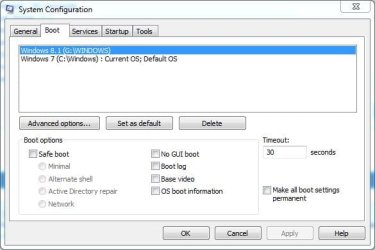
BTW. you don't need Easy BCD to find out what is the boot drive. Just go to the System Configuration Panel (msconfig) and display the Boot. Click the Start orb and then enter either "System Configuration" or "msconfig" and press enter. The panel will come up and in the Boot Tab will be what OS (or OS's) are there. In fact if you had a dual boot of say Win 7 and Win XP in that panel and you wanted to remove XP all you have to do is delete it from that panel.

Here is mine, I have a dual boot with Win 7 and Win 8. Win 7 is set as the "default" during boot up.
 

Attachments

  • Boot config.JPG
    Boot config.JPG
    33.8 KB · Views: 7

My Computer My Computer

At a glance

Windows 10 64 bitIntel i7 6700K16GB Corsair DominatorIntel CPU Graphics
Computer type
PC/Desktop
Computer Manufacturer/Model Number
My Own Build
OS
Windows 10 64 bit
CPU
Intel i7 6700K
Motherboard
ASUS ROG Maximus VIII Hero
Memory
16GB Corsair Dominator
Graphics Card(s)
Intel CPU Graphics
Sound Card
RealTek
Monitor(s) Displays
27" Dell S2719dgf
Screen Resolution
2560X1440
Hard Drives
1 TB Samsung 850 EVO SSD for Win 10 Pro
500GB Samsung 850 EVO SSD for Win 10 Insider
2 TB drive for backup
PSU
EVGA Supernova 750G2
Case
BeQuiet Silent Base 600
Cooling
Deepcool Captain 120EX
Keyboard
Microsoft Wireless 2000
Mouse
Microsoft wireless
Internet Speed
100 MB/sec (Cable)
Antivirus
Microsoft Defender and Malwarebytes
Browser
Edge/Firefox
Other Info
Cakewalk (Sonar) by BandLab and Studio One 4.1 Pro recording studio software. MOTU 896Mk3 Hybrid recording interface, Frontier Tranzport wireless control unit, Behringer X-Touch Control Surface.
Five USB connected optical drives for CD Audio production using Nero BurningROM
If you installed the new Win7 to its HD with the old HD plugged in then it should have configured a Multi-Boot with the boot files remaining on the old HD. Do you have a boot menu at Startup?

Best to post back a screenshot of Disk Management - Post a Screen Capture Image so we can look it over for you.

The correct way to uninstall any OS is to delete its partition in Disk Mgmt, or wipe its HD using Diskpart Clean Command. This removes boot code and partition table which can interfere later.

Your old OS's could be adjusted to start on new hardware using Adjust Win7 to boot on new hardware with Paragon Adaptive Restore CD .

Otherwise I'd move the data off the old HD to wipe or delete its partitions, repartition as a data drive in Disk Mgmt.
 
Many thanks to both for fast response!
I've taken the point about backing up!
gregrocker: I installed the new Win 7 before I plugged in the disk containing the old OS. (Both old OS were OEM, so I assumed they wouldn't activate on the new computer. A pity I hadn't read the article on switching to new motherboard! My loss.) So there's no boot menu at startup, and only one OS shows up with msconfig.
 

My Computer My Computer

At a glance

Windows 7 SP1 Home Premium 32AMD Athlon 3.1Ghz2Gb
Computer type
PC/Desktop
Computer Manufacturer/Model Number
Custom
OS
Windows 7 SP1 Home Premium 32
CPU
AMD Athlon 3.1Ghz
Motherboard
Novatech/Gigabyte
Memory
2Gb
Antivirus
AVG
Browser
Firefox
Back
Top