Can I save all of the SP and Win Updates if I do a re-install?

therealsimpsons

New member
Member
Local time
5:56 AM
Messages
49
Location
Illinois
I have a corrupt file somewhere in Windows, and need to do a re-install, but I don't want to go through all of those updates. I put my installation disk in the drive, expecting to a get a repair option, but there wasn't one.


The corrupt file is just a guess. I have an Nvidia GTX GPU and it includes GeForce Experience, which has "Shadow Play" for recording games. For some reason it will not open. The FPS counter works, the Screenshot mode works, but not the recording software. I have un-installed it and re-installed it several times, no joy.


I have communicated back and forth with Nvidia support, sending diagnostic files, etc. and have tried every proposed solution. No joy. They have washed their hands of the problem.


Any help is greatly appreciated.
 

My Computer My Computer

At a glance

Win 7 Home Premium 64Intel Core i5 3570K @ 3.40GHZ 3.80 GHZ16GBEVGA Nvidia GeForce GTX 750Ti
Computer type
PC/Desktop
Computer Manufacturer/Model Number
custom build
OS
Win 7 Home Premium 64
CPU
Intel Core i5 3570K @ 3.40GHZ 3.80 GHZ
Motherboard
Gigabyte GA-B75M-HD3
Memory
16GB
Graphics Card(s)
EVGA Nvidia GeForce GTX 750Ti
Sound Card
Creative Sound Blaster Audigy FX
Monitor(s) Displays
Dell 2407WFP-HC
Screen Resolution
1920 x 1200
Hard Drives
1TB Toshiba DT01ACA100 ATA Device
PSU
Inland Silver Series ILS 500R2
Case
Thermaltake V3 Black
Cooling
some fans that are inside :)
Keyboard
ONN wireless
Mouse
Logitech wireless laser
Internet Speed
4.89 avg dl speed 3.67 avg ul speed
Antivirus
Microsoft Security Essentials
Browser
Mozilla
Hi therealsimpsons,
No, you cannot save all the SP & Win updates if you do a re-install or repair install. In short, there are registry entries, etc. that are specific to your OS, hardware & software installed, & other issues.

Why don't you just repair the corrupt files?
For starters run:
sfc /scannow from Administrative Command Prompt


My Computer My Computer

At a glance

Win 10 x64, Linux Lite, Win 7 x64, BlackArch,...
Computer type
PC/Desktop
Computer Manufacturer/Model Number
HP Desktop & Compaq Laptop
OS
Win 10 x64, Linux Lite, Win 7 x64, BlackArch, & Kali
Hard Drives
Samsung 850 Pro 256Gb,
Hitachi HDD 1Tb,
Crucial MX SSD 250Gb
Segate 3Tb USB 3.0 Ext. Backup HDD
Internet Speed
150Mbps dn, 20Mbps up
Antivirus
Avast Free, Malwarebytes Anti-Exploit & Anti-Ransomware
Browser
Firefox, Chrome, Opera, & VPN
Hi therealsimpsons,

For starters run:
sfc /scannow from Administrative Command Prompt


Thanks for the reply.


I got this message: You must be an administrator running a console session in order to use the sfc utility.


??
 

My Computer My Computer

At a glance

Win 7 Home Premium 64Intel Core i5 3570K @ 3.40GHZ 3.80 GHZ16GBEVGA Nvidia GeForce GTX 750Ti
Computer type
PC/Desktop
Computer Manufacturer/Model Number
custom build
OS
Win 7 Home Premium 64
CPU
Intel Core i5 3570K @ 3.40GHZ 3.80 GHZ
Motherboard
Gigabyte GA-B75M-HD3
Memory
16GB
Graphics Card(s)
EVGA Nvidia GeForce GTX 750Ti
Sound Card
Creative Sound Blaster Audigy FX
Monitor(s) Displays
Dell 2407WFP-HC
Screen Resolution
1920 x 1200
Hard Drives
1TB Toshiba DT01ACA100 ATA Device
PSU
Inland Silver Series ILS 500R2
Case
Thermaltake V3 Black
Cooling
some fans that are inside :)
Keyboard
ONN wireless
Mouse
Logitech wireless laser
Internet Speed
4.89 avg dl speed 3.67 avg ul speed
Antivirus
Microsoft Security Essentials
Browser
Mozilla
Type cmd in start search box

rt click cmd.exe and select "Run As Adminstartor"
 

My Computers My Computers

  • At a glance

    7 X64i5 84002x8gb 3200mhz
    Computer type
    PC/Desktop
    OS
    7 X64
    CPU
    i5 8400
    Motherboard
    gigabyte b365m ds3h
    Memory
    2x8gb 3200mhz
    Hard Drives
    various
    PSU
    pure power 11 400w cm
    Case
    Coolermaster
    Cooling
    cryorig m9i
  • At a glance

    7x64g54008gb ddr4 2400
    Computer type
    PC/Desktop
    OS
    7x64
    CPU
    g5400
    Motherboard
    ga b365m ds3h
    Memory
    8gb ddr4 2400
    PSU
    xfx pro 450w
Thanks for the reply.


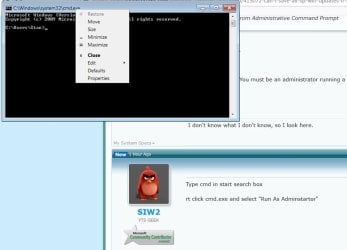
This in the pop-up I got when I followed your instruction. Where might I find, "Run as Administrator"?
 

Attachments

  • Win 7 help.jpg
    Win 7 help.jpg
    41.8 KB · Views: 1

My Computer My Computer

At a glance

Win 7 Home Premium 64Intel Core i5 3570K @ 3.40GHZ 3.80 GHZ16GBEVGA Nvidia GeForce GTX 750Ti
Computer type
PC/Desktop
Computer Manufacturer/Model Number
custom build
OS
Win 7 Home Premium 64
CPU
Intel Core i5 3570K @ 3.40GHZ 3.80 GHZ
Motherboard
Gigabyte GA-B75M-HD3
Memory
16GB
Graphics Card(s)
EVGA Nvidia GeForce GTX 750Ti
Sound Card
Creative Sound Blaster Audigy FX
Monitor(s) Displays
Dell 2407WFP-HC
Screen Resolution
1920 x 1200
Hard Drives
1TB Toshiba DT01ACA100 ATA Device
PSU
Inland Silver Series ILS 500R2
Case
Thermaltake V3 Black
Cooling
some fans that are inside :)
Keyboard
ONN wireless
Mouse
Logitech wireless laser
Internet Speed
4.89 avg dl speed 3.67 avg ul speed
Antivirus
Microsoft Security Essentials
Browser
Mozilla
Right mouse button click cmd.exe and select Run As Administrator.
 
Right mouse button click cmd.exe and select Run As Administrator.


What? That's the same answer as above, and I posted a picture of what I get when I right click on cmd.exe/


Help:huh:
 

My Computer My Computer

At a glance

Win 7 Home Premium 64Intel Core i5 3570K @ 3.40GHZ 3.80 GHZ16GBEVGA Nvidia GeForce GTX 750Ti
Computer type
PC/Desktop
Computer Manufacturer/Model Number
custom build
OS
Win 7 Home Premium 64
CPU
Intel Core i5 3570K @ 3.40GHZ 3.80 GHZ
Motherboard
Gigabyte GA-B75M-HD3
Memory
16GB
Graphics Card(s)
EVGA Nvidia GeForce GTX 750Ti
Sound Card
Creative Sound Blaster Audigy FX
Monitor(s) Displays
Dell 2407WFP-HC
Screen Resolution
1920 x 1200
Hard Drives
1TB Toshiba DT01ACA100 ATA Device
PSU
Inland Silver Series ILS 500R2
Case
Thermaltake V3 Black
Cooling
some fans that are inside :)
Keyboard
ONN wireless
Mouse
Logitech wireless laser
Internet Speed
4.89 avg dl speed 3.67 avg ul speed
Antivirus
Microsoft Security Essentials
Browser
Mozilla
Hi therealsimpsons, From the startorb type in the search box Command Prompt, and you right click on it there


to get run as administrator.:D
 

My Computer My Computer

At a glance

Windows 10 Pro 64 bitAMD A4-5300 APU with Radeon(tm) HD Graphics8.00 GBAMD Radeon HD 7480D
Computer type
PC/Desktop
Computer Manufacturer/Model Number
ASUS A85XM-A custom build
OS
Windows 10 Pro 64 bit
CPU
AMD A4-5300 APU with Radeon(tm) HD Graphics
Motherboard
ASUSTeK COMPUTER INC. A85XM-A
Memory
8.00 GB
Graphics Card(s)
AMD Radeon HD 7480D
Sound Card
(1) High Definition Audio Device (2) Realtek High Definiti
Monitor(s) Displays
HP W2072a 20 inch Led Backlit Monitor
Screen Resolution
1600 x 900 x 32 bits (4294967296 colors) @ 60 Hz
Hard Drives
TOSHIBA DT01ACA100 SATA Disk Device
Keyboard
Acer
Mouse
Acer
Internet Speed
varies
Antivirus
Windows Defender Antivirus
Browser
Waterfox, Edge
Type cmd in start search box

DO NOT PRESS ENTER

You will see a little black icon called cmd.exe at the top of the start menu

Move the mouse cursor next to cmd.exe

Rt click the mouse button

A context menu will appear

Select Run As Administrator
 

My Computers My Computers

  • At a glance

    7 X64i5 84002x8gb 3200mhz
    Computer type
    PC/Desktop
    OS
    7 X64
    CPU
    i5 8400
    Motherboard
    gigabyte b365m ds3h
    Memory
    2x8gb 3200mhz
    Hard Drives
    various
    PSU
    pure power 11 400w cm
    Case
    Coolermaster
    Cooling
    cryorig m9i
  • At a glance

    7x64g54008gb ddr4 2400
    Computer type
    PC/Desktop
    OS
    7x64
    CPU
    g5400
    Motherboard
    ga b365m ds3h
    Memory
    8gb ddr4 2400
    PSU
    xfx pro 450w
Aha! Can you tell I'm totally ignorant regarding most computer stuff? :(


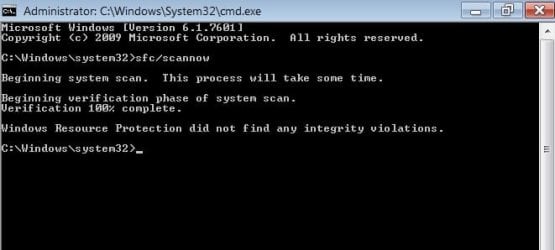
Here is the result from the sfc/scannow What now? Is it possible to remove every file connected to Nvidia GeForce Experience, using regedit? I have un-installed it and re-installed it several times with no luck getting it to work. Perhaps a clean install will help?
 

Attachments

  • Win 7 help sfc-scannow 6-17-18.jpg
    Win 7 help sfc-scannow 6-17-18.jpg
    21.8 KB · Views: 22

My Computer My Computer

At a glance

Win 7 Home Premium 64Intel Core i5 3570K @ 3.40GHZ 3.80 GHZ16GBEVGA Nvidia GeForce GTX 750Ti
Computer type
PC/Desktop
Computer Manufacturer/Model Number
custom build
OS
Win 7 Home Premium 64
CPU
Intel Core i5 3570K @ 3.40GHZ 3.80 GHZ
Motherboard
Gigabyte GA-B75M-HD3
Memory
16GB
Graphics Card(s)
EVGA Nvidia GeForce GTX 750Ti
Sound Card
Creative Sound Blaster Audigy FX
Monitor(s) Displays
Dell 2407WFP-HC
Screen Resolution
1920 x 1200
Hard Drives
1TB Toshiba DT01ACA100 ATA Device
PSU
Inland Silver Series ILS 500R2
Case
Thermaltake V3 Black
Cooling
some fans that are inside :)
Keyboard
ONN wireless
Mouse
Logitech wireless laser
Internet Speed
4.89 avg dl speed 3.67 avg ul speed
Antivirus
Microsoft Security Essentials
Browser
Mozilla
Last edited:

My Computer My Computer

At a glance

Win 10 x64, Linux Lite, Win 7 x64, BlackArch,...
Computer type
PC/Desktop
Computer Manufacturer/Model Number
HP Desktop & Compaq Laptop
OS
Win 10 x64, Linux Lite, Win 7 x64, BlackArch, & Kali
Hard Drives
Samsung 850 Pro 256Gb,
Hitachi HDD 1Tb,
Crucial MX SSD 250Gb
Segate 3Tb USB 3.0 Ext. Backup HDD
Internet Speed
150Mbps dn, 20Mbps up
Antivirus
Avast Free, Malwarebytes Anti-Exploit & Anti-Ransomware
Browser
Firefox, Chrome, Opera, & VPN
I totally agree with Snick.
Also when uninstalling with Revo Uninstaller [FREE], when the check for leftover items screen appears select the Advanced option.
 

My Computer My Computer

At a glance

Win 7 HP SP1 64-bit Vista HB SP2 32-bit Linux...Intel(R) Pentium(R) CPU P6200 @ 2.13GHz4.00 GBIntel(R) Graphics Media Accelerator HD
Computer type
Laptop
Computer Manufacturer/Model Number
Fujitsu LIFEBOOK
OS
Win 7 HP SP1 64-bit Vista HB SP2 32-bit Linux Mint 18.3
CPU
Intel(R) Pentium(R) CPU P6200 @ 2.13GHz
Motherboard
FUJITSU FJNBB06
Memory
4.00 GB
Graphics Card(s)
Intel(R) Graphics Media Accelerator HD
Sound Card
[1] Realtek High Definition Audio [2] Intel(R) Display Audio
Screen Resolution
1366 x 768 x 32 bits (4294967296 colors) @ 59 Hz
Hard Drives
TOSHIBA MK5076GSX
Antivirus
AVG FREE
Back
Top