can i sli two nvidia gtx 295 on a ASUS P5E3 Deluxe Wi-Fi motherboard.

shanks69

New member
Local time
10:42 PM
Messages
7
Location
mountrath
hi guys i have a gaming tower with the following spec: Windows 7 Ultimate (x64) 3.20 gigahertz Intel Core2 Extreme motherboard ASUS P5E3 Deluxe Wi-Fi 64 kilobyte primary memory cache 6144 kilobyte secondary memory cache 64-bit ready Multi-core (4 total) Board: ASUSTeK Computer INC. P5E3 Deluxe Rev 1.xx Bus Clock: 400 megahertz BIOS: American Megatrends Inc. 750W thermaltake pcu Thermaltake case V3 with side window, 2x120mm blue LED fans+ 2x120mm fans CPU Cooler Thermalright 120 Ultra+120mm fan RAM Patriot 2x2GB 1333MHz 1500.06 Gigabytes Usable Hard Drive Capacity SoundMAX Integrated Digital HD Audio two Nvidia graphic cards GTX 295 Dual GPU card microsoft office Multi memory card reader there was only one gtx 295 graphics card in the tower when i bought it but i bought another and sli them together. but its not happening when in opertion. can my mother board sli them and if not, is there anything i can do to get them to work together???? thanks tom
 

My Computer My Computer

At a glance

windows 7 64 bit3.20 gigahertz Intel Core2 ExtremeRAM Patriot 2x2GB 1333MHztwo Nvidia graphic cards GTX 295 Dual GPU card
OS
windows 7 64 bit
CPU
3.20 gigahertz Intel Core2 Extreme
Motherboard
ASUS P5E3 Deluxe Wi-Fi
Memory
RAM Patriot 2x2GB 1333MHz
Graphics Card(s)
two Nvidia graphic cards GTX 295 Dual GPU card
Sound Card
SoundMAX Integrated Digital HD Audio
Hard Drives
1500.06 Gigabytes Usable Hard Drive Capacity
PSU
750W thermaltake pcu
Case
Thermaltake case V3 with side window
Your motherboard would work fine for sli, I think your motherboard is chip X38 so it is SLI PCI-E 2.0 x16 x2, So i don't think thats the problem, i do believe your psu is not powerful enough for two gtx295's. I would suggest a 800-1000 watt psu, but you will easilly get away with a 800watt psu.

Hope I helped in some small way
 

My Computer My Computer

At a glance

64bit Windows 10Intel i964g-8x8gig DDR4 3600Asus ROg Strix 1080ti
Computer type
PC/Desktop
Computer Manufacturer/Model Number
Custom built
OS
64bit Windows 10
CPU
Intel i9
Motherboard
MSI X299 Carbon pro
Memory
64g-8x8gig DDR4 3600
Graphics Card(s)
Asus ROg Strix 1080ti
Monitor(s) Displays
Samsung 49" Odyssey g9
Screen Resolution
5210x1440
Hard Drives
1 x 512GB m.2 OS Drive
2 x 512gb ssd
1 x 2tb

4x 1TB's
PSU
Corsair AX1200w
Case
Silverstone TJ11 B-W
Cooling
AIC
Keyboard
Asus Rog Claymore 2
Mouse
Asus Rog Apatha
Internet Speed
1gb Fibre
can i sli two nvidia gtx 295 on a ASUS P5E3 Deluxe Wi-Fi motherboard

hi

thanks for the reply and steer. when i go into the nvidia graphics control and into the 3d settings which i have in advanced and config. theres nothing showing sli for me to choose.
im new to all this and learning every day lol. was told that my psu might need upgrading to 800 alright. have tested both cards on they re own and working perfect on battlefield 3 and other games.
thanks again for your reply

tom
 

My Computer My Computer

At a glance

windows 7 64 bit3.20 gigahertz Intel Core2 ExtremeRAM Patriot 2x2GB 1333MHztwo Nvidia graphic cards GTX 295 Dual GPU card
OS
windows 7 64 bit
CPU
3.20 gigahertz Intel Core2 Extreme
Motherboard
ASUS P5E3 Deluxe Wi-Fi
Memory
RAM Patriot 2x2GB 1333MHz
Graphics Card(s)
two Nvidia graphic cards GTX 295 Dual GPU card
Sound Card
SoundMAX Integrated Digital HD Audio
Hard Drives
1500.06 Gigabytes Usable Hard Drive Capacity
PSU
750W thermaltake pcu
Case
Thermaltake case V3 with side window
Your welcome, but i am also a learner, so hope some of the pro's answer you better, but the psu upgrade is definitely a must. And i would suggest the ax850 from corsair, it's modular, great performance and reviews, but a little pricy,i have its bigger brother and love it and that xtra 50wats over the normal 800 is a great boost.
 

My Computer My Computer

At a glance

64bit Windows 10Intel i964g-8x8gig DDR4 3600Asus ROg Strix 1080ti
Computer type
PC/Desktop
Computer Manufacturer/Model Number
Custom built
OS
64bit Windows 10
CPU
Intel i9
Motherboard
MSI X299 Carbon pro
Memory
64g-8x8gig DDR4 3600
Graphics Card(s)
Asus ROg Strix 1080ti
Monitor(s) Displays
Samsung 49" Odyssey g9
Screen Resolution
5210x1440
Hard Drives
1 x 512GB m.2 OS Drive
2 x 512gb ssd
1 x 2tb

4x 1TB's
PSU
Corsair AX1200w
Case
Silverstone TJ11 B-W
Cooling
AIC
Keyboard
Asus Rog Claymore 2
Mouse
Asus Rog Apatha
Internet Speed
1gb Fibre
  • Like
Reactions: JMH
can i sli two nvidia gtx 295 on a ASUS P5E3 Deluxe Wi-Fi motherboard

just to add on my last reply......

yeah the mother board is X38 with graphics interface pci express link width x16 and max supported x16. the bios american megatrends version 1415. processors intel core 2 extreme qx9770.

im in nvidia manage 3d settings and i need an understanding on the following in the global settings. on muilti gpu rendering mode, its set to nvidia recommended but theres 3 more options single gpu, force alternate frame rendering 1 and force alternate frame rendering 2. is it set right on that??? maximum pe-rendering frames is set to 3 with an option 1 to 8. is it set right at that??? on muilti-display/mixed-gpu acceleration its set to muiltiuple display performance mode with 2 more options of single display performance mode and compatibility performance mode. is that also right at that????

on set muilti-gpu and physX configuration. its set to maximize 3d performancew with physX settings on auto select (recommended) but below those. theres a diagram of two cards stating geforce gtx. geforce gtx 295 (1) with 1A (is hd) & 1B. geforce gtx 295 (2) 2A (is hd) & 2B. on the geforce gtx 295 (1) im using the analog display on 1B but the physX is on 2B. under the geforce gtx 295 (1) it says muilti gpu in green but nothing under geforce gtx 295 (2).

sorry about frying your brain as i typed in what im seing on my gaming tower. thanks
 

My Computer My Computer

At a glance

windows 7 64 bit3.20 gigahertz Intel Core2 ExtremeRAM Patriot 2x2GB 1333MHztwo Nvidia graphic cards GTX 295 Dual GPU card
OS
windows 7 64 bit
CPU
3.20 gigahertz Intel Core2 Extreme
Motherboard
ASUS P5E3 Deluxe Wi-Fi
Memory
RAM Patriot 2x2GB 1333MHz
Graphics Card(s)
two Nvidia graphic cards GTX 295 Dual GPU card
Sound Card
SoundMAX Integrated Digital HD Audio
Hard Drives
1500.06 Gigabytes Usable Hard Drive Capacity
PSU
750W thermaltake pcu
Case
Thermaltake case V3 with side window
No worries, the basics of sli i remember was:

- Both cards have to have the same chip, so both 2gig 295's
- Roll back or remove all gfx drivers and reinstall the driver you got with the card on both
- Then update to latest driver on both.
- Sli usually works best after a clean format and both cards are inserted at startup and begin with clean driver installs
- And have enough juice for both.

And i know that driver are most likely the top issue.
 

My Computer My Computer

At a glance

64bit Windows 10Intel i964g-8x8gig DDR4 3600Asus ROg Strix 1080ti
Computer type
PC/Desktop
Computer Manufacturer/Model Number
Custom built
OS
64bit Windows 10
CPU
Intel i9
Motherboard
MSI X299 Carbon pro
Memory
64g-8x8gig DDR4 3600
Graphics Card(s)
Asus ROg Strix 1080ti
Monitor(s) Displays
Samsung 49" Odyssey g9
Screen Resolution
5210x1440
Hard Drives
1 x 512GB m.2 OS Drive
2 x 512gb ssd
1 x 2tb

4x 1TB's
PSU
Corsair AX1200w
Case
Silverstone TJ11 B-W
Cooling
AIC
Keyboard
Asus Rog Claymore 2
Mouse
Asus Rog Apatha
Internet Speed
1gb Fibre
I'm sorry to say that you will not be able to SLI two of those 295's on that board. The P35, X38, and X48 only supported AMD Crossfire; for SLI you will need an X58 or newer chipset. You can still run a single 295 in multi gpu mode without issue

Edit- To run sli with your current cpu and ddr3 ram you would need an nvidia 790i sli motherboard. There were also nvidia 680/750/780 boards that can run your cpu and sli but only the 790 supported ddr3
 
Last edited:

My Computer My Computer

At a glance

windows 8.1 Pro x64intel [email protected]2x8gb ripjaws x @2133asus r9-290@1100/1300
Computer type
PC/Desktop
Computer Manufacturer/Model Number
Elsa
OS
windows 8.1 Pro x64
CPU
intel [email protected]
Motherboard
msi mpower max ac
Memory
2x8gb ripjaws x @2133
Graphics Card(s)
asus r9-290@1100/1300
Sound Card
creative sbz
Monitor(s) Displays
dell u3011
Hard Drives
840 evo 250 & 8.5tb
PSU
evga supernova p2-1000
Case
corsair air 540
Cooling
corsair h100
Keyboard
logitech g710+
Mouse
logitech g502
Internet Speed
50/10
Antivirus
avg
Browser
firefox
I'm sorry to say that you will not be able to SLI two of those 295's on that board. The P35, X38, and X48 only supported AMD Crossfire; for SLI you will need an X58 or newer chipset. You can still run a single 295 in multi gpu mode without issue

Edit- To run sli with your current cpu and ddr3 ram you would need an nvidia 790i sli motherboard. There were also nvidia 680/750/780 boards that can run your cpu and sli but only the 790 supported ddr3


Wow, thanx 4 correcting me, i never knew that, sorry shanks69,i tottally was way of track glad one of the pro's replied.Nice one Zahl
 

My Computer My Computer

At a glance

64bit Windows 10Intel i964g-8x8gig DDR4 3600Asus ROg Strix 1080ti
Computer type
PC/Desktop
Computer Manufacturer/Model Number
Custom built
OS
64bit Windows 10
CPU
Intel i9
Motherboard
MSI X299 Carbon pro
Memory
64g-8x8gig DDR4 3600
Graphics Card(s)
Asus ROg Strix 1080ti
Monitor(s) Displays
Samsung 49" Odyssey g9
Screen Resolution
5210x1440
Hard Drives
1 x 512GB m.2 OS Drive
2 x 512gb ssd
1 x 2tb

4x 1TB's
PSU
Corsair AX1200w
Case
Silverstone TJ11 B-W
Cooling
AIC
Keyboard
Asus Rog Claymore 2
Mouse
Asus Rog Apatha
Internet Speed
1gb Fibre
nah, no worries bud. i only knew because I was trying to do the same with an x38.
but its not like the boards are not capable of sli but rather that they were never licensed to use it:mad:


Edit- I did find this info if anyone is brave enough. Just note that I've never tried it so don't curse me if you end up having to reinstall windows or something
http://www.techpowerup.com/forums/showpost.php?p=1562277&postcount=923
 
Last edited:

My Computer My Computer

At a glance

windows 8.1 Pro x64intel [email protected]2x8gb ripjaws x @2133asus r9-290@1100/1300
Computer type
PC/Desktop
Computer Manufacturer/Model Number
Elsa
OS
windows 8.1 Pro x64
CPU
intel [email protected]
Motherboard
msi mpower max ac
Memory
2x8gb ripjaws x @2133
Graphics Card(s)
asus r9-290@1100/1300
Sound Card
creative sbz
Monitor(s) Displays
dell u3011
Hard Drives
840 evo 250 & 8.5tb
PSU
evga supernova p2-1000
Case
corsair air 540
Cooling
corsair h100
Keyboard
logitech g710+
Mouse
logitech g502
Internet Speed
50/10
Antivirus
avg
Browser
firefox
morning guys

just read the thread. so ill need to get a new mother board X58 or newer to get my cards sli??? or what other motherboard would you suggest??
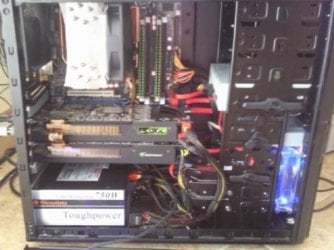
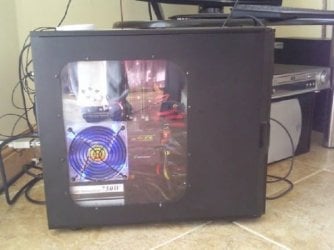
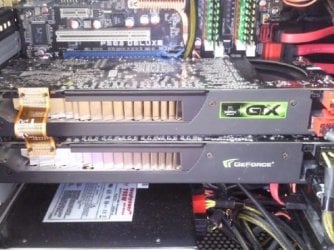
would the x58 have the same lay out as my X38??? i ve got a midi tower as you can see in the pictures i ve attached. just thinking would i have to replace anything else ie the processor, ram and case???

or am i just better off selling the two cards and buying two amd crossfire?? what ones would suit my X38?

thanks a lot lads for your help.
 

Attachments

  • tower3.jpg
    tower3.jpg
    37 KB · Views: 33
  • tower2.jpg
    tower2.jpg
    29.2 KB · Views: 20
  • tower4.jpg
    tower4.jpg
    49 KB · Views: 34

My Computer My Computer

At a glance

windows 7 64 bit3.20 gigahertz Intel Core2 ExtremeRAM Patriot 2x2GB 1333MHztwo Nvidia graphic cards GTX 295 Dual GPU card
OS
windows 7 64 bit
CPU
3.20 gigahertz Intel Core2 Extreme
Motherboard
ASUS P5E3 Deluxe Wi-Fi
Memory
RAM Patriot 2x2GB 1333MHz
Graphics Card(s)
two Nvidia graphic cards GTX 295 Dual GPU card
Sound Card
SoundMAX Integrated Digital HD Audio
Hard Drives
1500.06 Gigabytes Usable Hard Drive Capacity
PSU
750W thermaltake pcu
Case
Thermaltake case V3 with side window
As Zahl said, i think the best and cheapest option for you is to get a nvidia 790i sli motherboard. like the

Asus striker II, it uses the 790sli chip but goes further and uses adds ultra to it,which as far as i know allows for faster ddr3 ram. I think getting a sli790 motherboard and 800wat psu would be best, also the striker II is atx form,so it will fit your case( i think all mid towers are atx or m-atx, just make shore of that and get a 790i that is ither m-atx or atx if you prefer. But getting new motherboard,cpu,gfx cards and so on is more fun...but verry xpencive and a waist since all you need is a motherboard and maybe a new psu.
 

My Computer My Computer

At a glance

64bit Windows 10Intel i964g-8x8gig DDR4 3600Asus ROg Strix 1080ti
Computer type
PC/Desktop
Computer Manufacturer/Model Number
Custom built
OS
64bit Windows 10
CPU
Intel i9
Motherboard
MSI X299 Carbon pro
Memory
64g-8x8gig DDR4 3600
Graphics Card(s)
Asus ROg Strix 1080ti
Monitor(s) Displays
Samsung 49" Odyssey g9
Screen Resolution
5210x1440
Hard Drives
1 x 512GB m.2 OS Drive
2 x 512gb ssd
1 x 2tb

4x 1TB's
PSU
Corsair AX1200w
Case
Silverstone TJ11 B-W
Cooling
AIC
Keyboard
Asus Rog Claymore 2
Mouse
Asus Rog Apatha
Internet Speed
1gb Fibre
Well, in all honesty I would just run a single 295 or maybe sell both 295's and grab a single monster of a card. Your other options are not worth it at all and dual cards from either side will require a new power supply.
 

My Computer My Computer

At a glance

windows 8.1 Pro x64intel [email protected]2x8gb ripjaws x @2133asus r9-290@1100/1300
Computer type
PC/Desktop
Computer Manufacturer/Model Number
Elsa
OS
windows 8.1 Pro x64
CPU
intel [email protected]
Motherboard
msi mpower max ac
Memory
2x8gb ripjaws x @2133
Graphics Card(s)
asus r9-290@1100/1300
Sound Card
creative sbz
Monitor(s) Displays
dell u3011
Hard Drives
840 evo 250 & 8.5tb
PSU
evga supernova p2-1000
Case
corsair air 540
Cooling
corsair h100
Keyboard
logitech g710+
Mouse
logitech g502
Internet Speed
50/10
Antivirus
avg
Browser
firefox
hi zahl and alsisgevat

yeah think its best not to spend nothing more. going to keep my machine as it is and keep the other graphics card as a spare. its a power full enough machine but i do have one more question, i want to keep the spare card in the tower for safe keeping. can i switch the power off going to the spare card and if so, how do i do it? through bios??? or.....

guys, thanks a million for your support and info. sound for that.

thanks again

tom
 

My Computer My Computer

At a glance

windows 7 64 bit3.20 gigahertz Intel Core2 ExtremeRAM Patriot 2x2GB 1333MHztwo Nvidia graphic cards GTX 295 Dual GPU card
OS
windows 7 64 bit
CPU
3.20 gigahertz Intel Core2 Extreme
Motherboard
ASUS P5E3 Deluxe Wi-Fi
Memory
RAM Patriot 2x2GB 1333MHz
Graphics Card(s)
two Nvidia graphic cards GTX 295 Dual GPU card
Sound Card
SoundMAX Integrated Digital HD Audio
Hard Drives
1500.06 Gigabytes Usable Hard Drive Capacity
PSU
750W thermaltake pcu
Case
Thermaltake case V3 with side window
I have a strong feeling Zahl is gonna correct me here, but i think if you just dont give it power by not attaching the wires from the psu would be good enough. But i would suggest rather removing the card, the openspace will give your first card the breathing room it needs, there is no point in blocking that cards airflow with a nother that isn't working.

And i didn't help much but your more than welcome! And hope you enjoy years of gaming on your machine.
 

My Computer My Computer

At a glance

64bit Windows 10Intel i964g-8x8gig DDR4 3600Asus ROg Strix 1080ti
Computer type
PC/Desktop
Computer Manufacturer/Model Number
Custom built
OS
64bit Windows 10
CPU
Intel i9
Motherboard
MSI X299 Carbon pro
Memory
64g-8x8gig DDR4 3600
Graphics Card(s)
Asus ROg Strix 1080ti
Monitor(s) Displays
Samsung 49" Odyssey g9
Screen Resolution
5210x1440
Hard Drives
1 x 512GB m.2 OS Drive
2 x 512gb ssd
1 x 2tb

4x 1TB's
PSU
Corsair AX1200w
Case
Silverstone TJ11 B-W
Cooling
AIC
Keyboard
Asus Rog Claymore 2
Mouse
Asus Rog Apatha
Internet Speed
1gb Fibre
I would definitely recommend removing th card not in use.
Fabe
 

My Computer My Computer

At a glance

Windows 7 ultimate 64 bit / XP Home sp3intel Core 2 Duo E8400 3.0ghz8 gigs 1066 OCZ Fata1tyEVGA GTX 580 Call of Duty Black Ops Edition
Computer Manufacturer/Model Number
Self Built
OS
Windows 7 ultimate 64 bit / XP Home sp3
CPU
intel Core 2 Duo E8400 3.0ghz
Motherboard
Asus P5ND bios 1401
Memory
8 gigs 1066 OCZ Fata1ty
Graphics Card(s)
EVGA GTX 580 Call of Duty Black Ops Edition
Sound Card
Creative Soundblaster Audigy 2zs
Monitor(s) Displays
Asus 24in LCD's 2MS X2
Screen Resolution
1920x1080p @60Hz
Hard Drives
WD Caviar 500 Black/ WD Caviar 200 Blue
PSU
OCZ 700W GameXtreme
Case
NZXT Apollo
Cooling
Corsair H50 CPU/120mm x3 /60mm x2 /Corsair Dominator Ram
Keyboard
Logitech Bluetooth Wireless MX5000
Mouse
Logitech Bluetooth Wireless MX1000
Internet Speed
Download 19.83 Upload 0.97
Other Info
Logitech Z2300 Speakers/ Bose Noise Cancelling Headphones/Avermedia PCI-e Hybrid TV Bravo/Epson NX415 all in one/ 4 Port Powered USB Hub/ LG 10x Bluray Burner /TSST Corp DVDRW External
That would be nice but you can't power down the card completely. It will still get enough power through the pci-e port to keep it alive and complaining that things are unplugged. It will be safer in a box in the closet, trust me;)

Edit- If you really-really want to keep in the case and get some use out of it, you could dedicate it to physx processing. However only one gpu can be used for physx so half of the card would be sitting there doing nothing. A total waste in my honest opinion but i'm throwing it out there. You could also use it to drive additional displays if so you wished.
 

My Computer My Computer

At a glance

windows 8.1 Pro x64intel [email protected]2x8gb ripjaws x @2133asus r9-290@1100/1300
Computer type
PC/Desktop
Computer Manufacturer/Model Number
Elsa
OS
windows 8.1 Pro x64
CPU
intel [email protected]
Motherboard
msi mpower max ac
Memory
2x8gb ripjaws x @2133
Graphics Card(s)
asus r9-290@1100/1300
Sound Card
creative sbz
Monitor(s) Displays
dell u3011
Hard Drives
840 evo 250 & 8.5tb
PSU
evga supernova p2-1000
Case
corsair air 540
Cooling
corsair h100
Keyboard
logitech g710+
Mouse
logitech g502
Internet Speed
50/10
Antivirus
avg
Browser
firefox

My Computer My Computer

At a glance

Windows 7 Ultimate x64Intel Core2 Quad Q8300 2.5GhzKingston HyperX 4x1GB DDR2 1066MhzAsus/Nvidia 9500GT 1GB
Computer type
PC/Desktop
Computer Manufacturer/Model Number
Self Build
OS
Windows 7 Ultimate x64
CPU
Intel Core2 Quad Q8300 2.5Ghz
Motherboard
Asus P5QD Turbo
Memory
Kingston HyperX 4x1GB DDR2 1066Mhz
Graphics Card(s)
Asus/Nvidia 9500GT 1GB
Sound Card
On-Board HD
Monitor(s) Displays
22" Widescreen TFT
Screen Resolution
1920x1080
Hard Drives
2x 320Gb Seagate SATAII RAID 0
2x 80Gb Seagate SATAII RAID 0
1x 1tb hybrid (8gb ssd)
PSU
650w
Case
ATX
Cooling
140mm front, 120mm Rear, 80mm Chipset + stock CPU and GPU
Keyboard
Plastic one
Mouse
Plastic one
Internet Speed
4Mbps
Other Info
Laptop: HP Elitebook 2560p
i5 @2.7Ghz 4GB DDR3
Very nice. I'd probably give that a shot:devil:
 

My Computer My Computer

At a glance

windows 8.1 Pro x64intel [email protected]2x8gb ripjaws x @2133asus r9-290@1100/1300
Computer type
PC/Desktop
Computer Manufacturer/Model Number
Elsa
OS
windows 8.1 Pro x64
CPU
intel [email protected]
Motherboard
msi mpower max ac
Memory
2x8gb ripjaws x @2133
Graphics Card(s)
asus r9-290@1100/1300
Sound Card
creative sbz
Monitor(s) Displays
dell u3011
Hard Drives
840 evo 250 & 8.5tb
PSU
evga supernova p2-1000
Case
corsair air 540
Cooling
corsair h100
Keyboard
logitech g710+
Mouse
logitech g502
Internet Speed
50/10
Antivirus
avg
Browser
firefox
You need the SLI patch

HyperSLI (Enabling SLI on non-sli motherboards) - techPowerUp! Forums

HOWTO: SLI on a non-SLI Motherboard (GTX5xx compatible 1.0 final released!)

Then you can run SLi on a crossfire board! CAUTION, requires a reasonable level of experience in using patches, unsigned drivers and following instructions carefully.

hey sub styler, thanks for your info. to be honest, im just a beginner in all this hi tech stuff about computers especially with gaming. can you have a peep at my spec at the start of the thread and would installing this bugger up my machine? could you give me a step by step how to go about this.

thanks alot for putting a little light on it.

thanks

tom;)
 

My Computer My Computer

At a glance

windows 7 64 bit3.20 gigahertz Intel Core2 ExtremeRAM Patriot 2x2GB 1333MHztwo Nvidia graphic cards GTX 295 Dual GPU card
OS
windows 7 64 bit
CPU
3.20 gigahertz Intel Core2 Extreme
Motherboard
ASUS P5E3 Deluxe Wi-Fi
Memory
RAM Patriot 2x2GB 1333MHz
Graphics Card(s)
two Nvidia graphic cards GTX 295 Dual GPU card
Sound Card
SoundMAX Integrated Digital HD Audio
Hard Drives
1500.06 Gigabytes Usable Hard Drive Capacity
PSU
750W thermaltake pcu
Case
Thermaltake case V3 with side window
Well everything you need is in the first link to be honest.

You already have the cards in and the drivers on so it's just a case of downloading and installing HyperSLI (latest)

From what I understand it uses you CPU's virtualisation technology to make the SLI bridge, This is enabled by default but you could always check the BIOS just to make sure it's enabled (Processor features). The side effect of using this will mean the CPU's virtualisation technology will no be visible to other applications but this is not biggie if you are not virtualising.
 

My Computer My Computer

At a glance

Windows 7 Ultimate x64Intel Core2 Quad Q8300 2.5GhzKingston HyperX 4x1GB DDR2 1066MhzAsus/Nvidia 9500GT 1GB
Computer type
PC/Desktop
Computer Manufacturer/Model Number
Self Build
OS
Windows 7 Ultimate x64
CPU
Intel Core2 Quad Q8300 2.5Ghz
Motherboard
Asus P5QD Turbo
Memory
Kingston HyperX 4x1GB DDR2 1066Mhz
Graphics Card(s)
Asus/Nvidia 9500GT 1GB
Sound Card
On-Board HD
Monitor(s) Displays
22" Widescreen TFT
Screen Resolution
1920x1080
Hard Drives
2x 320Gb Seagate SATAII RAID 0
2x 80Gb Seagate SATAII RAID 0
1x 1tb hybrid (8gb ssd)
PSU
650w
Case
ATX
Cooling
140mm front, 120mm Rear, 80mm Chipset + stock CPU and GPU
Keyboard
Plastic one
Mouse
Plastic one
Internet Speed
4Mbps
Other Info
Laptop: HP Elitebook 2560p
i5 @2.7Ghz 4GB DDR3
Back
Top