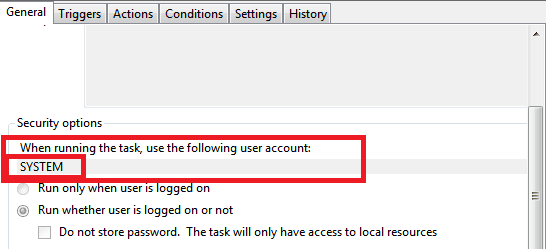
Can I stop UAC prompt for scheduled program (not "task" oriented)?
I have a TV capture app which required installing in legacy mode. With scheduled recordings a UAC prompt requires confirmation before initialization negating the usefulness of scheduling. I can leave the app open in the background and scheduled recordings will proceed as expected but with XP I could simply have it closed and allow it to wake itself in prep for a scheduled recording.
Is there any way to have this single app bypass UAC? I can't see a way to integrate this with Windows Task Scheduler nor do I see a way to make the Elevated Program Shortcut be a work-around. Any suggestions would be much appreciated.
This challenge is on a Windows 7 32bit system (not the one listed in system specs).
I have a TV capture app which required installing in legacy mode. With scheduled recordings a UAC prompt requires confirmation before initialization negating the usefulness of scheduling. I can leave the app open in the background and scheduled recordings will proceed as expected but with XP I could simply have it closed and allow it to wake itself in prep for a scheduled recording.
Is there any way to have this single app bypass UAC? I can't see a way to integrate this with Windows Task Scheduler nor do I see a way to make the Elevated Program Shortcut be a work-around. Any suggestions would be much appreciated.
This challenge is on a Windows 7 32bit system (not the one listed in system specs).
My Computer
- Computer type
- PC/Desktop
- Computer Manufacturer/Model Number
- Self Assembly
- OS
- Windows 10 64
- CPU
- Intel i5 3570K (4.13GHz w/cool & quiet))
- Motherboard
- ASUS P8Z77-V LK
- Memory
- 4x-4Gb Crucial Ballistix Sport PC3-12800 (1600)
- Graphics Card(s)
- GeForce GTX 1060 6GB
- Sound Card
- Realtek ALC892 (onboard)
- Monitor(s) Displays
- TCL 50" 4K
- Screen Resolution
- 3840x2160
- Hard Drives
- Crucial MX500, Intel 330; Adata 480; Sea ST8000MD
- PSU
- Antec HCG-520M
- Cooling
- CPU - Coolermaster Hyper 212 P, Case - 2-120mm Scythe
- Keyboard
- Logitecl compact
- Mouse
- Logitec M705
- Internet Speed
- Gigabit
- Other Info
- 1 RX-C525 Rosewill trayless hot-swap mobile rack