Solved scheduled task not consistently happening: shutdown /s /f /t 30

klong915

New member
Local time
10:41 PM
Messages
18
Hi,
I would like pc to shut down at a given time daily. I did this in the task scheduler and all was ok for a couple days, but now it doesn't.
The task uses the only user account there is.
I've used both switches: "Run only when user is logged on" and "Run whether user is logged on or not"
in which case "Run with highest privileges" is selected.
The task is not hidden and is configured for Windows 7, Windows Server 2008 R2"
Trigger Daily @time and it's enabled
action: start a program: c:\windows\system32\shutdown /S /F /T 30
no other conditions are selected
settings: "Allow task to run on demand" selected, "Stop the task if it runs longer than 3 days" ,"If running task does not end when requested, force a stop" are also selected

This pc is booting windows 7 home premium 64 bit.
thanks,
keith
 

My Computer My Computer

At a glance

32bit
Computer type
PC/Desktop
OS
32bit
Hi,
I've since created the same shutdown request with a different name. I've altered the time to test it and it works as specified (as did initial task). I've reset the time to the desired time and will see what occurs.

There is no log, or history of any of these events. The "Enable all tasks history" is displayed in right window below Actions but when properties of the task is selected and history tab selected there are no entries.
The history tab is displayed as "History (disabled)" . How can I activate it?
thanks,
keith
 

My Computer My Computer

At a glance

32bit
Computer type
PC/Desktop
OS
32bit
Click on "Enable all tasks history" and that will turn on Task History.

That link will then change to "Disable All Tasks History".

That's how to toggle Task History on and off.
I always have my OS's set to Enabled, the history file does not grow in size indefinitely.
For me only the last few months of history are kept, then older history gets deleted automatically.
 

My Computer My Computer

At a glance

Multi-Boot W7_Pro_x64 W8.1_Pro_x64 W10_Pro_x6...AMD Athlon II x4 6206GB GSkill DDR2 800AMD 4670 GPU + AMD 4200 IGP
Computer type
PC/Desktop
Computer Manufacturer/Model Number
home built
OS
Multi-Boot W7_Pro_x64 W8.1_Pro_x64 W10_Pro_x64 +Linux_VMs +Chromium_VM
CPU
AMD Athlon II x4 620
Motherboard
Gigabyte GA-MA785G-UD3H
Memory
6GB GSkill DDR2 800
Graphics Card(s)
AMD 4670 GPU + AMD 4200 IGP
Sound Card
on board Realtek ALC889A
Monitor(s) Displays
RCA 40" LCD TV, Insignia 32" LCD TV, HP 15" LCD monitor
Screen Resolution
1680 x 1050
Hard Drives
OCZ Vertex 3 120GB,
Samsung F3 1TB (3),
Several others - WD, Seagate, Hitachi, ...
PSU
Corsair 500 W
Case
Rosewill mid tower
Cooling
CM 90mm rifle
Keyboard
Gyration wireless, Logitech wireless, Dell USB wired
Mouse
Gyration wireless, Logitech wireless, V7 USB wired
Internet Speed
Spectrum - 100Mbps D / 10Mbps U
Antivirus
Avast, MBAM3, EMET, WinPatrol
Browser
Pale Moon, Firefox, IE
Other Info
2 multi-boot PC's
Mainly HTPC/Office/Gen purpose (no gaming).
Trendnet USB KVM.
LG DVD burner/Blue Ray Player.
Tray system for removable SATA backup drives.

Not currently OCd, under-volted.
I use Hybrid sleep, rarely re-boot or shutdown.

Hauppauge HD-PVR, Avermedia PCIe TV Tuner, Hauppauge PCI TV Tuner.
Yes, this is set to same, but I get no log at all of the event. Also the history tab displayed when looking at task properties suggests that history is disabled: the tab -> "History (disabled)"
 

My Computer My Computer

At a glance

32bit
Computer type
PC/Desktop
OS
32bit
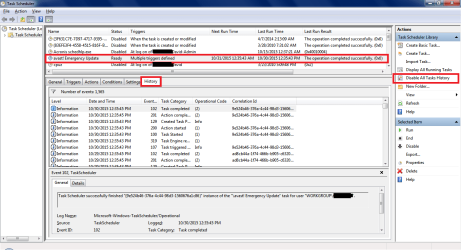
See if your Task Scheduler Enabled History setting looks like mine.
My screen print shows my setting, and it shows i see history for the enabled task i selected.
If your Task Scheduler shows "Enable All Tasks History" it is turned off.

Post a screen print of your task scheduler like my example screen print, so we can see what you do.
http://www.sevenforums.com/tutorials/9733-screenshots-files-upload-post-seven-forums.html
I blacked out my "PC Name", not sure if that really matters, but i don't post anything that MIGHT be personal info.

Task Scheduler.png
 

My Computer My Computer

At a glance

Multi-Boot W7_Pro_x64 W8.1_Pro_x64 W10_Pro_x6...AMD Athlon II x4 6206GB GSkill DDR2 800AMD 4670 GPU + AMD 4200 IGP
Computer type
PC/Desktop
Computer Manufacturer/Model Number
home built
OS
Multi-Boot W7_Pro_x64 W8.1_Pro_x64 W10_Pro_x64 +Linux_VMs +Chromium_VM
CPU
AMD Athlon II x4 620
Motherboard
Gigabyte GA-MA785G-UD3H
Memory
6GB GSkill DDR2 800
Graphics Card(s)
AMD 4670 GPU + AMD 4200 IGP
Sound Card
on board Realtek ALC889A
Monitor(s) Displays
RCA 40" LCD TV, Insignia 32" LCD TV, HP 15" LCD monitor
Screen Resolution
1680 x 1050
Hard Drives
OCZ Vertex 3 120GB,
Samsung F3 1TB (3),
Several others - WD, Seagate, Hitachi, ...
PSU
Corsair 500 W
Case
Rosewill mid tower
Cooling
CM 90mm rifle
Keyboard
Gyration wireless, Logitech wireless, Dell USB wired
Mouse
Gyration wireless, Logitech wireless, V7 USB wired
Internet Speed
Spectrum - 100Mbps D / 10Mbps U
Antivirus
Avast, MBAM3, EMET, WinPatrol
Browser
Pale Moon, Firefox, IE
Other Info
2 multi-boot PC's
Mainly HTPC/Office/Gen purpose (no gaming).
Trendnet USB KVM.
LG DVD burner/Blue Ray Player.
Tray system for removable SATA backup drives.

Not currently OCd, under-volted.
I use Hybrid sleep, rarely re-boot or shutdown.

Hauppauge HD-PVR, Avermedia PCIe TV Tuner, Hauppauge PCI TV Tuner.
Hi, Yes I see the same (logging of tasks run). Thanks for your patients.
I don't know why I needed to re-establish the shut down task. No log at that time.
The replaced shutdown is working as it's predecessor did and now I have a tracking log.
I will close this ticket.
thanks,
Keith
 

My Computer My Computer

At a glance

32bit
Computer type
PC/Desktop
OS
32bit
You're welcome Keith and glad to hear you got it fixed.
 

My Computer My Computer

At a glance

Multi-Boot W7_Pro_x64 W8.1_Pro_x64 W10_Pro_x6...AMD Athlon II x4 6206GB GSkill DDR2 800AMD 4670 GPU + AMD 4200 IGP
Computer type
PC/Desktop
Computer Manufacturer/Model Number
home built
OS
Multi-Boot W7_Pro_x64 W8.1_Pro_x64 W10_Pro_x64 +Linux_VMs +Chromium_VM
CPU
AMD Athlon II x4 620
Motherboard
Gigabyte GA-MA785G-UD3H
Memory
6GB GSkill DDR2 800
Graphics Card(s)
AMD 4670 GPU + AMD 4200 IGP
Sound Card
on board Realtek ALC889A
Monitor(s) Displays
RCA 40" LCD TV, Insignia 32" LCD TV, HP 15" LCD monitor
Screen Resolution
1680 x 1050
Hard Drives
OCZ Vertex 3 120GB,
Samsung F3 1TB (3),
Several others - WD, Seagate, Hitachi, ...
PSU
Corsair 500 W
Case
Rosewill mid tower
Cooling
CM 90mm rifle
Keyboard
Gyration wireless, Logitech wireless, Dell USB wired
Mouse
Gyration wireless, Logitech wireless, V7 USB wired
Internet Speed
Spectrum - 100Mbps D / 10Mbps U
Antivirus
Avast, MBAM3, EMET, WinPatrol
Browser
Pale Moon, Firefox, IE
Other Info
2 multi-boot PC's
Mainly HTPC/Office/Gen purpose (no gaming).
Trendnet USB KVM.
LG DVD burner/Blue Ray Player.
Tray system for removable SATA backup drives.

Not currently OCd, under-volted.
I use Hybrid sleep, rarely re-boot or shutdown.

Hauppauge HD-PVR, Avermedia PCIe TV Tuner, Hauppauge PCI TV Tuner.
Back
Top