Can I stream stereomix audio with Xi-Fi Go! Pro?

nuggetman

New member
Local time
5:14 AM
Messages
3
Basically I used to stream audio to a friend but then I got a new laptop with a crappy sound card that doesn't have stereomix (even hidden). So I bought an x-fi Go! Pro as I read on-line that it enables the stereo mix option.

So is it possible for me to stream say music on my laptop to my friend via cam or justin.tv? At the minute the levels on justin.tv say that its picking up the music but it doesn't seem to be actually be streaming it.

I'v looked at a lot of articles on here about this but so far no luck. I'm not looking to record sound (i have software to do that) I want to stream the stereomix.

(Or someone suggested using a double ended jack and an audio splitter)

Thanks.
 

My Computer My Computer

At a glance

Windows 7
OS
Windows 7
nuggetman, welcome to the Seven Forums.

According to here,

Creative Worldwide Support

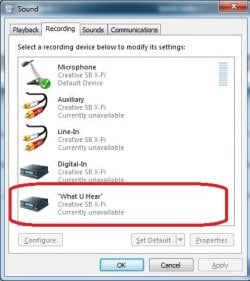
it should be available. It won't be called stereo mix but "What U hear".

whatuhear.jpg

If it is it is just a matter of setting it as the default recording device to use it.
 

My Computer My Computer

At a glance

Win 7 Ultimate x64FX-8350 @ 4.6 GHz so farADATA XPG V1 Series Black 8GB DDR3 1600Sapphire R9 270x Dual-X
Computer type
PC/Desktop
Computer Manufacturer/Model Number
Me
OS
Win 7 Ultimate x64
CPU
FX-8350 @ 4.6 GHz so far
Motherboard
Asus M5A97 EVO
Memory
ADATA XPG V1 Series Black 8GB DDR3 1600
Graphics Card(s)
Sapphire R9 270x Dual-X
Sound Card
Xonar DGX w/ Corsair Vengence 1300
Monitor(s) Displays
Acer S232HL Abid
Screen Resolution
1920x1080
Hard Drives
120 GB OCZ Vertex 3
500 GB Seagate 7200.12
PSU
Antec Earthwatts 650W Green
Case
Antec Three Hundred
Cooling
Cooler Master 212 EVO
Keyboard
Logitech G510
Mouse
Logitech G500s
Internet Speed
35000/3000
Hey thanks for the reply. I currently have "What you hear" set to default, The X-Fi Mic set to Ready and my on board mic set to disable. That's everything in my Recording settings. The levels on the screen bounce up and down fine but when I try to stream it, nothing is picked up except my speech... Same goes for recording.
 

My Computer My Computer

At a glance

Windows 7
OS
Windows 7
Hey thanks for the reply. I currently have "What you hear" set to default, The X-Fi Mic set to Ready and my on board mic set to disable. That's everything in my Recording settings. The levels on the screen bounce up and down fine but when I try to stream it, nothing is picked up except my speech... Same goes for recording.

In the Playback tab the X-Fi Go speakers have also a microphone setting. Check this one is not disable.
 

My Computer My Computer

At a glance

Windows 7 Professional SP1 - x64 [Non-UEFI Boot]Ivy Bridge Core i5 3570K (Delidded)G.Skill "Ares" DDR3 PC3-12800 - 1600MHz (16Gb)Asus Dual-RX480-O4G
Computer type
PC/Desktop
Computer Manufacturer/Model Number
Custom Build
OS
Windows 7 Professional SP1 - x64 [Non-UEFI Boot]
CPU
Ivy Bridge Core i5 3570K (Delidded)
Motherboard
Asus P8Z77-V LE PLUS
Memory
G.Skill "Ares" DDR3 PC3-12800 - 1600MHz (16Gb)
Graphics Card(s)
Asus Dual-RX480-O4G
Sound Card
Creative Sound Blaster Z w/5.1 sound system
Monitor(s) Displays
Asus IPS 23"
Screen Resolution
16/9
Hard Drives
Internal:
500Go Sata 6Gb/s (x2)
500Go Sata 3Gb/s (x2)
SSD 60Go Sata 6Gb/s
PSU
In Win C 900W Series 80+ Platinum
Case
Thermaltake Chaser A71
Cooling
Custom Water Cooling Loop
Keyboard
Cooler Master QuickFire XTi
Mouse
Razer Imperator 2012 (4G)
Antivirus
MSE
Browser
IE 11.0.xxx Rtm
Other Info
"Raid0" with Intel Smart Response Technology (HDD/SSD)
That's done the trick :) Thanks
 

My Computer My Computer

At a glance

Windows 7
OS
Windows 7
Back
Top