Can I swap motherboards without re-installing Win7?

bbinnard

New member
Pro User
Local time
4:05 AM
Messages
238
My current system is Win7-64 SP1 running in an ASUS P6T motherboard with i7-920 & 6GB RAM. My boot drive is a Samsung 840-Pro SSD.

I'm planning on building a new system with an ASUS P877-M board running an i7-3770S with 8GB RAM so I can get SATA3, USB3, a faster CPU, and a smaller form factor system. My thought was to just move all my drives as-is from my current system to the new one.

But if I do that will the new system boot OK? I'm not sure what dependency Win7 has on chipsets, or if there will be a difference (from the Win7 point of view) between my current i7-920 CPU and the i7-3770S my new system will have.

I am aware that Win7 itself will require re-validation because of Microsoft's fear that their precious OS has been installed on a 2nd system, but I have already checked with them on that and verified that my existing Product Key can be re-validated ok.
 

My Computer My Computer

At a glance

Win7-64Intel i7-3770S16GBnVidia GT630
Computer type
PC/Desktop
Computer Manufacturer/Model Number
Custom built
OS
Win7-64
CPU
Intel i7-3770S
Motherboard
ASUS P8Z77-M
Memory
16GB
Graphics Card(s)
nVidia GT630
Sound Card
onboard
Monitor(s) Displays
dual
Screen Resolution
1920x1200 (primary) 1050x1680 (secondary)
Hard Drives
128GB SSD (boot)
64GB SSD (Temp/My Documents)
500GB (photos/videos)
1TB (rendered video, backups)
PSU
650W
Case
Thermaltake A30
Cooling
Thermaltake
Keyboard
Logitech Lighted
Mouse
Kensington Expert Mouse (trackball)
Internet Speed
FIOS 35/35
Antivirus
MS Security Essentials
Browser
Chrome (beta)
You can, with some prep and use of Sysprep, but my question would be why would you want to? A clean install doesn't take very long if you plan ahead, and it will leave your system running as efficiently as possible. It gives you the best chance of having updated drivers and apps, and eliminates some big variables in case something isn't working properly in the new system.

Besides, you'd be backing up your data regardless, so why fear/avoid the clean install?
 

My Computer My Computer

At a glance

Windows 7 Ultimate x64 SP1Intel Core i7-260012 GB Patriot Extreme DDR3-1333Nvidia GTX 470
OS
Windows 7 Ultimate x64 SP1
CPU
Intel Core i7-2600
Motherboard
Gigabyte GA-P67A-UD3P-B3
Memory
12 GB Patriot Extreme DDR3-1333
Graphics Card(s)
Nvidia GTX 470
Monitor(s) Displays
Dell UltraSharp 2209WA
Hard Drives
OCZ Agility3 240 GB, WD5001AALS, WD7501AALS
PSU
OCZ ModStream 700W
Case
CoolerMaster HAF 912 Advanced
Cooling
CoolerMaster Hyper 212 Plus
I've not used Sysprep before so will see what I can find out about that.

The problem with a clean install is, of course, re-installing all my software and then tweaking it to be able to access where all my data is. My current system has 2 SSD's (boot and temp etc.) and 2 HDD's (data of various kinds) with some Junction Links connecting everything. Recreating this would not be a fun task.

Since my boot drive is an SSD I don't worry about fragmentation. I've given up worrying about the ongoing growth of WINSXS since my SSD has enough room for that. I don't plan on migrating to Win8 any time in the foreseeable future and my current OS works just fine.

I can always do a clean install if for some reason I can't get my current boot drive to work, but I really don't want to do this.
 

My Computer My Computer

At a glance

Win7-64Intel i7-3770S16GBnVidia GT630
Computer type
PC/Desktop
Computer Manufacturer/Model Number
Custom built
OS
Win7-64
CPU
Intel i7-3770S
Motherboard
ASUS P8Z77-M
Memory
16GB
Graphics Card(s)
nVidia GT630
Sound Card
onboard
Monitor(s) Displays
dual
Screen Resolution
1920x1200 (primary) 1050x1680 (secondary)
Hard Drives
128GB SSD (boot)
64GB SSD (Temp/My Documents)
500GB (photos/videos)
1TB (rendered video, backups)
PSU
650W
Case
Thermaltake A30
Cooling
Thermaltake
Keyboard
Logitech Lighted
Mouse
Kensington Expert Mouse (trackball)
Internet Speed
FIOS 35/35
Antivirus
MS Security Essentials
Browser
Chrome (beta)
This is one of the reasons I am a firm believer in the K.I.S.S. principle.
 

My Computer My Computer

At a glance

Windows 7 Ultimate x64 SP1Intel Core i7-260012 GB Patriot Extreme DDR3-1333Nvidia GTX 470
OS
Windows 7 Ultimate x64 SP1
CPU
Intel Core i7-2600
Motherboard
Gigabyte GA-P67A-UD3P-B3
Memory
12 GB Patriot Extreme DDR3-1333
Graphics Card(s)
Nvidia GTX 470
Monitor(s) Displays
Dell UltraSharp 2209WA
Hard Drives
OCZ Agility3 240 GB, WD5001AALS, WD7501AALS
PSU
OCZ ModStream 700W
Case
CoolerMaster HAF 912 Advanced
Cooling
CoolerMaster Hyper 212 Plus

My Computer My Computer

At a glance

Windows 10 Pro. 64/ version 1709 Windows 7 Pr...Intel i7-6800K @ 4.3Corsair Platinum 16 gig @2400EVGA GTX 1070 OC
Computer type
PC/Desktop
Computer Manufacturer/Model Number
Home made Desktop
OS
Windows 10 Pro. 64/ version 1709 Windows 7 Pro/64
CPU
Intel i7-6800K @ 4.3
Motherboard
ASUS X-99 Deluxe II
Memory
Corsair Platinum 16 gig @2400
Graphics Card(s)
EVGA GTX 1070 OC
Monitor(s) Displays
Asus 27" LED LCD/VE278Q
Screen Resolution
1920-1080 or 1280-720 HDMI
Hard Drives
INTEL SSD 730-240 Gb Sata 3.0/
PSU
EVGA Platium 1200W
Case
Phanteks Luxe Tempered Glass 8 fans/ one radiator
Cooling
XSPC/ Water Cooled CPU
Keyboard
Das 4 Professional
Mouse
Logitech M705/MX Anywhere 2-S
Internet Speed
100 mbits
Antivirus
Microsoft Security Essentials/ Malwarebytes Premium 3.0/ SAS
Browser
I.E. 11 default/Firefox/ ISP Time Warner Cable/Spectrum
Other Info
LG BluRay Burner/
Sound system-KLipsch-THX/
Icy Dock ssd Hot Swap bays.
Macrium Reflect (as does Acronis) sells a product that allows you to migrate an existing Win7 install to a new PC. You need a CD or folder of the drivers needed for the new PC, but with a motherboard, those typically come on CD.

To use it, you connect the old drive to the new PC, Boot from the MR CD (you have to burn this if you download their product) and then select the option to install to new hardware. IT prompts you for the driver CD and replaces all the old drivers with new drivers -- for that PC. When you reboot, your PC is ready to go.

It's not free but it can save a lot of work and hassle reinstalling lots of software.
 

My Computer My Computer

At a glance

Win7 Pro 32-bit, Win8 Pro 32-bitAMD Phenom II X6 1090T4GB ddr3 1300AMD HD 4290 onboard
Computer type
PC/Desktop
Computer Manufacturer/Model Number
Custom
OS
Win7 Pro 32-bit, Win8 Pro 32-bit
CPU
AMD Phenom II X6 1090T
Motherboard
Gigabyte
Memory
4GB ddr3 1300
Graphics Card(s)
AMD HD 4290 onboard
Sound Card
Builtin Realtek HD Audio
Monitor(s) Displays
Samsung 24" widescreen, LG 23" widescreen
Screen Resolution
1920x1200/1920x1080
Hard Drives
Kingston 256GB SSD
Keyboard
Logitech Illuminated Keyboard
Mouse
Logitech M705 wireless mouse
Antivirus
Norton Av 2013
Browser
IE v10
It's not free but it can save a lot of work and hassle reinstalling lots of software.
I wouldn't say it saves work and hassle...it just brings a different set of work and hassles. Anytime you migrate an install, there is still plenty of cleanup work to do, testing to be done, and drivers to install. None of that even accounts for the random issues or troubleshooting you may have to do, since it wasn't a clean install.

That's why you keep your installs relatively simple, your data backed up, and your drivers handy, so a clean install is not a big issue. It shouldn't be, if planned out. I can do mine in about 2 hours time, and the end result is a much cleaner, better performing system.
 

My Computer My Computer

At a glance

Windows 7 Ultimate x64 SP1Intel Core i7-260012 GB Patriot Extreme DDR3-1333Nvidia GTX 470
OS
Windows 7 Ultimate x64 SP1
CPU
Intel Core i7-2600
Motherboard
Gigabyte GA-P67A-UD3P-B3
Memory
12 GB Patriot Extreme DDR3-1333
Graphics Card(s)
Nvidia GTX 470
Monitor(s) Displays
Dell UltraSharp 2209WA
Hard Drives
OCZ Agility3 240 GB, WD5001AALS, WD7501AALS
PSU
OCZ ModStream 700W
Case
CoolerMaster HAF 912 Advanced
Cooling
CoolerMaster Hyper 212 Plus
My current system is Win7-64 SP1 running in an ASUS P6T motherboard with i7-920 & 6GB RAM. My boot drive is a Samsung 840-Pro SSD.

I'm planning on building a new system with an ASUS P877-M board running an i7-3770S with 8GB RAM so I can get SATA3, USB3, a faster CPU, and a smaller form factor system. My thought was to just move all my drives as-is from my current system to the new one.

But if I do that will the new system boot OK? I'm not sure what dependency Win7 has on chipsets, or if there will be a difference (from the Win7 point of view) between my current i7-920 CPU and the i7-3770S my new system will have.

I am aware that Win7 itself will require re-validation because of Microsoft's fear that their precious OS has been installed on a 2nd system, but I have already checked with them on that and verified that my existing Product Key can be re-validated ok.

Just do the following with win7 on old motherboard:
  • uninstall all graphics, sound, network configuration programs, cpu monitor programs, mouse programs, keyboard programs. All what is special for your current hardware
  • upgrade using device manger your gpu to "standard vga"
  • device manager->uninstall network driver, wifi driver, usb stuff, webcam etcetera... all stuff special for your current hardware
  • In device manager ->IDE ATA/ATAPI controllers: You see SATA AHCI controllers? upgrade to standard AHCI 1.0 serial ATA controller.=>this is the most import part!! Without a working disk driver you get stop 7b on reboot. Be sure new motherboard is also in AHCI mode
  • In device manager: uninstall all usb stuff
All driver upgrades should be done using: find on my computer->pick from list. Put checkmark at "compatible hardware".
Don't reboot after each step!

All is very clean now. Shutdown, power off. Now replace motherboard and cross your fingers. If system boots fine with new motherboard let win7 find drivers. Of course install network driver first. use motherboard CD to install chipset drivers. Check device manager if all is fine
 
Last edited:

My Computer My Computer

At a glance

Microsoft Windows 7 Home Premium 64-bits 7601...Intel(R) Core(TM) i3 CPU M 370 @ 2.40GHz4,00 GBATI Mobility Radeon HD 5400 Series
Computer type
Laptop
Computer Manufacturer/Model Number
ACER ASPIRE 5742G
OS
Microsoft Windows 7 Home Premium 64-bits 7601 Multiprocessor Free Service Pack 1
CPU
Intel(R) Core(TM) i3 CPU M 370 @ 2.40GHz
Motherboard
Acer Aspire 5742G
Memory
4,00 GB
Graphics Card(s)
ATI Mobility Radeon HD 5400 Series
Sound Card
(1) AMD High Definition Audio Device (2) Realtek High Defi
Screen Resolution
1366 x 768 x 32 bits (4294967296 colors) @ 60 Hz
Hard Drives
WDC WD5000BEVT-22ZAT0
You may well need to Re-Activate Windows Registration. If windows notices a big hardware change. If online Activation fails.

Use Telephone Activation.
 
Last edited:

My Computer My Computer

At a glance

Windows 7 Home Premium 64 BitCore I7 1155 3.4GHZ8GB DDR 1600
Computer Manufacturer/Model Number
Cooler Master
OS
Windows 7 Home Premium 64 Bit
CPU
Core I7 1155 3.4GHZ
Memory
8GB DDR 1600
Hard Drives
64 GB SSD - OS
1TB - DATA
PSU
340 Watt Corsair
Case
Cooler Master
Cooling
Cooler Master
Kaktussoft - thanks for your detailed reply. After reading through it I think I will be OK without doing a lot of what you suggested:

1. My current system has a Logitech keyboard and a Kensington trackball and specific drivers for each. I'll put these on the new motherboard when I boot so there should not be a problem with either. Plus, I know both work OK when booting in Safe Mode, so I always have that as a backup.

2. Since my current system boots off an SSD my bios is set to AHCI mode and I will ensure the new BIOS gets set that way too before I boot.

3. My current system includes both the Intel ICH10R SATA AHCI controller and the Standard AHCI controller so I am already covered there.

4. The network "card" on the new board is the same as the oine in my current board so that should be OK.

5. My current system does have a PCI/USB3 adapter card driving a USB 2/3 multi-function card reader (P6T board is only USB2), but this device has it's own driver CD which I have. Since the new motherboard has USB3 included I may not install this reader on the new system, but if I do I have the driver CD to take care of it.

6. The new system has an nVidia graphics card that is supported by the same nVidia driver I am currently running, so this should work OK. If not I can always go into Safe Mode and update it.
 

My Computer My Computer

At a glance

Win7-64Intel i7-3770S16GBnVidia GT630
Computer type
PC/Desktop
Computer Manufacturer/Model Number
Custom built
OS
Win7-64
CPU
Intel i7-3770S
Motherboard
ASUS P8Z77-M
Memory
16GB
Graphics Card(s)
nVidia GT630
Sound Card
onboard
Monitor(s) Displays
dual
Screen Resolution
1920x1200 (primary) 1050x1680 (secondary)
Hard Drives
128GB SSD (boot)
64GB SSD (Temp/My Documents)
500GB (photos/videos)
1TB (rendered video, backups)
PSU
650W
Case
Thermaltake A30
Cooling
Thermaltake
Keyboard
Logitech Lighted
Mouse
Kensington Expert Mouse (trackball)
Internet Speed
FIOS 35/35
Antivirus
MS Security Essentials
Browser
Chrome (beta)
Kaktussoft - thanks for your detailed reply. After reading through it I think I will be OK without doing a lot of what you suggested:

1. My current system has a Logitech keyboard and a Kensington trackball and specific drivers for each. I'll put these on the new motherboard when I boot so there should not be a problem with either. Plus, I know both work OK when booting in Safe Mode, so I always have that as a backup.

2. Since my current system boots off an SSD my bios is set to AHCI mode and I will ensure the new BIOS gets set that way too before I boot.

3. My current system includes both the Intel ICH10R SATA AHCI controller and the Standard AHCI controller so I am already covered there.

4. The network "card" on the new board is the same as the oine in my current board so that should be OK.

5. My current system does have a PCI/USB3 adapter card driving a USB 2/3 multi-function card reader (P6T board is only USB2), but this device has it's own driver CD which I have. Since the new motherboard has USB3 included I may not install this reader on the new system, but if I do I have the driver CD to take care of it.

6. The new system has an nVidia graphics card that is supported by the same nVidia driver I am currently running, so this should work OK. If not I can always go into Safe Mode and update it.

I would still recommend uninstalling, and reinstalling new drivers using the Disc that comes with the board, Perhaps check the Manu's website for the latest drivers.
 

My Computer My Computer

At a glance

Windows 7 Home Premium 64 BitCore I7 1155 3.4GHZ8GB DDR 1600
Computer Manufacturer/Model Number
Cooler Master
OS
Windows 7 Home Premium 64 Bit
CPU
Core I7 1155 3.4GHZ
Memory
8GB DDR 1600
Hard Drives
64 GB SSD - OS
1TB - DATA
PSU
340 Watt Corsair
Case
Cooler Master
Cooling
Cooler Master
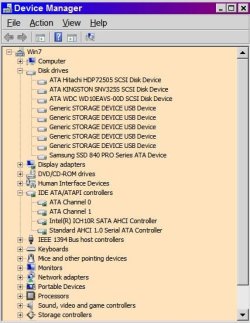
My current system includes both the Intel ICH10R SATA AHCI controller and the Standard AHCI controller so I am already covered there.
Both are in device manager? Please post screenshot

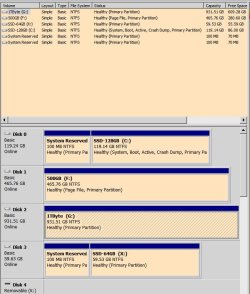
Post screenshot of disk management as well please with all fields visible
 

My Computer My Computer

At a glance

Microsoft Windows 7 Home Premium 64-bits 7601...Intel(R) Core(TM) i3 CPU M 370 @ 2.40GHz4,00 GBATI Mobility Radeon HD 5400 Series
Computer type
Laptop
Computer Manufacturer/Model Number
ACER ASPIRE 5742G
OS
Microsoft Windows 7 Home Premium 64-bits 7601 Multiprocessor Free Service Pack 1
CPU
Intel(R) Core(TM) i3 CPU M 370 @ 2.40GHz
Motherboard
Acer Aspire 5742G
Memory
4,00 GB
Graphics Card(s)
ATI Mobility Radeon HD 5400 Series
Sound Card
(1) AMD High Definition Audio Device (2) Realtek High Defi
Screen Resolution
1366 x 768 x 32 bits (4294967296 colors) @ 60 Hz
Hard Drives
WDC WD5000BEVT-22ZAT0
Only real problem is SATA driver. If you have an INTEL driver installed and new motherboard has non intel... it bsod's in stopcode 7B. Using tricks you can insert standard sata driver hower. (very difficult). Also important is uninstall special CPU software.

USB, network card... can be fixed later.
gpu problem... boot in safe mode and uninstall driver.

To recover the usb mess.... uninstall all usb serial bus-controllers stuff in device manager and let windows discover it after reboot.
 

My Computer My Computer

At a glance

Microsoft Windows 7 Home Premium 64-bits 7601...Intel(R) Core(TM) i3 CPU M 370 @ 2.40GHz4,00 GBATI Mobility Radeon HD 5400 Series
Computer type
Laptop
Computer Manufacturer/Model Number
ACER ASPIRE 5742G
OS
Microsoft Windows 7 Home Premium 64-bits 7601 Multiprocessor Free Service Pack 1
CPU
Intel(R) Core(TM) i3 CPU M 370 @ 2.40GHz
Motherboard
Acer Aspire 5742G
Memory
4,00 GB
Graphics Card(s)
ATI Mobility Radeon HD 5400 Series
Sound Card
(1) AMD High Definition Audio Device (2) Realtek High Defi
Screen Resolution
1366 x 768 x 32 bits (4294967296 colors) @ 60 Hz
Hard Drives
WDC WD5000BEVT-22ZAT0
DeviceMgr.JPG

DiskMgr.JPG

C: is current boot SSD; X: is old SSD currently used for temp etc.; F: & G: are HDDs for data/backup/etc.
 

My Computer My Computer

At a glance

Win7-64Intel i7-3770S16GBnVidia GT630
Computer type
PC/Desktop
Computer Manufacturer/Model Number
Custom built
OS
Win7-64
CPU
Intel i7-3770S
Motherboard
ASUS P8Z77-M
Memory
16GB
Graphics Card(s)
nVidia GT630
Sound Card
onboard
Monitor(s) Displays
dual
Screen Resolution
1920x1200 (primary) 1050x1680 (secondary)
Hard Drives
128GB SSD (boot)
64GB SSD (Temp/My Documents)
500GB (photos/videos)
1TB (rendered video, backups)
PSU
650W
Case
Thermaltake A30
Cooling
Thermaltake
Keyboard
Logitech Lighted
Mouse
Kensington Expert Mouse (trackball)
Internet Speed
FIOS 35/35
Antivirus
MS Security Essentials
Browser
Chrome (beta)
View attachment 252797

View attachment 252798

C: is current boot SSD; X: is old SSD currently used for temp etc.; F: & G: are HDDs for data/backup/etc.
Device manager looks fine.

"system reserved" on disk 0 and disk 3 can be deleted. Normally it's active and has bootmenu and bootmgr. Because you boot from C (marked system) they are useless! After deletion you can add their space to C and X. You can do this using Partition Wizard Home (move/resize partition). Althouth it's only 100MB you win.

Only C is marked active .. so even if you swap disk cables.... it can only boot from C. Great!

Did you place pagefile on F on purpose?
 

My Computer My Computer

At a glance

Microsoft Windows 7 Home Premium 64-bits 7601...Intel(R) Core(TM) i3 CPU M 370 @ 2.40GHz4,00 GBATI Mobility Radeon HD 5400 Series
Computer type
Laptop
Computer Manufacturer/Model Number
ACER ASPIRE 5742G
OS
Microsoft Windows 7 Home Premium 64-bits 7601 Multiprocessor Free Service Pack 1
CPU
Intel(R) Core(TM) i3 CPU M 370 @ 2.40GHz
Motherboard
Acer Aspire 5742G
Memory
4,00 GB
Graphics Card(s)
ATI Mobility Radeon HD 5400 Series
Sound Card
(1) AMD High Definition Audio Device (2) Realtek High Defi
Screen Resolution
1366 x 768 x 32 bits (4294967296 colors) @ 60 Hz
Hard Drives
WDC WD5000BEVT-22ZAT0
After swapping motherboards:
  • All disks have the disk signature as before. No matter in which order you connect them windows can uniquely identify them
  • Start sector of each partition will still be the same. All partitions will have correct drive letter.
Drive letters are maintaned in registry of OS. In registry key HKEY_LOCAL_MACHINE\SYSTEM\MountedDevices it's defined. It's a combination of disksignature+startsector. Partition Wizard "move-action" modifies the start sector ... and adjusts this key.
 

My Computer My Computer

At a glance

Microsoft Windows 7 Home Premium 64-bits 7601...Intel(R) Core(TM) i3 CPU M 370 @ 2.40GHz4,00 GBATI Mobility Radeon HD 5400 Series
Computer type
Laptop
Computer Manufacturer/Model Number
ACER ASPIRE 5742G
OS
Microsoft Windows 7 Home Premium 64-bits 7601 Multiprocessor Free Service Pack 1
CPU
Intel(R) Core(TM) i3 CPU M 370 @ 2.40GHz
Motherboard
Acer Aspire 5742G
Memory
4,00 GB
Graphics Card(s)
ATI Mobility Radeon HD 5400 Series
Sound Card
(1) AMD High Definition Audio Device (2) Realtek High Defi
Screen Resolution
1366 x 768 x 32 bits (4294967296 colors) @ 60 Hz
Hard Drives
WDC WD5000BEVT-22ZAT0
Thanks again for your helpful reply.

I am aware of the 100MB partition on disks 0 and 3. My understanding was that this got created when Win7 gets installed and was needed to be kept in order for the Win7 disk recovery function to operate. Originally drive 3 was my Win7 boot device but I cloned it onto Disk 0 when I started to get short of free space due to the ever-increasing size of WINSXS. (WINSXS is my biggest complaint about Win7, but that's a different issue.)

I used to run with no paging file at all but I read somewhere that the absence of a page file can (somehow) reduce Win7's efficiency. Even though this made no sense to me I put a paging file out there simply because I have the space available to do so.

My new system will have 8GB RAM instead of the 6 I have now so I'm probably going to remove the page file again.

I took the Active tag off my old boot drive because i found out only the low-level boot manager sees this and it's best to have only your real boot drive marked as Active. I used to think Active meant active (silly me!) and I was a bit hesitant to take that parameter off a drive that was currently active/running, but as you know doing that had no effect on anything.

My sense is that most people do not understand what the Active parameter really means.
 

My Computer My Computer

At a glance

Win7-64Intel i7-3770S16GBnVidia GT630
Computer type
PC/Desktop
Computer Manufacturer/Model Number
Custom built
OS
Win7-64
CPU
Intel i7-3770S
Motherboard
ASUS P8Z77-M
Memory
16GB
Graphics Card(s)
nVidia GT630
Sound Card
onboard
Monitor(s) Displays
dual
Screen Resolution
1920x1200 (primary) 1050x1680 (secondary)
Hard Drives
128GB SSD (boot)
64GB SSD (Temp/My Documents)
500GB (photos/videos)
1TB (rendered video, backups)
PSU
650W
Case
Thermaltake A30
Cooling
Thermaltake
Keyboard
Logitech Lighted
Mouse
Kensington Expert Mouse (trackball)
Internet Speed
FIOS 35/35
Antivirus
MS Security Essentials
Browser
Chrome (beta)

My Computer My Computer

At a glance

Microsoft Windows 7 Home Premium 64-bits 7601...Intel(R) Core(TM) i3 CPU M 370 @ 2.40GHz4,00 GBATI Mobility Radeon HD 5400 Series
Computer type
Laptop
Computer Manufacturer/Model Number
ACER ASPIRE 5742G
OS
Microsoft Windows 7 Home Premium 64-bits 7601 Multiprocessor Free Service Pack 1
CPU
Intel(R) Core(TM) i3 CPU M 370 @ 2.40GHz
Motherboard
Acer Aspire 5742G
Memory
4,00 GB
Graphics Card(s)
ATI Mobility Radeon HD 5400 Series
Sound Card
(1) AMD High Definition Audio Device (2) Realtek High Defi
Screen Resolution
1366 x 768 x 32 bits (4294967296 colors) @ 60 Hz
Hard Drives
WDC WD5000BEVT-22ZAT0
It's not free but it can save a lot of work and hassle reinstalling lots of software.
I wouldn't say it saves work and hassle...it just brings a different set of work and hassles. Anytime you migrate an install, there is still plenty of cleanup work to do, testing to be done, and drivers to install. None of that even accounts for the random issues or troubleshooting you may have to do, since it wasn't a clean install.

So you say (and generally, I agree), but I actually DID this on a Win7 PC and not only did I have NO cleanup to do, it created NO new work or hassles.

The MR tool found all the drivers and installed them for me. There were no drivers I had to hunt down or install myself. After 15 minutes, the PC was up and running and now, months later, there has still not been a single problem.

And yeah, it surprised me to as, before I did that, I expected the kinds of problems you mention.

Not saying this is always going to be the case, but it my case, it DID save a lot of work and hassles.
 

My Computer My Computer

At a glance

Win7 Pro 32-bit, Win8 Pro 32-bitAMD Phenom II X6 1090T4GB ddr3 1300AMD HD 4290 onboard
Computer type
PC/Desktop
Computer Manufacturer/Model Number
Custom
OS
Win7 Pro 32-bit, Win8 Pro 32-bit
CPU
AMD Phenom II X6 1090T
Motherboard
Gigabyte
Memory
4GB ddr3 1300
Graphics Card(s)
AMD HD 4290 onboard
Sound Card
Builtin Realtek HD Audio
Monitor(s) Displays
Samsung 24" widescreen, LG 23" widescreen
Screen Resolution
1920x1200/1920x1080
Hard Drives
Kingston 256GB SSD
Keyboard
Logitech Illuminated Keyboard
Mouse
Logitech M705 wireless mouse
Antivirus
Norton Av 2013
Browser
IE v10
Results of bcdedit:

Windows Boot Manager
--------------------
identifier {bootmgr}
device partition=C:
path \bootmgr
description Windows Boot Manager
locale en-US
default {current}
displayorder {current}
timeout 30

Windows Boot Loader
-------------------
identifier {current}
device partition=C:
path \Windows\system32\winload.exe
description Windows 7 Home Premium (recovered)
locale en-US
osdevice partition=C:
systemroot \Windows
resumeobject {2241f931-40fe-11e2-b762-806e6f6e6963}

Resume from Hibernate
---------------------
identifier {2241f931-40fe-11e2-b762-806e6f6e6963}
device partition=C:
path \Windows\system32\winresume.exe
description Windows 7 Home Premium (recovered)
locale en-US
inherit {resumeloadersettings}
filedevice partition=C:
filepath \hiberfil.sys
debugoptionenabled No

Windows Memory Tester
---------------------
identifier {memdiag}
device partition=C:
path \boot\memtest.exe
description Windows Memory Diagnostic
locale en-US


I normally run with System Protection off because I am careful about what I download & run and in general like to have the minimum number of system tasks running. But lately I've been running with it on.
 

My Computer My Computer

At a glance

Win7-64Intel i7-3770S16GBnVidia GT630
Computer type
PC/Desktop
Computer Manufacturer/Model Number
Custom built
OS
Win7-64
CPU
Intel i7-3770S
Motherboard
ASUS P8Z77-M
Memory
16GB
Graphics Card(s)
nVidia GT630
Sound Card
onboard
Monitor(s) Displays
dual
Screen Resolution
1920x1200 (primary) 1050x1680 (secondary)
Hard Drives
128GB SSD (boot)
64GB SSD (Temp/My Documents)
500GB (photos/videos)
1TB (rendered video, backups)
PSU
650W
Case
Thermaltake A30
Cooling
Thermaltake
Keyboard
Logitech Lighted
Mouse
Kensington Expert Mouse (trackball)
Internet Speed
FIOS 35/35
Antivirus
MS Security Essentials
Browser
Chrome (beta)
Back
Top