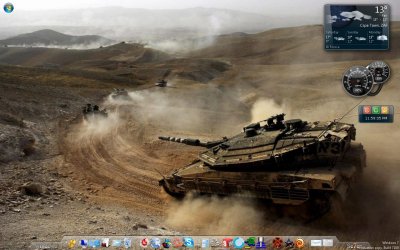
Can I switch off the taskbar?

bigseb

Same old, same old
I ask 'cos I just installed rocketdock which I'd prefer to use. Can I disable the taskbar and have just the 'Start' pearl showing?
 

My Computer

Computer type
PC/Desktop
Computer Manufacturer/Model Number
Own build
OS
Windows 7 x64 Professional
CPU
Intel Core i7-870 Lynnfield 2.93 GHz
Motherboard
Intel Whitesburg P55 LGA1156
Memory
Kingston Hyper X 1333MHz DDR3 4x4Gb
Graphics Card(s)
Nvidia GTS 250
Monitor(s) Displays
AOC Q3279VWF 31.5"
Screen Resolution
2560x1440
Hard Drives
Western Digital 1000GB Hard Drive (SATA 3.0Gb/s, 7200rpm, 32MB Cache)
Verbatim 500GB (External)
PSU
650W
Case
Coolermaster HAF 912
Cooling
Stock
Keyboard
Logitech
Mouse
Logitech
Antivirus
Avira
Browser
Firefox
Other Info
LG OptDrive 24x SATA DVDRW Lightscribe
I ask 'cos I just installed rocketdock which I'd prefer to use. Can I disable the taskbar and have just the 'Start' pearl showing?


The only thing I know of is having it set to Auto hide.
 

My Computer

Computer Manufacturer/Model Number
Home Brew
OS
Windows 7 Ultimate Vista Ultimate x64
CPU
Core 2 Duo E8500 3.16Ghz @ 3.8Ghz
Motherboard
eVGA 750i FTW
Memory
2x2Gigs Patriot PC2-6400 LL
Graphics Card(s)
Inno3D GeForce GTX260 216 SP
Monitor(s) Displays
ASUS VW222U 22" 2ms Response time
Screen Resolution
1680x1050
Hard Drives
SATA 150GB
SATA II 250GB
USB IDE 750GB Ext.
PSU
HYTEC 600W & Thermaltake 650W Toughpower Power Exp
Case
Thermaltake Armor LCS (Liquid Cooling System)
Cooling
Liquid Cooling System
Keyboard
Logitech G15 Gaming Keyboard
Mouse
Logitech G9 Gaming Mouse
The only thing I know of is having it set to Auto hide.

Already doing that... just really annoying to have it pop up every time the pointer slides over it...
 

My Computer

Computer type
PC/Desktop
Computer Manufacturer/Model Number
Own build
OS
Windows 7 x64 Professional
CPU
Intel Core i7-870 Lynnfield 2.93 GHz
Motherboard
Intel Whitesburg P55 LGA1156
Memory
Kingston Hyper X 1333MHz DDR3 4x4Gb
Graphics Card(s)
Nvidia GTS 250
Monitor(s) Displays
AOC Q3279VWF 31.5"
Screen Resolution
2560x1440
Hard Drives
Western Digital 1000GB Hard Drive (SATA 3.0Gb/s, 7200rpm, 32MB Cache)
Verbatim 500GB (External)
PSU
650W
Case
Coolermaster HAF 912
Cooling
Stock
Keyboard
Logitech
Mouse
Logitech
Antivirus
Avira
Browser
Firefox
Other Info
LG OptDrive 24x SATA DVDRW Lightscribe
You could do that in xp by preventing explorer from loading and instead loading whatever other ui elements you wanted. That would be a good starting point to investigate if it's possible on w7.
 

My Computer

OS
7264x64/7260x86
i think you can do what you want with objectdock, you can have the start orb and minimised windows on the dock itself - system tray too if you pay for the plus version.
 

My Computer

Computer Manufacturer/Model Number
mickey megabyte 1234
OS
ultimate 64 sp1
CPU
i5 2500K [email protected]
Motherboard
MSI P67A-GD53
Memory
8 gigs GSkill Ripjaws 1600
Graphics Card(s)
amd hd6950
Sound Card
creative x-fi gamer
Monitor(s) Displays
samsung 24"
Screen Resolution
1920x1080
Hard Drives
ocz vertex 2e 60 gig, samsung f3 1tb, buffalo 2tb ext
PSU
antec 550
Case
antec three hundred
Cooling
i'm a cooling fan
Keyboard
saitek eclipse ii
Mouse
logitech g3
Internet Speed
about 4 Mbps
Other Info
i love win7
I use ObjectDock Plus - it contains a setting to hide the Windows taskbar completely. I do not use it, but it works. I do not believe the 64-bit version supports the Start button in a dock - only the 32-bit version does.

Again, my best option is to relocate the Windows taskbar to another side of the screen. Not a workaround for all, but it allows me to have access to the native Windows functionality as well as the added functions of ObjectDock.
 
Thanx for all the info, everyone.
 

My Computer

Computer type
PC/Desktop
Computer Manufacturer/Model Number
Own build
OS
Windows 7 x64 Professional
CPU
Intel Core i7-870 Lynnfield 2.93 GHz
Motherboard
Intel Whitesburg P55 LGA1156
Memory
Kingston Hyper X 1333MHz DDR3 4x4Gb
Graphics Card(s)
Nvidia GTS 250
Monitor(s) Displays
AOC Q3279VWF 31.5"
Screen Resolution
2560x1440
Hard Drives
Western Digital 1000GB Hard Drive (SATA 3.0Gb/s, 7200rpm, 32MB Cache)
Verbatim 500GB (External)
PSU
650W
Case
Coolermaster HAF 912
Cooling
Stock
Keyboard
Logitech
Mouse
Logitech
Antivirus
Avira
Browser
Firefox
Other Info
LG OptDrive 24x SATA DVDRW Lightscribe

My Computer

OS
windows 7 Ultimate 32bit
CPU
intel c2d e7200 2.53ghz
Motherboard
asus p5gcmx/1333
Memory
2gb DDR2
Graphics Card(s)
nvidia GeForce 7300SE
Monitor(s) Displays
samsung sync master 793s
Screen Resolution
1280X1024
Hard Drives
250gb seagate
Case
Circle
Keyboard
iball
Mouse
iball
Internet Speed
512kbps
deleted posts relating to kinto's direct download versus link as he now has a link for the program
 

My Computers

System One System Two

  • Computer type
    PC/Desktop
    Computer Manufacturer/Model Number
    The Beast Model A (homebrew)
    OS
    Windows 11 21H2 Current build
    CPU
    AMD Ryzen 9 3950X
    Motherboard
    MSI MEG X570 GODLIKE
    Memory
    4 * 32 GB - Corsair Vengeance 3600 MHz
    Graphics Card(s)
    EVGA GeForce RTX 3080 Ti XC3 ULTRA GAMING (12G-P5-3955-KR)
    Sound Card
    Realtek® ALC1220 Codec
    Monitor(s) Displays
    2x Eve Spectrum ES07D03 4K Gaming Monitor (Matte) | Eve Spec
    Screen Resolution
    3x 3840 x 2160
    Hard Drives
    3x Samsung 980 Pro NVMe PCIe 4 M.2 2 TB SSD (MZ-V8P2T0B/AM) } 3x Sabrent Rocket NVMe 4.0 1 TB SSD
    PSU
    PC Power & Cooling’s Silencer Series 1050 Watt, 80 Plus Plat
    Case
    Fractal Design Define 7 XL Dark ATX Full Tower Case
    Cooling
    SteelSeries Apex Pro Wired Gaming Keyboard
    Keyboard
    SteelSeries Apex Pro
    Mouse
    Logitech MX Master 3S | MX Master 3 for business
    Internet Speed
    AT&T LightSpeed Gigabit Duplex Ftth
    Antivirus
    Windows Defender + MB 3
    Browser
    Nightly (default) + Firefox (stable),Chrome, Edge
  • Computer type
    PC/Desktop
    System Manufacturer/Model Number
    Dell Latitude E5470
    OS
    ChromeOS Flex Dev Channel (current)
    CPU
    Intel(R) Core(TM) i5-6300U CPU @ 2.40GHz, 2501 Mhz, 2 Core(s), 4 Logical Processor(s)
    Motherboard
    Dell
    Memory
    16 GB
    Graphics Card(s)
    Intel(R) HD Graphics 520
    Sound Card
    Intel(R) HD Graphics 520 + RealTek Audio
    Monitor(s) Displays
    Dell laptop display 15"
    Screen Resolution
    1920 * 1080
    Hard Drives
    Toshiba 128GB M.2 22300 drive
    INTEL Cherryville 520 Series SSDSC2CW180A 180 GB SATA III SSD
    PSU
    Dell
    Case
    Dell
    Cooling
    Dell
    Keyboard
    Dell
    Mouse
    Logitech MX Master 3S (shared w. Sys 1) | Dell TouchPad
    Internet Speed
    AT&T LightSpeed Gigabit Duplex Ftth
Got something called "Hide Taskbar", can't remember where I found it but you're supposed to pop it in the startup folder et voila... no more taskbar :D

Pity it don't work... :cry:
 

My Computer

Computer type
PC/Desktop
Computer Manufacturer/Model Number
Own build
OS
Windows 7 x64 Professional
CPU
Intel Core i7-870 Lynnfield 2.93 GHz
Motherboard
Intel Whitesburg P55 LGA1156
Memory
Kingston Hyper X 1333MHz DDR3 4x4Gb
Graphics Card(s)
Nvidia GTS 250
Monitor(s) Displays
AOC Q3279VWF 31.5"
Screen Resolution
2560x1440
Hard Drives
Western Digital 1000GB Hard Drive (SATA 3.0Gb/s, 7200rpm, 32MB Cache)
Verbatim 500GB (External)
PSU
650W
Case
Coolermaster HAF 912
Cooling
Stock
Keyboard
Logitech
Mouse
Logitech
Antivirus
Avira
Browser
Firefox
Other Info
LG OptDrive 24x SATA DVDRW Lightscribe
taskbar eliminator is a good software to hide the taskbar and display only the start button.

Dude THAT also doesn't work... even though it's set to not allow the taskbar on startup? Is there a setting on windows 7 that needs to be changed or something?

confuzzled....
 

My Computer

Computer type
PC/Desktop
Computer Manufacturer/Model Number
Own build
OS
Windows 7 x64 Professional
CPU
Intel Core i7-870 Lynnfield 2.93 GHz
Motherboard
Intel Whitesburg P55 LGA1156
Memory
Kingston Hyper X 1333MHz DDR3 4x4Gb
Graphics Card(s)
Nvidia GTS 250
Monitor(s) Displays
AOC Q3279VWF 31.5"
Screen Resolution
2560x1440
Hard Drives
Western Digital 1000GB Hard Drive (SATA 3.0Gb/s, 7200rpm, 32MB Cache)
Verbatim 500GB (External)
PSU
650W
Case
Coolermaster HAF 912
Cooling
Stock
Keyboard
Logitech
Mouse
Logitech
Antivirus
Avira
Browser
Firefox
Other Info
LG OptDrive 24x SATA DVDRW Lightscribe
UPDATE: in order for taskbar eliminator to work you need unclick 'lock taskbar' and 'auto hide' and unclick all toolbars (eg: quick launch). Paste the taskbar eliminator.exe into startup folder and VOILA, no more taskbar. BONUS: the start pearl still shows!!! I moved my taskbar to the left (to the left) so the start pearl sit in the upper left hand corner. Very nice...

Untitled.jpg

There are downsides however. Firstly, my startup takes a bit longer than normal. Secondly, certain windows don't show in Rocketdock when minimised (eg: notepad). Basically I have to check with the task manager to see what all is running.
 

My Computer

Computer type
PC/Desktop
Computer Manufacturer/Model Number
Own build
OS
Windows 7 x64 Professional
CPU
Intel Core i7-870 Lynnfield 2.93 GHz
Motherboard
Intel Whitesburg P55 LGA1156
Memory
Kingston Hyper X 1333MHz DDR3 4x4Gb
Graphics Card(s)
Nvidia GTS 250
Monitor(s) Displays
AOC Q3279VWF 31.5"
Screen Resolution
2560x1440
Hard Drives
Western Digital 1000GB Hard Drive (SATA 3.0Gb/s, 7200rpm, 32MB Cache)
Verbatim 500GB (External)
PSU
650W
Case
Coolermaster HAF 912
Cooling
Stock
Keyboard
Logitech
Mouse
Logitech
Antivirus
Avira
Browser
Firefox
Other Info
LG OptDrive 24x SATA DVDRW Lightscribe
Back
Top