Solved Can I turn off computer when BitLocker is encrypting?

green elephant

New member
Local time
5:10 AM
Messages
60
I'm encrypting a drive with BitLocker (its taking forever) and I want to shut down my PC. Can I press "Pause" on bitlocker and resume it when I start my computer back up?
 

My Computer My Computer

Computer type
PC/Desktop
Computer Manufacturer/Model Number
lenovo v570
OS
windows 7 home premium
Memory
6gb
Hard Drives
552gb
2tb (external
500gb (external
Antivirus
microsoft security
Browser
google chrome
Hello Green elephant,

No. If you stop the encryption process, it could fail and may have to start the process all over. You could also risk data loss if you just shut down.

It's best to let it finish.
 
Last edited:

My Computer My Computer

Computer type
PC/Desktop
Computer Manufacturer/Model Number
Self built custom
OS
64-bit Windows 11 Pro for Workstations
CPU
Intel i7-8700K OC'd to 5 GHz
Motherboard
ASUS ROG Maximus XI Formula Z390
Memory
64 GB (4x16GB) G.SKILL TridentZ RGB DDR4 3600 MHz
Graphics Card(s)
ASUS ROG-STRIX-GTX1080TI-O11G-GAMING
Sound Card
Integrated
Monitor(s) Displays
2 x Samsung Odyssey G7 27"
Screen Resolution
2560x1440
Hard Drives
1TB Samsung 990 PRO M.2,
4TB Samsung 990 PRO PRO M.2,
TerraMaster F8 SSD Plus NAS
PSU
Seasonic Prime Titanium 850W
Case
Thermaltake Core P3
Cooling
Corsair Hydro H115i
Keyboard
Logitech wireless K800
Mouse
Logitech MX Master 4
Internet Speed
2 Gb/s Download and 100 Mb/s Upload
Antivirus
Malwarebyte Anti-Malware Premium
Browser
Google Chrome
Other Info
Logitech Z625 speaker system,
Logitech BRIO 4K Pro webcam,
HP Color LaserJet Pro MFP M477fdn,
APC SMART-UPS RT 1000 XL - SURT1000XLI,
Galaxy S23 Plus phone
Bitlocker takes a long time, don`t shut off the pc.

Why are you even using Bitlocker ? What are you worried about ?
 

My Computer My Computer

Computer type
PC/Desktop
Computer Manufacturer/Model Number
Skylake Special #666
OS
Windows 10 Pro x64
CPU
Intel Core i7 6700K
Motherboard
Asus Sabertooth Z170 Mark 1
Memory
GSkill TridentZ RGB 16GB 3600 16-16-16-36
Graphics Card(s)
EVGA GTX 980 Ti SC x2
Sound Card
Realtek High Definition
Monitor(s) Displays
AOC G2460PG
Screen Resolution
1920 x 1080 144Hz
Hard Drives
Samsung 860 Pro 256GB, Seagate Barracuda 4TB x2
PSU
EVGA 1000 P2, EVGA White Custom Braided Cables
Case
Corsair Vengeance C70 Gunmetal Black
Cooling
Corsair H100i v2, Corsair ML120 x2, Thermal Grizzly Kryonaut
Keyboard
Logitech G910 Orion Spectrum
Mouse
Logitech G700s
Internet Speed
Verizon Fios Quantum Gateway 75/75
Antivirus
Windows Defender, Malwarebytes Free 3.8.3
Browser
Chrome
Other Info
Corsair SP120 x4, LG Blu-ray Drive, Durabrand HT-395 100 Watt Dolby Digital Amp, Corsair H2100 Wireless 7.1 Headset
Hello Green elephant,

No. If you stop the encryption process, it could fail and may have to start the process all over. You could also risk data loss if you just shut down.

It's best to let it finish.

Ok thanks.
 
Last edited by a moderator:

My Computer My Computer

Computer type
PC/Desktop
Computer Manufacturer/Model Number
lenovo v570
OS
windows 7 home premium
Memory
6gb
Hard Drives
552gb
2tb (external
500gb (external
Antivirus
microsoft security
Browser
google chrome
BitLocker Encrypting Progress Page Gone?

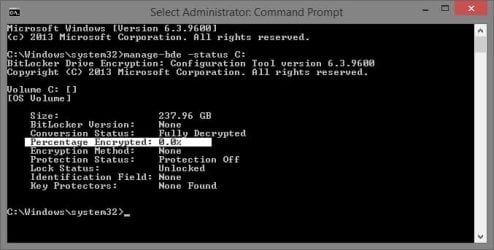
Yesterday I could see the little window that shows BitLocker encryption progress, but this morning I come to see it is gone. there's no way it is done because it was taking forever (days). i go into bitlocker management area and see it shows it is still encrypting, but I don't know what the progress is anymore because the page is gone.
Can I get the page to come back up somehow? I already checked hidden icons.


My Computer My Computer

Computer type
PC/Desktop
Computer Manufacturer/Model Number
lenovo v570
OS
windows 7 home premium
Memory
6gb
Hard Drives
552gb
2tb (external
500gb (external
Antivirus
microsoft security
Browser
google chrome
Last edited:

My Computer My Computer

Computer type
PC/Desktop
Computer Manufacturer/Model Number
Self built custom
OS
64-bit Windows 11 Pro for Workstations
CPU
Intel i7-8700K OC'd to 5 GHz
Motherboard
ASUS ROG Maximus XI Formula Z390
Memory
64 GB (4x16GB) G.SKILL TridentZ RGB DDR4 3600 MHz
Graphics Card(s)
ASUS ROG-STRIX-GTX1080TI-O11G-GAMING
Sound Card
Integrated
Monitor(s) Displays
2 x Samsung Odyssey G7 27"
Screen Resolution
2560x1440
Hard Drives
1TB Samsung 990 PRO M.2,
4TB Samsung 990 PRO PRO M.2,
TerraMaster F8 SSD Plus NAS
PSU
Seasonic Prime Titanium 850W
Case
Thermaltake Core P3
Cooling
Corsair Hydro H115i
Keyboard
Logitech wireless K800
Mouse
Logitech MX Master 4
Internet Speed
2 Gb/s Download and 100 Mb/s Upload
Antivirus
Malwarebyte Anti-Malware Premium
Browser
Google Chrome
Other Info
Logitech Z625 speaker system,
Logitech BRIO 4K Pro webcam,
HP Color LaserJet Pro MFP M477fdn,
APC SMART-UPS RT 1000 XL - SURT1000XLI,
Galaxy S23 Plus phone
I recommend you reference the TechNet library pages, as they contain accurate and relevant information pertaining to the subject and question in the original post.

https://technet.microsoft.com/en-us/library/Ee449438%28v=WS.10%29.aspx

As such, the above link references an official TechNet library page pertaining to BitLocker encryption and it answers the aforementioned question accordingly.
What happens if the computer is turned off during encryption or decryption?

If the computer is turned off or goes into hibernation, the BitLocker encryption and decryption process will resume where it stopped the next time Windows starts. This is true even if the power is suddenly unavailable.

Sincerely,
Ombrius
 
Last edited by a moderator:

My Computer My Computer

Computer type
Laptop
OS
Windows 10 Enteprise / CB / x64
Back
Top