Can I upgrade?

rocki934

New member
Local time
8:17 AM
Messages
10
Hi, I just bought a netbook that runs 7 starter. My office purchased an upgrade for 7 professional.

Can i upgrade from starter to pro?

Thanks in advance!

SPECS:

Processor & Cache Intel® Atom™ N270 1.6GHz Processor Operating System Windows 7 Starter Chipsets Intel® 945GSE+ICH7M System Memory DDR2 2GB LCD Display 10.1" 1024x600 LCD Panel Graphics & Video Module UMA Audio HD Audio, Stereo speakers HDD 160GB SATA Webcam 0.3M Card Reader 4-in-1 Card Reader, SD/MMC/MS/MS Pro Communication Ports Built-in 10/100 LAN
Built-in 802.11b/g
Bluetooth Supported (Bluetooth is optional)
I/O Ports Graphics Card Output (15-pin, D-Sub) X 1 VGA
USB2.0 Port X 3
Mic-in Port X 1/Line-in Port x 1
Headphone Output X 1
LAN Port X 1
AC Adaptor Output: 20V DC, 40W / Input: 100~ 240V AC, 50/60Hz universal Battery Pack & Life 6 cells (aprox 5 hrs.) Dimension & Weight 10.4" x 7.1" x 1.3" (WxDxH)
2.6lbs. With full system and battery
 

My Computer

OS
windows 7 starter
You probably can, though you may not need to, and you'll notice a small performance drop.
 

My Computer

Computer Manufacturer/Model Number
Zen Productions
OS
Windows 7 Ultimate x64
CPU
Intel i7-860
Motherboard
Gigabyte GA-P55A-UD4P
Memory
Corsair Dominator 1600Mhz, 8-8-8-24 1.65v 2x2GB
Graphics Card(s)
ATI Radeon 5770 HD
Sound Card
Intel High Definition Sound
Monitor(s) Displays
Samsung P2570HD
Screen Resolution
1920x1080
Hard Drives
Western Digital Caviar Black 500gb
PSU
Corsair CMPSU-750HX 750W
Case
Antec p183
Cooling
Corsair H50 Water Cooler
Keyboard
Logitech G110
Mouse
Logitech MX Revolution
Internet Speed
768 mb/s
Hi rocki934 and welcome to Windows 7 Forums :party:

Why not give it a go and see? Just make sure that you follow the instructions on how to make restore disks for your netbook first, and create them so that you can revert back should things go awry.
 

My Computer

Computer type
PC/Desktop
Computer Manufacturer/Model Number
Dwarf Dwf/11/2012 r09/2013
OS
Windows 8.1 Pro RTM x64
CPU
Intel Core-i5-3570K 4-core @ 3.4GHz (Ivy Bridge) (OC 4.4GHz)
Motherboard
ASRock Z77 Extreme4-M
Memory
4 x 4GB DDR3-1600 Corsair Vengeance CMZ8GX3M2A1600C9B (16GB)
Graphics Card(s)
MSI GeForce GTX770 Gaming OC 2GB
Sound Card
Realtek High Definition on board solution (ALC 898)
Monitor(s) Displays
ViewSonic VA1912w Widescreen (VGA)
Screen Resolution
1440x900
Hard Drives
OCZ Agility 3 SSD 120GB SATA III x2 (RAID 0)
Samsung HD501LJ 500GB SATA II x2
Hitachi HDS721010CLA332 1TB SATA II
Iomega 1.5TB Ext USB 2.0
WD 2.0TB Ext USB 3.0
PSU
XFX Pro Series 850W Semi-Modular
Case
Gigabyte IF233
Cooling
1 x 120mm Front Inlet 1 x 120mm Rear Exhaust
Keyboard
Microsoft Comfort Curve Keyboard 3000 (USB)
Mouse
Microsoft Comfort Mouse 3000 for Business (USB)
Internet Speed
NetGear DG834Gv3 ADSL Modem/Router (Ethernet) ~4.0 Mb/s (O2)
Antivirus
Avast! 8.0.1497
Browser
IE 11
Other Info
Optical Drive: HL-DT-ST BD-RE BH10LS30 SATA Bluray
Lexmark S305 Printer/Scanner/Copier (USB)
WEI Score: 8.1/8.1/8.5/8.5/8.25
Asus Eee PC 1011PX Netbook (Windows 7 x86 Starter)
Thanks for the responses--Can anyone help me understand my video card issues? From the 7 pro update install requirements:
Video cardDirectX 9 graphics processor with WDDM 1.0 or later driver
Also, anyone know of an online tutorial for making restore disks? does it matter that i don't have an optical drive?
 

My Computer

OS
windows 7 starter
Thanks for the responses--Can anyone help me
anyone know of an online tutorial for making restore disks? does it matter that i don't have an optical drive?

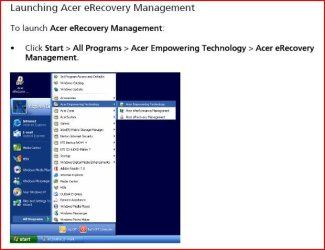
Have look at the manual for your Netbook, how to make recvery disks.

This from a Acer:
 

Attachments

  • Capture.JPG
    Capture.JPG
    40.7 KB · Views: 8

My Computer

OS
ME/XP/Vista/Win7
cool! i actually just tried the upgrade anytime program and it told me i can upgrade!

Next Question:

I have a volume license key for 7 pro upgrade-- well , i actually have 2-- a MAK and a KMS. Can someone explain to me what that means?
 

My Computer

OS
windows 7 starter
Here's a quote from Microsoft about the Keys:
Volume Activation provides two different models for completing volume activations. The first model is Key Management Service (KMS) and the second is Multiple Activation Key (MAK). KMS allows organizations to activate systems within their own network, while MAK activates systems on a one-time basis, using Microsoft’s hosted activation services. Customers can use either or both key types to activate systems in their environment.

I am not that familiar with the different Key types, so I don't know how much I can help, The website I found this information on is HERE..

Hope this Helps..
 

My Computer

Computer Manufacturer/Model Number
HP Pavilion dv5 Notebook PC
OS
Windows Seven x64
CPU
2.2 GHz Dual Core
Motherboard
Quanta 3600
Memory
4GB
Graphics Card(s)
ATI Mobility RADEON HD 3470
Sound Card
ATI
Monitor(s) Displays
Laptop
Hard Drives
ATA Hitachi HTS543215 (5400RPM)
Case
Laptop
Cooling
Fan
Internet Speed
Basic DSL 1.5 up and Down
Back
Top