can I use paint for science fair project

momweber

New member
Local time
2:36 PM
Messages
3
Hi, my dtr wants to do a science fair project that compares different detergents and effect on stain removal. Her teacher liked the idea but said it needed to be measured accurately, not just eyeballing the differences. Somewhere online someone commented that this could be measured by taking digital photos of each fabric and importing into Paint and using Paint to " find the average of the RGB values to see which one is lightest". I have no idea what this means or how to do it. Any help would be greatly appreciated.
 

My Computer My Computer

At a glance

7 premium, 64
OS
7 premium, 64
hmm, well i certainly wouldn't use paint (as supplied with windows 7), it just isn't sophisticated enough to display rgb values.

you could use the freebie (and very goodie paint.net) to do the job, though.

ok, let's now explain RGB values:

in simple terms, colours on a computer can be measured by their rgb value - how much red, green and blue there is. each of these colours is given a number, generally between 0 and 255.

so a bright red would be 255,0,0 because there is a lot of red with no green and blue, whereas a bright yellow would be more like 255,255,0 as there's lots of red and green but no blue.

pure black is 0,0,0 and white is 255,255,255. a bright clean t-shirt (for example) would be closer to the high end than a dirty one (if they were the same colour to begin with, and were photographed under the same light conditions.)

you could take photos of shirts, load these photos up in paint.net or similar powerful photo-editing program, and use a tool to measure the rgb values of the photos.

however, i'm not sure if it's truly an accurate way to determine dirtiness...although it may do for a simple school project.

i've tried to keep it simple, and i hope i've explained things well.

do post back for more help or info.

oh, and welcome to sevenforums!

 

My Computer My Computer

At a glance

ultimate 64 sp1i5 2500K [email protected]8 gigs GSkill Ripjaws 1600amd hd6950
Computer Manufacturer/Model Number
mickey megabyte 1234
OS
ultimate 64 sp1
CPU
i5 2500K [email protected]
Motherboard
MSI P67A-GD53
Memory
8 gigs GSkill Ripjaws 1600
Graphics Card(s)
amd hd6950
Sound Card
creative x-fi gamer
Monitor(s) Displays
samsung 24"
Screen Resolution
1920x1080
Hard Drives
ocz vertex 2e 60 gig, samsung f3 1tb, buffalo 2tb ext
PSU
antec 550
Case
antec three hundred
Cooling
i'm a cooling fan
Keyboard
saitek eclipse ii
Mouse
logitech g3
Internet Speed
about 4 Mbps
Other Info
i love win7
thank you so much! Your explanation was so simple to understand. I downloaded paint.net and have searched how to assess the RGB values and couldn't find answer so posted my question on forum there. Hopefully someone over there can help us with this. I really appreciate you taking the time so write such a thorough explanation of the RGB values. My dtr will be able to use that description in her write up. Have a great day!
 

My Computer My Computer

At a glance

7 premium, 64
OS
7 premium, 64
Last edited:

My Computer My Computer

At a glance

win 7 X64 Ultimate SP1I3770KG Skill F3-14900CL9-4GBXL x 4NVIDIA GeForce GTX670 + Intel 4000
Computer Manufacturer/Model Number
BGC (Bob's Garage Crew)
OS
win 7 X64 Ultimate SP1
CPU
I3770K
Motherboard
Asus P8Z77-V Deluxe
Memory
G Skill F3-14900CL9-4GBXL x 4
Graphics Card(s)
NVIDIA GeForce GTX670 + Intel 4000
Sound Card
Realtek HD 5.1 (MOB)
Monitor(s) Displays
Asus VW224T (1)
Screen Resolution
1920 x 1080
Hard Drives
SATA Corsair Force GT 2.5" 180GB (System) Sata 3
OCZ Vertex3 120GB
OCZ Vertex 2 120GB 2.5" SATA II
ST31000524AS 1000.2GB
WD15EARS (External)
PSU
CoolerMaster 1000 Watt
Case
CoolerMaster HAF X
Cooling
CPU -- CoolerMaster 520N
Keyboard
MS Wireless 3000 V2
Mouse
MS Wireless 3000 V2
Internet Speed
Cable
Antivirus
Norton Internet Security
Browser
IE9
Other Info
AMI Bios 1805
OC'd 3%
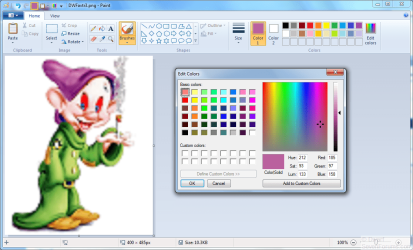
I've just checked, and Paint (the one included in Windows 7) will do the job perfectly well.

Open the image in Paint and click on the Color picker under Tools (middle icon on the bottom row). Now click on the spot in the image that you wish to analyse. You will notice that Color 1 will change and will now be the same color as the spot you have just clicked on. To find the RGB values, just click on Edit Colors.

The example below shows an enlarged version of my current Avatar, with part of my hat selected for the colour.

Capture.PNG

If doing this scientifically, you will also need to include a reference for correction purposes. A piece of white card will do the trick, so long as you use the same piece on each sample. Since you know that the RGB of white is 255 255 255 you can use this to correct the other measurement.
 

My Computer My Computer

At a glance

Windows 8.1 Pro RTM x64Intel Core-i5-3570K 4-core @ 3.4GHz (Ivy Brid...4 x 4GB DDR3-1600 Corsair Vengeance CMZ8GX3M2...MSI GeForce GTX770 Gaming OC 2GB
Computer type
PC/Desktop
Computer Manufacturer/Model Number
Dwarf Dwf/11/2012 r09/2013
OS
Windows 8.1 Pro RTM x64
CPU
Intel Core-i5-3570K 4-core @ 3.4GHz (Ivy Bridge) (OC 4.4GHz)
Motherboard
ASRock Z77 Extreme4-M
Memory
4 x 4GB DDR3-1600 Corsair Vengeance CMZ8GX3M2A1600C9B (16GB)
Graphics Card(s)
MSI GeForce GTX770 Gaming OC 2GB
Sound Card
Realtek High Definition on board solution (ALC 898)
Monitor(s) Displays
ViewSonic VA1912w Widescreen (VGA)
Screen Resolution
1440x900
Hard Drives
OCZ Agility 3 SSD 120GB SATA III x2 (RAID 0)
Samsung HD501LJ 500GB SATA II x2
Hitachi HDS721010CLA332 1TB SATA II
Iomega 1.5TB Ext USB 2.0
WD 2.0TB Ext USB 3.0
PSU
XFX Pro Series 850W Semi-Modular
Case
Gigabyte IF233
Cooling
1 x 120mm Front Inlet 1 x 120mm Rear Exhaust
Keyboard
Microsoft Comfort Curve Keyboard 3000 (USB)
Mouse
Microsoft Comfort Mouse 3000 for Business (USB)
Internet Speed
NetGear DG834Gv3 ADSL Modem/Router (Ethernet) ~4.0 Mb/s (O2)
Antivirus
Avast! 8.0.1497
Browser
IE 11
Other Info
Optical Drive: HL-DT-ST BD-RE BH10LS30 SATA Bluray
Lexmark S305 Printer/Scanner/Copier (USB)
WEI Score: 8.1/8.1/8.5/8.5/8.25
Asus Eee PC 1011PX Netbook (Windows 7 x86 Starter)
i'm glad i could help, momweber, there are many ways of doing this,and paint.net was the first tool that came to mind.

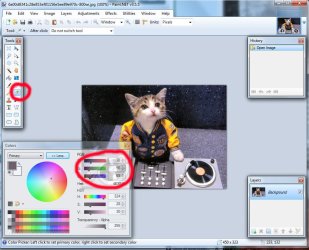
you need to use the colour-picker in paint.net.

first, click the 'More>>' button in the colors box.

then select the color picker tool (next to the pencil).

then when you move it over the image, and click certain points, the rgb values will be displayed.

ask if you need more help. :)
 

Attachments

  • paint.jpg
    paint.jpg
    94.6 KB · Views: 7

My Computer My Computer

At a glance

ultimate 64 sp1i5 2500K [email protected]8 gigs GSkill Ripjaws 1600amd hd6950
Computer Manufacturer/Model Number
mickey megabyte 1234
OS
ultimate 64 sp1
CPU
i5 2500K [email protected]
Motherboard
MSI P67A-GD53
Memory
8 gigs GSkill Ripjaws 1600
Graphics Card(s)
amd hd6950
Sound Card
creative x-fi gamer
Monitor(s) Displays
samsung 24"
Screen Resolution
1920x1080
Hard Drives
ocz vertex 2e 60 gig, samsung f3 1tb, buffalo 2tb ext
PSU
antec 550
Case
antec three hundred
Cooling
i'm a cooling fan
Keyboard
saitek eclipse ii
Mouse
logitech g3
Internet Speed
about 4 Mbps
Other Info
i love win7
Thanks so very much for showing me that! That is exactly what I was trying to figure out. Don't know if averaging the three values would be scientific in determining whiteness but it looks good to me. I appreciate you help on this! Take care.
 

My Computer My Computer

At a glance

7 premium, 64
OS
7 premium, 64
Mickey hit the nail on the head when he said "and were photographed under the same light conditions", that's nearly impossible to achieve unless you have studio facilities. You could always scan a flat section of the shirts. At least the light source would be the same. And by the way, don't forget that if one shirt looks cleaner than another one, then it probably is;)
 

My Computer My Computer

At a glance

Microsoft Windows 7 Home Premium 64-bit 7601 ...Intel(R) Core(TM) i7-3770 CPU @ 3.40GHz8.00 GBIntel(R) HD Graphics 4000
Computer type
PC/Desktop
OS
Microsoft Windows 7 Home Premium 64-bit 7601 Multiprocessor Free Service Pack 1
CPU
Intel(R) Core(TM) i7-3770 CPU @ 3.40GHz
Motherboard
ASUSTeK COMPUTER INC. P8H77-M
Memory
8.00 GB
Graphics Card(s)
Intel(R) HD Graphics 4000
Sound Card
On Board
Monitor(s) Displays
Dell 24"
Screen Resolution
1920 x 1080
Hard Drives
(1) INTEL SSDSC2CT180A3 ATA Device (2) ST500DM002-1BD142 ATA Device (3) WDC WD3200AAKS-75L9A0 ATA Device (4) Generic- Compact Flash USB Device (5) Generic- MS/MS-Pro USB Device (6) Generic- SD/MMC USB Device (7) Generic- SM/xD-Picture USB
PSU
500w Corsair
Case
Cooler Master
Cooling
3 Fans
Keyboard
Logitech MK300
Mouse
Logitech WOM
Internet Speed
75Mb
Antivirus
Norton 360
Browser
Firefox, Opera, IE
Back
Top