Solved Can I Use PC3-12800 RAM With a PC3-10700 Motherboard?

Mohanned Aladin

New member
Local time
12:15 PM
Messages
39
Hello,

I'm not particularly familiar with RAM upgrades for laptops. My Laptop has a motherboard which supports 4GB PC3-10700 (667 MHz) RAM. Will the 8GB PC3-12800 stick work in it?

Thank You,

MohaNNed

Laptop Link

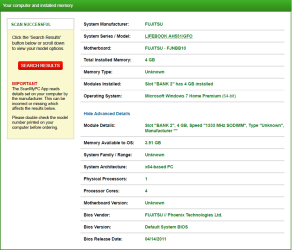
Fujitsu Siemens LifeBook AH531/GFO Memory RAM Upgrades - FREE Delivery & Guaranteed Compatible | Mr Memory(R)

Computer and Installed Memory

406105d1543613289-can-i-use-pc3-12800-ram-pc3-10700-motherboard-fujitsu-lifebook-ah531-gfo.png


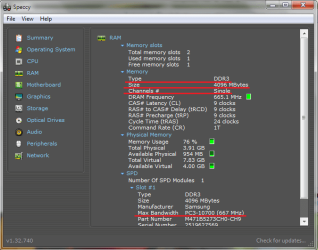
RAM

406106d1543613289-can-i-use-pc3-12800-ram-pc3-10700-motherboard-ram.png


8GB PC3-12800 RAM

406110d1543614722-can-i-use-pc3-12800-ram-pc3-10700-motherboard-8gb-pc3-12800.jpg
 

Attachments

  • FUJITSU LIFEBOOK AH531-GFO.png
    FUJITSU LIFEBOOK AH531-GFO.png
    31.1 KB · Views: 31
  • RAM.png
    RAM.png
    25.5 KB · Views: 32
  • 8GB PC3-12800.jpg
    8GB PC3-12800.jpg
    59 KB · Views: 30

My Computer My Computer

At a glance

Windows Home Premium
OS
Windows Home Premium
The best I can tell is that the RAM you have is 204 pin but the stick you want to replace it with is 240 pin. I think you would be best off asking Fujitsu. Not sure why you want to go to 8 GB. Unless you do something that benefits from that much RAM, I think 8 GB is overkill (just my opinion).

I should correct myself- I didn't look closely at the image of the memory stick you wanted to use. I see that it is 204 pin. :o
 
Last edited:

My Computer My Computer

At a glance

Windows 7 Pro SP1 64 bit8 GB
Computer type
Laptop
Computer Manufacturer/Model Number
Dell M6500 Precision Work Station
OS
Windows 7 Pro SP1 64 bit
Memory
8 GB
Screen Resolution
1920x
Internet Speed
30 Mbps
Antivirus
Norton Security
Browser
IE 11
The best I can tell is that the RAM you have is 204 pin but the stick you want to replace it with is 240 pin. I think you would be best off asking Fujitsu. Not sure why you want to go to 8 GB. Unless you do something that benefits from that much RAM, I think 8 GB is overkill (just my opinion).

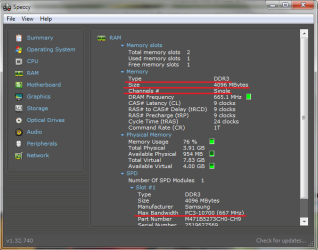
I have a single channel, that means i can't add more than one RAM to my motherboard and i have 4 GB installed, so if i want to upgrade my memory i need 6 GB or more and i don't think there is 6 GB RAM (i didn't find it) so i chose 8 GB (maximum memory). I need that RAM for some engineering programs to work faster like AutoCAD and Revit :-)

Thanks for your reply, Wither ;)
 

My Computer My Computer

At a glance

Windows Home Premium
OS
Windows Home Premium
The best I can tell is that the RAM you have is 204 pin but the stick you want to replace it with is 240 pin. I think you would be best off asking Fujitsu. Not sure why you want to go to 8 GB. Unless you do something that benefits from that much RAM, I think 8 GB is overkill (just my opinion).

204 pin is Laptop memory
240 pin is desktop memory

Ive seen benefits of installing 6-8GB of RAM. Helps with browsing web with multiple tabs open, and helps with some applications.

I have a single channel, that means i can't add more than one RAM to my motherboard and i have 4 GB installed,

Not quite so. Two single channel memory sticks will work side-by-side. Provided they are technically identical in every other way. Two Single channel modules wont be quite as fast as two dual channel modules.

According to the link you provided, your Lifebook supports two RAM slots. So you could purchase a second 4GB DDR3 204-pin RAM module and install it.


According to the link you provided, your Lifebook supports two RAM slots.​
 

My Computer My Computer

At a glance

Windows 7 x64, Vista x64, 8.1 smartphoneIntel E8400 65W 64-bitDDR2 2 x 2GB, 1GB x 2XFX Radeon HD5750
Computer type
PC/Desktop
OS
Windows 7 x64, Vista x64, 8.1 smartphone
CPU
Intel E8400 65W 64-bit
Motherboard
Gigabyte EP45-UD3LR
Memory
DDR2 2 x 2GB, 1GB x 2
Graphics Card(s)
XFX Radeon HD5750
Sound Card
AMD High Definition Audio; Realtek High Definition Audio
Monitor(s) Displays
iiyama prolite X2377HDS
Screen Resolution
1920 x 1080
Hard Drives
500GB 7200 rpm Seagate ST3500413AS 16MB, 500GB 5400 rpm Toshiba MQ02ABF050H 32MB, 200GB 7200 rpm Seagate ST3200820AS 8MB, 2TB 7200 rpm Western Digital WD20EZRX 64MB
PSU
Enermax Liberty Modular
Case
Antec P193 Midi Tower
Keyboard
Mionix ZIBAL 60
Mouse
Razer USB 2.0 Diamondback Mouse or Huion Graphics Tablet
Browser
Internet Explorer, Lunascape, Firefox, Opera, Avast Safezone
204 pin is Laptop memory
240 pin is desktop memory

Ive seen benefits of installing 6-8GB of RAM. Helps with browsing web with multiple tabs open, and helps with some applications.


Not quite so. Two single channel memory sticks will work side-by-side. Provided they are technically identical in every other way. Two Single channel modules wont be quite as fast as two dual channel modules.

According to the link you provided, your Lifebook supports two RAM slots. So you could purchase a second 4GB DDR3 204-pin RAM module and install it.


According to the link you provided, your Lifebook supports two RAM slots.

You are absolutely right :thumbsup::thumbsup::thumbsup:

You really surprised me because i opened my laptop MANY times and didn't notice there's another single channel under the installed memory, then i thought i can't add more than one memory and to make sure of what i thought, i installed CPU-Z and Speccy and they showed your channel is single. To be honest i saw the number of slots but i ignored them because i did't understand what they meant.

I told my friend "unfortunately i can't add more than one ram" and he asked "what's your laptop model?" after i told him he kept telling me "i think you're wrong you can add another memory" and i kept telling him "no i'm sure i can't" :D when i read your reply, you made me immediately shut down my laptop and open it and then i noticed the other single channel under the installed memory.
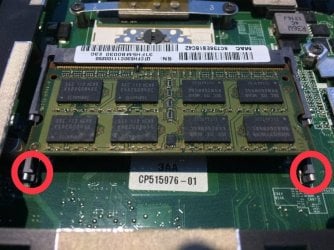
i was going to buy 8GB PC3-12800 this week, but you saved my money thank you :D Now i need a second 4GB PC3-10700 RAM and if i found 4GB PC3-12800 RAM and i use it with 4GB PC3-10700 RAM, i can potentially have instabilities or crashes/reboots due to RAM incompatibility, is that correct?
 

Attachments

  • another single channel under the installed memory.jpg
    another single channel under the installed memory.jpg
    89.2 KB · Views: 1
Last edited:

My Computer My Computer

At a glance

Windows Home Premium
OS
Windows Home Premium
if you found a 4GB PC3-12800 (204 pin) and tried to use it @1600MHz along side the 4GB PC3-10600 (204 pin) , then yes you would see instabilities. Your computer's motherboard might not support that much speed however, so you might not even see the option to try this out.

All DDR3 RAM will work at the slowest speed. That just means, from a compatibility point of view, that there is no point in buying faster RAM.

So, to answer your question. From a cost and performance point of view, you'd be better off buying a second 4GB PC3-10600 RAM, because when installed properly, it should give you 8GB total RAM.

Looking at your photo, it might be difficult to place a RAM module into the first slot, because the second slot is already occupied.

So you might want to take out the RAM module from the second slot, and place it into the first slot, before buying any extra RAM.
 

My Computer My Computer

At a glance

Windows 7 x64, Vista x64, 8.1 smartphoneIntel E8400 65W 64-bitDDR2 2 x 2GB, 1GB x 2XFX Radeon HD5750
Computer type
PC/Desktop
OS
Windows 7 x64, Vista x64, 8.1 smartphone
CPU
Intel E8400 65W 64-bit
Motherboard
Gigabyte EP45-UD3LR
Memory
DDR2 2 x 2GB, 1GB x 2
Graphics Card(s)
XFX Radeon HD5750
Sound Card
AMD High Definition Audio; Realtek High Definition Audio
Monitor(s) Displays
iiyama prolite X2377HDS
Screen Resolution
1920 x 1080
Hard Drives
500GB 7200 rpm Seagate ST3500413AS 16MB, 500GB 5400 rpm Toshiba MQ02ABF050H 32MB, 200GB 7200 rpm Seagate ST3200820AS 8MB, 2TB 7200 rpm Western Digital WD20EZRX 64MB
PSU
Enermax Liberty Modular
Case
Antec P193 Midi Tower
Keyboard
Mionix ZIBAL 60
Mouse
Razer USB 2.0 Diamondback Mouse or Huion Graphics Tablet
Browser
Internet Explorer, Lunascape, Firefox, Opera, Avast Safezone
So, to answer your question. From a cost and performance point of view, you'd be better off buying a second 4GB PC3-10600 RAM, because when installed properly, it should give you 8GB total RAM.
I think you meant 4GB PC3-10700 RAM? Or
Did you mean i can use 4GB PC3-10600 RAM with 4GB PC3-10700 RAM together? Or
PC3-10600 and PC3-10700 is the same thing

What about type of memory is it must have be the same as the installed memory?
 
Last edited:

My Computer My Computer

At a glance

Windows Home Premium
OS
Windows Home Premium
I mean DDR3 PC3-10600 1333MHz 204-pin SODIMM, like what is stated on the link you provided in your first post on this thread.

I.ve assumed that you have 64-bit version of Windows. I thought I read it in your system specs. Can you confirm that youi have a 64-bit OS?

Yes, you can use 4GB PC3-10600 RAM with 4GB PC3-10700 RAM, but the system will probably only be stable at 1333MHz.

DDR3 PC3-10600 and DDR3 PC-10700 are the same type of SDRAM, but they exhibit different clock speeds, and maybe different latencies.
 

My Computer My Computer

At a glance

Windows 7 x64, Vista x64, 8.1 smartphoneIntel E8400 65W 64-bitDDR2 2 x 2GB, 1GB x 2XFX Radeon HD5750
Computer type
PC/Desktop
OS
Windows 7 x64, Vista x64, 8.1 smartphone
CPU
Intel E8400 65W 64-bit
Motherboard
Gigabyte EP45-UD3LR
Memory
DDR2 2 x 2GB, 1GB x 2
Graphics Card(s)
XFX Radeon HD5750
Sound Card
AMD High Definition Audio; Realtek High Definition Audio
Monitor(s) Displays
iiyama prolite X2377HDS
Screen Resolution
1920 x 1080
Hard Drives
500GB 7200 rpm Seagate ST3500413AS 16MB, 500GB 5400 rpm Toshiba MQ02ABF050H 32MB, 200GB 7200 rpm Seagate ST3200820AS 8MB, 2TB 7200 rpm Western Digital WD20EZRX 64MB
PSU
Enermax Liberty Modular
Case
Antec P193 Midi Tower
Keyboard
Mionix ZIBAL 60
Mouse
Razer USB 2.0 Diamondback Mouse or Huion Graphics Tablet
Browser
Internet Explorer, Lunascape, Firefox, Opera, Avast Safezone
From Tomshardware.com-

"The problem comes with "rounding" and was first noticed with DDR-266 (PC-2100). The data rate of 266 MHz is actually 266.6 (continuously repeating decimal) megahertz, so the true transfer rate was 2133 MHz.

Today's DDR3-1333 has a peak bandwidth of 10666 MHz, which can be improperly rounded down and called PC3-10600, rounded up to be called PC3-10700 or stated without rounding as PC3-10666 depending on the manufacturer's desires."
 

My Computer My Computer

At a glance

Windows 7 Pro SP1 64 bit8 GB
Computer type
Laptop
Computer Manufacturer/Model Number
Dell M6500 Precision Work Station
OS
Windows 7 Pro SP1 64 bit
Memory
8 GB
Screen Resolution
1920x
Internet Speed
30 Mbps
Antivirus
Norton Security
Browser
IE 11
I mean DDR3 PC3-10600 1333MHz 204-pin SODIMM, like what is stated on the link you provided in your first post on this thread.

I.ve assumed that you have 64-bit version of Windows. I thought I read it in your system specs. Can you confirm that youi have a 64-bit OS?

But Speccy showed my RAM is 4GB PC3-10700, so what should i choose if find both of them (PC3-10600 and PC3-10700)?

Yes i have 64-bit OS.
 

Attachments

  • RAM.png
    RAM.png
    25.5 KB · Views: 17
Last edited:

My Computer My Computer

At a glance

Windows Home Premium
OS
Windows Home Premium
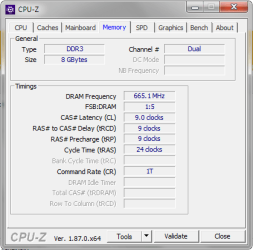
Yes, speccy does show PC3-10700 as the MAXIMUM bandwidth. But the DRAM frequency reading remains at 665.1 MHz. The part number is a SAMSUNG M471B5273CH0-CH9.

If you found both modules, then choose the SAMSUNG M471B5273CH0-CH9.
 

My Computer My Computer

At a glance

Windows 7 x64, Vista x64, 8.1 smartphoneIntel E8400 65W 64-bitDDR2 2 x 2GB, 1GB x 2XFX Radeon HD5750
Computer type
PC/Desktop
OS
Windows 7 x64, Vista x64, 8.1 smartphone
CPU
Intel E8400 65W 64-bit
Motherboard
Gigabyte EP45-UD3LR
Memory
DDR2 2 x 2GB, 1GB x 2
Graphics Card(s)
XFX Radeon HD5750
Sound Card
AMD High Definition Audio; Realtek High Definition Audio
Monitor(s) Displays
iiyama prolite X2377HDS
Screen Resolution
1920 x 1080
Hard Drives
500GB 7200 rpm Seagate ST3500413AS 16MB, 500GB 5400 rpm Toshiba MQ02ABF050H 32MB, 200GB 7200 rpm Seagate ST3200820AS 8MB, 2TB 7200 rpm Western Digital WD20EZRX 64MB
PSU
Enermax Liberty Modular
Case
Antec P193 Midi Tower
Keyboard
Mionix ZIBAL 60
Mouse
Razer USB 2.0 Diamondback Mouse or Huion Graphics Tablet
Browser
Internet Explorer, Lunascape, Firefox, Opera, Avast Safezone
From Tomshardware.com-

"The problem comes with "rounding" and was first noticed with DDR-266 (PC-2100). The data rate of 266 MHz is actually 266.6 (continuously repeating decimal) megahertz, so the true transfer rate was 2133 MHz.

Today's DDR3-1333 has a peak bandwidth of 10666 MHz, which can be improperly rounded down and called PC3-10600, rounded up to be called PC3-10700 or stated without rounding as PC3-10666 depending on the manufacturer's desires."

Thanks for the info, much appreciated.
 

My Computer My Computer

At a glance

Windows Home Premium
OS
Windows Home Premium
Yes, speccy does show PC3-10700 as the MAXIMUM bandwidth. But the DRAM frequency reading remains at 665.1 MHz. The part number is a SAMSUNG M471B5273CH0-CH9.

If you found both modules, then choose the SAMSUNG M471B5273CH0-CH9.

Okay, the last thing if i didn't find Samsung and found other types like Kingston or Crucial can i use it with Samsung?
 

My Computer My Computer

At a glance

Windows Home Premium
OS
Windows Home Premium
If there was no SAMSUNG M471B5273CH0-CH9, then pick a different make that does PC3-10600 with CAS Latency (CL) 9. That will be the same as the SAMSUNG's.
 

My Computer My Computer

At a glance

Windows 7 x64, Vista x64, 8.1 smartphoneIntel E8400 65W 64-bitDDR2 2 x 2GB, 1GB x 2XFX Radeon HD5750
Computer type
PC/Desktop
OS
Windows 7 x64, Vista x64, 8.1 smartphone
CPU
Intel E8400 65W 64-bit
Motherboard
Gigabyte EP45-UD3LR
Memory
DDR2 2 x 2GB, 1GB x 2
Graphics Card(s)
XFX Radeon HD5750
Sound Card
AMD High Definition Audio; Realtek High Definition Audio
Monitor(s) Displays
iiyama prolite X2377HDS
Screen Resolution
1920 x 1080
Hard Drives
500GB 7200 rpm Seagate ST3500413AS 16MB, 500GB 5400 rpm Toshiba MQ02ABF050H 32MB, 200GB 7200 rpm Seagate ST3200820AS 8MB, 2TB 7200 rpm Western Digital WD20EZRX 64MB
PSU
Enermax Liberty Modular
Case
Antec P193 Midi Tower
Keyboard
Mionix ZIBAL 60
Mouse
Razer USB 2.0 Diamondback Mouse or Huion Graphics Tablet
Browser
Internet Explorer, Lunascape, Firefox, Opera, Avast Safezone
thank you guys for all your support. I am going back to you when i bought it, much love to all of you ;)
 

My Computer My Computer

At a glance

Windows Home Premium
OS
Windows Home Premium
IMO, I would go with the 10700.
 

My Computer My Computer

At a glance

Windows 7 Pro SP1 64 bit8 GB
Computer type
Laptop
Computer Manufacturer/Model Number
Dell M6500 Precision Work Station
OS
Windows 7 Pro SP1 64 bit
Memory
8 GB
Screen Resolution
1920x
Internet Speed
30 Mbps
Antivirus
Norton Security
Browser
IE 11
IMO, I would go with the 10700.

I bought 10600. Why do you prefer 10700?

If there was no SAMSUNG M471B5273CH0-CH9, then pick a different make that does PC3-10600 with CAS Latency (CL) 9. That will be the same as the SAMSUNG's.

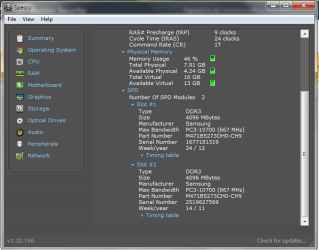
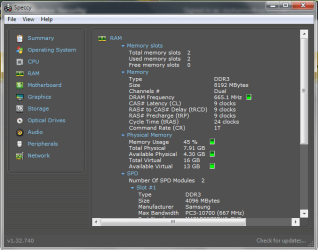
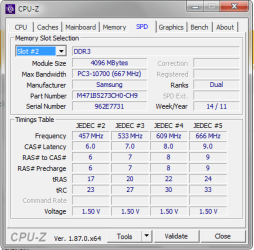
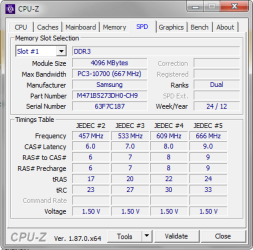
There was no SAMSUNG M471B5273CH0-CH9. I bought SAMSUNG M471B5273DH0-CH9, is there any differences?

SAMSUNG M471B5273DH0-CH9 RAM

406134d1543771939-can-i-use-pc3-12800-ram-pc3-10700-motherboard-samsung-m471b5273dh0-ch9.jpg


CPU-Z SPD Slot 1

406128d1543770828-can-i-use-pc3-12800-ram-pc3-10700-motherboard-cpu-z-spd-slot-1.png


CPU-Z SPD Slot 2

406129d1543770828-can-i-use-pc3-12800-ram-pc3-10700-motherboard-cpu-z-spd-slot-2.png


CPU-Z Memory

406130d1543770828-can-i-use-pc3-12800-ram-pc3-10700-motherboard-cpu-z-memory.png


Speccy RAM Page 1 of 2

406131d1543770828-can-i-use-pc3-12800-ram-pc3-10700-motherboard-speccy-ram-page-1.png


Speccy RAM Page 2 of 2

406132d1543770828-can-i-use-pc3-12800-ram-pc3-10700-motherboard-speccy-ram-page-2.png
 

Attachments

  • Speccy RAM Page 2.png
    Speccy RAM Page 2.png
    24.9 KB · Views: 12
  • Speccy RAM Page 1.png
    Speccy RAM Page 1.png
    23.8 KB · Views: 12
  • CPU-Z Memory.png
    CPU-Z Memory.png
    12 KB · Views: 12
  • CPU-Z SPD Slot 2.png
    CPU-Z SPD Slot 2.png
    13.8 KB · Views: 12
  • CPU-Z SPD Slot 1.png
    CPU-Z SPD Slot 1.png
    13.8 KB · Views: 12
  • SAMSUNG M471B5273DH0-CH9.jpg
    SAMSUNG M471B5273DH0-CH9.jpg
    108.9 KB · Views: 12

My Computer My Computer

At a glance

Windows Home Premium
OS
Windows Home Premium
Looks like there is no difference other than the week/year!

Congratulations! You have now got 8GB RAM :-)
 

My Computer My Computer

At a glance

Windows 7 x64, Vista x64, 8.1 smartphoneIntel E8400 65W 64-bitDDR2 2 x 2GB, 1GB x 2XFX Radeon HD5750
Computer type
PC/Desktop
OS
Windows 7 x64, Vista x64, 8.1 smartphone
CPU
Intel E8400 65W 64-bit
Motherboard
Gigabyte EP45-UD3LR
Memory
DDR2 2 x 2GB, 1GB x 2
Graphics Card(s)
XFX Radeon HD5750
Sound Card
AMD High Definition Audio; Realtek High Definition Audio
Monitor(s) Displays
iiyama prolite X2377HDS
Screen Resolution
1920 x 1080
Hard Drives
500GB 7200 rpm Seagate ST3500413AS 16MB, 500GB 5400 rpm Toshiba MQ02ABF050H 32MB, 200GB 7200 rpm Seagate ST3200820AS 8MB, 2TB 7200 rpm Western Digital WD20EZRX 64MB
PSU
Enermax Liberty Modular
Case
Antec P193 Midi Tower
Keyboard
Mionix ZIBAL 60
Mouse
Razer USB 2.0 Diamondback Mouse or Huion Graphics Tablet
Browser
Internet Explorer, Lunascape, Firefox, Opera, Avast Safezone
Looks like there is no difference other than the week/year!

Congratulations! You have now got 8GB RAM :-)

Thank you so much, you really helped me a lot! I love you from the deepest of my heart ♥♥♥

IMO, I would go with the 10700.

Thanks, Wither you are such a great support as always!


Wish You All The Best

MohaNNed​
 

My Computer My Computer

At a glance

Windows Home Premium
OS
Windows Home Premium
Back
Top