Solved can I utilize all memory?

pawz7

New member
Member
VIP
Local time
4:40 PM
Messages
181
Location
UK
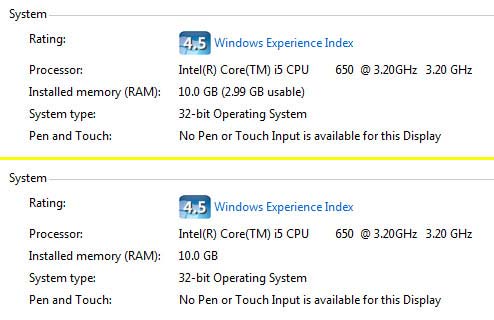
we have a new 64bit tower PC which came with 8GB memory, but we had to install a 32bit version of Windows Seven. Does that limit the amount of memory available to beneath the 4GB ceiling please?
 

My Computer

Computer type
PC/Desktop
Computer Manufacturer/Model Number
Novatech / Homebuilt
OS
win seven 32, win seven 64
CPU
intel dual-core/i5
Motherboard
MSI/Gigabyte
Memory
4GB/8GB
Graphics Card(s)
both Nvidia
Sound Card
realtek/ummm
Monitor(s) Displays
dell widescreen
Screen Resolution
16-something x something
Hard Drives
lots!
Yes. A 32 bit OS can only address slightly less than 4GB.
 

My Computer

Computer type
PC/Desktop
Computer Manufacturer/Model Number
My Own Build
OS
Windows 10 64 bit
CPU
Intel i7 6700K
Motherboard
ASUS ROG Maximus VIII Hero
Memory
16GB Corsair Dominator
Graphics Card(s)
Intel CPU Graphics
Sound Card
RealTek
Monitor(s) Displays
27" Dell S2719dgf
Screen Resolution
2560X1440
Hard Drives
1 TB Samsung 850 EVO SSD for Win 10 Pro
500GB Samsung 850 EVO SSD for Win 10 Insider
2 TB drive for backup
PSU
EVGA Supernova 750G2
Case
BeQuiet Silent Base 600
Cooling
Deepcool Captain 120EX
Keyboard
Microsoft Wireless 2000
Mouse
Microsoft wireless
Internet Speed
100 MB/sec (Cable)
Antivirus
Microsoft Defender and Malwarebytes
Browser
Edge/Firefox
Other Info
Cakewalk (Sonar) by BandLab and Studio One 4.1 Pro recording studio software. MOTU 896Mk3 Hybrid recording interface, Frontier Tranzport wireless control unit, Behringer X-Touch Control Surface.
Five USB connected optical drives for CD Audio production using Nero BurningROM
Yes,memory is limited to 4 GBytes only unless you use physical address extension.
There are some ways to break this barrier (with PAE) though but I wouldn't suggest it.

skse02a.velika.jpg
 
Last edited:

My Computer

OS
Windows 7 x64 Pro
so, to be clear, we need to put a 64bit OS on there to access all the available memory.. yes?

Oh, I see from unreal's post that yes, this is so. Thanks guys (sigh)
 

My Computer

Computer type
PC/Desktop
Computer Manufacturer/Model Number
Novatech / Homebuilt
OS
win seven 32, win seven 64
CPU
intel dual-core/i5
Motherboard
MSI/Gigabyte
Memory
4GB/8GB
Graphics Card(s)
both Nvidia
Sound Card
realtek/ummm
Monitor(s) Displays
dell widescreen
Screen Resolution
16-something x something
Hard Drives
lots!
Yes.
 

My Computer

Computer type
PC/Desktop
Computer Manufacturer/Model Number
custom build
OS
Windows 7 Professional 64bit
CPU
Intel i7-5960X
Motherboard
EVGA X99 Classified
Memory
64GB Corsair Dominator 2400MHz
Graphics Card(s)
3 EVGA GTX980's
Sound Card
on board
Monitor(s) Displays
3 Dell E2715H 27"
Screen Resolution
1920x1080 (5760x1080)
Hard Drives
Samsung 950 Pro 1TB M.2 SSD,
Western Digital Black 2TB HDD's x5
Western Digital Black 1TB HDD's x3
PSU
Corsair AX1200i
Case
Corsair 750D
Cooling
Corsair H110i GT
Keyboard
Corsair K70
Mouse
Corsair M45
Internet Speed
250 down/10 up
Antivirus
Microsoft Security Essentials
Browser
IE 11, Google Chrome
so, to be clear, we need to put a 64bit OS on there to access all the available memory.. yes?

No.You can use PAE for 32 bit system.
But I would suggest you to install 64 bit system.
 

My Computer

OS
Windows 7 x64 Pro
don't want to go down the PAE road - from what I have read in the past it is not recommended and could lead to instability. We will probably go fo a 64 bit OS, as you say, eventually. He isn't a gamer or power user, so it isn't urgent, and being an i5, the new box is still much more responsive than his previous 32bit machine. Ho hum, thanks for the help folks.
 

My Computer

Computer type
PC/Desktop
Computer Manufacturer/Model Number
Novatech / Homebuilt
OS
win seven 32, win seven 64
CPU
intel dual-core/i5
Motherboard
MSI/Gigabyte
Memory
4GB/8GB
Graphics Card(s)
both Nvidia
Sound Card
realtek/ummm
Monitor(s) Displays
dell widescreen
Screen Resolution
16-something x something
Hard Drives
lots!
In any computer system there are to limitations on how much RAM it can access:
1. How much RAM the hardware can provide to the OS.
2. How much RAM the OS can access.
The usable limit is whichever one is smaller. Neither the OS nor the hardware can override the limitations of the other.

The use of PAE will not allow a 32 bit client version of Windows to access more than 4 GB RAM. In reality it is somewhat less than that. Doing so would require the use of a modified kernel which would be a violation of Microsoft's EULA and I will not discuss it. PAE permits a 32 bit CPU to access more than 4 GB RAM but that does you no good unless the OS is an active participant in this. 32 bit client versions of Windows by design will ignore all memory above 4GB and the use of PAE doesn't change that. Using PAE will allow some devices such as a RAM disk to access RAM above 4 GB but applications cannot.
 

My Computer

Computer type
PC/Desktop
Computer Manufacturer/Model Number
HP
OS
Windows 7 Pro 64 bit
CPU
Xeon W3520
Memory
8 GB
Graphics Card(s)
Nvidia Geforce 210
For years people have been playing with PAE and all it's done is cause problems.
Use the proper installation of Windows 7/64 will let Windows 7 and your programs use the Ram you have installed up to it's limits and your hardware limits.

The following table specifies the limits on physical memory for Windows 7.
Version Limit on X86 Limit on X64. The top numbers are max. for a 32 bit and the bottom numbers are max. for a 64 bit Windows 7.


Windows 7 Ultimate
4 GB
192 GB


Windows 7 Enterprise
4 GB
192 GB

Windows 7 Professional
4 GB
192 GB

Windows 7 Home Premium
4 GB
16 GB

Windows 7 Home Basic
4 GB
8 GB

Windows 7 Starter
2 GB
N/A
 

My Computer

Computer type
PC/Desktop
Computer Manufacturer/Model Number
Home made Desktop
OS
Windows 10 Pro. 64/ version 1709 Windows 7 Pro/64
CPU
Intel i7-6800K @ 4.3
Motherboard
ASUS X-99 Deluxe II
Memory
Corsair Platinum 16 gig @2400
Graphics Card(s)
EVGA GTX 1070 OC
Monitor(s) Displays
Asus 27" LED LCD/VE278Q
Screen Resolution
1920-1080 or 1280-720 HDMI
Hard Drives
INTEL SSD 730-240 Gb Sata 3.0/
PSU
EVGA Platium 1200W
Case
Phanteks Luxe Tempered Glass 8 fans/ one radiator
Cooling
XSPC/ Water Cooled CPU
Keyboard
Das 4 Professional
Mouse
Logitech M705/MX Anywhere 2-S
Internet Speed
100 mbits
Antivirus
Microsoft Security Essentials/ Malwarebytes Premium 3.0/ SAS
Browser
I.E. 11 default/Firefox/ ISP Time Warner Cable/Spectrum
Other Info
LG BluRay Burner/
Sound system-KLipsch-THX/
Icy Dock ssd Hot Swap bays.
The use of PAE will not allow a 32 bit client version of Windows to access more than 4 GB RAM. In reality it is somewhat less than that. Doing so would require the use of a modified kernel which would be a violation of Microsoft's EULA and I will not discuss it. PAE permits a 32 bit CPU to access more than 4 GB RAM but that does you no good unless the OS is an active participant in this. 32 bit client versions of Windows by design will ignore all memory above 4GB and the use of PAE doesn't change that. Using PAE will allow some devices such as a RAM disk to access RAM above 4 GB but applications cannot.

That's not correct, entirely. PAE was created specifically to allow 32 bits OSs to use more than 4 GB of RAM (up to 64GB). It's true that usage of PAE requires a modified kernel, but ALL versions of Windows conveniently include such kernel (it's the file NTKRNLPA.EXE, opposed to the normal kernel NTOSKRNL.EXE both found in system32). The only thing that requires patching is the bootloader that chooses between these two kernels (and that's what may come with a license problem). Once that's done, everything can use the full memory installed on the system.

But in itself, 32 bits Windows is fully capable of using up to 64 GB of memory but MS ridiculosly limits such ability to server editions (look at the memory capabilities of Windows 2008).
For a more detailed reference on the topic, look here:
Licensed Memory in 32-Bit Windows Vista

Now, back to the central topic, while it's possible to make Windows x86 recognise and use the full memory, I would opt to go for a x64 version. That's because the 64 bits version includes support for some extra security features (DEP and driver signing enforcement for example) and allow for 64 bits native processes, which can have somewhat improved performance for some programs, among other things.
 

My Computer

Computer type
Laptop
Computer Manufacturer/Model Number
Toshiba Sattelite A665-S6092
OS
Windows 7 Ultimate x64
CPU
Intel Core i7-740QM
Memory
8 GB DDR3
Graphics Card(s)
NVIDIA GeForce 330GT
Screen Resolution
1366x768
Hard Drives
Samsung 840 SSD 500GB
1TB USB3 external HD
Cooling
Coolermaster Notepal U3 notebook cooling pad
Internet Speed
3mbps ASDL
Antivirus
ClamWin 0.98.7
Browser
Opera 12.17 x86 (main), Firefox 38 (sec), IE11 (last resort)
we got a paging error on the new machine two days ago - himself was quite upset to see a blue screen on his new computer. This has decided us to get the 64bit OS. I assumed it could be to do with the memory issue.
 

My Computer

Computer type
PC/Desktop
Computer Manufacturer/Model Number
Novatech / Homebuilt
OS
win seven 32, win seven 64
CPU
intel dual-core/i5
Motherboard
MSI/Gigabyte
Memory
4GB/8GB
Graphics Card(s)
both Nvidia
Sound Card
realtek/ummm
Monitor(s) Displays
dell widescreen
Screen Resolution
16-something x something
Hard Drives
lots!
Why did a PC with 8 GB of memory not come with 64 bit ?

Or did you build the PC ?
 

My Computer

Computer type
PC/Desktop
Computer Manufacturer/Model Number
Skylake Special #666
OS
Windows 10 Pro x64
CPU
Intel Core i7 6700K
Motherboard
Asus Sabertooth Z170 Mark 1
Memory
GSkill TridentZ RGB 16GB 3600 16-16-16-36
Graphics Card(s)
EVGA GTX 980 Ti SC x2
Sound Card
Realtek High Definition
Monitor(s) Displays
AOC G2460PG
Screen Resolution
1920 x 1080 144Hz
Hard Drives
Samsung 860 Pro 256GB, Seagate Barracuda 4TB x2
PSU
EVGA 1000 P2, EVGA White Custom Braided Cables
Case
Corsair Vengeance C70 Gunmetal Black
Cooling
Corsair H100i v2, Corsair ML120 x2, Thermal Grizzly Kryonaut
Keyboard
Logitech G910 Orion Spectrum
Mouse
Logitech G700s
Internet Speed
Verizon Fios Quantum Gateway 75/75
Antivirus
Windows Defender, Malwarebytes Free 3.8.3
Browser
Chrome
Other Info
Corsair SP120 x4, LG Blu-ray Drive, Durabrand HT-395 100 Watt Dolby Digital Amp, Corsair H2100 Wireless 7.1 Headset
we built the system, and had already bought a Win 7 disk for the older 32 bit computer, so put that onto the 64bit without thinking about the difference.
 

My Computer

Computer type
PC/Desktop
Computer Manufacturer/Model Number
Novatech / Homebuilt
OS
win seven 32, win seven 64
CPU
intel dual-core/i5
Motherboard
MSI/Gigabyte
Memory
4GB/8GB
Graphics Card(s)
both Nvidia
Sound Card
realtek/ummm
Monitor(s) Displays
dell widescreen
Screen Resolution
16-something x something
Hard Drives
lots!
I say 'built' but it is hardly that these days - no fiddling with jumpers or worrying about 'chip creep' like it used to be, just fix it all together, press the button and da-da!¬
 

My Computer

Computer type
PC/Desktop
Computer Manufacturer/Model Number
Novatech / Homebuilt
OS
win seven 32, win seven 64
CPU
intel dual-core/i5
Motherboard
MSI/Gigabyte
Memory
4GB/8GB
Graphics Card(s)
both Nvidia
Sound Card
realtek/ummm
Monitor(s) Displays
dell widescreen
Screen Resolution
16-something x something
Hard Drives
lots!
Don't give the game away dude - I like all that 'wow ain't you clever, I wish I could build computers' . . .
 

My Computer

Computer type
PC/Desktop
Computer Manufacturer/Model Number
self build
OS
W10 Pro x64, W7 Pro x64 in VMware
CPU
i7 2600K @ 4.4GHz
Motherboard
MSI Z68A-GD80
Memory
8GB Mushkin @ 1600MHz
Graphics Card(s)
Nvidia GTX 750 Ti
Monitor(s) Displays
27" Benq + 27" LG
Screen Resolution
1080p
Hard Drives
500GB 850 Evo SSD + 3 * 2TB Seagate
PSU
EVGA 650 GS modular
Case
Antec 300
Cooling
Seidon 120V v2
Internet Speed
62/18 Mbps
Antivirus
Defender (W10) + MSE (W7)
Browser
Firefox
Do you have the 64 bit install dvd ?
 

My Computer

Computer type
PC/Desktop
Computer Manufacturer/Model Number
Skylake Special #666
OS
Windows 10 Pro x64
CPU
Intel Core i7 6700K
Motherboard
Asus Sabertooth Z170 Mark 1
Memory
GSkill TridentZ RGB 16GB 3600 16-16-16-36
Graphics Card(s)
EVGA GTX 980 Ti SC x2
Sound Card
Realtek High Definition
Monitor(s) Displays
AOC G2460PG
Screen Resolution
1920 x 1080 144Hz
Hard Drives
Samsung 860 Pro 256GB, Seagate Barracuda 4TB x2
PSU
EVGA 1000 P2, EVGA White Custom Braided Cables
Case
Corsair Vengeance C70 Gunmetal Black
Cooling
Corsair H100i v2, Corsair ML120 x2, Thermal Grizzly Kryonaut
Keyboard
Logitech G910 Orion Spectrum
Mouse
Logitech G700s
Internet Speed
Verizon Fios Quantum Gateway 75/75
Antivirus
Windows Defender, Malwarebytes Free 3.8.3
Browser
Chrome
Other Info
Corsair SP120 x4, LG Blu-ray Drive, Durabrand HT-395 100 Watt Dolby Digital Amp, Corsair H2100 Wireless 7.1 Headset
Don't give the game away dude - I like all that 'wow ain't you clever, I wish I could build computers' . . .

oh, sorry wasnotwas. Truth be known though, there is nuttin much clever about 'building' computers today - the cleverness comes in understanding what is going on under the hood and knowing how to fix it when things go wrong - which is where forums like this come into the spotlight. I have 'fixed' many computers for other folk in the last 20 years, and in Win 95 days it was a nightmare - no one to ask, no web to get guidance from,just esoteric blue screens which gave no clear indication as to where the problem might lie. Since XP and the creation of good quality forums like this,the mysteries have been solved much sooner and with less grey hairs. The buffs on here are the clever folk, and hats off to them.
 

My Computer

Computer type
PC/Desktop
Computer Manufacturer/Model Number
Novatech / Homebuilt
OS
win seven 32, win seven 64
CPU
intel dual-core/i5
Motherboard
MSI/Gigabyte
Memory
4GB/8GB
Graphics Card(s)
both Nvidia
Sound Card
realtek/ummm
Monitor(s) Displays
dell widescreen
Screen Resolution
16-something x something
Hard Drives
lots!
Do you have the 64 bit install dvd ?

it came this morning.. now we have to go through the entire clean install process and put-everything-back-where-it-was-before scenario again.... oh joy..:(
 

My Computer

Computer type
PC/Desktop
Computer Manufacturer/Model Number
Novatech / Homebuilt
OS
win seven 32, win seven 64
CPU
intel dual-core/i5
Motherboard
MSI/Gigabyte
Memory
4GB/8GB
Graphics Card(s)
both Nvidia
Sound Card
realtek/ummm
Monitor(s) Displays
dell widescreen
Screen Resolution
16-something x something
Hard Drives
lots!
I have 'fixed' many computers for other folk in the last 20 years, and in Win 95 days it was a nightmare - no one to ask, no web to get guidance from,just esoteric blue screens which gave no clear indication as to where the problem might lie.

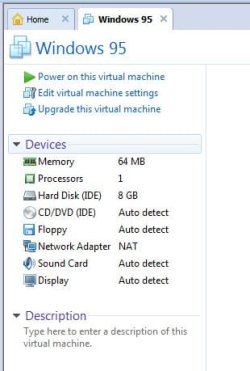
If you want to re-live the good old days of Win 95 - 16MB RAM, DOS, fdisk, format C: etc, can I suggest VMware. I have the full set from Windows for Workgroups 3.11 to present day in VM. Here's my spec for VM W95 -

win95_vm.jpg

free VMware Player here
 

My Computer

Computer type
PC/Desktop
Computer Manufacturer/Model Number
self build
OS
W10 Pro x64, W7 Pro x64 in VMware
CPU
i7 2600K @ 4.4GHz
Motherboard
MSI Z68A-GD80
Memory
8GB Mushkin @ 1600MHz
Graphics Card(s)
Nvidia GTX 750 Ti
Monitor(s) Displays
27" Benq + 27" LG
Screen Resolution
1080p
Hard Drives
500GB 850 Evo SSD + 3 * 2TB Seagate
PSU
EVGA 650 GS modular
Case
Antec 300
Cooling
Seidon 120V v2
Internet Speed
62/18 Mbps
Antivirus
Defender (W10) + MSE (W7)
Browser
Firefox
ahh, dear old fdisk... interesting adventure wasnot, but.. no, I will reminisce on the good bits in my idle moments, and try to forget the day I just had a blinking cursor and no clue as to what next to do - THAT was how I got into the fixing business - I could not reinstall Win 95 on a Friday - no ATAPI drivers found for the CD drive - and had to have a load of docs ready on someone's desk by Monday, did not know what DOS commands to put in to see the drive.. I got rescued by a sympathetic young man on the end of a phone (he detected the panic in my voice I think, and it was his magazine's help-line that told me to uninstall Win 95 in first place because of some issue that came on their cover disk), and even though that turned out OK, I vowed never again to be in that position, but to become the master of this smug little beige box. HA! not sure I achieved that, but I muddled through, and it got easier over time..
 

My Computer

Computer type
PC/Desktop
Computer Manufacturer/Model Number
Novatech / Homebuilt
OS
win seven 32, win seven 64
CPU
intel dual-core/i5
Motherboard
MSI/Gigabyte
Memory
4GB/8GB
Graphics Card(s)
both Nvidia
Sound Card
realtek/ummm
Monitor(s) Displays
dell widescreen
Screen Resolution
16-something x something
Hard Drives
lots!
Back
Top