Can malware damage the files?

khoshtipi

New member
VIP
Local time
6:39 AM
Messages
238
Location
Kurdistan
Hi all,

When a computer is infected by malware, can that malware damage the non OS files or only damage the OS files? For example, someone may have thousands of various files in folders in drives of HDD, when his/her computer in infected by malware, is it possible that those personal files (such as music, picture, videos, ...) to be infected?

Thanks.
 

My Computer

OS
windows 7 Ultimate X86
I recall a few years ago there was malware that deleted certain file extensions such as .mp3 files. So to answer your question I would say yes, it can effect certain file types depending on the malware in question.
 

My Computer

Computer type
PC/Desktop
Computer Manufacturer/Model Number
Custom Build
OS
Windows 7 Ultimate x64
CPU
FX 8350 @ 4.8ghz, turbo clocked to 5.4ghz
Motherboard
Asus Sabertooth FX990 Gen 3.0 R2.0
Memory
Mushkin Enhanced Blackline 16GB 1760mhz 10-10-9-24 T1
Graphics Card(s)
Gigabyte-660 Windforce OC- GPU Clock 1212MHz /3504MHz ram
Sound Card
Creative Sound Blaster Recon3D PCIe Sound Card
Monitor(s) Displays
Samsung SyncMaster S27B350H (HDMI)
Screen Resolution
1920x1080 60HZ
Hard Drives
1 x SSD Crucial M4 256GB (Primary OS)
3 x HDD WD 1TB
4 x HDD 2TB
1 x HDD 160GB (Secondary Backup OS)
Raid SATA III 6GB/s 4-port PCI-e Controller Card, Marvel 88SE9215 chipset
PSU
Chieftec-650-14CS (Modular) 80 Plus Gold-650 Watt
Case
Akasa Venom Toxic Gaming Big tower ( Custom Black ) Ver 2.0
Cooling
Water 2.0 PRO / GEIL Cyclone VRM / 6x120mm 2x220mm 2x140mm
Keyboard
Logitech G19
Mouse
Wireless Notebook Presenter Mouse 8000
Internet Speed
Fiber GBS
Antivirus
Don't Announce it to the world :)
Browser
Gotta have at least 1!
These things are rare.
Files are infected by viruses ( aka file infectors) and not regular malware. They are less common, and they can infect .exe. .sys, .com, .dll, .pif files (most other files can't be launched thus are of no use for viruses).
There are specific ransomwares, that encrypt documents or images on disk.
There are ones that delete or corrupt files just for kick, but they are even more rare.
The most popular ones that are similar to ones you describe are trojans using double extensions : .jpg.exe or similar.
 

My Computer

OS
Windows 7 64 / Windows 8 64
Some nastier ones can disable any security program on a PC so it can't detect the infection. In Control panel/Folder options/ View I uncheck "Hide extensions for know files trype" then the double extension like gied mentioned, ex: jpg.exe will be seen.
 

My Computer

Computer type
PC/Desktop
Computer Manufacturer/Model Number
Home Built Desktop By DataTech
OS
Windows 7 Ultimate X64 SP1
CPU
Intel i5-2550K, Differing ~4.4-4.8GHz No built in GPU
Motherboard
ASUS P8Z68-V PRO/GEN3
Memory
16GB G.Skill Sniper 1866MHz @ 2133MHz 2x8GB
Graphics Card(s)
ASUS GTX650TIB-DC2OC-2GD5, (650TI Boost)
Sound Card
Onboard Realtek 5-1
Monitor(s) Displays
Samsung P2570HD
Screen Resolution
1920x1080
Hard Drives
Samsung 840 Pro 256GB SSD for OS, 500GB Seagate Constellation (Enterprise drive) for Data
PSU
Corsair HX650W
Case
Inwin Dragon Rider
Cooling
Hyper 212 EVO w/two Noctua fans, push-pull, @1300 RPM
Keyboard
E-Z Eyes, bright yellow keys with large characters
Mouse
steelseries SENSEI Laser Pro Gaming
Internet Speed
48-51Mbs Mbs down, 11 Mbs up Xfinity Cable
Antivirus
Norton Internet Security 2013
Browser
IE 10, Opera, Pale Moon if needed
Other Info
4 case fans, LG BluRay-RE, ASUS DVD-RW, Mr. Fusion power supply, 1.21 gigawatts.
These things are rare.
Files are infected by viruses ( aka file infectors) and not regular malware. They are less common, and they can infect .exe. .sys, .com, .dll, .pif files (most other files can't be launched thus are of no use for viruses).
There are specific ransomwares, that encrypt documents or images on disk.
There are ones that delete or corrupt files just for kick, but they are even more rare.
The most popular ones that are similar to ones you describe are trojans using double extensions : .jpg.exe or similar.

So your answer to my question is yes? If so, when I scan/remove those personal infected files, it's possible that those my files be removed. not?
 

My Computer

OS
windows 7 Ultimate X86
Here is the way I look at it.
1. Never under estimate the ability of the bad guys.
2. The bad guys can create a infection to do just about anything and attach it to just about anything.
3. Don't assume a infections is located in only one place in your system.
4. Some infection are wrote to only hold the back door of your computer open to let all their little buddies in to do their damage.
-----
Example:
I helped a fellow member a long time ago that had a picture infected. He chose several pictures for a screen saver to cycle every so many seconds. When it landed on that infected picture all kinds of bad things happened.
 

My Computer

Computer type
PC/Desktop
Computer Manufacturer/Model Number
Home made Desktop
OS
Windows 10 Pro. 64/ version 1709 Windows 7 Pro/64
CPU
Intel i7-6800K @ 4.3
Motherboard
ASUS X-99 Deluxe II
Memory
Corsair Platinum 16 gig @2400
Graphics Card(s)
EVGA GTX 1070 OC
Monitor(s) Displays
Asus 27" LED LCD/VE278Q
Screen Resolution
1920-1080 or 1280-720 HDMI
Hard Drives
INTEL SSD 730-240 Gb Sata 3.0/
PSU
EVGA Platium 1200W
Case
Phanteks Luxe Tempered Glass 8 fans/ one radiator
Cooling
XSPC/ Water Cooled CPU
Keyboard
Das 4 Professional
Mouse
Logitech M705/MX Anywhere 2-S
Internet Speed
100 mbits
Antivirus
Microsoft Security Essentials/ Malwarebytes Premium 3.0/ SAS
Browser
I.E. 11 default/Firefox/ ISP Time Warner Cable/Spectrum
Other Info
LG BluRay Burner/
Sound system-KLipsch-THX/
Icy Dock ssd Hot Swap bays.
khoshtipi,

When a computer is infected by malware, can that malware damage the non OS files or only damage the OS files?

Malware can damage all sorts of files, depending on how the malware operates. It can also infect the computer's Master Boot Record.

We have no specific information, so, we can only speculate.

On the computer with the issue, did the AntiVirus program detect an infection?

Do you have a report of what malware was found?
 

My Computer

Computer type
PC/Desktop
Computer Manufacturer/Model Number
An ol' eMachines
OS
Windows 7 Home Premium
Internet Speed
Fine for me...I'm retired!
Malware can be near anything it want's to be. It all depends on the person who makes it. Also these day's god knows what it can do: This might help you understand more Malware - Wikipedia, the free encyclopedia
 

My Computer

Computer type
PC/Desktop
Computer Manufacturer/Model Number
Dell / Lenovo g550
OS
Windows 7 Ultimate 64-bit
CPU
Intel Core 2 Duo E6550 @2.33GHz
Motherboard
foxconn g33m02
Memory
4GB DDR"
Graphics Card(s)
NVIDIA GeForce 8600 GS
Hard Drives
HDD 1 = 150GB
HDD 2 = 1.5TB
PSU
450W
Cooling
Stock fan
Internet Speed
12Mb
Antivirus
AVG Internet Security
khoshtipi,

When a computer is infected by malware, can that malware damage the non OS files or only damage the OS files?

Malware can damage all sorts of files, depending on how the malware operates. It can also infect the computer's Master Boot Record.

We have no specific information, so, we can only speculate.

On the computer with the issue, did the AntiVirus program detect an infection?

Do you have a report of what malware was found?

yes some viruses.

So when my machine is infected and it's possible that my personal files are infected too, so, when I scan the machine and then remove infected files, maybe those my personal files which are infected dele. not?
 

My Computer

OS
windows 7 Ultimate X86
@cottonball:

Those malware found were in type of trojan and virus. I found them by my avira bootable disk which is not possible to picture them. Anyway, on that scan, Avira found 10 malware, so if I remove those malware maybe one of them be one of my personal files so it's possible to loss that, so isn't it better to before scanning, I back up my personal files to save them from removing by anti-malware in scanning time?
 

My Computer

OS
windows 7 Ultimate X86
It is difficult to remove something I cannot see.

To play it safe, let's download Dr.Web CureIt!
Scroll down to the bottom of the page to download the free version.
Save to the Desktop.

After the file downloads, temporarily disable your antivirus program and disconnect from the Internet.
The scan will go faster.
Info: How To Temporarily Disable Your Anti-virus, Firewall And Anti-malware Programs - Security Mini-Guides

Right-click the cureit.exe file
Drweb-cureit-9_zpsa6b7b265.gif
and select: Run as Administrator

At the Dr.Web CureIt console, License and Updates prompt, agree to participate, and select: Continue

At the San Mode prompt, click: Select objects for scanning

At the next prompt, Custom Scan, check all the items except:
Temporary files
System Restore points.

Next, press: Click to select files and folders
Under Browse, select the drives to scan making sure the drive containing the Operating System, normally C:, is selected. Also select any additional drives (not the CD/DVD drive). When done, click: OK

Reboot computer to Safe Mode (Tap F8 key before the Microsoft logo appears. Select Safe Mode from the options).

Back at Dr.Web, click: Start Scanning

Please do not run any other programs while the scan is in progress.
The time needed for a full scan depends on factors, such as system performance, available memory, running processes, number of drives and files, etc. Please be patient since it may take a while.

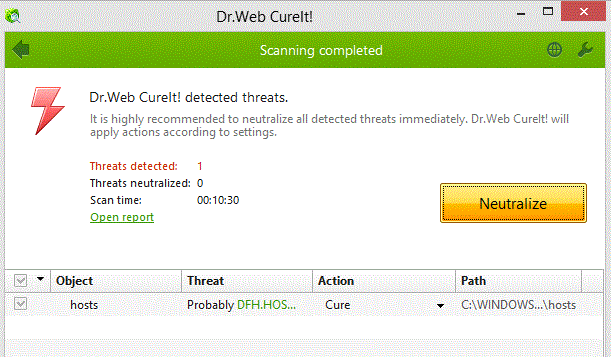
If a threat is detected, a screen similar to the following appears:

Drweb-cureit-5_zpsd7be6acf.gif


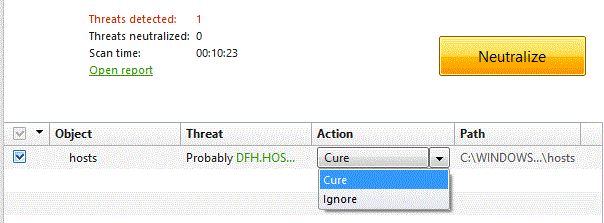
For each entry detected, click on the down arrow by Action, and select: Cure (or Ignore, if it is something you recognize)

Drweb-cureit-8_zpsb099f9d5.gif


For the program to apply the selection on the Action column, click: Neutralize

When the actions are applied, a message appears: All security threats were neutralized successfully!

Now, click on the green: Open Report
The report appears in Notepad, and is called: Cureit.log
Save the report to the Desktop.

Close Dr.Web Cureit

Restart the computer to allow the files in use to be acted upon during reboot.

After reboot, attach the Cureit.log, saved previously, in your reply.

Re-enable your antivirus program when done.

 

My Computer

Computer type
PC/Desktop
Computer Manufacturer/Model Number
An ol' eMachines
OS
Windows 7 Home Premium
Internet Speed
Fine for me...I'm retired!
Back
Top