Can my data be saved before a format on a hard drive?

SagreeLess

New member
Local time
2:00 AM
Messages
6
Hi Guys
I am no expert, so I really need your expertise on this one.
After purchasing a hard drive (internal) for my external media player from Western Digital, I was unable to find my drive on My Computer.
I went through Disk Management and formatted the drive and Viola!!!
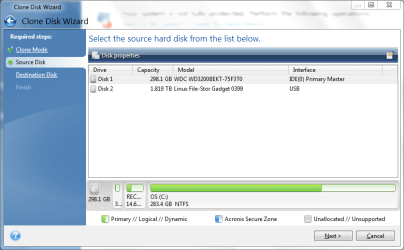
I downloaded a software from Western Digital- Acronis thinking I could make my work easy for me, by transferring my old data from the 500 GB drive to the new 2 TB NAS Hard drive.
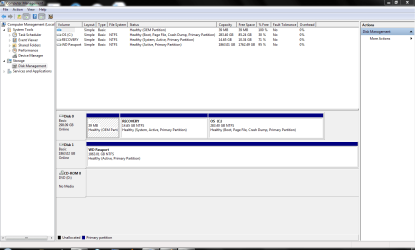
After spending a day, getting 100 GB of data to be transferred, I am now back to square one. Cannot access the data on My Computer, No drive, no disk showing up. I see it under Disk Management. I also know the data transferred over, as I connected the player to my TV, and the files showed up.
My concern, is that I need to access it on my PC so that I can make a folder system, for the various data I have.

Is there a way of getting this data, without losing it if I do the format again.
I am under the impression that it has to do with the GPT and MBR when formatting was done, and then changed with using Acronis :(

Please HELP!
 

My Computer My Computer

At a glance

Windoes 7 Home Premium 64bit
OS
Windoes 7 Home Premium 64bit
I cloned my entire windows 7 drive using macrium reflex free
Macrium Reflect FREE Edition - Information and download

Was easy and it boots fine afterwards.

I am not sure what your trying to do. just copy a data folder to the new drive, but then the drive is no longer visible in explorer? Are you leaving this drive in the PC?

If you have a cloned bootable copy, might be good in case your one drive goes bad, then boot from the other.
 

My Computer My Computer

At a glance

Windows 7 Ultimate x64
OS
Windows 7 Ultimate x64

My Computer My Computer

At a glance

Windows 10 Pro x64 ; Xubuntu x64Intel i7 860 @ 2.80 GHz O/C'ed to 4.0GHz16GB Corsair Vengance DDR3 @ 661 MHz Dual Cha...EVGA NVidia GTX 560 1024MB
Computer type
PC/Desktop
Computer Manufacturer/Model Number
Golden Mk. I.4
OS
Windows 10 Pro x64 ; Xubuntu x64
CPU
Intel i7 860 @ 2.80 GHz O/C'ed to 4.0GHz
Motherboard
Gigabyte P55A-UD3R Rev.1. Award BIOS F13
Memory
16GB Corsair Vengance DDR3 @ 661 MHz Dual Channel (9-9-9-24)
Graphics Card(s)
EVGA NVidia GTX 560 1024MB
Sound Card
Realtek Integrated
Monitor(s) Displays
Dual Samsung SyncMaster 2494HS
Screen Resolution
1920*1080 and 1920*1080
Hard Drives
1*Samsung 840 EVO 120GB SSD;
1*OCZ Vertex 2 60GB SSD;
2*Samsung F3 SpinPoint 1TB in RAID0;
1*Samsung F1 SpinPoint 1TB;
2*Western Digital 1TB External USB 3.0
1*Western Digital 500GB External USB 3.0
1*Seagate 500GB External USB 2.0
PSU
Thermaltake ToughPower QFan 750W
Case
Thermaltake Element S VK60001W2Z
Cooling
Corsair H60 Water Cooling, 2*230mm and 2*80mm case fans
Keyboard
Logitech G110
Mouse
Logitech MX518
As Golden suggests, It would be helpful to see Disk Management, but if you have an external or space on an internal drive, Microsoft syncToy will back up your data on a 1-1 basis. In other words it will be an exact copy and not an image. Just create a 'folder pair' with what you want to back up on the left and where you want it to be copied to on the right, set it to echo, give it a name and press start. When finished, there will be an exact duplicate on the destination drive or folder you listed as the destination.
 

My Computers My Computers

  • At a glance

    Windows 11 ProRyzen 9 5900X32GB G Skill DDR4-3600EVGA RTX 3080 FTW 3 Ultra
    Computer type
    PC/Desktop
    Computer Manufacturer/Model Number
    ALWAYS UNDER CONSTRUCTION
    OS
    Windows 11 Pro
    CPU
    Ryzen 9 5900X
    Motherboard
    Asus X570 Crosshair Viii Hero
    Memory
    32GB G Skill DDR4-3600
    Graphics Card(s)
    EVGA RTX 3080 FTW 3 Ultra
    Sound Card
    On Board/Sennheiser PC37X Headset
    Monitor(s) Displays
    3 X Asus 27"
    Screen Resolution
    2560x1440
    Hard Drives
    2 X 1 TB NVME drives
    PSU
    EVGA 850
    Case
    Phanteks Eclipse P400A
    Cooling
    EVGA 280 AIO
    Keyboard
    Logitech G510s/ Logitech G13
    Mouse
    Logitech G502
    Internet Speed
    24/1
    Antivirus
    ESET/MBAM Pro/SAS Pro
    Browser
    Chrome/ Firefox/ Edge
  • At a glance

    Windows 11 ProIntel Ultra 9 288V32 GB LPDDR5X 8533
    Computer type
    Laptop
    System Manufacturer/Model Number
    Dell 16 Plus
    OS
    Windows 11 Pro
    CPU
    Intel Ultra 9 288V
    Memory
    32 GB LPDDR5X 8533
    Monitor(s) Displays
    16" Mini-LED HDR600 Touch 90 Hz
    Screen Resolution
    2560X1600
    Hard Drives
    1 TB NVME
Attached pics of my problem

Ok, here goes. Thanks for the replies.
My issue is this. My drive I am talking about is not my OS.
I have bought a bigger drive to hold all my photos, movies, music etc.
I have an external Media Player which I connect to the TV and on occasion to my Laptop, where I can play movies and so on.
The Hard Drive is connected into the player, which can be connected the Laptop via USB. When connecting same to TV, it needs a HDMI cable.
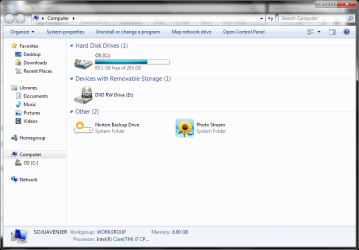
After trying to transfer the data from the small drive to the 2 TB size drive, I am now unable to see the Player/with the new drive on my Computer. See picture attached.
 

Attachments

  • Disk Management.PNG
    Disk Management.PNG
    31.1 KB · Views: 8
  • My Computer.PNG
    My Computer.PNG
    38.3 KB · Views: 4
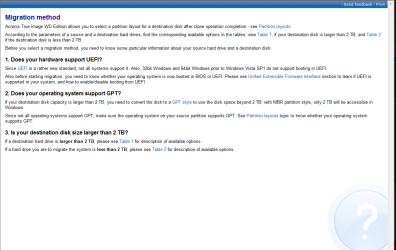
  • CaptureMigration.PNG
    CaptureMigration.PNG
    29.2 KB · Views: 5
  • Acronis.PNG
    Acronis.PNG
    33.5 KB · Views: 6

My Computer My Computer

At a glance

Windoes 7 Home Premium 64bit
OS
Windoes 7 Home Premium 64bit
So, as u guys can see, I have nothing on my Computer to show me that I have a WD 2 TB drive/media player connected via USB. How do I sync, cos I am unable to make a new folder pair. If there is any other way to find this data, Please let me know, then I will reformat the drive, and do the transfer with the SyncToy, which looks like a cool program :)
Before using the Acronis software to clone the disk, I did see this same drive/media player in My Computer :(
 

My Computer My Computer

At a glance

Windoes 7 Home Premium 64bit
OS
Windoes 7 Home Premium 64bit
After trying to transfer the data from the small drive to the 2 TB size drive, I am now unable to see the Player/with the new drive on my Computer. See picture attached.

is the drive still visible in disk management formatted as NTFS while part of the external media player device?

Is the drive not visible in Windows explorer even though formatted as NTFS?
Your trying to view the drive contents while the drive is physically part of the media player device? and connected to the PC by a usb cable?

is the external media player device a box with a hard drive in it used as an external drive with a usb 2.0 interface cable?
 

My Computer My Computer

At a glance

Windows 7 Ultimate x64
OS
Windows 7 Ultimate x64
Code:
Before using the Acronis software to clone the disk, I did see this same drive/media player in My Computer
You did not clone the whole disk using Acronis, just copied some files and folders?

I am not sure why you need Acronis at all.

Why not just
remove the partition
repartiton
copy the folders using windows explorer
Then it will work in explorer.
 

My Computer My Computer

At a glance

Windows 7 Ultimate x64
OS
Windows 7 Ultimate x64
SDowney. The first part of your understanding is correct. All yes to those questions.
Here's the hard part :) My husband saved some movies onto the new drive, which we have no copy of. And that is correct about copying only some files and folders.
I am afraid that when I repartition, I may lose all the contents of that drive.
and due to the size of the old drive, which consists of nearly 500 GB of data, and I might add, that every time u need to access these drives, one needs to be removed and replaced with the other, so we tried saving some files/folders onto a small USB drive, and transferred in this fashion.
As I said, I am not an expert on computers, LOL. So that was why I thought Acronis could do the job :(
 

My Computer My Computer

At a glance

Windoes 7 Home Premium 64bit
OS
Windoes 7 Home Premium 64bit
I am afraid that when I repartition, I may lose all the contents of that drive
Yes you will if you do that.

You can try this, download the ubuntu desktop.
Download Ubuntu | Ubuntu
you can burn it to a CD disk
You can run it as a liveCD, or even make a liveUSB thumb drive. You are then running it as a bootable drive which wont touch your hard drives at all.
Boot ubuntu, (will be slow to boot up as its on a cd or liveusb) and see if it can see those files on the extrenal drive.
Ubuntu CAN read NTFS partitions, if so then you can copy them back onto some other drive, then your ok.

For help you can ask questions there.
Ubuntu Forums

Computers are fun, so think how much more you can learn.
 

My Computer My Computer

At a glance

Windows 7 Ultimate x64
OS
Windows 7 Ultimate x64
Ok, cool, I will give it a try!
Tomorrow, another day, so I can start early, and go through the process.
And yes, Computers are much fun, and I love to learn all the time :)

TY Sdowney, I hope to have some news tomorrow!
 

My Computer My Computer

At a glance

Windoes 7 Home Premium 64bit
OS
Windoes 7 Home Premium 64bit

My Computers My Computers

  • At a glance

    Windows 11 ProRyzen 9 5900X32GB G Skill DDR4-3600EVGA RTX 3080 FTW 3 Ultra
    Computer type
    PC/Desktop
    Computer Manufacturer/Model Number
    ALWAYS UNDER CONSTRUCTION
    OS
    Windows 11 Pro
    CPU
    Ryzen 9 5900X
    Motherboard
    Asus X570 Crosshair Viii Hero
    Memory
    32GB G Skill DDR4-3600
    Graphics Card(s)
    EVGA RTX 3080 FTW 3 Ultra
    Sound Card
    On Board/Sennheiser PC37X Headset
    Monitor(s) Displays
    3 X Asus 27"
    Screen Resolution
    2560x1440
    Hard Drives
    2 X 1 TB NVME drives
    PSU
    EVGA 850
    Case
    Phanteks Eclipse P400A
    Cooling
    EVGA 280 AIO
    Keyboard
    Logitech G510s/ Logitech G13
    Mouse
    Logitech G502
    Internet Speed
    24/1
    Antivirus
    ESET/MBAM Pro/SAS Pro
    Browser
    Chrome/ Firefox/ Edge
  • At a glance

    Windows 11 ProIntel Ultra 9 288V32 GB LPDDR5X 8533
    Computer type
    Laptop
    System Manufacturer/Model Number
    Dell 16 Plus
    OS
    Windows 11 Pro
    CPU
    Intel Ultra 9 288V
    Memory
    32 GB LPDDR5X 8533
    Monitor(s) Displays
    16" Mini-LED HDR600 Touch 90 Hz
    Screen Resolution
    2560X1600
    Hard Drives
    1 TB NVME
Hello SDowney :(
I tried to download the Ubuntu onto a CD. But, Nothing nothing!!! The laptop will not boot from the CD. I have also gone over the Ubuntu forums, seems the disc did not burn correctly! Well, it only happens cos I am no expert on this :(
But TY for this resource.
 

My Computer My Computer

At a glance

Windoes 7 Home Premium 64bit
OS
Windoes 7 Home Premium 64bit
Alternatively, you can create a Live USB drive with this program in windows, so no need to burn
http://www.ubuntu.com/download/help/create-a-usb-stick-on-windows
This might work better
You must be able to boot from a USB hard drive device for this to work.
Some PC you hit a key, some use bios settings. Some of the settings might be tricky.
Usually newer system, you can hit a function key to select a boot device.


Burner guide, you can download a free burner.
Yeah I know its a pain sometimes.
I usually use CDRW or DVDRW for burns.
Must be BIG enough to fit the whole install onto the disc.


https://help.ubuntu.com/community/BurningIsoHowto

also verify the download checksum
highly recommended that you verify the md5 sum
 

My Computer My Computer

At a glance

Windows 7 Ultimate x64
OS
Windows 7 Ultimate x64
Try giving the NAS drive a drive letter from Disk Management. Right click the used space and you will see the option, follow the prompts.
 

My Computer My Computer

At a glance

Windows 7 Ultimate X64 SP1Intel i5-2550K, Differing ~4.4-4.8GHz No buil...16GB G.Skill Sniper 1866MHz @ 2133MHz 2x8GBASUS GTX650TIB-DC2OC-2GD5, (650TI Boost)
Computer type
PC/Desktop
Computer Manufacturer/Model Number
Home Built Desktop By DataTech
OS
Windows 7 Ultimate X64 SP1
CPU
Intel i5-2550K, Differing ~4.4-4.8GHz No built in GPU
Motherboard
ASUS P8Z68-V PRO/GEN3
Memory
16GB G.Skill Sniper 1866MHz @ 2133MHz 2x8GB
Graphics Card(s)
ASUS GTX650TIB-DC2OC-2GD5, (650TI Boost)
Sound Card
Onboard Realtek 5-1
Monitor(s) Displays
Samsung P2570HD
Screen Resolution
1920x1080
Hard Drives
Samsung 840 Pro 256GB SSD for OS, 500GB Seagate Constellation (Enterprise drive) for Data
PSU
Corsair HX650W
Case
Inwin Dragon Rider
Cooling
Hyper 212 EVO w/two Noctua fans, push-pull, @1300 RPM
Keyboard
E-Z Eyes, bright yellow keys with large characters
Mouse
steelseries SENSEI Laser Pro Gaming
Internet Speed
48-51Mbs Mbs down, 11 Mbs up Xfinity Cable
Antivirus
Norton Internet Security 2013
Browser
IE 10, Opera, Pale Moon if needed
Other Info
4 case fans, LG BluRay-RE, ASUS DVD-RW, Mr. Fusion power supply, 1.21 gigawatts.
Back
Top