Can no longer find "USB Audio Codec" when device plugged in

RadxBoy

New member
Member
Local time
3:41 AM
Messages
48
When I right click on the tray speaker icon and select the sound window, I can no longer find the "USB Audio Codec" selection when the device is correctly plugged in. The USB device still works because I can test it on another computer.

It is present in the devices and printers window. Software that used to work with that sound selection no longer work.

Looking hopefully for suggestions. Thank you!

Hank
 

My Computer My Computer

At a glance

Windows 7 Home Premium 64bit
Computer Manufacturer/Model Number
HP TouchSmart 610
OS
Windows 7 Home Premium 64bit
Does it show up in the Device Manager? and if it does, is it shown as working OK or does it have an error code?

If it's shown as working OK int he device manager, it would have to be set as the default audio playback device. Does it show up in the Control Panel/Hardware and Sound and finally the Sound playback panel? If it is not shown, RIGHT click in an empty area in the panel and click to show disabled and disconnected devices and then see if it shows up.
 

My Computer My Computer

At a glance

Windows 10 64 bitIntel i7 6700K16GB Corsair DominatorIntel CPU Graphics
Computer type
PC/Desktop
Computer Manufacturer/Model Number
My Own Build
OS
Windows 10 64 bit
CPU
Intel i7 6700K
Motherboard
ASUS ROG Maximus VIII Hero
Memory
16GB Corsair Dominator
Graphics Card(s)
Intel CPU Graphics
Sound Card
RealTek
Monitor(s) Displays
27" Dell S2719dgf
Screen Resolution
2560X1440
Hard Drives
1 TB Samsung 850 EVO SSD for Win 10 Pro
500GB Samsung 850 EVO SSD for Win 10 Insider
2 TB drive for backup
PSU
EVGA Supernova 750G2
Case
BeQuiet Silent Base 600
Cooling
Deepcool Captain 120EX
Keyboard
Microsoft Wireless 2000
Mouse
Microsoft wireless
Internet Speed
100 MB/sec (Cable)
Antivirus
Microsoft Defender and Malwarebytes
Browser
Edge/Firefox
Other Info
Cakewalk (Sonar) by BandLab and Studio One 4.1 Pro recording studio software. MOTU 896Mk3 Hybrid recording interface, Frontier Tranzport wireless control unit, Behringer X-Touch Control Surface.
Five USB connected optical drives for CD Audio production using Nero BurningROM
Thanks for your advice fireberd.
I tried all your suggestions and it just does not show up!
 

My Computer My Computer

At a glance

Windows 7 Home Premium 64bit
Computer Manufacturer/Model Number
HP TouchSmart 610
OS
Windows 7 Home Premium 64bit
Check the USB section in the Device Manager and see if there is an Unknown device listed. If there is, chances are its the USB connected sound device, and the status is corrupted in Windows. If this is the case, RIGHT click on the entry for the device and then LEFT click "uninstall". DO NOT check the box to also uninstall the drivers. Then disconnect the device from the PC and then restart the PC. After Windows starts, reconnect the device and Windows should find the new hardware and reinstall it. Then check the Device Manager and it should be shown under "Sound, Video and Game Controllers".
 

My Computer My Computer

At a glance

Windows 10 64 bitIntel i7 6700K16GB Corsair DominatorIntel CPU Graphics
Computer type
PC/Desktop
Computer Manufacturer/Model Number
My Own Build
OS
Windows 10 64 bit
CPU
Intel i7 6700K
Motherboard
ASUS ROG Maximus VIII Hero
Memory
16GB Corsair Dominator
Graphics Card(s)
Intel CPU Graphics
Sound Card
RealTek
Monitor(s) Displays
27" Dell S2719dgf
Screen Resolution
2560X1440
Hard Drives
1 TB Samsung 850 EVO SSD for Win 10 Pro
500GB Samsung 850 EVO SSD for Win 10 Insider
2 TB drive for backup
PSU
EVGA Supernova 750G2
Case
BeQuiet Silent Base 600
Cooling
Deepcool Captain 120EX
Keyboard
Microsoft Wireless 2000
Mouse
Microsoft wireless
Internet Speed
100 MB/sec (Cable)
Antivirus
Microsoft Defender and Malwarebytes
Browser
Edge/Firefox
Other Info
Cakewalk (Sonar) by BandLab and Studio One 4.1 Pro recording studio software. MOTU 896Mk3 Hybrid recording interface, Frontier Tranzport wireless control unit, Behringer X-Touch Control Surface.
Five USB connected optical drives for CD Audio production using Nero BurningROM
Check the USB section in the Device Manager and see if there is an Unknown device listed. If there is, chances are its the USB connected sound device, and the status is corrupted in Windows. If this is the case, RIGHT click on the entry for the device and then LEFT click "uninstall". DO NOT check the box to also uninstall the drivers. Then disconnect the device from the PC and then restart the PC. After Windows starts, reconnect the device and Windows should find the new hardware and reinstall it. Then check the Device Manager and it should be shown under "Sound, Video and Game Controllers".

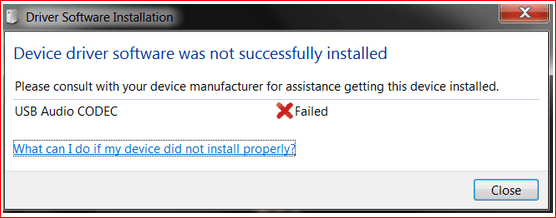
Thanks again, fireberd. I did as you suggested but it is not installing correctly...
unsuccessfull.PNG

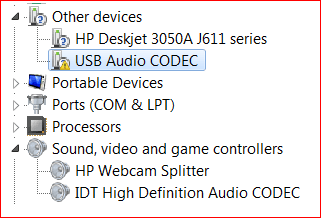
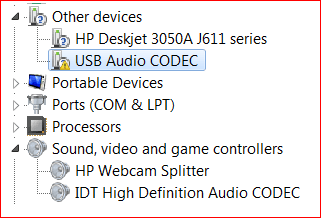
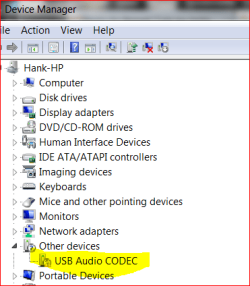
This is what the device manager window looks like (as you thought)...
other devices.PNG

Now the truth comes out :D... Just before I started having this trouble, in the sounds window you get when right clicking the speaker icon in the task bar, under playback and recording, I thought I would be clever and change the name of the device from "USB Audio Codec" to "SignaLink" (the actual name of the device). It worked OK for awhile, but after restarting the pc, the "USB Audio Codec" disappeared from the sounds window as well as "SignaLink."
So I think that's what I did to screw it up. I tried to restore to a previous time but those all failed ("failed to extract c:\config.msi from the restore point").

What do I do next?:cry:
 

My Computer My Computer

At a glance

Windows 7 Home Premium 64bit
Computer Manufacturer/Model Number
HP TouchSmart 610
OS
Windows 7 Home Premium 64bit
Not sure what you will have to do to get it to work. Uninstall it in the Device Manager and also check the box to uninstall the drivers this time. Disconnect the device, restart the PC and after Windows starts reconnect it and see if Windows can install it.
 

My Computer My Computer

At a glance

Windows 10 64 bitIntel i7 6700K16GB Corsair DominatorIntel CPU Graphics
Computer type
PC/Desktop
Computer Manufacturer/Model Number
My Own Build
OS
Windows 10 64 bit
CPU
Intel i7 6700K
Motherboard
ASUS ROG Maximus VIII Hero
Memory
16GB Corsair Dominator
Graphics Card(s)
Intel CPU Graphics
Sound Card
RealTek
Monitor(s) Displays
27" Dell S2719dgf
Screen Resolution
2560X1440
Hard Drives
1 TB Samsung 850 EVO SSD for Win 10 Pro
500GB Samsung 850 EVO SSD for Win 10 Insider
2 TB drive for backup
PSU
EVGA Supernova 750G2
Case
BeQuiet Silent Base 600
Cooling
Deepcool Captain 120EX
Keyboard
Microsoft Wireless 2000
Mouse
Microsoft wireless
Internet Speed
100 MB/sec (Cable)
Antivirus
Microsoft Defender and Malwarebytes
Browser
Edge/Firefox
Other Info
Cakewalk (Sonar) by BandLab and Studio One 4.1 Pro recording studio software. MOTU 896Mk3 Hybrid recording interface, Frontier Tranzport wireless control unit, Behringer X-Touch Control Surface.
Five USB connected optical drives for CD Audio production using Nero BurningROM
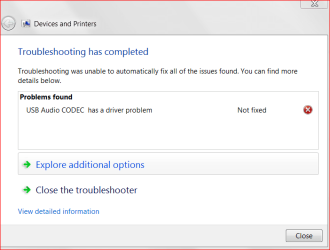
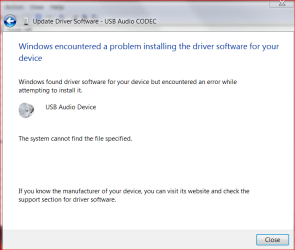
Apparently, there is a problem installing the drivers...
device manager.PNG
I cannot even update the driver, even when going on line....
problem installing driver.PNG
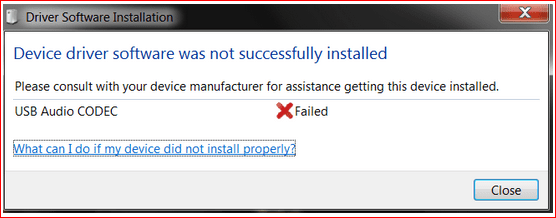
unsuccessfull.PNG:cry:

I'm beginning to feel like I'm hosed.
Do you think a possible solution lies in the registry?
More suggestions?

Thank you!
 

Attachments

  • usb audio has a problem.PNG
    usb audio has a problem.PNG
    15.1 KB · Views: 3
  • other devices.PNG
    other devices.PNG
    6.2 KB · Views: 844

My Computer My Computer

At a glance

Windows 7 Home Premium 64bit
Computer Manufacturer/Model Number
HP TouchSmart 610
OS
Windows 7 Home Premium 64bit
Does the USB sound unit Vendor have a driver for this? That would be the next step (question).
 

My Computer My Computer

At a glance

Windows 10 64 bitIntel i7 6700K16GB Corsair DominatorIntel CPU Graphics
Computer type
PC/Desktop
Computer Manufacturer/Model Number
My Own Build
OS
Windows 10 64 bit
CPU
Intel i7 6700K
Motherboard
ASUS ROG Maximus VIII Hero
Memory
16GB Corsair Dominator
Graphics Card(s)
Intel CPU Graphics
Sound Card
RealTek
Monitor(s) Displays
27" Dell S2719dgf
Screen Resolution
2560X1440
Hard Drives
1 TB Samsung 850 EVO SSD for Win 10 Pro
500GB Samsung 850 EVO SSD for Win 10 Insider
2 TB drive for backup
PSU
EVGA Supernova 750G2
Case
BeQuiet Silent Base 600
Cooling
Deepcool Captain 120EX
Keyboard
Microsoft Wireless 2000
Mouse
Microsoft wireless
Internet Speed
100 MB/sec (Cable)
Antivirus
Microsoft Defender and Malwarebytes
Browser
Edge/Firefox
Other Info
Cakewalk (Sonar) by BandLab and Studio One 4.1 Pro recording studio software. MOTU 896Mk3 Hybrid recording interface, Frontier Tranzport wireless control unit, Behringer X-Touch Control Surface.
Five USB connected optical drives for CD Audio production using Nero BurningROM
No, the vendor says it uses the generic microsoft driver usbaudio.sys which is present and accounted for. I have tried Windows update with no improvement.
 

My Computer My Computer

At a glance

Windows 7 Home Premium 64bit
Computer Manufacturer/Model Number
HP TouchSmart 610
OS
Windows 7 Home Premium 64bit
Last shot. Does HP have any motherboard chipset drivers? If they do install them and see if it helps.
 

My Computer My Computer

At a glance

Windows 10 64 bitIntel i7 6700K16GB Corsair DominatorIntel CPU Graphics
Computer type
PC/Desktop
Computer Manufacturer/Model Number
My Own Build
OS
Windows 10 64 bit
CPU
Intel i7 6700K
Motherboard
ASUS ROG Maximus VIII Hero
Memory
16GB Corsair Dominator
Graphics Card(s)
Intel CPU Graphics
Sound Card
RealTek
Monitor(s) Displays
27" Dell S2719dgf
Screen Resolution
2560X1440
Hard Drives
1 TB Samsung 850 EVO SSD for Win 10 Pro
500GB Samsung 850 EVO SSD for Win 10 Insider
2 TB drive for backup
PSU
EVGA Supernova 750G2
Case
BeQuiet Silent Base 600
Cooling
Deepcool Captain 120EX
Keyboard
Microsoft Wireless 2000
Mouse
Microsoft wireless
Internet Speed
100 MB/sec (Cable)
Antivirus
Microsoft Defender and Malwarebytes
Browser
Edge/Firefox
Other Info
Cakewalk (Sonar) by BandLab and Studio One 4.1 Pro recording studio software. MOTU 896Mk3 Hybrid recording interface, Frontier Tranzport wireless control unit, Behringer X-Touch Control Surface.
Five USB connected optical drives for CD Audio production using Nero BurningROM
fireberd, I think this description from the HP site is them...

Description:
s.gif
This package provides the original driver for the Intel Express Chipset and 5 Series/3400 Series Chipset Family solutions in supported models that are running a supported operating system.
Does that look like them??
 

My Computer My Computer

At a glance

Windows 7 Home Premium 64bit
Computer Manufacturer/Model Number
HP TouchSmart 610
OS
Windows 7 Home Premium 64bit
Yes, that looks like it may be them.
 

My Computer My Computer

At a glance

Windows 10 64 bitIntel i7 6700K16GB Corsair DominatorIntel CPU Graphics
Computer type
PC/Desktop
Computer Manufacturer/Model Number
My Own Build
OS
Windows 10 64 bit
CPU
Intel i7 6700K
Motherboard
ASUS ROG Maximus VIII Hero
Memory
16GB Corsair Dominator
Graphics Card(s)
Intel CPU Graphics
Sound Card
RealTek
Monitor(s) Displays
27" Dell S2719dgf
Screen Resolution
2560X1440
Hard Drives
1 TB Samsung 850 EVO SSD for Win 10 Pro
500GB Samsung 850 EVO SSD for Win 10 Insider
2 TB drive for backup
PSU
EVGA Supernova 750G2
Case
BeQuiet Silent Base 600
Cooling
Deepcool Captain 120EX
Keyboard
Microsoft Wireless 2000
Mouse
Microsoft wireless
Internet Speed
100 MB/sec (Cable)
Antivirus
Microsoft Defender and Malwarebytes
Browser
Edge/Firefox
Other Info
Cakewalk (Sonar) by BandLab and Studio One 4.1 Pro recording studio software. MOTU 896Mk3 Hybrid recording interface, Frontier Tranzport wireless control unit, Behringer X-Touch Control Surface.
Five USB connected optical drives for CD Audio production using Nero BurningROM
Well, that didn't help. The drivers in C:\windows\system32\drivers didn't appear to change at all.
Next?
 

My Computer My Computer

At a glance

Windows 7 Home Premium 64bit
Computer Manufacturer/Model Number
HP TouchSmart 610
OS
Windows 7 Home Premium 64bit
Back
Top