Can not access internet.

1vincent

New member
Local time
1:21 PM
Messages
40
Hello.

My friends daughters laptop started to have problems connecting to the internet last week. I said i would have a look at it for her.
The daughter is 14 so you can imagine all the crap she has on the laptop and also some school work which she needs so a i have to be carefull i dont wipe it all off.
The laptop can get access to the internet but when i click IE browser tab a window opens and it says IE cannot display the webpage. The strange thing is that i did a Windows update and it connected to the internet and downloaded all the updates but it will not let me connect to the interenet.
Its running Windows 7 and i have done Anti-spyware and Malwarebytes scan the problem is still there. There is no problems in the device manager list.
Any ideas please will be a great help.
Thank you.
 

My Computer

Computer type
PC/Desktop
Computer Manufacturer/Model Number
Custom
OS
Windows 7 Ultimate 32
CPU
AMD A4
Motherboard
MSI FM2-A55M-E33
Memory
4 GB
Graphics Card(s)
768mb ATI AMD Radeon HD7480D
Sound Card
Realtek high definition audio
Monitor(s) Displays
Philips 17"
Hard Drives
Seagate 160gb SATA
PSU
500W
Case
Old Mesh tower
Keyboard
PS/2 keyboard
Mouse
PS/2 mouse
Internet Speed
40mb Fibre
Antivirus
MSE
Browser
I.E. 11
Hello. Just to be sure that you have internet connection try to ping out the page that you want to open,for example Google.
Start->Run-cmd . There write ping Google. You should see something like this
Code:
Reply from 209.85.229.104: bytes=32 time=55ms TTL=54
Reply from 209.85.229.104: bytes=32 time=56ms TTL=54

Also check your Antivirus and Spyware firewall. Maybe they are blocking...
 

My Computer

Computer type
PC/Desktop
Computer Manufacturer/Model Number
Custom Build
OS
Windows 10 Pro x64
CPU
Intel Core i5 4440 @Stock
Motherboard
Gigabyte Z97 D3H
Memory
4 x 4GB HyperX Fury DDR3
Graphics Card(s)
Gigabyte GTX 1050Ti O4G
Sound Card
Integrated
Monitor(s) Displays
Dell P2417H
Screen Resolution
1920 x 1080
Hard Drives
Samsung EVO 850 120GB / Toshiba DT01ACA050 1TB 7200prm 32MB
PSU
Riotoro Onyx 750W
Case
NZXT H500 Black-Red
Cooling
Stock CPU + NZXT 120mm + 2x120mm red fans
Keyboard
Modecom Volcano Lanparty
Mouse
Asus ROG Gladius / DeepCool E-Pad Plus
Internet Speed
DOCSIS 50/3 Mbit
Browser
Google Chrome
Other Info
Asus K55VJ(i5 3210M, GT635M / 2GB, 8GB DDR3, 500GB HDD)
Do you see a gateway when entering IPCONFIG /ALL in your CMD?
 

My Computer

Computer Manufacturer/Model Number
Asus
OS
Seven ultimate 32bit
CPU
Core2Duo E5700
Motherboard
Asus p5qlem
Memory
3GB DDR2
Graphics Card(s)
HD5670
Sound Card
Onboard
Monitor(s) Displays
Philips 18.5 widescreen
Screen Resolution
Depends
Hard Drives
500GB Samsung 7200RPM
PSU
500w Sparta
Case
Aerocool
Cooling
Standard + 2x 40's inserted
Keyboard
Multimedia
Mouse
Genius
Internet Speed
10meg.
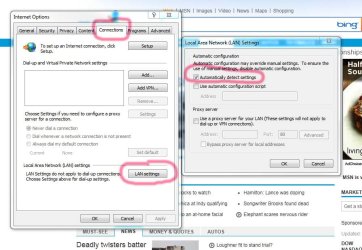
sounds like there is a proxy setup in the IE settings.
I'll post a picture in a sec to show you where it is to check.

In Internet Explorer,
Go to Tools>Internet Options
and see if you have the settings like mine,
 

Attachments

  • lan settings.jpg
    lan settings.jpg
    97.7 KB · Views: 17

My Computer

Computer Manufacturer/Model Number
HAL-9000
OS
Windows 7 Ultimate 64bit
CPU
Intel i7 3770K
Motherboard
Asus Sabertooth Z77
Memory
16GB DDR3 1333 Corsair XMS3
Graphics Card(s)
XFX HD6950 2GB EyeFinity
Sound Card
Logitech G35 & Sennheiser PC135 & VIA HD
Monitor(s) Displays
23" HP 2310e, 23" Samsung B2230, 21.5" Viewsonic
Screen Resolution
5760x1080
Hard Drives
16TB of Storage
128GB & 256GB Crucial M4 SSD's, 2X 1TB WD Black, 3x 2TB WD, 3x 2TB Samsung F4, 1.5TB Seagate, WD 500GB,
PSU
Antec True Power New 650watt
Case
Cooler Master HAF-932
Cooling
Corsair H60 Hydro Cooler, 3x 230mm Fans, 2x120mm Fan
Keyboard
Logitech G15 and G13
Mouse
Logitech G700 Gaming Mouse
Internet Speed
50/10 Mbit
Other Info
Speakers : Alesis M1 Active Mk2 Studio Monitors , APC RS 1200 UPS, HP 4500DN Color Laser, HP P1006 mono Laser, Kodak 8500 Dye-Sub, Epson 1280 inkjet, Epson Worforce 610 MFC
And what about a different browser?
 

My Computer

Computer Manufacturer/Model Number
Asus
OS
Seven ultimate 32bit
CPU
Core2Duo E5700
Motherboard
Asus p5qlem
Memory
3GB DDR2
Graphics Card(s)
HD5670
Sound Card
Onboard
Monitor(s) Displays
Philips 18.5 widescreen
Screen Resolution
Depends
Hard Drives
500GB Samsung 7200RPM
PSU
500w Sparta
Case
Aerocool
Cooling
Standard + 2x 40's inserted
Keyboard
Multimedia
Mouse
Genius
Internet Speed
10meg.
Zepher. Mine settings are the same.No luck.
SmurofNeves> I see no default gateway for the LAN.
 

My Computer

Computer type
PC/Desktop
Computer Manufacturer/Model Number
Custom
OS
Windows 7 Ultimate 32
CPU
AMD A4
Motherboard
MSI FM2-A55M-E33
Memory
4 GB
Graphics Card(s)
768mb ATI AMD Radeon HD7480D
Sound Card
Realtek high definition audio
Monitor(s) Displays
Philips 17"
Hard Drives
Seagate 160gb SATA
PSU
500W
Case
Old Mesh tower
Keyboard
PS/2 keyboard
Mouse
PS/2 mouse
Internet Speed
40mb Fibre
Antivirus
MSE
Browser
I.E. 11
Did you check your AV and firewall as I said in first post?
 

My Computer

Computer type
PC/Desktop
Computer Manufacturer/Model Number
Custom Build
OS
Windows 10 Pro x64
CPU
Intel Core i5 4440 @Stock
Motherboard
Gigabyte Z97 D3H
Memory
4 x 4GB HyperX Fury DDR3
Graphics Card(s)
Gigabyte GTX 1050Ti O4G
Sound Card
Integrated
Monitor(s) Displays
Dell P2417H
Screen Resolution
1920 x 1080
Hard Drives
Samsung EVO 850 120GB / Toshiba DT01ACA050 1TB 7200prm 32MB
PSU
Riotoro Onyx 750W
Case
NZXT H500 Black-Red
Cooling
Stock CPU + NZXT 120mm + 2x120mm red fans
Keyboard
Modecom Volcano Lanparty
Mouse
Asus ROG Gladius / DeepCool E-Pad Plus
Internet Speed
DOCSIS 50/3 Mbit
Browser
Google Chrome
Other Info
Asus K55VJ(i5 3210M, GT635M / 2GB, 8GB DDR3, 500GB HDD)
StalkeR. The laptop only has Windows firewall and there was no AV apart from Windows defender.I have turned off the firewall and it is still the same.
Ping request couldn't find host Google if that helps.
As for different browser i will have to download from my comp and copy to disk as no internet.
 

My Computer

Computer type
PC/Desktop
Computer Manufacturer/Model Number
Custom
OS
Windows 7 Ultimate 32
CPU
AMD A4
Motherboard
MSI FM2-A55M-E33
Memory
4 GB
Graphics Card(s)
768mb ATI AMD Radeon HD7480D
Sound Card
Realtek high definition audio
Monitor(s) Displays
Philips 17"
Hard Drives
Seagate 160gb SATA
PSU
500W
Case
Old Mesh tower
Keyboard
PS/2 keyboard
Mouse
PS/2 mouse
Internet Speed
40mb Fibre
Antivirus
MSE
Browser
I.E. 11
I have put on firefox on the laptop and still the same result.
 

My Computer

Computer type
PC/Desktop
Computer Manufacturer/Model Number
Custom
OS
Windows 7 Ultimate 32
CPU
AMD A4
Motherboard
MSI FM2-A55M-E33
Memory
4 GB
Graphics Card(s)
768mb ATI AMD Radeon HD7480D
Sound Card
Realtek high definition audio
Monitor(s) Displays
Philips 17"
Hard Drives
Seagate 160gb SATA
PSU
500W
Case
Old Mesh tower
Keyboard
PS/2 keyboard
Mouse
PS/2 mouse
Internet Speed
40mb Fibre
Antivirus
MSE
Browser
I.E. 11
Try resetting the Router it should have a reset at the bottom of the device. Or just power off & on it should help.

If theres no gateway theres no internet except if your using a proxy connection..
 

My Computer

Computer Manufacturer/Model Number
Asus
OS
Seven ultimate 32bit
CPU
Core2Duo E5700
Motherboard
Asus p5qlem
Memory
3GB DDR2
Graphics Card(s)
HD5670
Sound Card
Onboard
Monitor(s) Displays
Philips 18.5 widescreen
Screen Resolution
Depends
Hard Drives
500GB Samsung 7200RPM
PSU
500w Sparta
Case
Aerocool
Cooling
Standard + 2x 40's inserted
Keyboard
Multimedia
Mouse
Genius
Internet Speed
10meg.
I have resetted the router,uninstalled wireless and then reinstall but still not working.
I have done a system restore back to about a month ago and that's not worked.
Very frustrating not being able to connect as i can get Windows updates through wireless but on the IE or Firefox.
 

My Computer

Computer type
PC/Desktop
Computer Manufacturer/Model Number
Custom
OS
Windows 7 Ultimate 32
CPU
AMD A4
Motherboard
MSI FM2-A55M-E33
Memory
4 GB
Graphics Card(s)
768mb ATI AMD Radeon HD7480D
Sound Card
Realtek high definition audio
Monitor(s) Displays
Philips 17"
Hard Drives
Seagate 160gb SATA
PSU
500W
Case
Old Mesh tower
Keyboard
PS/2 keyboard
Mouse
PS/2 mouse
Internet Speed
40mb Fibre
Antivirus
MSE
Browser
I.E. 11
You might try a hard reset,,what is the model of your router... Normally you keep the reset in for about 30sec depending on your router. Then you'll need all your ISP's settings to be configured from scratch.
 

My Computer

Computer Manufacturer/Model Number
Asus
OS
Seven ultimate 32bit
CPU
Core2Duo E5700
Motherboard
Asus p5qlem
Memory
3GB DDR2
Graphics Card(s)
HD5670
Sound Card
Onboard
Monitor(s) Displays
Philips 18.5 widescreen
Screen Resolution
Depends
Hard Drives
500GB Samsung 7200RPM
PSU
500w Sparta
Case
Aerocool
Cooling
Standard + 2x 40's inserted
Keyboard
Multimedia
Mouse
Genius
Internet Speed
10meg.
I have eventually got it all sorted in the early hours of this morning.
When she got the laptop it came with all sorts of crap that's not needed. There was Norton Internet Security installed but when you click onto the icon it kept saying it was corrupt. Went into uninstall progs but it wasn't listed. I tried loads of things last night and then i remembered that she said they had a powercut a few weekks ago when charging the laptop.
Well i looked on this forum and downloaded the norton removal tool and ran it on the laptop and all is working ok.
I was getting to the point of doing a Windows 7 clean install.
Thank you all for your help and good luck to you all.
Vin.
 

My Computer

Computer type
PC/Desktop
Computer Manufacturer/Model Number
Custom
OS
Windows 7 Ultimate 32
CPU
AMD A4
Motherboard
MSI FM2-A55M-E33
Memory
4 GB
Graphics Card(s)
768mb ATI AMD Radeon HD7480D
Sound Card
Realtek high definition audio
Monitor(s) Displays
Philips 17"
Hard Drives
Seagate 160gb SATA
PSU
500W
Case
Old Mesh tower
Keyboard
PS/2 keyboard
Mouse
PS/2 mouse
Internet Speed
40mb Fibre
Antivirus
MSE
Browser
I.E. 11
Back
Top