Solved Can not change network from public to home since installing new router

judylloyd

New member
Local time
4:50 PM
Messages
3
Location
Ohio
Two days ago I installed a new router in my home. Since then, my windows 7 home premium computer defaults to a PUBLIC network. I have tried about 5 different potential solutions I found "googling" but to no avail. Even after editing the registry to change the network D-word values to "1" I have had zero success. I'm hoping someone here can help me solve my problem.

I am still using the Windows 7 home computer because I have a photo editor from 1999 that I am particularly partial to and also Adobe Acrobat 8 which will run on nothing higher than Win 7 home. Re the photo editor, it does everything I need it to do and at age 76 I certainly don't want to have to learn a new, infinitely more complicated photo editor.
 

My Computers My Computers

  • At a glance

    Windows 7 Home Premium 32 bitIntel Core I5-2450M 2.5 GHZ8 GBIntel HD Graphics 3000
    Computer type
    Laptop
    Computer Manufacturer/Model Number
    HP Pavilion DV 7
    OS
    Windows 7 Home Premium 32 bit
    CPU
    Intel Core I5-2450M 2.5 GHZ
    Motherboard
    don't know
    Memory
    8 GB
    Graphics Card(s)
    Intel HD Graphics 3000
    Hard Drives
    local fixed disk
    Antivirus
    AVG internet security
    Browser
    Chrome secure browser
  • Computer type
    PC/Desktop
    Antivirus
    AVG internet security
Well, since I don't know what solutions you tired, I'll just post these and tell me if you used them or not. First and foremost, it appears this has been an issue for a lot of people from what I can see. No idea if Microsoft ever fixed it. SP1 was released in February of 2011 so maybe that fixed it. Also, it appears perhaps if DHCP isn't used from the router or if your computer's network card (NIC) can't use DHCP, Windows defaults to Private instead of Home.

1) Go into Device Manager and right click the NIC and disable. Now enable. See if you can change to Home now.

2) Go to Windows search and enter cmd. In command prompt enter ipconfig /all Do you see DHCP being used or are you using a static IP assignment to the router? For your adapter in the long list it will say DHCP Enabled.......... YES or NO.

3) Are you using a modem with the router? Is the modem in bridge mode to prevent a double NAT? To see if you have a double NAT go back to command prompt and in command prompt enter tracert 1.1.1.1. If you see a private IP address in the first two hops to 1.1.1.1 you have a double NAT. A private IP address like 192.168.xxx.xxx, 10.0.xxx.xxx, 172.16.xxx.xxx.

4) Have you tried this?

Go to start>Search>secpol.msc
Network List Manager Policies>Unidentified Networks
Double Click>Change Location Type to Private !!Warning, this means from now on all Unidentified Networks will be set as private!!

5) As to solution #1 above, but if you have more than one NIC.


DISABLE ALL NETWORK ADAPTERS
ENABLE THE ADAPTER THAT'S ONLY SHOWING UP THE UNCHANGEABLE PUBLIC NETWORK
IN THE NETWORK AND SHARING CENTER, SELECT "CHOOSE HOMEGROUP AND SHARING OPTIONS"
CLICK ON "WHAT IS THIS LOCATION?"
SELECT HOME/WORK
RE-ENABLE ALL OTHER ADAPTERS

6) Right click the NIC in Device Manager and uninstall, but don't chose to delete the driver. Now right click the adapter and scan for hardware changes. See if you have Home group ability.

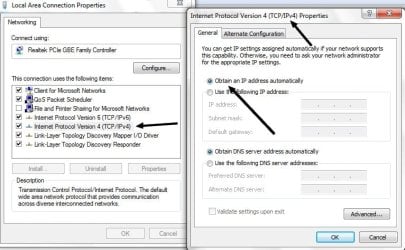
7) Go to your network adapters and right click the network adapter. Click Internet Protocol Version 4 (TCP/IPv4) and click the Properties button. Make sure Obtain an IP address automatically is selected. See screenshot.
sdegrsw.jpg


I'm assuming you already saw this long thread.


I'd advise you to change that registry setting back to what it was. At least before you go through everything I wrote here.


If nothing still works there is a powershell script that looks interesting, but it may only be for Windows 10. I'll have to test it myself.
 

My Computer My Computer

At a glance

Windows 7 Ultimate x64
Computer type
PC/Desktop
OS
Windows 7 Ultimate x64
Still cannot change network to HOME

Thanks much for your thorough reply. Unfortunately, All attempts to fix this problem have been unsuccessful.
1. Device Manager, I have already uninstalled the network card, rebooted machine to no avail. Did it again – same result; computer is still stuck in PUBLIC mode.

2. Result of this is that DHCP is enabled for the wireless adapter (Ralink RT5390R – drivers up to date). I went to Services and stopped and restarted DHCP.

3. I am using an EERO router; no separate modem - ipconfig / all indicates tunnel adapters disconnected.

4. On my WIN-7 home premium computer secpol.msc is not a recognized command. I believe that command is available in WIN-7 pro, and not WIN-7 home. I have only one network showing with the proper network name Bootso (the name of our dog). I have also previously edited the registry to remove entries for all previous/old networks, then rebooted and only Bootso network now has a registry entry. I have changed D-word for this network to “1”, but upon reboot D-word reverts to “0”

5. Only Bootso (the unchangeable and only network), in Network and Sharing Center “Homegroup and sharing options” Location, I have attempted selecting HOME for network location, but when doing this network location still shows up as PUBLIC.

6. I have uninstalled the Ralink network adapter, rebooted and it was reinstalled. This did not solve the problem.

7. In Device Manager/Network Adapters, when right clicking on the network adapter, I can not get a menu such as shown in your screenshot. As to IP addresses, these were assigned automatically when the new EERO router was installed, as each of my 4 computers was assigned a new IP address of 192.268.4.xxx vs the pre-router-change addresses of 192.168.200.xxx.

8. YES, I have now read the information at the link to “social.technet.microsoft.com/Forums” that you provided and none of those suggestions worked either. Wireless driver is up to date and IP addresses definitely seem to be assigned automatically. No problem connecting to internet; just to home network. No unidentified networks.

9. Unfortunately, network is still stuck on PUBLIC. I’m beginning to think that I’m going to have to implement a workaround of, when needed transferring files via a thumb drive, and moving the Win-7 computer close enough to the USB printer which is installed on a WIN-10 computer and connect the WIN-7 computer via a USB printer cable to the printer when I need to print, since I can no longer use printer sharing. Prior to installing the EERO router, my home network (4 computers) worked seamlessly.

Your time and attention to my post is much appreciated.

- - - Updated - - -

A most bizarre thing just happened. A popup in AVG Internet Security said a suspicious device with the IP address of one of my other home network computers was trying to access the Win-7 computer. I clicked ALLOW and now the network is showing as HOME in Network and Sharing Center. The HOME setting survived a reboot. However, I can only see one of the 2 home network computers that are currently turned on and running in file explorer/NETWORK. I have the IP addresses of all network computers set to "allow" in AVG internet Security firewall settings.
 

My Computers My Computers

  • At a glance

    Windows 7 Home Premium 32 bitIntel Core I5-2450M 2.5 GHZ8 GBIntel HD Graphics 3000
    Computer type
    Laptop
    Computer Manufacturer/Model Number
    HP Pavilion DV 7
    OS
    Windows 7 Home Premium 32 bit
    CPU
    Intel Core I5-2450M 2.5 GHZ
    Motherboard
    don't know
    Memory
    8 GB
    Graphics Card(s)
    Intel HD Graphics 3000
    Hard Drives
    local fixed disk
    Antivirus
    AVG internet security
    Browser
    Chrome secure browser
  • Computer type
    PC/Desktop
    Antivirus
    AVG internet security
Anti-virus software was listed as a possible problem to others. I'd just uninstall the whole thing (if it doesn't already mess up the TCP/IP stack). As crazy is this might sound to you, it's actually not protecting you but stealing your privacy as anti-virus software needs to intercept TLS (HTTPS) connections to scan websites. Like a MiTM (Man In The Middle). The anti-virus sends all this telemetry back to AV headquarters. Also, anti-virus software today is nothing but bloat crap. There are two products I know that pack a cryptocurrency miner sucking up resources on a person's computer to make money. That's not even what a so-called anti-virus software should do. Its principal function is to prevent a malware infection. In all the years I ran anti-virus software I have A) never seen it stop anything other than false positives and B) cause computer issues.

I used to use anti-virus software many years ago. I no longer do. I now use something for my browser called Sandboxie which runs your browser in a sandbox so malicious Javascript and whatnot stays in the sandbox and not jumps to the computer. I also scan all downloads at VirusTotal. Since they use a large amount of anti-virus engines false positives are likely to occur. The general consensus is four hits and you toss. But it does depend on what you got. There's more here, but my cybersecurity knowledge would go way over your head.

There's really not one good anti-virus product out there anymore. ClamWin is an on demand scanner that's nice, but if you have it scan the entire C drive it'll take three thousand years. I do use ClamWin on some stuff though. In addition to ClamWin, I run Sanity Check downloaded from here. I use other tools as well beyond the scope of this discussion. Nothing ever found though.

Anti-virus software now-a-days has become more of a joke, misnomer and fallacy. It used to be important to have anti-virus back in the day. Like the mid 1990s to early 2000s Today, and in my opinion it's bloat and does nothing more than to mess things up. Also, zero-day malware will slip right on by, like ransomware that has no anti-virus definition. Like polymorphic malware.

So yeah, I don't even run an anti-virus software. And for the most part, you really don't have to. It's a shame you're using the Home version of 7 because in Pro and above you can get access to group policy. There you want turn of autoplay for thumb drives, CDs and whatnot. That's a no, no in terms of malware prevention and infection.

With better security comes more cumbersomeness and a learning curve. It also means staying ahead of what's out there and knowing the industry. If you run the uBlock extension (add-on) in your browser with the malware domain block list that'll help.

A lot of anti-virus is so intertwined in the OS you might need these two tools.

Install AVG on your PC, Mac | AVG installation files

How to use the AVG Uninstall Tool | AVG

I like how they say your PC will NOT be "protected" anymore. It sounds like a marketing thing from the freaking mafia.

- - - Updated - - -

Oh, the fact you can't even right click the adapter to see its properties tells me you may have OS corruption.

You can A) run an elevated command prompt and try to run everyone's favorite sfc /scannow or B) do an in place repair install.

 

My Computer My Computer

At a glance

Windows 7 Ultimate x64
Computer type
PC/Desktop
OS
Windows 7 Ultimate x64
Valuable analysis and information - thanks

Thank you profusely for your time and insight. AVG - which I've been using since 1999 - and probably other such software, though I don't have personal experience with them - is constantly attempting upselling for their other products but I always ignore such popups and prompts such as "we've found privacy issues let us resolve them" (by buying additional products). I tried a VPN last year and couldn't live with the resultant loss of internet speed. I definitely agree an Antivirus can cause problems. AVG is a bit tricky but they definitely have stellar technical support and are very responsive, which is why I've continued to use it. I also use the AVG secure browser add-on to Chrome and that nicely blocks connections to suspicious websites and identifies the purported problem.

Although the Win-7 "stuck on public network" problem has seemingly solved itself, AVG is now blocking connectivity with 2 of the 3 frequently online home network computers. I've traced that problem to Remote Access Shield which appears to be ignoring the exceptions. Remote Access Shield disabled, connectivity problem solved.

I got my first PC in the 1980's (a dual floppy IBM) but this high tech stuff is way above my head. Currently all of my computers are HP, again for the good technical support even when products are long out of warranty.

Thanks again. I really appreciate your knowledge and the time you spent writing your last post.

I will definitely try the suggestions you provided. Meanwhile, what are your thoughts on Malwarebytes? In the past I bought several lifetime subscriptions to that product but haven't been using it as it conflicts with AVG.
 

My Computers My Computers

  • At a glance

    Windows 7 Home Premium 32 bitIntel Core I5-2450M 2.5 GHZ8 GBIntel HD Graphics 3000
    Computer type
    Laptop
    Computer Manufacturer/Model Number
    HP Pavilion DV 7
    OS
    Windows 7 Home Premium 32 bit
    CPU
    Intel Core I5-2450M 2.5 GHZ
    Motherboard
    don't know
    Memory
    8 GB
    Graphics Card(s)
    Intel HD Graphics 3000
    Hard Drives
    local fixed disk
    Antivirus
    AVG internet security
    Browser
    Chrome secure browser
  • Computer type
    PC/Desktop
    Antivirus
    AVG internet security
It's no doubt that Malwarebytes conflicts with AVG. And that's because you never run more than one anti-virus software at the same time as they can interact with each other in a negative way. Further complicating matters, they can work against each other in trying to quarantine a virus or what ever. This has been the golden rule now for years.

I really can't offer much insight into any anti-virus product since I simply don't use them anymore. Back in circa 2008 I used to run Malwarebytes as a scanner only and not on an on demand level. It's been maybe three or four years since I even ran (tested) the now more "modern" Malwarebytes and as I recall I didn't like how it was made. On the plus side however, they are an American company...


Malwarebytes - Wikipedia

AVG AntiVirus - Wikipedia

If you decide to horse around with Sandboxie (it can be overwhelming at first) it takes some getting used to. What I like in particular is that each and every single download presents a window asking if you want to "recover" the download file. This is great in that if your browser auto downloads something behind your back at least you can be altered to it. If you didn't request that download you don't recover and allow Sandboxie to delete it. Sandboxie is not for everyone and it takes some getting used to and it needs to be configured. Also, since the software is now free and open source (a good thing), the guy who helps make it added a lot of crap to the Sandboxie Plus version. So because of that I use Sandboxie Classic instead. It gets the job done without all the nonsensical fluff. There may be YouTube video tutorials on how to use Sandboxie. I was thinking of making my own.

So between me scanning all downloads - ALL DOWNLOADS (sometimes even images as they CAN contain a malware payload) at VirusTotal and using Sandboxie I have never had a malware infection since I ran Windows 98se. And get this. At the time I ran Windows 98se I had AVG installed and it did absolutely nothing. Since then I've learned a lot about computers, cybersecurity and what have you and vowed never to let that happen to me ever again.
 

My Computer My Computer

At a glance

Windows 7 Ultimate x64
Computer type
PC/Desktop
OS
Windows 7 Ultimate x64
Back
Top