Can not click "restore" from previous versions in a folder

awesomegamer75

New member
Local time
9:50 AM
Messages
11
I was trying to get rid of some junk files from when I tried to install Adobe Cloud to my computer, I accidentally deleted some of the config files from the folder, and I want to try and restore them to a date before I deleted them, but it wont let me restore them? So I was just curious if there is someway around this problem.

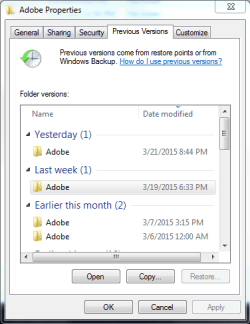
Here is a Screenshot of the problem
 

Attachments
  • Screenshot.PNG
    Screenshot.PNG
    14.5 KB · Views: 10

My Computer My Computer

At a glance

Windows 7 Home Premium 64bit16.0 GBNVIDIA GeForce GTX 660 Ti
Computer type
PC/Desktop
Computer Manufacturer/Model Number
DigitalStorm
OS
Windows 7 Home Premium 64bit
Memory
16.0 GB
Graphics Card(s)
NVIDIA GeForce GTX 660 Ti
Hard Drives
Toshiba Canvio Hard Drive 1TB
Antivirus
Kaspersky Internet Security 2013
Browser
Google Chrome

My Computer My Computer

At a glance

Windows 10 Pro. 64/ version 1709 Windows 7 Pr...Intel i7-6800K @ 4.3Corsair Platinum 16 gig @2400EVGA GTX 1070 OC
Computer type
PC/Desktop
Computer Manufacturer/Model Number
Home made Desktop
OS
Windows 10 Pro. 64/ version 1709 Windows 7 Pro/64
CPU
Intel i7-6800K @ 4.3
Motherboard
ASUS X-99 Deluxe II
Memory
Corsair Platinum 16 gig @2400
Graphics Card(s)
EVGA GTX 1070 OC
Monitor(s) Displays
Asus 27" LED LCD/VE278Q
Screen Resolution
1920-1080 or 1280-720 HDMI
Hard Drives
INTEL SSD 730-240 Gb Sata 3.0/
PSU
EVGA Platium 1200W
Case
Phanteks Luxe Tempered Glass 8 fans/ one radiator
Cooling
XSPC/ Water Cooled CPU
Keyboard
Das 4 Professional
Mouse
Logitech M705/MX Anywhere 2-S
Internet Speed
100 mbits
Antivirus
Microsoft Security Essentials/ Malwarebytes Premium 3.0/ SAS
Browser
I.E. 11 default/Firefox/ ISP Time Warner Cable/Spectrum
Other Info
LG BluRay Burner/
Sound system-KLipsch-THX/
Icy Dock ssd Hot Swap bays.
Thank You Layback Bear, but unforchantly my system restore will not work for me at all, I know that some antivirus programs disable system restore but I have tried to disable it and also going into Safemode but it still wont work for me, I believe it has something to do with a virus that got onto my computer and corrupted some of the files or file that makes system restore work, unless if there's someway to fix system restore, I'm not sure how to fix my problem.
 

My Computer My Computer

At a glance

Windows 7 Home Premium 64bit16.0 GBNVIDIA GeForce GTX 660 Ti
Computer type
PC/Desktop
Computer Manufacturer/Model Number
DigitalStorm
OS
Windows 7 Home Premium 64bit
Memory
16.0 GB
Graphics Card(s)
NVIDIA GeForce GTX 660 Ti
Hard Drives
Toshiba Canvio Hard Drive 1TB
Antivirus
Kaspersky Internet Security 2013
Browser
Google Chrome

My Computer My Computer

At a glance

Windows 10 Pro. 64/ version 1709 Windows 7 Pr...Intel i7-6800K @ 4.3Corsair Platinum 16 gig @2400EVGA GTX 1070 OC
Computer type
PC/Desktop
Computer Manufacturer/Model Number
Home made Desktop
OS
Windows 10 Pro. 64/ version 1709 Windows 7 Pro/64
CPU
Intel i7-6800K @ 4.3
Motherboard
ASUS X-99 Deluxe II
Memory
Corsair Platinum 16 gig @2400
Graphics Card(s)
EVGA GTX 1070 OC
Monitor(s) Displays
Asus 27" LED LCD/VE278Q
Screen Resolution
1920-1080 or 1280-720 HDMI
Hard Drives
INTEL SSD 730-240 Gb Sata 3.0/
PSU
EVGA Platium 1200W
Case
Phanteks Luxe Tempered Glass 8 fans/ one radiator
Cooling
XSPC/ Water Cooled CPU
Keyboard
Das 4 Professional
Mouse
Logitech M705/MX Anywhere 2-S
Internet Speed
100 mbits
Antivirus
Microsoft Security Essentials/ Malwarebytes Premium 3.0/ SAS
Browser
I.E. 11 default/Firefox/ ISP Time Warner Cable/Spectrum
Other Info
LG BluRay Burner/
Sound system-KLipsch-THX/
Icy Dock ssd Hot Swap bays.
Sorry about the confusion, it is Adobe Photoshop Elements 9 that I'm having trouble with right now.

Adobe Properties were the files for the registration, and I tried looking for the paper that had my registration code on it but I can't seem to find it anywhere, but I was just curious if there was someway to be able to click the "restore..." button next to Copy and Open from the screenshot above. Everytime I try to select a older version I want to restore it wont let me click it.

Also the link seems to bring me back to the front page of the forum everytime I click it.
 

My Computer My Computer

At a glance

Windows 7 Home Premium 64bit16.0 GBNVIDIA GeForce GTX 660 Ti
Computer type
PC/Desktop
Computer Manufacturer/Model Number
DigitalStorm
OS
Windows 7 Home Premium 64bit
Memory
16.0 GB
Graphics Card(s)
NVIDIA GeForce GTX 660 Ti
Hard Drives
Toshiba Canvio Hard Drive 1TB
Antivirus
Kaspersky Internet Security 2013
Browser
Google Chrome

My Computer My Computer

At a glance

Windows 10 Pro. 64/ version 1709 Windows 7 Pr...Intel i7-6800K @ 4.3Corsair Platinum 16 gig @2400EVGA GTX 1070 OC
Computer type
PC/Desktop
Computer Manufacturer/Model Number
Home made Desktop
OS
Windows 10 Pro. 64/ version 1709 Windows 7 Pro/64
CPU
Intel i7-6800K @ 4.3
Motherboard
ASUS X-99 Deluxe II
Memory
Corsair Platinum 16 gig @2400
Graphics Card(s)
EVGA GTX 1070 OC
Monitor(s) Displays
Asus 27" LED LCD/VE278Q
Screen Resolution
1920-1080 or 1280-720 HDMI
Hard Drives
INTEL SSD 730-240 Gb Sata 3.0/
PSU
EVGA Platium 1200W
Case
Phanteks Luxe Tempered Glass 8 fans/ one radiator
Cooling
XSPC/ Water Cooled CPU
Keyboard
Das 4 Professional
Mouse
Logitech M705/MX Anywhere 2-S
Internet Speed
100 mbits
Antivirus
Microsoft Security Essentials/ Malwarebytes Premium 3.0/ SAS
Browser
I.E. 11 default/Firefox/ ISP Time Warner Cable/Spectrum
Other Info
LG BluRay Burner/
Sound system-KLipsch-THX/
Icy Dock ssd Hot Swap bays.
Thanks Layback Bear, but that's not what I was talking about. I was saying that I lost my registration code for Adobe Photoshop Elements 9 and that's why I needed to restore my Adobe Properties folder in order for me to use the application, because I deleted some of the files within the folder that I need to restore for it to work.

Also I'm still questioned on why I cant click the "restore..." button next to Copy and Open from the screenshot that I shared in my original question.
 

My Computer My Computer

At a glance

Windows 7 Home Premium 64bit16.0 GBNVIDIA GeForce GTX 660 Ti
Computer type
PC/Desktop
Computer Manufacturer/Model Number
DigitalStorm
OS
Windows 7 Home Premium 64bit
Memory
16.0 GB
Graphics Card(s)
NVIDIA GeForce GTX 660 Ti
Hard Drives
Toshiba Canvio Hard Drive 1TB
Antivirus
Kaspersky Internet Security 2013
Browser
Google Chrome
From you post #5

looking for the paper that had my registration code
Belarc just might show you that code.

If you don't have the registration code wrote down or it's not on your computer you will have to buy another one unless you have made a backup of your system and it is on the backup.

You have posted you don't have restore points.

From your post #3
Thank You Layback Bear, but unforchantly my system restore will not work for me at all,

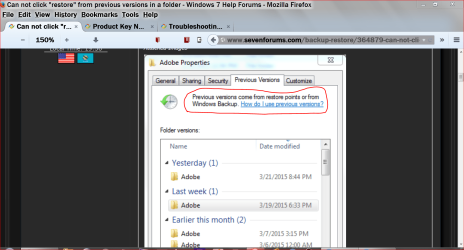
If you read the top portion of the picture in your post #1 you will understand.

adobe for today only.PNG
 

My Computer My Computer

At a glance

Windows 10 Pro. 64/ version 1709 Windows 7 Pr...Intel i7-6800K @ 4.3Corsair Platinum 16 gig @2400EVGA GTX 1070 OC
Computer type
PC/Desktop
Computer Manufacturer/Model Number
Home made Desktop
OS
Windows 10 Pro. 64/ version 1709 Windows 7 Pro/64
CPU
Intel i7-6800K @ 4.3
Motherboard
ASUS X-99 Deluxe II
Memory
Corsair Platinum 16 gig @2400
Graphics Card(s)
EVGA GTX 1070 OC
Monitor(s) Displays
Asus 27" LED LCD/VE278Q
Screen Resolution
1920-1080 or 1280-720 HDMI
Hard Drives
INTEL SSD 730-240 Gb Sata 3.0/
PSU
EVGA Platium 1200W
Case
Phanteks Luxe Tempered Glass 8 fans/ one radiator
Cooling
XSPC/ Water Cooled CPU
Keyboard
Das 4 Professional
Mouse
Logitech M705/MX Anywhere 2-S
Internet Speed
100 mbits
Antivirus
Microsoft Security Essentials/ Malwarebytes Premium 3.0/ SAS
Browser
I.E. 11 default/Firefox/ ISP Time Warner Cable/Spectrum
Other Info
LG BluRay Burner/
Sound system-KLipsch-THX/
Icy Dock ssd Hot Swap bays.
Okay Thank you, I will go deeper into if I can find that registration code.

But I still have that unanswered question that why I am unable click the Restore... button next to Copy and Open when I have it selected to the restore point that I want from the screenshot that I shared in my original question.

By the way Im talking about Previous Versions not System Restore, that wont work for me.

That just shows me how to use Previous Versions.
 

My Computer My Computer

At a glance

Windows 7 Home Premium 64bit16.0 GBNVIDIA GeForce GTX 660 Ti
Computer type
PC/Desktop
Computer Manufacturer/Model Number
DigitalStorm
OS
Windows 7 Home Premium 64bit
Memory
16.0 GB
Graphics Card(s)
NVIDIA GeForce GTX 660 Ti
Hard Drives
Toshiba Canvio Hard Drive 1TB
Antivirus
Kaspersky Internet Security 2013
Browser
Google Chrome
Did you not read the portion of the picture that is circled in RED

You do not have restore points or backup to retrieve from.
 

My Computer My Computer

At a glance

Windows 10 Pro. 64/ version 1709 Windows 7 Pr...Intel i7-6800K @ 4.3Corsair Platinum 16 gig @2400EVGA GTX 1070 OC
Computer type
PC/Desktop
Computer Manufacturer/Model Number
Home made Desktop
OS
Windows 10 Pro. 64/ version 1709 Windows 7 Pro/64
CPU
Intel i7-6800K @ 4.3
Motherboard
ASUS X-99 Deluxe II
Memory
Corsair Platinum 16 gig @2400
Graphics Card(s)
EVGA GTX 1070 OC
Monitor(s) Displays
Asus 27" LED LCD/VE278Q
Screen Resolution
1920-1080 or 1280-720 HDMI
Hard Drives
INTEL SSD 730-240 Gb Sata 3.0/
PSU
EVGA Platium 1200W
Case
Phanteks Luxe Tempered Glass 8 fans/ one radiator
Cooling
XSPC/ Water Cooled CPU
Keyboard
Das 4 Professional
Mouse
Logitech M705/MX Anywhere 2-S
Internet Speed
100 mbits
Antivirus
Microsoft Security Essentials/ Malwarebytes Premium 3.0/ SAS
Browser
I.E. 11 default/Firefox/ ISP Time Warner Cable/Spectrum
Other Info
LG BluRay Burner/
Sound system-KLipsch-THX/
Icy Dock ssd Hot Swap bays.
Yes, but that's not answering my question to you, I asked for your help on.

"Why I am unable click the Restore... button next to Copy and Open when I have it selected to the restore point that I want from the screenshot"

I tried looking into this but Microsoft does not have the answer for that for what I'm looking for, it just shows me how to use Previous Versions, not detailing to my exact question.
 

My Computer My Computer

At a glance

Windows 7 Home Premium 64bit16.0 GBNVIDIA GeForce GTX 660 Ti
Computer type
PC/Desktop
Computer Manufacturer/Model Number
DigitalStorm
OS
Windows 7 Home Premium 64bit
Memory
16.0 GB
Graphics Card(s)
NVIDIA GeForce GTX 660 Ti
Hard Drives
Toshiba Canvio Hard Drive 1TB
Antivirus
Kaspersky Internet Security 2013
Browser
Google Chrome
Because the restore does not exist and Windows 7 know that so the button is not activated. You can't get something from a restore if the restore doesn't exist.
You can't get something from a backup if a backup doesn't exist.

I don't know how I can explain it any simpler and I'm not going to try.

Have a nice day
 

My Computer My Computer

At a glance

Windows 10 Pro. 64/ version 1709 Windows 7 Pr...Intel i7-6800K @ 4.3Corsair Platinum 16 gig @2400EVGA GTX 1070 OC
Computer type
PC/Desktop
Computer Manufacturer/Model Number
Home made Desktop
OS
Windows 10 Pro. 64/ version 1709 Windows 7 Pro/64
CPU
Intel i7-6800K @ 4.3
Motherboard
ASUS X-99 Deluxe II
Memory
Corsair Platinum 16 gig @2400
Graphics Card(s)
EVGA GTX 1070 OC
Monitor(s) Displays
Asus 27" LED LCD/VE278Q
Screen Resolution
1920-1080 or 1280-720 HDMI
Hard Drives
INTEL SSD 730-240 Gb Sata 3.0/
PSU
EVGA Platium 1200W
Case
Phanteks Luxe Tempered Glass 8 fans/ one radiator
Cooling
XSPC/ Water Cooled CPU
Keyboard
Das 4 Professional
Mouse
Logitech M705/MX Anywhere 2-S
Internet Speed
100 mbits
Antivirus
Microsoft Security Essentials/ Malwarebytes Premium 3.0/ SAS
Browser
I.E. 11 default/Firefox/ ISP Time Warner Cable/Spectrum
Other Info
LG BluRay Burner/
Sound system-KLipsch-THX/
Icy Dock ssd Hot Swap bays.
Yes, but that's not answering my question to you, I asked for your help on.

"Why I am unable click the Restore... button next to Copy and Open when I have it selected to the restore point that I want from the screenshot"

I tried looking into this but Microsoft does not have the answer for that for what I'm looking for, it just shows me how to use Previous Versions, not detailing to my exact question.

Previous versions of files: frequently asked questions - Windows Help

Under the third drop down arrow at the bottom is this note:

Note

If the Restore button isn't available, you can't restore a previous version of the file or folder to its original location. However, you might be able to open it or save it to a different location.
 

My Computer My Computer

At a glance

Win 10 Pro x64Intel I5-2500K @3.3GHz16GB G.Skill Ripjaws X (4x4GB)EVGA GeForce 750 Ti SC 2GB
Computer type
PC/Desktop
Computer Manufacturer/Model Number
Self Built
OS
Win 10 Pro x64
CPU
Intel I5-2500K @3.3GHz
Motherboard
Asrock P67 Extreme4
Memory
16GB G.Skill Ripjaws X (4x4GB)
Graphics Card(s)
EVGA GeForce 750 Ti SC 2GB
Sound Card
ASUS Xonar DG 5.1 Channels 24-bit 96KHz PCI Interface Sound
Monitor(s) Displays
auria eq2367
Screen Resolution
1920 x 1080
Hard Drives
250GB Samsung 850 EVO SSD
1TB WD Blue
1TB Hitachi
PSU
SeaSonic X 650W 80 Plus Gold
Case
Corsair Obsidian 750D
Cooling
Corsair H60, Three 140mm case fans
Keyboard
Logitech Wireless Keyboard K520
Mouse
Logitech Wireless Mouse M310
Internet Speed
Wave Broadband ~ 100 dn 5 up
Antivirus
Windows Defender, Malwarebytes Premium
Browser
Edge, IE11, Chrome
Other Info
Laptop specs: HP g7-1365dx /
CPU: AMD A6-3420M APU with Radeon(tm) HD Graphics /
RAM: Crucial 8Gb (2x4Gb) /
SSD: Crucial M4-CT128M4SSD2 ATA Device/ FW 000F /
GFX: AMD Radeon HD 6520G /
OS: Windows 10 Pro x64
Thank derekimo for the information.

Very true if it hasn't been deleted.
awesomegamer75 has deleted part or all of the desired Adobe program and it's authorization key and doesn't have restore points or backups.
I don't care if the button was flashing reg white and blue it can retrieve something that isn't there.
That is all I'm trying to say.

Getting the a Adobe program is simple, just download it.
If one doesn't have the authorization key saved some where in some fashion then one will just have to buy another one.
 

My Computer My Computer

At a glance

Windows 10 Pro. 64/ version 1709 Windows 7 Pr...Intel i7-6800K @ 4.3Corsair Platinum 16 gig @2400EVGA GTX 1070 OC
Computer type
PC/Desktop
Computer Manufacturer/Model Number
Home made Desktop
OS
Windows 10 Pro. 64/ version 1709 Windows 7 Pro/64
CPU
Intel i7-6800K @ 4.3
Motherboard
ASUS X-99 Deluxe II
Memory
Corsair Platinum 16 gig @2400
Graphics Card(s)
EVGA GTX 1070 OC
Monitor(s) Displays
Asus 27" LED LCD/VE278Q
Screen Resolution
1920-1080 or 1280-720 HDMI
Hard Drives
INTEL SSD 730-240 Gb Sata 3.0/
PSU
EVGA Platium 1200W
Case
Phanteks Luxe Tempered Glass 8 fans/ one radiator
Cooling
XSPC/ Water Cooled CPU
Keyboard
Das 4 Professional
Mouse
Logitech M705/MX Anywhere 2-S
Internet Speed
100 mbits
Antivirus
Microsoft Security Essentials/ Malwarebytes Premium 3.0/ SAS
Browser
I.E. 11 default/Firefox/ ISP Time Warner Cable/Spectrum
Other Info
LG BluRay Burner/
Sound system-KLipsch-THX/
Icy Dock ssd Hot Swap bays.
Layback Bear and derekimo I completely understand what you are talking about, but the backups are available to be restored from my screenshot they are shown.

I just want to know why I cant click the Restore... button next to Copy and Open when I have it selected to the restore point that I want to restore it to.
 

My Computer My Computer

At a glance

Windows 7 Home Premium 64bit16.0 GBNVIDIA GeForce GTX 660 Ti
Computer type
PC/Desktop
Computer Manufacturer/Model Number
DigitalStorm
OS
Windows 7 Home Premium 64bit
Memory
16.0 GB
Graphics Card(s)
NVIDIA GeForce GTX 660 Ti
Hard Drives
Toshiba Canvio Hard Drive 1TB
Antivirus
Kaspersky Internet Security 2013
Browser
Google Chrome
I just want to know why I cant click the Restore... button next to Copy and Open when I have it selected to the restore point that I want to restore it to.

Well, I don't know why, since it seems to happen enough for them to put it in the FAQ, there could be many reasons.

Have tried moving it elsewhere like it suggests?
 

My Computer My Computer

At a glance

Win 10 Pro x64Intel I5-2500K @3.3GHz16GB G.Skill Ripjaws X (4x4GB)EVGA GeForce 750 Ti SC 2GB
Computer type
PC/Desktop
Computer Manufacturer/Model Number
Self Built
OS
Win 10 Pro x64
CPU
Intel I5-2500K @3.3GHz
Motherboard
Asrock P67 Extreme4
Memory
16GB G.Skill Ripjaws X (4x4GB)
Graphics Card(s)
EVGA GeForce 750 Ti SC 2GB
Sound Card
ASUS Xonar DG 5.1 Channels 24-bit 96KHz PCI Interface Sound
Monitor(s) Displays
auria eq2367
Screen Resolution
1920 x 1080
Hard Drives
250GB Samsung 850 EVO SSD
1TB WD Blue
1TB Hitachi
PSU
SeaSonic X 650W 80 Plus Gold
Case
Corsair Obsidian 750D
Cooling
Corsair H60, Three 140mm case fans
Keyboard
Logitech Wireless Keyboard K520
Mouse
Logitech Wireless Mouse M310
Internet Speed
Wave Broadband ~ 100 dn 5 up
Antivirus
Windows Defender, Malwarebytes Premium
Browser
Edge, IE11, Chrome
Other Info
Laptop specs: HP g7-1365dx /
CPU: AMD A6-3420M APU with Radeon(tm) HD Graphics /
RAM: Crucial 8Gb (2x4Gb) /
SSD: Crucial M4-CT128M4SSD2 ATA Device/ FW 000F /
GFX: AMD Radeon HD 6520G /
OS: Windows 10 Pro x64
I put another pot of coffee on. I haven't given up yet.

This is my understanding.
You can't move something that isn't there because it has been deleted.
The restore previous version dose not save the program in a special place. It looks in restore points or backups for it. If Window can't find it in one of those places as far as Windows is concerned it doesn't exist. This computer was infected plus awesomegamer75 has deleted some or all of the program and the key. Either one of those things could of changed or remove the path to the program if it was still there. Once the path is gone Windows 7 will not be able to find the program.

derekimo am I crazy or does that sound correct.
 

My Computer My Computer

At a glance

Windows 10 Pro. 64/ version 1709 Windows 7 Pr...Intel i7-6800K @ 4.3Corsair Platinum 16 gig @2400EVGA GTX 1070 OC
Computer type
PC/Desktop
Computer Manufacturer/Model Number
Home made Desktop
OS
Windows 10 Pro. 64/ version 1709 Windows 7 Pro/64
CPU
Intel i7-6800K @ 4.3
Motherboard
ASUS X-99 Deluxe II
Memory
Corsair Platinum 16 gig @2400
Graphics Card(s)
EVGA GTX 1070 OC
Monitor(s) Displays
Asus 27" LED LCD/VE278Q
Screen Resolution
1920-1080 or 1280-720 HDMI
Hard Drives
INTEL SSD 730-240 Gb Sata 3.0/
PSU
EVGA Platium 1200W
Case
Phanteks Luxe Tempered Glass 8 fans/ one radiator
Cooling
XSPC/ Water Cooled CPU
Keyboard
Das 4 Professional
Mouse
Logitech M705/MX Anywhere 2-S
Internet Speed
100 mbits
Antivirus
Microsoft Security Essentials/ Malwarebytes Premium 3.0/ SAS
Browser
I.E. 11 default/Firefox/ ISP Time Warner Cable/Spectrum
Other Info
LG BluRay Burner/
Sound system-KLipsch-THX/
Icy Dock ssd Hot Swap bays.
Nope, you're not crazy Jack,

Something is still there, as shown in his screenshot, for whatever reason it cannot be restored to it's original location since the restore button isn't clickable or "Available".

They are all part of system restore so the other option is to copy and paste the one they want to another location and then access it.

That is how I understand it, even if the newer one was deleted the older one is still in the system restore as long as that hasn't been deleted.

Previous versions is just a mini system restore for that particular item.

So I agree with most of what you say but it does show something but they just can't put it back where it was probably for reasons you mentioned, moving it elsewhere is the only other option.
 

My Computer My Computer

At a glance

Win 10 Pro x64Intel I5-2500K @3.3GHz16GB G.Skill Ripjaws X (4x4GB)EVGA GeForce 750 Ti SC 2GB
Computer type
PC/Desktop
Computer Manufacturer/Model Number
Self Built
OS
Win 10 Pro x64
CPU
Intel I5-2500K @3.3GHz
Motherboard
Asrock P67 Extreme4
Memory
16GB G.Skill Ripjaws X (4x4GB)
Graphics Card(s)
EVGA GeForce 750 Ti SC 2GB
Sound Card
ASUS Xonar DG 5.1 Channels 24-bit 96KHz PCI Interface Sound
Monitor(s) Displays
auria eq2367
Screen Resolution
1920 x 1080
Hard Drives
250GB Samsung 850 EVO SSD
1TB WD Blue
1TB Hitachi
PSU
SeaSonic X 650W 80 Plus Gold
Case
Corsair Obsidian 750D
Cooling
Corsair H60, Three 140mm case fans
Keyboard
Logitech Wireless Keyboard K520
Mouse
Logitech Wireless Mouse M310
Internet Speed
Wave Broadband ~ 100 dn 5 up
Antivirus
Windows Defender, Malwarebytes Premium
Browser
Edge, IE11, Chrome
Other Info
Laptop specs: HP g7-1365dx /
CPU: AMD A6-3420M APU with Radeon(tm) HD Graphics /
RAM: Crucial 8Gb (2x4Gb) /
SSD: Crucial M4-CT128M4SSD2 ATA Device/ FW 000F /
GFX: AMD Radeon HD 6520G /
OS: Windows 10 Pro x64
I think I know what you are saying derekimo.

Windows 7 is indicating the program is in the system some place.
It might not be the last previous version but it could be 2 previous versions back in time.

That make sense because Windows 7 will offer previous versions of different dates.

The little button is not usable because Windows 7 can't find the previous version in the normal fashion is my guess. that also makes sense to me.

***Now here is where I get lost.***
Possibly cause by one of my 3 brain cells not working properly.

awesomegamer75 has posted their are no restore points and their are no backups.
I'm understanding that to mean that restore points were turned off and backups were not made.

If that is true, where would Windows put this program where it could be retrieved or moved once it has been remove by the operator?
Or possibly damaged by a infection not allow Windows to find the program.

Is their another secret hiding place that Windows 7 stores things when
1. They have been deleted
2. When their are no restore point
3. When their are no backups.
4. They are not in the Recycle Bin

awesomegamer75 sorry about all my question about your problem but when we get done we both will have a better understanding of how your problem was created and the possible fix.
I hope you understand.

Did you ever find the authorization key for your Adobe program in your paper work? I'm thinking that is the major concern.
Got to have that key.

Thank you for this. I did read it.

Previous versions of files: frequently asked questions - Windows Help
 

My Computer My Computer

At a glance

Windows 10 Pro. 64/ version 1709 Windows 7 Pr...Intel i7-6800K @ 4.3Corsair Platinum 16 gig @2400EVGA GTX 1070 OC
Computer type
PC/Desktop
Computer Manufacturer/Model Number
Home made Desktop
OS
Windows 10 Pro. 64/ version 1709 Windows 7 Pro/64
CPU
Intel i7-6800K @ 4.3
Motherboard
ASUS X-99 Deluxe II
Memory
Corsair Platinum 16 gig @2400
Graphics Card(s)
EVGA GTX 1070 OC
Monitor(s) Displays
Asus 27" LED LCD/VE278Q
Screen Resolution
1920-1080 or 1280-720 HDMI
Hard Drives
INTEL SSD 730-240 Gb Sata 3.0/
PSU
EVGA Platium 1200W
Case
Phanteks Luxe Tempered Glass 8 fans/ one radiator
Cooling
XSPC/ Water Cooled CPU
Keyboard
Das 4 Professional
Mouse
Logitech M705/MX Anywhere 2-S
Internet Speed
100 mbits
Antivirus
Microsoft Security Essentials/ Malwarebytes Premium 3.0/ SAS
Browser
I.E. 11 default/Firefox/ ISP Time Warner Cable/Spectrum
Other Info
LG BluRay Burner/
Sound system-KLipsch-THX/
Icy Dock ssd Hot Swap bays.
Back
Top