Solved Can not delete folder HELP am going mad !!

chrisnewton

New member
Local time
10:29 PM
Messages
7
Hi all

I have a problem thats really really starting to get to me lol

I had a folder that had loads of kindle books in it that i tried to delete, however it would not delete some of them because the file name was to long ?? i managed to get rid of all of them expect these 2 folders which would not delete because of long names, i dragged the folder to my desktop and tried again and now i am getting the following message

"the file is no longer located in C: etc etc etc verfity the items loacation and try again.

i have put the folder back in original location but still no joy !

I have tried going through the command promp and sure enough its there and when i try and delete thorugh dos it asks me if i am sure i say Y and still its there????

any ideas anyone this is driving me mad
 

My Computer

OS
windows 7 premium 64 bit
Heh this is a troublesome one.

There are some programs on the net that will delete the file, but you can try a couple of things yourself.

1) Simply rename the file to a single character name. Then try to delete.
2) Try renaming folders that are in the path if you can to one character names (but don't rename any system folders like "user" of course). Try to delete.
3) Got this from the net:
Another option is deleting the files from the cmd prompt.
Start > Run > "cmd" Enter.
cd to the folder one level up from the one that contains the files that won't delete, and use the rd command like "rd /s /q folderwithbadfilenames" Enter
4) Look for a utility on the net. There are several, some for pay and some suspecious looking :P I can't give advice on a good one.
5) Write a program in c or something to delete the pathname...

The crux of the problem (and it's dissapointing that it's still there) is that NTFS can handle pathnames that are 4096 characters olng but windows explorer can only handle names that are 256 chars or shorter :(

So programs can handle them fine but as a user through explorer this can happen...
 
Last edited by a moderator:

My Computer

Computer Manufacturer/Model Number
Scratch built
OS
Windows 7 x64 Ultimate
CPU
i7 960
Motherboard
Asus P6X58D
Memory
12 Gig Corsair Dominator
Graphics Card(s)
Nvidia 480
Sound Card
Maudio Delta 44 + breakout box
Monitor(s) Displays
Dell UltraSharp U2410 24in and Samsung 21 dual monitors
Screen Resolution
1920x1200 and 1280x1024
Hard Drives
Primary: Intel X-25M G2 160G SSD
Secondary: Segate baracuda 1.0 TB
HDs in AHCI mode.
PSU
Corasair TX850
Case
Cooler Master HAF
Cooling
Corsair H50
Keyboard
Logitech G15 + N52 game pad
Mouse
Logitech MX518
Internet Speed
15kbs down 4.5kbps up
Other Info
WEI 7.6
CPU & RAM 7.6
Graphics 7.9
Hard disk 7.7
thanks for your quick reply, when i try to rename the folder it says

could not find this item the folder is no longer located on c: blah blah etc

can you explain what you mean by the RD command a bit more??

thanks again

Chris
 

My Computer

OS
windows 7 premium 64 bit
I had a folder I couldn't delete.
I booted into the safe mode and was able to delete it.
 

My Computer

Computer type
PC/Desktop
Computer Manufacturer/Model Number
Custom Build
OS
Windows 7 Home Premium 64 bit
CPU
Intel Core i7-4790
Motherboard
GA-Z87X-D3H
Memory
G.SKILL 8GB (2 x 4GB) DDR3 F3-10666CL9D-8GBNT
Graphics Card(s)
AMD Radeon R7 250
Sound Card
Realtek ALC892
Monitor(s) Displays
Samsung UN32EH5000, Dell 1703FPT
Screen Resolution
1920 x 1080, 1280 x 1024
Hard Drives
WD5003AZEX
WD10EZEX
Samsung HD103SJ
Samsung 128 GB 840 PRO
PSU
SeaSonic M12II SS-500GM
Case
Fractal Design Define R4
Cooling
Zalman CNPS9900ALED
Keyboard
Logitech K800
Mouse
Logitech M705
Internet Speed
16 Mbps
Antivirus
Avast
Browser
Firefox
Other Info
Bose Companion 2 Multimedia Speakers
i tried the safe mode suggestion but still no luck, i have gone through dos and deleted eveything in the folder but it wont let me delete the actual folder, when i click on the folder it says location is not available etc etc refers to a location that is unavailable, it could be on the hard drive of this computer or on a network arrghhhhhhhhhhhh there must be a way !!
 

My Computer

OS
windows 7 premium 64 bit
Hello Chris, and welcome to Seven Forums.

You might see if you may be able to use the free program Unlocker to delete the folder.

Hope this helps,
Shawn
 

My Computer

Computer type
PC/Desktop
Computer Manufacturer/Model Number
Self built custom
OS
64-bit Windows 11 Pro for Workstations
CPU
Intel i7-8700K OC'd to 5 GHz
Motherboard
ASUS ROG Maximus XI Formula Z390
Memory
64 GB (4x16GB) G.SKILL TridentZ RGB DDR4 3600 MHz
Graphics Card(s)
ASUS ROG-STRIX-GTX1080TI-O11G-GAMING
Sound Card
Integrated
Monitor(s) Displays
2 x Samsung Odyssey G7 27"
Screen Resolution
2560x1440
Hard Drives
1TB Samsung 990 PRO M.2,
4TB Samsung 990 PRO PRO M.2,
TerraMaster F8 SSD Plus NAS
PSU
Seasonic Prime Titanium 850W
Case
Thermaltake Core P3
Cooling
Corsair Hydro H115i
Keyboard
Logitech wireless K800
Mouse
Logitech MX Master 4
Internet Speed
2 Gb/s Download and 100 Mb/s Upload
Antivirus
Malwarebyte Anti-Malware Premium
Browser
Google Chrome
Other Info
Logitech Z625 speaker system,
Logitech BRIO 4K Pro webcam,
HP Color LaserJet Pro MFP M477fdn,
APC SMART-UPS RT 1000 XL - SURT1000XLI,
Galaxy S23 Plus phone
Well the rd command I got from the net, but lets say the path was "C:\one\two\three\file.ext"
You would open a command prompt at "C:\one\two" (Or "cd" to that folder)
Then type the command "rd /s /q three" and it will delete the "three" folder and all files in it.

Now this is assuming that the folder "three" is expendable :)

Info on the rd command:
MS-DOS rd and rmdir command help

and

http://www.sevenforums.com/tutorials/55721-folder-delete-command-prompt.html

I do not know if this works myself though...
 
Last edited by a moderator:

My Computer

Computer Manufacturer/Model Number
Scratch built
OS
Windows 7 x64 Ultimate
CPU
i7 960
Motherboard
Asus P6X58D
Memory
12 Gig Corsair Dominator
Graphics Card(s)
Nvidia 480
Sound Card
Maudio Delta 44 + breakout box
Monitor(s) Displays
Dell UltraSharp U2410 24in and Samsung 21 dual monitors
Screen Resolution
1920x1200 and 1280x1024
Hard Drives
Primary: Intel X-25M G2 160G SSD
Secondary: Segate baracuda 1.0 TB
HDs in AHCI mode.
PSU
Corasair TX850
Case
Cooler Master HAF
Cooling
Corsair H50
Keyboard
Logitech G15 + N52 game pad
Mouse
Logitech MX518
Internet Speed
15kbs down 4.5kbps up
Other Info
WEI 7.6
CPU & RAM 7.6
Graphics 7.9
Hard disk 7.7
The file manager in 7-zip will delete everything, it is much more powerful than explorer or many other file managers.

Explorer has some severe limitations.

7-Zip

<http://www.7-zip.org/>

32 and 64 BIT freeware.

Regards....Mike Connor
 

My Computer

OS
Several, including Windows 7 x64 Ultimate
Hi,

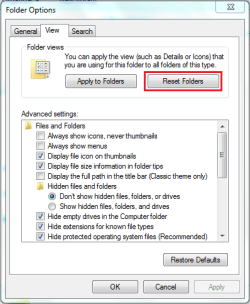
You could try resetting all folders to see if it helps...

Folder Options 2.PNG

I've seen many issues with folders not deleting until a refresh (F5) is performed and it has helped. Your issue sounds very similar in the fact that...

1, You may have already deleted the folder and Windows folder view has broken and needs resetting
2, When the folder view is broken deleted folders will still show. There'll be no error with the 1st delete but every delete after


OS
 

My Computer

Computer Manufacturer/Model Number
Compaq Desktop
OS
Windows 7 Ultimate x64
CPU
AMD Sempron Dual Core
Memory
3GB
Graphics Card(s)
NVIDIA GeForce 6150SE nForce 430
Screen Resolution
1024x768
Hard Drives
150GB Sata
Is the folder empty ? ?
 

My Computer

Computer Manufacturer/Model Number
Self-Built
OS
Vista Ultimate X64/ Windows 7 Dual-boot
CPU
Q6600
Motherboard
ASUS P5K
Memory
4G OCZ PC2 8500 Platinum
Graphics Card(s)
EVGA 8800GTS Vid Card
Hard Drives
500G Seagate SATA
200G Seagate SATA
100G WD Caviar SATA
80G WD Caviar IDE
PSU
OCZ Elite 800W PSU
Case
RaidMax Smilodon Case
hi all thanks i got rid of it with the rd command in dos!

Thanks for all your help

Chris
 

My Computer

OS
windows 7 premium 64 bit
In my research, many comments related to non-printable (not visible) characters being in the folder or filename - which is exactly what happened to me.

The solution of using 7 Zip is excellent. (Download 7 Zip from SourceForge.net - Safe site)

In a case that I had, there was a final " " Space(1) at the end of the folder name which is easily missed in Windows Explorer because it does not add the final backslash (i.e. "\") that 7 Zip does do. That made the solution more obvious therefore fixable.

My guess is that MS Trims the folder name (eliminating the trailing "Space") when it does its search, thus it cannot find the folder.

When you want to delete a folder but Explorer cannot find that folder, assume that there is a Space as the last character. Open a Cmd(.exe) window as Administrator and issue the following:
RMDIR "Your File Name " (Notice the Space after the word "Name")
This may well solve your challenge is a short time period.

BTW, this is an excellent Win 7 site! I have quickly found many safe and well documentated solutions here.

Thanks Dennis
 
Last edited:

My Computer

OS
Win 7 both 32 & 64
solved my folder deletion issue

I searched high and low trying to figure out why I couldn't delete file folders on my thumbdrive. Even though I was the administrator it kept telling me that I didn't have permission to delete or change the folder. And it wouldn't allow me to take ownership or change the permissions. I realized(after also seeing things such as "cant delete because folder is open in another window" etc.) that I might have a file folder name conflict. Sure enough, I took my thumbdrive to another computer that didn't have the same file names on it and I was then able to delete the folders. So glad this nightmare is over!!
 

My Computer

Computer type
PC/Desktop
OS
Windows 7 Home Premium 64 bit
New method

Alright so I'm running Windows 8.1 64 bit and I constantly get this message where my folder's location become unavailable and I'm unable to either delete it, move it, or even rename it. I have found that the sure fire method to getting rid of them is to move the folder to another location using unlocker and then you are able to delete it.

It took me a great deal of time and even accidentally deleting my entire Drive once just to get this answer but if you have a Windows 7 it may just also solve your problem so I hope this helps
 

My Computer

Computer type
PC/Desktop
OS
Windows 8.1 64 bit
Back
Top