can not install any os

GlobesStudios

Win7 Theme Designer
Power User
Local time
7:40 PM
Messages
177
if i try installing windows 7 it says windows is loading files.. when it finishes i have to wait around 10 hours for it to go into the installation screen and once i install it in the middle it says error, can not install please restart and try again.. every time..
when i try installing xp.. it shows setup is starting windows.. and then gives me blue screen of death!
what should i do?
 

My Computer

OS
Windows 7 Ultimate x64
CPU
Intel Core 2 Duo E8400
Motherboard
GIGABYTE GA-EX38-DS4
Memory
Mushkin DDR2 4096MB (2048MBx2) 800Mhz CL 5-5-5-18 SP
Graphics Card(s)
Club3D ATI Radeon HD4850 512MB PCIe
Monitor(s) Displays
Asus 22" VK222U 2ms LCD
Screen Resolution
1680x1050
Hard Drives
Seagate ST3500320AS 500GB SATA2 32MB
PSU
Enermax Pro82+ 525W
Case
NZXT Trinity
Cooling
Arctic Cooling Case Fan AF12025 120mm
Keyboard
Logitech Media Keyboard
Mouse
Logitech RX700 Cordless
Are you attempting a clean install or an upgrade?
 

My Computer

Computer type
PC/Desktop
Computer Manufacturer/Model Number
Ignatz Special; 4 speed manual gearbox; factory air conditioning; one of one
OS
Windows 7 Home Premium SP1, 64-bit
CPU
Intel Skylake i5-6600K, not overclocked
Motherboard
AsRock Z170M Extreme 4, micro ATX
Memory
8 GB HyperX DDR4-2666 (2 x 4 GB)
Graphics Card(s)
none; graphics are integrated on CPU
Sound Card
onboard: Realtek ALC1150; external: USB Behringer UF0-202
Monitor(s) Displays
Dell S2340M 23 inch IPS
Screen Resolution
1600 x 900
Hard Drives
System: Crucial MX100 series SSD, 128 GB;
Data: Samsung Spinpoint 103SJ, 1 TB;
Backup: WD Caviar Green WD30EZRX-00D8PB0, 3 TB
PSU
Rosewill SilentNight 500 watt fanless, semi-modular
Case
Antec Solo II
Cooling
Noctua NH-U12S; Noctua F12 intake, Noctua S12A exhaust
Keyboard
Microsoft 200 6JH-00001 USB
Mouse
Dell or Microsoft optical wired; USB
Antivirus
Microsoft Security Essentials and Malwarebytes Premium
Browser
Pale Moon
Other Info
All fans PWM; speeds at idle: CPU circa 500 rpm; intake circa 600 rpm; exhaust circa 600 rpm; CPU temps 27 idle and 47 C load in a warm room (27 C/81 F) when running Intel Extreme Tuning Utility stress test.
for some reason my password isn;t working and i cant get in.. so i decided to install on another partition until i figure out how to get back in.. with 7 im doing a clean install on a diffrent partition...
though it did say something about there already existing system files on it and that it will cahne them to windows.old or something..
with xp i dont even get to a stage i can choose like i said
 

My Computer

OS
Windows 7 Ultimate x64
CPU
Intel Core 2 Duo E8400
Motherboard
GIGABYTE GA-EX38-DS4
Memory
Mushkin DDR2 4096MB (2048MBx2) 800Mhz CL 5-5-5-18 SP
Graphics Card(s)
Club3D ATI Radeon HD4850 512MB PCIe
Monitor(s) Displays
Asus 22" VK222U 2ms LCD
Screen Resolution
1680x1050
Hard Drives
Seagate ST3500320AS 500GB SATA2 32MB
PSU
Enermax Pro82+ 525W
Case
NZXT Trinity
Cooling
Arctic Cooling Case Fan AF12025 120mm
Keyboard
Logitech Media Keyboard
Mouse
Logitech RX700 Cordless
Do you have any personal data that you care about anywhere on any partition on this hard drive?

To put it another way, would you care if all data and all information on any partition on that hard drive magically disappeared?
 

My Computer

Computer type
PC/Desktop
Computer Manufacturer/Model Number
Ignatz Special; 4 speed manual gearbox; factory air conditioning; one of one
OS
Windows 7 Home Premium SP1, 64-bit
CPU
Intel Skylake i5-6600K, not overclocked
Motherboard
AsRock Z170M Extreme 4, micro ATX
Memory
8 GB HyperX DDR4-2666 (2 x 4 GB)
Graphics Card(s)
none; graphics are integrated on CPU
Sound Card
onboard: Realtek ALC1150; external: USB Behringer UF0-202
Monitor(s) Displays
Dell S2340M 23 inch IPS
Screen Resolution
1600 x 900
Hard Drives
System: Crucial MX100 series SSD, 128 GB;
Data: Samsung Spinpoint 103SJ, 1 TB;
Backup: WD Caviar Green WD30EZRX-00D8PB0, 3 TB
PSU
Rosewill SilentNight 500 watt fanless, semi-modular
Case
Antec Solo II
Cooling
Noctua NH-U12S; Noctua F12 intake, Noctua S12A exhaust
Keyboard
Microsoft 200 6JH-00001 USB
Mouse
Dell or Microsoft optical wired; USB
Antivirus
Microsoft Security Essentials and Malwarebytes Premium
Browser
Pale Moon
Other Info
All fans PWM; speeds at idle: CPU circa 500 rpm; intake circa 600 rpm; exhaust circa 600 rpm; CPU temps 27 idle and 47 C load in a warm room (27 C/81 F) when running Intel Extreme Tuning Utility stress test.
i would car very very greatly..
i have three partitions on c:\ i have all my game save files
on d:\ i have around 400 gb of games movies tv shows.. and stuff
e:\ is less important and is wherer im trying to install another os...
i can't backup anything because i havebeen locked out my comp for some reason
 

My Computer

OS
Windows 7 Ultimate x64
CPU
Intel Core 2 Duo E8400
Motherboard
GIGABYTE GA-EX38-DS4
Memory
Mushkin DDR2 4096MB (2048MBx2) 800Mhz CL 5-5-5-18 SP
Graphics Card(s)
Club3D ATI Radeon HD4850 512MB PCIe
Monitor(s) Displays
Asus 22" VK222U 2ms LCD
Screen Resolution
1680x1050
Hard Drives
Seagate ST3500320AS 500GB SATA2 32MB
PSU
Enermax Pro82+ 525W
Case
NZXT Trinity
Cooling
Arctic Cooling Case Fan AF12025 120mm
Keyboard
Logitech Media Keyboard
Mouse
Logitech RX700 Cordless
Well, I am confused.

Your original post says:

"when i try installing xp.. it shows setup is starting windows.. and then gives me blue screen of death!"

So I thought you had no operating system at all and this was an empty drive.

So, forgetting about Windows 7, your biggest problem is that you cannot boot into Windows XP, which is your operating system? And you can't boot into it because you can't remember a password?

If that is right, why are you trying to install Windows 7 right now?
 

My Computer

Computer type
PC/Desktop
Computer Manufacturer/Model Number
Ignatz Special; 4 speed manual gearbox; factory air conditioning; one of one
OS
Windows 7 Home Premium SP1, 64-bit
CPU
Intel Skylake i5-6600K, not overclocked
Motherboard
AsRock Z170M Extreme 4, micro ATX
Memory
8 GB HyperX DDR4-2666 (2 x 4 GB)
Graphics Card(s)
none; graphics are integrated on CPU
Sound Card
onboard: Realtek ALC1150; external: USB Behringer UF0-202
Monitor(s) Displays
Dell S2340M 23 inch IPS
Screen Resolution
1600 x 900
Hard Drives
System: Crucial MX100 series SSD, 128 GB;
Data: Samsung Spinpoint 103SJ, 1 TB;
Backup: WD Caviar Green WD30EZRX-00D8PB0, 3 TB
PSU
Rosewill SilentNight 500 watt fanless, semi-modular
Case
Antec Solo II
Cooling
Noctua NH-U12S; Noctua F12 intake, Noctua S12A exhaust
Keyboard
Microsoft 200 6JH-00001 USB
Mouse
Dell or Microsoft optical wired; USB
Antivirus
Microsoft Security Essentials and Malwarebytes Premium
Browser
Pale Moon
Other Info
All fans PWM; speeds at idle: CPU circa 500 rpm; intake circa 600 rpm; exhaust circa 600 rpm; CPU temps 27 idle and 47 C load in a warm room (27 C/81 F) when running Intel Extreme Tuning Utility stress test.
i dont have xp installed, my main os is windows 7.
i forgot my password on 7, and i am just pointing out that i can not install any os now :S
 

My Computer

OS
Windows 7 Ultimate x64
CPU
Intel Core 2 Duo E8400
Motherboard
GIGABYTE GA-EX38-DS4
Memory
Mushkin DDR2 4096MB (2048MBx2) 800Mhz CL 5-5-5-18 SP
Graphics Card(s)
Club3D ATI Radeon HD4850 512MB PCIe
Monitor(s) Displays
Asus 22" VK222U 2ms LCD
Screen Resolution
1680x1050
Hard Drives
Seagate ST3500320AS 500GB SATA2 32MB
PSU
Enermax Pro82+ 525W
Case
NZXT Trinity
Cooling
Arctic Cooling Case Fan AF12025 120mm
Keyboard
Logitech Media Keyboard
Mouse
Logitech RX700 Cordless
In an earlier post you said:

"with 7 im doing a clean install on a diffrent partition."

Why a different partition? Why not on the same partition Windows 7 is already on?
 

My Computer

Computer type
PC/Desktop
Computer Manufacturer/Model Number
Ignatz Special; 4 speed manual gearbox; factory air conditioning; one of one
OS
Windows 7 Home Premium SP1, 64-bit
CPU
Intel Skylake i5-6600K, not overclocked
Motherboard
AsRock Z170M Extreme 4, micro ATX
Memory
8 GB HyperX DDR4-2666 (2 x 4 GB)
Graphics Card(s)
none; graphics are integrated on CPU
Sound Card
onboard: Realtek ALC1150; external: USB Behringer UF0-202
Monitor(s) Displays
Dell S2340M 23 inch IPS
Screen Resolution
1600 x 900
Hard Drives
System: Crucial MX100 series SSD, 128 GB;
Data: Samsung Spinpoint 103SJ, 1 TB;
Backup: WD Caviar Green WD30EZRX-00D8PB0, 3 TB
PSU
Rosewill SilentNight 500 watt fanless, semi-modular
Case
Antec Solo II
Cooling
Noctua NH-U12S; Noctua F12 intake, Noctua S12A exhaust
Keyboard
Microsoft 200 6JH-00001 USB
Mouse
Dell or Microsoft optical wired; USB
Antivirus
Microsoft Security Essentials and Malwarebytes Premium
Browser
Pale Moon
Other Info
All fans PWM; speeds at idle: CPU circa 500 rpm; intake circa 600 rpm; exhaust circa 600 rpm; CPU temps 27 idle and 47 C load in a warm room (27 C/81 F) when running Intel Extreme Tuning Utility stress test.
In an earlier post you said:

"with 7 im doing a clean install on a diffrent partition."

Why a different partition? Why not on the same partition Windows 7 is already on?

because w7 is on c:\ wich contains all my save files for games...
and there is not enough room to install on there without formating the drive.

so my plan was install w7 on another partition.. or any other os..
then burn a password recovery tool to a disc.. and get my password back..
because i dont have access o another burner...

but i can't seem to install any operating system
 

My Computer

OS
Windows 7 Ultimate x64
CPU
Intel Core 2 Duo E8400
Motherboard
GIGABYTE GA-EX38-DS4
Memory
Mushkin DDR2 4096MB (2048MBx2) 800Mhz CL 5-5-5-18 SP
Graphics Card(s)
Club3D ATI Radeon HD4850 512MB PCIe
Monitor(s) Displays
Asus 22" VK222U 2ms LCD
Screen Resolution
1680x1050
Hard Drives
Seagate ST3500320AS 500GB SATA2 32MB
PSU
Enermax Pro82+ 525W
Case
NZXT Trinity
Cooling
Arctic Cooling Case Fan AF12025 120mm
Keyboard
Logitech Media Keyboard
Mouse
Logitech RX700 Cordless
please guys this is really urgent
 

My Computer

OS
Windows 7 Ultimate x64
CPU
Intel Core 2 Duo E8400
Motherboard
GIGABYTE GA-EX38-DS4
Memory
Mushkin DDR2 4096MB (2048MBx2) 800Mhz CL 5-5-5-18 SP
Graphics Card(s)
Club3D ATI Radeon HD4850 512MB PCIe
Monitor(s) Displays
Asus 22" VK222U 2ms LCD
Screen Resolution
1680x1050
Hard Drives
Seagate ST3500320AS 500GB SATA2 32MB
PSU
Enermax Pro82+ 525W
Case
NZXT Trinity
Cooling
Arctic Cooling Case Fan AF12025 120mm
Keyboard
Logitech Media Keyboard
Mouse
Logitech RX700 Cordless
First and Most Important

Protect your data or you'll loose it!:cry:
Your safest option would be to take the hard drive out of your computer and place it in another computer and save your data before you go anywhere with your current plan of attack. You'll be much happier; it takes less then a second to loose hundreds of hours of work.:mad::shock::sick::eek:
Once you are free from the stress you'll be able to be more creative with your options of fixing your problem.:)
 

My Computer

Computer Manufacturer/Model Number
IceMicro
OS
6@Win XP 1@Vista (1@Win 7 (Mine))
CPU
AMD Phenom XII 550 Black 3.1Ghz Unlocked to 4cores at 3.1Ghz
Motherboard
Gigabyte GA-M790X-UD4P
Memory
4 (2 X 2) Gig OCZ Reaper DDR2 800
Graphics Card(s)
Gigabyte HD4670 1Gig DDR3
Sound Card
On Board
Monitor(s) Displays
Gateway 22" LCD
Screen Resolution
1650 X 1080
Hard Drives
WD SATA 3Gbs 500Gig
Hitichi SATA 3Gbs 500Gig
PSU
Coolmaster 560W
Case
NZXT
Cooling
Stock plus added case fans
Keyboard
Microsoft Egronomic
Mouse
Microsoft Wireless Laser 5000
Internet Speed
768K DSL
Protect your data or you'll loose it!:cry:
Your safest option would be to take the hard drive out of your computer and place it in another computer and save your data before you go anywhere with your current plan of attack. You'll be much happier; it takes less then a second to loose hundreds of hours of work.:mad::shock::sick::eek:
Once you are free from the stress you'll be able to be more creative with your options of fixing your problem.:)


If he can't remember his password what good would it do to remove the hard drive and put it in another comp:huh: you got the same prob.

Smitty
 

My Computer

Computer Manufacturer/Model Number
Dell XPS 730
OS
Windows 7 Home Premium 64 bit
CPU
Intel Core 2 quad Extreme Q9770 @ 3.2 GHz
Memory
4x2 GB Muskin 1600 MHz ram
Graphics Card(s)
NVidia GTX 250
Sound Card
Soundblaster X-Fi Fatality Champion
Monitor(s) Displays
2 Dell 2007WFP Ultrascans
Screen Resolution
3360 x 1050
Hard Drives
WD Black 1TB sata, 2-WD Black 500 sata, 2-Seagate 500 Go external
PSU
1000 Watt
Cooling
air
Keyboard
MS Natrual Keyboard Pro
Mouse
Logitech Wireless Trackball
Internet Speed
DSL Elite
Don't switch drives in the second comp. Just add it in and then boot up and copy needed files to a thumbdrive or dvd or something. Might have to http://www.sevenforums.com/tutorials/1911-take-ownership-shortcut.html or something. There is a hidden Admin acct. in Seven, have you tried going into that. You could save stuff or maybe change the other accounts password to get back in. Info here if needed: http://www.sevenforums.com/tutorials/507-built-administrator-account-enable-disable.html

Hope this helps.

Gary
 

My Computer

Computer Manufacturer/Model Number
Dell XPS420
OS
Vista Ult 64 bit Seven Ult RTM x64
CPU
Intel Core2 Quad Q6600 2.40 gigahertz
Memory
Crucial Ballistix 4x2GB PC2 6400
Graphics Card(s)
NVIDIA GeForce 8600 GTS 256 MB
Sound Card
Creative SB X-Fi audio
Monitor(s) Displays
HP w2207 + HPvs15
Screen Resolution
1680x1050 + 1024x768
Hard Drives
2-WD5000AAKS-500 GB
WD5000AAV-500 GB external
Keyboard
Microsoft Comfort Curve
Mouse
MX Revolution
Other Info
Wacom Intuos 2 Graphics Tablet
Experience Index=5.5
Don't switch drives in the second comp. Just add it in and then boot up and copy needed files to a thumbdrive or dvd or something. Might have to http://www.sevenforums.com/tutorials/1911-take-ownership-shortcut.html or something. There is a hidden Admin acct. in Seven, have you tried going into that. You could save stuff or maybe change the other accounts password to get back in. Info here if needed: http://www.sevenforums.com/tutorials/507-built-administrator-account-enable-disable.html

Hope this helps.

Gary

Protect your data or you'll loose it!:cry:
Your safest option would be to take the hard drive out of your computer and place it in another computer and save your data before you go anywhere with your current plan of attack. You'll be much happier; it takes less then a second to loose hundreds of hours of work.:mad::shock::sick::eek:
Once you are free from the stress you'll be able to be more creative with your options of fixing your problem.:)

i dont know the password, for my admin account wich, is why im formatting
knowone is adressing the not being able tyo install any os... which is the problem i posted... lol
 

My Computer

OS
Windows 7 Ultimate x64
CPU
Intel Core 2 Duo E8400
Motherboard
GIGABYTE GA-EX38-DS4
Memory
Mushkin DDR2 4096MB (2048MBx2) 800Mhz CL 5-5-5-18 SP
Graphics Card(s)
Club3D ATI Radeon HD4850 512MB PCIe
Monitor(s) Displays
Asus 22" VK222U 2ms LCD
Screen Resolution
1680x1050
Hard Drives
Seagate ST3500320AS 500GB SATA2 32MB
PSU
Enermax Pro82+ 525W
Case
NZXT Trinity
Cooling
Arctic Cooling Case Fan AF12025 120mm
Keyboard
Logitech Media Keyboard
Mouse
Logitech RX700 Cordless
dont need to format anymore because i got access to a burner..
now i jut need a password recovery tool that will bypass my password and works with windows 7 64bit
 

My Computer

OS
Windows 7 Ultimate x64
CPU
Intel Core 2 Duo E8400
Motherboard
GIGABYTE GA-EX38-DS4
Memory
Mushkin DDR2 4096MB (2048MBx2) 800Mhz CL 5-5-5-18 SP
Graphics Card(s)
Club3D ATI Radeon HD4850 512MB PCIe
Monitor(s) Displays
Asus 22" VK222U 2ms LCD
Screen Resolution
1680x1050
Hard Drives
Seagate ST3500320AS 500GB SATA2 32MB
PSU
Enermax Pro82+ 525W
Case
NZXT Trinity
Cooling
Arctic Cooling Case Fan AF12025 120mm
Keyboard
Logitech Media Keyboard
Mouse
Logitech RX700 Cordless
Don't switch drives in the second comp. Just add it in and then boot up and copy needed files to a thumbdrive or dvd or something. Might have to http://www.sevenforums.com/tutorials/1911-take-ownership-shortcut.html or something. There is a hidden Admin acct. in Seven, have you tried going into that. You could save stuff or maybe change the other accounts password to get back in. Info here if needed: http://www.sevenforums.com/tutorials/507-built-administrator-account-enable-disable.html

Hope this helps.

Gary

Protect your data or you'll loose it!:cry:
Your safest option would be to take the hard drive out of your computer and place it in another computer and save your data before you go anywhere with your current plan of attack. You'll be much happier; it takes less then a second to loose hundreds of hours of work.:mad::shock::sick::eek:
Once you are free from the stress you'll be able to be more creative with your options of fixing your problem.:)

i dont know the password, for my admin account wich, is why im formatting
knowone is adressing the not being able tyo install any os... which is the problem i posted... lol

This is not the acct. you created when you installed the OS, hence the term 'Hidden' acct. If you have never activated the account it does not yet have a password. Just want to be clear that these are two different accounts. If you have activated it and have forgotten the password to both accounts, then we are trying to make sure the data is saved as you indicated you didn't want to lose it. As I said, you may be able to change the password from this other admin acct. which would give you access to your acct. Or you can create another acct. and move all the needed files from the old acct. to the new one. I've done this when an acct. got corrupted. I recommend deactivating the admin acct. when your done.

Gary
 

My Computer

Computer Manufacturer/Model Number
Dell XPS420
OS
Vista Ult 64 bit Seven Ult RTM x64
CPU
Intel Core2 Quad Q6600 2.40 gigahertz
Memory
Crucial Ballistix 4x2GB PC2 6400
Graphics Card(s)
NVIDIA GeForce 8600 GTS 256 MB
Sound Card
Creative SB X-Fi audio
Monitor(s) Displays
HP w2207 + HPvs15
Screen Resolution
1680x1050 + 1024x768
Hard Drives
2-WD5000AAKS-500 GB
WD5000AAV-500 GB external
Keyboard
Microsoft Comfort Curve
Mouse
MX Revolution
Other Info
Wacom Intuos 2 Graphics Tablet
Experience Index=5.5
i never activated an admin account
how do i access it?
 

My Computer

OS
Windows 7 Ultimate x64
CPU
Intel Core 2 Duo E8400
Motherboard
GIGABYTE GA-EX38-DS4
Memory
Mushkin DDR2 4096MB (2048MBx2) 800Mhz CL 5-5-5-18 SP
Graphics Card(s)
Club3D ATI Radeon HD4850 512MB PCIe
Monitor(s) Displays
Asus 22" VK222U 2ms LCD
Screen Resolution
1680x1050
Hard Drives
Seagate ST3500320AS 500GB SATA2 32MB
PSU
Enermax Pro82+ 525W
Case
NZXT Trinity
Cooling
Arctic Cooling Case Fan AF12025 120mm
Keyboard
Logitech Media Keyboard
Mouse
Logitech RX700 Cordless
What Version of Windows 7 do you Have??

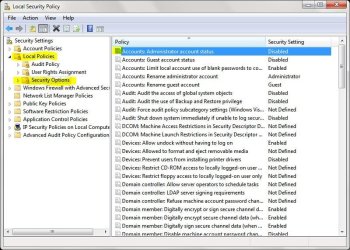
If you have Professional or Higher than click the start button and search Local Security Policy..

And then when that Window opens click the down arrow of Local Policies under that click the Security options. after that look for Accounts Administrator account status. and then enable it.. if you have not activated it..it will not have any password to it..
Admin.JPG

Hope this Helps..
 

My Computer

Computer Manufacturer/Model Number
HP Pavilion dv5 Notebook PC
OS
Windows Seven x64
CPU
2.2 GHz Dual Core
Motherboard
Quanta 3600
Memory
4GB
Graphics Card(s)
ATI Mobility RADEON HD 3470
Sound Card
ATI
Monitor(s) Displays
Laptop
Hard Drives
ATA Hitachi HTS543215 (5400RPM)
Case
Laptop
Cooling
Fan
Internet Speed
Basic DSL 1.5 up and Down
nvm i solved the problem, thanks anyway guys
 

My Computer

OS
Windows 7 Ultimate x64
CPU
Intel Core 2 Duo E8400
Motherboard
GIGABYTE GA-EX38-DS4
Memory
Mushkin DDR2 4096MB (2048MBx2) 800Mhz CL 5-5-5-18 SP
Graphics Card(s)
Club3D ATI Radeon HD4850 512MB PCIe
Monitor(s) Displays
Asus 22" VK222U 2ms LCD
Screen Resolution
1680x1050
Hard Drives
Seagate ST3500320AS 500GB SATA2 32MB
PSU
Enermax Pro82+ 525W
Case
NZXT Trinity
Cooling
Arctic Cooling Case Fan AF12025 120mm
Keyboard
Logitech Media Keyboard
Mouse
Logitech RX700 Cordless
Back
Top