Can not play commercial DVD movies with win7 ultimate

sdowney717

New member
Power User
VIP
Local time
4:44 PM
Messages
705
The only player that has been able to play a movie so far is powerdvd demo program.

How can I make it play with

VLC just a black screen

MPC-HC copy protection fail

WMP some error about protection scheme and video drivers

or any other normal video player?
Does win7 ultimate not allow you to play dvd discs?

I thought at least VLC could play dvd
 

My Computer My Computer

At a glance

Windows 7 Ultimate x64
OS
Windows 7 Ultimate x64
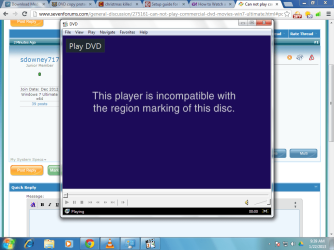
ok tried a different disc and get this error
incompatible region.

When powerdvd first ran, it said something about setting regions and I choose the US-Canada, I live in the US.
 

Attachments

  • mp.png
    mp.png
    70.2 KB · Views: 4

My Computer My Computer

At a glance

Windows 7 Ultimate x64
OS
Windows 7 Ultimate x64
I tried some more region free dvd players and they all fail to play.
So far the only software which can play dvd's is the powerDVD
cyberlink software.

I can play in ubuntu with no issue, so there is no real hardware issue, does win7 do something very restrictive that earlier windows versions did not do?

Anyone care to share the secret solution to this?
 

My Computer My Computer

At a glance

Windows 7 Ultimate x64
OS
Windows 7 Ultimate x64
tried the corel windvd pro and it claimed drive was on region 0
So I told it to set to region 1
Anyway it can not play dvd either.

So far only one that can is cyberlink powerdvd
 

My Computer My Computer

At a glance

Windows 7 Ultimate x64
OS
Windows 7 Ultimate x64
What region are you in ? Region # and what region are you trying to play ?

Is this a dvd that you bought in your local store ? Are all your dvd`s the same region ?

Do you have any region fee dvd`s you can try ?

Windows media center and player should easily be playing your dvd`s.
 

My Computer My Computer

At a glance

Windows 10 Pro x64Intel Core i7 6700KGSkill TridentZ RGB 16GB 3600 16-16-16-36EVGA GTX 980 Ti SC x2
Computer type
PC/Desktop
Computer Manufacturer/Model Number
Skylake Special #666
OS
Windows 10 Pro x64
CPU
Intel Core i7 6700K
Motherboard
Asus Sabertooth Z170 Mark 1
Memory
GSkill TridentZ RGB 16GB 3600 16-16-16-36
Graphics Card(s)
EVGA GTX 980 Ti SC x2
Sound Card
Realtek High Definition
Monitor(s) Displays
AOC G2460PG
Screen Resolution
1920 x 1080 144Hz
Hard Drives
Samsung 860 Pro 256GB, Seagate Barracuda 4TB x2
PSU
EVGA 1000 P2, EVGA White Custom Braided Cables
Case
Corsair Vengeance C70 Gunmetal Black
Cooling
Corsair H100i v2, Corsair ML120 x2, Thermal Grizzly Kryonaut
Keyboard
Logitech G910 Orion Spectrum
Mouse
Logitech G700s
Internet Speed
Verizon Fios Quantum Gateway 75/75
Antivirus
Windows Defender, Malwarebytes Free 3.8.3
Browser
Chrome
Other Info
Corsair SP120 x4, LG Blu-ray Drive, Durabrand HT-395 100 Watt Dolby Digital Amp, Corsair H2100 Wireless 7.1 Headset
I am in USA Virginia so region 1

Trying to play a region 1 disk

region free disks I dont know, would they be older DVD?

Windows media center and player should easily be playing your dvd`s
, I Wish so too!

The player drive number is GD2000, an older unit.

I have a ELR DVD disk I copied to my hard drive. That plays over the LAN using WMP as in
hit alt - open file - navigate to network shared folder and select a vob file.
 

My Computer My Computer

At a glance

Windows 7 Ultimate x64
OS
Windows 7 Ultimate x64
Yes, it can play a DVD disc I suppose it is not encrypted.
Called Anne of Green Gables, plays just fine using WMP
 

My Computer My Computer

At a glance

Windows 7 Ultimate x64
OS
Windows 7 Ultimate x64
Dvd`s have been around since 1997, check the date of the player, but that should not be the problem. A dvd player will play any retail dvd. You could always get a new player, they are so cheap.
 

My Computer My Computer

At a glance

Windows 10 Pro x64Intel Core i7 6700KGSkill TridentZ RGB 16GB 3600 16-16-16-36EVGA GTX 980 Ti SC x2
Computer type
PC/Desktop
Computer Manufacturer/Model Number
Skylake Special #666
OS
Windows 10 Pro x64
CPU
Intel Core i7 6700K
Motherboard
Asus Sabertooth Z170 Mark 1
Memory
GSkill TridentZ RGB 16GB 3600 16-16-16-36
Graphics Card(s)
EVGA GTX 980 Ti SC x2
Sound Card
Realtek High Definition
Monitor(s) Displays
AOC G2460PG
Screen Resolution
1920 x 1080 144Hz
Hard Drives
Samsung 860 Pro 256GB, Seagate Barracuda 4TB x2
PSU
EVGA 1000 P2, EVGA White Custom Braided Cables
Case
Corsair Vengeance C70 Gunmetal Black
Cooling
Corsair H100i v2, Corsair ML120 x2, Thermal Grizzly Kryonaut
Keyboard
Logitech G910 Orion Spectrum
Mouse
Logitech G700s
Internet Speed
Verizon Fios Quantum Gateway 75/75
Antivirus
Windows Defender, Malwarebytes Free 3.8.3
Browser
Chrome
Other Info
Corsair SP120 x4, LG Blu-ray Drive, Durabrand HT-395 100 Watt Dolby Digital Amp, Corsair H2100 Wireless 7.1 Headset
The DVD drive is bad? Just too old to work, my thinking is I get a newer one it still wont play.
The whole computer is old, this is an intel server board 478 CPU with 2.8ghz pentium 4
We have it for our taxes and word processing.

I just tried the k-lite codec pack and still wont play the ENCRYPTED dvd's
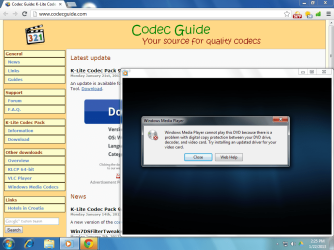
here is the message you get with WMP playing an encrypted DVD

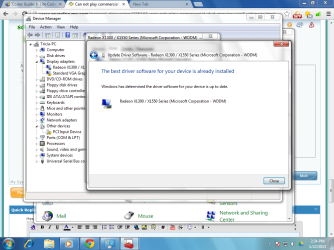
Also just tried upgradin vid driver and windows says it is fine.

Somewhere, I have a disk with some kind of dvd decoder that worked with winxp. It came bundled with a dvd writer. That did make winxp play these dvd. But I will have to search hard to find that.
 

Attachments

  • wmp2.png
    wmp2.png
    98.7 KB · Views: 7
  • wmp3.png
    wmp3.png
    81.4 KB · Views: 7

My Computer My Computer

At a glance

Windows 7 Ultimate x64
OS
Windows 7 Ultimate x64

My Computer My Computer

At a glance

Windows 7 Ultimate 32bit SP1Intel(R) Core(TM)2 Quad CPU @ 2.40GHz, 2400 MHz4 GBATI Radeon HD 2600 Pro
Computer type
PC/Desktop
Computer Manufacturer/Model Number
Bruce ... somewhere in his 40's
OS
Windows 7 Ultimate 32bit SP1
CPU
Intel(R) Core(TM)2 Quad CPU @ 2.40GHz, 2400 MHz
Motherboard
INTEL/D975XBX2
Memory
4 GB
Graphics Card(s)
ATI Radeon HD 2600 Pro
Monitor(s) Displays
Samsung SyncMaster 914v
Screen Resolution
1280 x 1024
Hard Drives
2/500GB each ... ST3500630AS ATA Device.
One is not connected
PSU
Rocketfish 700 W
Case
G.Skill Gigabyte Chassis
Keyboard
Standard PS/2 Keyboard
Mouse
Microsoft PS/2 Mouse
Internet Speed
DSL
Antivirus
Avira Internet Security
Browser
IE 11
Other Info
ATI HDMI Audio
Check the manufacturer's website ...

You may have to go to the manufacturer's website to get the latest driver for your graphics card.

I find the Windows Driver Updater to be a bit "hit and miss".

I've used K-Lite Mega Codec Pack (with Media Player Classic - Home Cinema) for years.
The only problems I've had:

  • A couple of years ago rmvb files stopped playing (that problem was fixed after about 6 months)
  • Occasionally Flash videos won't play (those times I use VLC)
 

My Computer My Computer

At a glance

W7 Ultimate SP1, LM19.2 MATE, W10 Home 1703, ...AMD Phenom II x6 1100T, 3.3 GHz12GB DDR3 1333 G-Skill (4GB x 2), G-Skill (2G...NVIDIA GeForce GTX 660
Computer type
PC/Desktop
Computer Manufacturer/Model Number
n/a
OS
W7 Ultimate SP1, LM19.2 MATE, W10 Home 1703, W10 Pro 1703 VM, #All 64 bit
CPU
AMD Phenom II x6 1100T, 3.3 GHz
Motherboard
ASUS M4A88T-M/USB3 (AM3)
Memory
12GB DDR3 1333 G-Skill (4GB x 2), G-Skill (2GB x 2)
Graphics Card(s)
NVIDIA GeForce GTX 660
Sound Card
Realtek?
Monitor(s) Displays
Samsung S23B350
Screen Resolution
1920x1080
Hard Drives
WD Green 2TB (SATA), WD Green 3TB (SATA), WD Blue 4TB (SATA), WD Blue 6TB (SATA)
PSU
Cooler Master
Case
Antec GX300 Tower
Cooling
3x Antec TRICOOL 120mm Fans
Mouse
Wired Optical
Internet Speed
DSL
Antivirus
Avast
Browser
Pale Moon (64 bit)
Other Info
2018-12-27 Upgraded HDDs
2015-12-10 Upgraded case, graphics card, storage
2015-08-15 Upgraded motherboard & RAM
2015-07-15 Upgraded LM17.1 to LM17.2
Try running slysoft's AnyDVD in the background while you play DVDs. It's not free sadly, but you can try it for (I think) 21 days before purchasing it to see if it does resolve your issue. Not a "fix" per-se, but a viable work-around.
 

My Computer My Computer

At a glance

Win7 Home Premium x64Intel Core i7 Extreme 990X @ 3.47GHz x616GB DDR3NVidia GeForce GTX460
Computer type
PC/Desktop
Computer Manufacturer/Model Number
HP Pavillion Elite HPE-590t
OS
Win7 Home Premium x64
CPU
Intel Core i7 Extreme 990X @ 3.47GHz x6
Motherboard
PEGATRON CORPORATION 2A86
Memory
16GB DDR3
Graphics Card(s)
NVidia GeForce GTX460
Monitor(s) Displays
Samsung SyncMaster 2443ewx
Screen Resolution
1920x1200
Hard Drives
160 GB SSD @ 2 TB 7200 Internal
750 GB HP, 2 TB WD, 2 TB Samsung External & 3 TB G-Tech firewire external
You should not have to add anything to Windows 7 to play a dvd, and just because your pc is old has nothing to do with it.

I have a Dell 4550 (2003) with a 478 Pentium 4 2.6 and QuadroFX video card, runs dvd`s fine.

Why are you even trying to watch dvd`s on it.
 

My Computer My Computer

At a glance

Windows 10 Pro x64Intel Core i7 6700KGSkill TridentZ RGB 16GB 3600 16-16-16-36EVGA GTX 980 Ti SC x2
Computer type
PC/Desktop
Computer Manufacturer/Model Number
Skylake Special #666
OS
Windows 10 Pro x64
CPU
Intel Core i7 6700K
Motherboard
Asus Sabertooth Z170 Mark 1
Memory
GSkill TridentZ RGB 16GB 3600 16-16-16-36
Graphics Card(s)
EVGA GTX 980 Ti SC x2
Sound Card
Realtek High Definition
Monitor(s) Displays
AOC G2460PG
Screen Resolution
1920 x 1080 144Hz
Hard Drives
Samsung 860 Pro 256GB, Seagate Barracuda 4TB x2
PSU
EVGA 1000 P2, EVGA White Custom Braided Cables
Case
Corsair Vengeance C70 Gunmetal Black
Cooling
Corsair H100i v2, Corsair ML120 x2, Thermal Grizzly Kryonaut
Keyboard
Logitech G910 Orion Spectrum
Mouse
Logitech G700s
Internet Speed
Verizon Fios Quantum Gateway 75/75
Antivirus
Windows Defender, Malwarebytes Free 3.8.3
Browser
Chrome
Other Info
Corsair SP120 x4, LG Blu-ray Drive, Durabrand HT-395 100 Watt Dolby Digital Amp, Corsair H2100 Wireless 7.1 Headset
Are you by any chance running WinTV on your PC? If so, this can cause the error message you get about installing the latest video driver, etc. Just uninstall WinTV.
 

My Computer My Computer

At a glance

Windows 7 Professional x64Intel Core i7-4790 CPU @ 3.60GHz (Haswell)16 GBNVIDIA GeForce GTX 745 4GB DDR 3
Computer type
PC/Desktop
Computer Manufacturer/Model Number
Dell XPS8700
OS
Windows 7 Professional x64
CPU
Intel Core i7-4790 CPU @ 3.60GHz (Haswell)
Motherboard
Dell Lynx Point Z87 Chipset motherboard
Memory
16 GB
Graphics Card(s)
NVIDIA GeForce GTX 745 4GB DDR 3
Sound Card
NVIDIA High Definition Audio
Monitor(s) Displays
HP Pavilion 27bw 27"
Screen Resolution
1920 x 1080 @ 60 Hz
Hard Drives
Seagate ST2000DM001 2 TB
Internet Speed
150 mb/s
Antivirus
Microsoft Security Essentials
Browser
Google Chrome
No winTV installed.
Just wanted to make it work.

I put another DVD player-writer Lite-on which was made in 2006 and it now plays DVD in WMP fine.
No hiccups just like any powerful new PC today.

What I think is it must have some firmware that tells WMP, I can play this DVD legally.
Something the older DVD drive is missing.

IMO, this kind of thing is forced hardware upgrades where a collusion exists between software and hardware makers forcing consumers to buy new hardware and dropping support for perfectly good old hardware. And it happens on many things. The older DVD player was perfectly acceptable, worked for reading DVD and CD's, not writing them.

So If they wanted they could make it work, but they dont and they wont. Of course it works fine in Linux and with PowerDVD.

The old Drive is Hitachi GD-2000 which used to be in a Compaq PC and I think was made around 2000.

Also the windows property page did not show a DVD page, so also might be a windows driver issue.

Here is the new one
 

Attachments

  • wmp4.png
    wmp4.png
    74.7 KB · Views: 3

My Computer My Computer

At a glance

Windows 7 Ultimate x64
OS
Windows 7 Ultimate x64
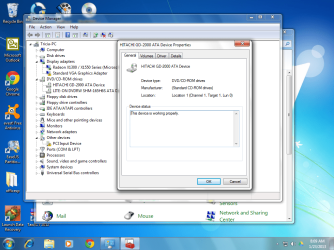
here is the GD-2000 property page not showing DVD for regions.
I have them both installed.

I wonder if windows since it is complaining about being incompatible with the region marking on this disk has to do with the drive not showing a DVD region in the properties page. So windows says it has no region, and then I wont play the disk idea.
 

Attachments

  • wmp6.png
    wmp6.png
    125 KB · Views: 5

My Computer My Computer

At a glance

Windows 7 Ultimate x64
OS
Windows 7 Ultimate x64
:D:D
 

My Computer My Computer

At a glance

Windows 10 Pro x64Intel Core i7 6700KGSkill TridentZ RGB 16GB 3600 16-16-16-36EVGA GTX 980 Ti SC x2
Computer type
PC/Desktop
Computer Manufacturer/Model Number
Skylake Special #666
OS
Windows 10 Pro x64
CPU
Intel Core i7 6700K
Motherboard
Asus Sabertooth Z170 Mark 1
Memory
GSkill TridentZ RGB 16GB 3600 16-16-16-36
Graphics Card(s)
EVGA GTX 980 Ti SC x2
Sound Card
Realtek High Definition
Monitor(s) Displays
AOC G2460PG
Screen Resolution
1920 x 1080 144Hz
Hard Drives
Samsung 860 Pro 256GB, Seagate Barracuda 4TB x2
PSU
EVGA 1000 P2, EVGA White Custom Braided Cables
Case
Corsair Vengeance C70 Gunmetal Black
Cooling
Corsair H100i v2, Corsair ML120 x2, Thermal Grizzly Kryonaut
Keyboard
Logitech G910 Orion Spectrum
Mouse
Logitech G700s
Internet Speed
Verizon Fios Quantum Gateway 75/75
Antivirus
Windows Defender, Malwarebytes Free 3.8.3
Browser
Chrome
Other Info
Corsair SP120 x4, LG Blu-ray Drive, Durabrand HT-395 100 Watt Dolby Digital Amp, Corsair H2100 Wireless 7.1 Headset
Back
Top