Solved Can not reinstall IE11 after uninstalling it

jstill1959

New member
Local time
9:11 PM
Messages
7
My computer would not bring up IE11 so I thought I had a virus. I ran several virus removal programs and it still would not come up. I uninstalled IE11 through Installed Updates and ran Microsoft's Safety Removal Tool and it found some things and I can now bring up IE10. I have tried several ways to install IE11 but it does not install. Attached are the DISM log and CheckSur log. I also ran SFC /Scannow and no errors were found. I updated Java to the latest version and than tried to reinstall IE11. Attached is the IE11 Main Log.

The ChecksurPersist File contained the following:

Unavailable repair files:
servicing\packages\Microsoft-Windows-IE-Hyphenation-Parent-Package-English~31bf3856ad364e35~~~10.2.9200.16437.mum
servicing\packages\Microsoft-Windows-IE-Spelling-Parent-Package-English~31bf3856ad364e35~~~10.2.9200.16437.mum
servicing\packages\Microsoft-Windows-IE-Hyphenation-Parent-Package-English~31bf3856ad364e35~~~10.2.9200.16437.cat
servicing\packages\Microsoft-Windows-IE-Spelling-Parent-Package-English~31bf3856ad364e35~~~10.2.9200.16437.cat
 

Attachments

Last edited:

My Computer My Computer

At a glance

Windows 7 64-bit Home Editioni3-21206GBIntel HD Graphics
Computer type
PC/Desktop
Computer Manufacturer/Model Number
Lenovo
OS
Windows 7 64-bit Home Edition
CPU
i3-2120
Motherboard
Unknown
Memory
6GB
Graphics Card(s)
Intel HD Graphics
Hard Drives
1TB ST31000524AS
Antivirus
Windows Secure Essentials
Browser
Chrome and Internet Explorer 10
Hi jstill1959 & welcome to sevenforums.

I'll look over your logs.

I believe I have the missing files, easy to replace.

Might be morning before I get back to you. I'm in Michigan 11:30 pm here.
 

My Computer My Computer

At a glance

Win 7 Home Premium x64/Linux Lite 2.6 x64
Computer type
Laptop
OS
Win 7 Home Premium x64/Linux Lite 2.6 x64
Thanks. I'll check in the morning.
 

My Computer My Computer

At a glance

Windows 7 64-bit Home Editioni3-21206GBIntel HD Graphics
Computer type
PC/Desktop
Computer Manufacturer/Model Number
Lenovo
OS
Windows 7 64-bit Home Edition
CPU
i3-2120
Motherboard
Unknown
Memory
6GB
Graphics Card(s)
Intel HD Graphics
Hard Drives
1TB ST31000524AS
Antivirus
Windows Secure Essentials
Browser
Chrome and Internet Explorer 10
Here's the missing cats & mums

Extract Packages folder to desktop

Navigate to: C:\Windows\Temp\CheckSUR \servicing

If CheckSUR folder doesn't exist create it

If servicing folder doesn't exist create it

Place Packages folder in services folder

Run SURT tool again, will place contents in proper location and maintain ownership to TrustedInstaller

post log & try to install IE11 again. I doubt it will install, but missing files will be replaced. I help you with the IE11 installation after.

If IE11 fails again post WindowsUpdate.log

location C:\Windows

Nite! :sleepy:
 

Attachments

My Computer My Computer

At a glance

Win 7 Home Premium x64/Linux Lite 2.6 x64
Computer type
Laptop
OS
Win 7 Home Premium x64/Linux Lite 2.6 x64
I put the files in the folder you indicated and rerun SURT and no errors, but IE11 would not install. I ran DISM again and had the same errors. I am attaching the ChuckSur, CheckSurPersist, DISM, and WindowsUpdate logs.
 

Attachments

My Computer My Computer

At a glance

Windows 7 64-bit Home Editioni3-21206GBIntel HD Graphics
Computer type
PC/Desktop
Computer Manufacturer/Model Number
Lenovo
OS
Windows 7 64-bit Home Edition
CPU
i3-2120
Motherboard
Unknown
Memory
6GB
Graphics Card(s)
Intel HD Graphics
Hard Drives
1TB ST31000524AS
Antivirus
Windows Secure Essentials
Browser
Chrome and Internet Explorer 10
Can anyone help me with this problem, I have looked everywhere online and could not get any of the suggested fixes to work. Do I need to do a clean install, but then I would lose my Microsoft Office and other programs.
 

My Computer My Computer

At a glance

Windows 7 64-bit Home Editioni3-21206GBIntel HD Graphics
Computer type
PC/Desktop
Computer Manufacturer/Model Number
Lenovo
OS
Windows 7 64-bit Home Edition
CPU
i3-2120
Motherboard
Unknown
Memory
6GB
Graphics Card(s)
Intel HD Graphics
Hard Drives
1TB ST31000524AS
Antivirus
Windows Secure Essentials
Browser
Chrome and Internet Explorer 10
My e-mail notifications are not working for sum reason. :(

No you don't have to do clean install!

Have a look see at Repair Install

To repair install you will need Win7x64 DVD & 25 character Windows product key.

Try running batch file & then VB script. Vb script might show error win32 incompatible, click OK and wait, it will continue to run.

Haven't figured out why error code appears yet? :o

If you are prompted for update location choose 2 Microsoft WSUS (it's the default server location for WU)
 

Attachments

My Computer My Computer

At a glance

Win 7 Home Premium x64/Linux Lite 2.6 x64
Computer type
Laptop
OS
Win 7 Home Premium x64/Linux Lite 2.6 x64
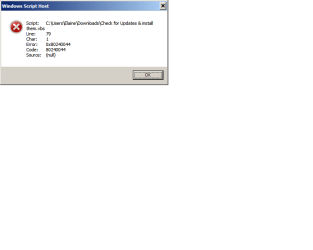
Repair install did not find any problems. I do not have the original Windows OEM disk. My Home Premium Disk does not have SP1. I tried running the two files you provided any the rest-windows-update-full.bat ran fine. when I ran the check for updates and it looked like it was going to work and then i got an error. see attached screen shot.
 

Attachments

  • error after running vbs file.png
    error after running vbs file.png
    5.5 KB · Views: 0

My Computer My Computer

At a glance

Windows 7 64-bit Home Editioni3-21206GBIntel HD Graphics
Computer type
PC/Desktop
Computer Manufacturer/Model Number
Lenovo
OS
Windows 7 64-bit Home Edition
CPU
i3-2120
Motherboard
Unknown
Memory
6GB
Graphics Card(s)
Intel HD Graphics
Hard Drives
1TB ST31000524AS
Antivirus
Windows Secure Essentials
Browser
Chrome and Internet Explorer 10
Haven't observed that error code on that VB script, I'll check into it.

Want to try Repair Install

Repair Install Video to Fix Windows 7 Without Reformatting by Britec

Check your PM (private message)

Checked VB script, looks good. Only thing I can figure is the upload or download dropped bit(s) or flipped bit. Line 79 Character 1 is "E" of statement "End if" had that happen on find product key.vbs. That's why I zip the uploads now. Zip encapsulates the contents, better protection.
 
Last edited:

My Computer My Computer

At a glance

Win 7 Home Premium x64/Linux Lite 2.6 x64
Computer type
Laptop
OS
Win 7 Home Premium x64/Linux Lite 2.6 x64
Here's attachment to find your Windows 25 character product key. Click popup that appears, press CTRL + C, you can't right-click and choose copy or cut, paste to notepad, wordpad, or word. I print it to prevent typos & transposition. You will need it if you decide to do Repair Install. I just did repair install on a laptop & desktop in the past few days. If repair install fails, sometime it does, I have solution that works a very high percentage of the time.
 

Attachments

My Computer My Computer

At a glance

Win 7 Home Premium x64/Linux Lite 2.6 x64
Computer type
Laptop
OS
Win 7 Home Premium x64/Linux Lite 2.6 x64
Well I downloaded the proper Windows Home Premium ISO file from Microsoft using the key I had. The key that the computer had was an OEM key and Microsoft would not download the ISO file so I used a key that I have never used. The repair install ran fine, but then it started to update windows and it ran into an error that it is stuck at. It says that Stage 5 of 5 Failure configuring Windows updates. Reverting changes. Do not turn off your computer. It reverted once and then started to upgrade again and ran into the same error message. It sits at this reverting stage for over an hour. I think it is truly broken now, but I made a system image before doing all this and a repair disk so I can recover back to where I was before the repair install. I guess I need to have the ISO file for the OEM key and I am going to see if Microsoft will provide it.

Thanks for all your help. Unless you have any other recommendation. I do not want to do a clean install because I have several programs that were downloaded off the internet in which I cannot recover.
 

My Computer My Computer

At a glance

Windows 7 64-bit Home Editioni3-21206GBIntel HD Graphics
Computer type
PC/Desktop
Computer Manufacturer/Model Number
Lenovo
OS
Windows 7 64-bit Home Edition
CPU
i3-2120
Motherboard
Unknown
Memory
6GB
Graphics Card(s)
Intel HD Graphics
Hard Drives
1TB ST31000524AS
Antivirus
Windows Secure Essentials
Browser
Chrome and Internet Explorer 10
I tried the in-place repair install again after doing a system image refresh back to the original image. This time it worked and I was able to install IE11.

Thanks for all the help. I wish I had tried the clean boot first rather than waste a product key on the iso image, but I was never going to use the Windows 7 Home Premium. I use Windows 7 Pro.

Again thanks for all the help
 

My Computer My Computer

At a glance

Windows 7 64-bit Home Editioni3-21206GBIntel HD Graphics
Computer type
PC/Desktop
Computer Manufacturer/Model Number
Lenovo
OS
Windows 7 64-bit Home Edition
CPU
i3-2120
Motherboard
Unknown
Memory
6GB
Graphics Card(s)
Intel HD Graphics
Hard Drives
1TB ST31000524AS
Antivirus
Windows Secure Essentials
Browser
Chrome and Internet Explorer 10
Back
Top