can not shrink my c drive

dumborambo

New member
Local time
1:24 AM
Messages
19
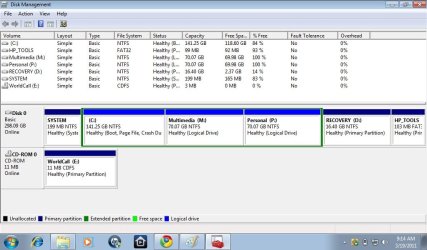
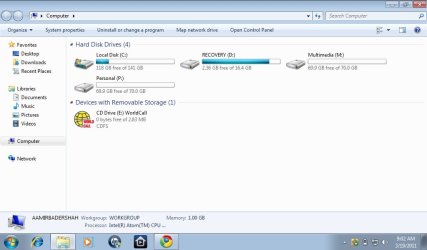
hi i have 320 gb of hard disk, i made partiton earlier out of 320 gb and was able to make a partiton of 100 gb, 40 gb and 80 gb (total 220gb)......but due to some reasons i reset my windows 7 starter to factory settings....how ever now when i try to shrink c drive it only allows me to shrink 140 gb out of 280 gb and rest 140 gb is used up by C drive only. it has 118 GB free but i can not shrink it to make new partitions...what do i do?here is a screen shot of my computer
 

Attachments
  • my comp.jpg
    my comp.jpg
    49.1 KB · Views: 317

My Computer My Computer

At a glance

windows 7 starter 32 bit
OS
windows 7 starter 32 bit
Can you please post a screenshot of Disk Management? (Start>Right Click Computer>Manage>Storage>Disk Management or search for it in Start Menu)
 

My Computer My Computer

At a glance

Windows 10 Pro x64Intel Core i5 7400 @ 3.00GHz8GB 2133Mhz DDR4 (OEM supplied)Gygabyte Windforce GTX 1050Ti (Factory Overcl...
Computer type
PC/Desktop
Computer Manufacturer/Model Number
Medion Erazer (note to self: insert model number) - with custom additions
OS
Windows 10 Pro x64
CPU
Intel Core i5 7400 @ 3.00GHz
Motherboard
OEM supllied with PC
Memory
8GB 2133Mhz DDR4 (OEM supplied)
Graphics Card(s)
Gygabyte Windforce GTX 1050Ti (Factory Overclocked)
Sound Card
Realtek
Monitor(s) Displays
Acer Al1980 + HKC
Screen Resolution
1360*768(HKC) / 1280*1024(Acer)
Hard Drives
1TB Toshiba
1TB WD Caviar Green
120GB Samsung Evo 840
PSU
OEM supplied (no power rating on case)
Case
OEM Supplied
Cooling
Stock
Keyboard
Logitech Wireless
Mouse
Logitect Wireless
Internet Speed
40Mb/s Down 10Mb/s Up
Antivirus
Defender
Browser
Firefox
here are the screen shots

here are the screen shots of disk management and also when i try to shrink c drive the available space shown is 0
 

Attachments

  • my comp.jpg
    my comp.jpg
    80.8 KB · Views: 543
  • disk management.jpg
    disk management.jpg
    91.2 KB · Views: 471

My Computer My Computer

At a glance

windows 7 starter 32 bit
OS
windows 7 starter 32 bit
Ya know... I find it very hard to believe you need all those partitions. You are really going to knacker your HDD out very quickly like that.

Shawn has explained what is causing your problem WAY better than I can in his tutorial, so I will just quote him:
The size of the available shrink space can be restricted by the amount of space currently allocated to on the hard drive for the virtual memory page file, System Protection maximum storage space size, and hibernation files. The location of the files on the hard drive plays a big part here because these files are marked as unmovable, and Disk Management is unable to relocate them. As such, if these unmovable files are located in the middle of the total amount of free space on the disk, then only the amount of free space on the other side (to the right) of these files will actually be available for the new partition. This will result in you showing that you have x amount of free space, but not being able to use it for your partition. The only way around this is to use a 3rd party hard drive partition management program, or setup the partition when installing Vista.
Source: http://www.sevenforums.com/tutorials/2672-partition-volume-shrink.html (step 5)
 
Last edited:

My Computer My Computer

At a glance

Windows 10 Pro x64Intel Core i5 7400 @ 3.00GHz8GB 2133Mhz DDR4 (OEM supplied)Gygabyte Windforce GTX 1050Ti (Factory Overcl...
Computer type
PC/Desktop
Computer Manufacturer/Model Number
Medion Erazer (note to self: insert model number) - with custom additions
OS
Windows 10 Pro x64
CPU
Intel Core i5 7400 @ 3.00GHz
Motherboard
OEM supllied with PC
Memory
8GB 2133Mhz DDR4 (OEM supplied)
Graphics Card(s)
Gygabyte Windforce GTX 1050Ti (Factory Overclocked)
Sound Card
Realtek
Monitor(s) Displays
Acer Al1980 + HKC
Screen Resolution
1360*768(HKC) / 1280*1024(Acer)
Hard Drives
1TB Toshiba
1TB WD Caviar Green
120GB Samsung Evo 840
PSU
OEM supplied (no power rating on case)
Case
OEM Supplied
Cooling
Stock
Keyboard
Logitech Wireless
Mouse
Logitect Wireless
Internet Speed
40Mb/s Down 10Mb/s Up
Antivirus
Defender
Browser
Firefox
Run Auslogics Disk Defragger on C, you will likely see System Files at the end of the partition blocking further shrinkage.

Next backup your files and a Win7 Backup Image, boot free Partition Wizard bootable CD, rightclick C to Resize, drag right grey border to the left to see how much it will allow you to shrink. It should allow more since the OS files will not be running and can be moved easier. Free Download Magic Partition Manager Software - Partition Wizard Online

If PW CD cannot shrink it as much as you need, next I would install free Perfect DIsk 10 trial version, defrag for Compactness, then rightclick on C to Offline defrag System files. Now try shrinking with PW CD.
 
Gregrocker please repeat it in a slow way and step by step...its too fast for me to understand as english is not my native language....i would be very grateful...thanks
 

My Computer My Computer

At a glance

windows 7 starter 32 bit
OS
windows 7 starter 32 bit
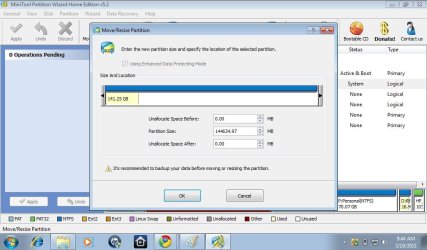
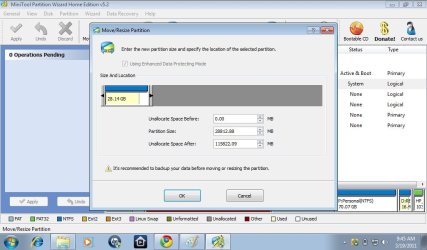
here is what it looks if i click on resize....is it going to affect my hard drive or windows? i have heard that if i perfrom this operation windows can get corrupt as well? is it true?
 

Attachments

  • pw.jpg
    pw.jpg
    69 KB · Views: 465
  • pw2.jpg
    pw2.jpg
    67.8 KB · Views: 249

My Computer My Computer

At a glance

windows 7 starter 32 bit
OS
windows 7 starter 32 bit
Hello mate.


It would be much better and safer for you to use the bootable version of Partition Wizard rather than the installed version; download the ISO file from this link below and burn the file to a CD and boot that to make changes.

Partition Wizard Free Bootable CD

ImgBurn Free ISO Burning Software


You can get some ideas on how to use the PWBD from this tutorial at the link below and be sure to post back with any further questions you may have and to keep us informed.

Partition Wizard : Use the Bootable CD
 

My Computer My Computer

At a glance

W 7 64-bit UltimateIntel Q9550 Yorkfield8GB Dominator 8500C5DATI : XFX 5870
Computer Manufacturer/Model Number
* BFK Customs *
OS
W 7 64-bit Ultimate
CPU
Intel Q9550 Yorkfield
Motherboard
ASUS P5Q Pro
Memory
8GB Dominator 8500C5D
Graphics Card(s)
ATI : XFX 5870
Sound Card
Realtek HD Audio 7-1
Monitor(s) Displays
1x 47" LCD HDMI & 3x 26" LCD HDMI
Screen Resolution
1920x1080P & 1920x1200
Hard Drives
1x 80GB Intel X25-M G2 SSD : 1x 500GB & 1x 640GB WD Caviar Black(s)
PSU
Corsair 620HX
Case
Cooler Master RC-690
Cooling
Tuniq Tower 120, 2x 140mm and 3x 120mm case fans
Keyboard
Microsoft 500
Mouse
Razer Diamondback 3G
Internet Speed
14 Mb/s
Other Info
1x Koutech 3Gb/s SATA HDD Hot Swap Rack
Back
Top