
Can not use BitLocker - why?

Kathycat

New member
Local time
11:55 PM
Messages
7
Location
Hong Kong
I have a big problem to set up BitLocker for my PC and also BitLocker to go either.
I have totally 4 HDD in my system and 2 external + USB Stick.

I already have activated BitLocker without TPM, thanks to the Tutorial here. If open computer and see all my hard drives I can only set up my Drive C where Windows 7 is installed. If I want to Turn on BitLocker it later always says it need a NTFS Format. (My "old" However there is no hidden partion on it, as I installed it on a new drive.
I have already prepared a 400MB partion as you can see in the Drive Management ScreenShot.

Furthermore on all other hard drives, regardless if internal or external I can not set up BitLocker or BitLocker to go.

Anyone has any idea how I am able to solve this problem? Especially for external Hard Disc / USB Sticks it is a important feature for me.

Does it matter if Windows is already activated or not? Up to now I not activate it.
 

Attachments
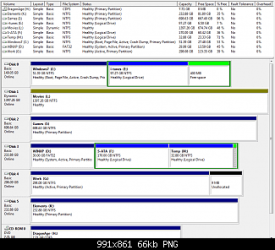
  • DriveManagement.png
    DriveManagement.png
    23.1 KB · Views: 1,322

My Computer

OS
Windows 7 Ultimate 64Bit
CPU
E6750
Motherboard
Gigabyte P35-DS4
Memory
6GB
Graphics Card(s)
GT 8800
Screen Resolution
1280*1024 / 1920 * 1080
Hard Drives
Samsung 250GB SATA
Samsung 160GB IDE
Seagate 750GB SATA
Seagate 1500GB SATA

Western Digital 250GB External Notebook
Western Digital 320GB External Notebook
Hello Kathycat, welcome to SevenForums.

Sorry if I misunderstand you, its 9:43am and I haven't had any sleep. Are you trying to make it so when you boot Windows, that it wont boot without the encryption drive in it? If you could explain a bit better what you wish to accomplish I could probably help you a bit more. :)
 

My Computer

Computer Manufacturer/Model Number
Custom | Whitebox
OS
Windows 7 Ultimate, OS X 10.7, Ubuntu 11.04
CPU
Intel E6750 @ 3.80GHz
Motherboard
Gigabyte GA-EP45-UD3L (Revision 1.1)
Memory
2x2GB & 2x1GB (6GB) OCZ Reaper 1066MHz @ 1080MHz
Graphics Card(s)
EVGA nVidia GTX 260 896mb (216 Core) FTW Edition
Sound Card
Realtek ALC888
Monitor(s) Displays
21" VIZIO TV
Screen Resolution
1680x1050 @ 60Hz
Hard Drives
Western Digital WD6401AALS - 640GB
Hitachi HDP725016GLA380 - 160GB
PSU
Corsair 750W
Case
NZXT Nemesis Elite
Cooling
Thermaltake SpinQ
Keyboard
Logitech Wireless S520
Mouse
Logitech Wireless S520 - Microsoft Wireless Arc Mouse
Internet Speed
Download: 20mbps, Upload: 3mbps
Hi DarkNovaGamer,

well I have sufficient time to solve this problem.

I have installed W7 Ultimate 64Bit some time ago. The feature BitLocker is important for me due to I want to easily deal with my external Hard Disc which I use also for work.

So I have set up the Bit Locker without TPM. Also force the Group Policies, restart the PC (even it is not required)
When I then click through my hard drives (which you can see on the photo) I only can Turn on BitLocker on my Drive C where Windows 7 is installed.
However after some time it says that this drive should be format to NTFS and it stops. :(
All other drives it can not be turned on, even except the WinXP Drive all are NTFS formated. In the Status Line it shows: BitLocker Status: Not encryptable.
I already have no idea what anymore solution I can do. I have looked in the Group Policies and enable most things which might help it. But still the same.
 

My Computer

OS
Windows 7 Ultimate 64Bit
CPU
E6750
Motherboard
Gigabyte P35-DS4
Memory
6GB
Graphics Card(s)
GT 8800
Screen Resolution
1280*1024 / 1920 * 1080
Hard Drives
Samsung 250GB SATA
Samsung 160GB IDE
Seagate 750GB SATA
Seagate 1500GB SATA

Western Digital 250GB External Notebook
Western Digital 320GB External Notebook
This particular thread has crashed Chrome on me twice now.. thats odd.

Anyways, so its just not encrypting any drives?
 

My Computer

Computer Manufacturer/Model Number
Custom | Whitebox
OS
Windows 7 Ultimate, OS X 10.7, Ubuntu 11.04
CPU
Intel E6750 @ 3.80GHz
Motherboard
Gigabyte GA-EP45-UD3L (Revision 1.1)
Memory
2x2GB & 2x1GB (6GB) OCZ Reaper 1066MHz @ 1080MHz
Graphics Card(s)
EVGA nVidia GTX 260 896mb (216 Core) FTW Edition
Sound Card
Realtek ALC888
Monitor(s) Displays
21" VIZIO TV
Screen Resolution
1680x1050 @ 60Hz
Hard Drives
Western Digital WD6401AALS - 640GB
Hitachi HDP725016GLA380 - 160GB
PSU
Corsair 750W
Case
NZXT Nemesis Elite
Cooling
Thermaltake SpinQ
Keyboard
Logitech Wireless S520
Mouse
Logitech Wireless S520 - Microsoft Wireless Arc Mouse
Internet Speed
Download: 20mbps, Upload: 3mbps
No, can not encrypt this drive. And Drive C is indeed not important at all. The other drives are more important for me. I do also have a 16GB USB Stick which is normally also attached to the PC. The 2 WD external Harddrives and the USB stick can NOT be used for BitLocker to go either.
 

My Computer

OS
Windows 7 Ultimate 64Bit
CPU
E6750
Motherboard
Gigabyte P35-DS4
Memory
6GB
Graphics Card(s)
GT 8800
Screen Resolution
1280*1024 / 1920 * 1080
Hard Drives
Samsung 250GB SATA
Samsung 160GB IDE
Seagate 750GB SATA
Seagate 1500GB SATA

Western Digital 250GB External Notebook
Western Digital 320GB External Notebook
No, can not encrypt this drive. And Drive C is indeed not important at all. The other drives are more important for me. I do also have a 16GB USB Stick which is normally also attached to the PC. The 2 WD external Harddrives and the USB stick can NOT be used for BitLocker to go either.

This sounds like a problem with BitLocker itself. I am not an expert with bitlocker, so you may not want to take my advice with this. I suggest installing Windows 7 again, in a dual-boot manner. See if it can encrypt anything with the fresh install.

If it cannot then its probably something to do with your drives, if it can then theres something on your original install thats causing the problem.
 

My Computer

Computer Manufacturer/Model Number
Custom | Whitebox
OS
Windows 7 Ultimate, OS X 10.7, Ubuntu 11.04
CPU
Intel E6750 @ 3.80GHz
Motherboard
Gigabyte GA-EP45-UD3L (Revision 1.1)
Memory
2x2GB & 2x1GB (6GB) OCZ Reaper 1066MHz @ 1080MHz
Graphics Card(s)
EVGA nVidia GTX 260 896mb (216 Core) FTW Edition
Sound Card
Realtek ALC888
Monitor(s) Displays
21" VIZIO TV
Screen Resolution
1680x1050 @ 60Hz
Hard Drives
Western Digital WD6401AALS - 640GB
Hitachi HDP725016GLA380 - 160GB
PSU
Corsair 750W
Case
NZXT Nemesis Elite
Cooling
Thermaltake SpinQ
Keyboard
Logitech Wireless S520
Mouse
Logitech Wireless S520 - Microsoft Wireless Arc Mouse
Internet Speed
Download: 20mbps, Upload: 3mbps
I might give it a try to re-install all again even it cause much work / time to set up all other programs.

At least might try to use the complete English version and not the language pack. ;)
 

My Computer

OS
Windows 7 Ultimate 64Bit
CPU
E6750
Motherboard
Gigabyte P35-DS4
Memory
6GB
Graphics Card(s)
GT 8800
Screen Resolution
1280*1024 / 1920 * 1080
Hard Drives
Samsung 250GB SATA
Samsung 160GB IDE
Seagate 750GB SATA
Seagate 1500GB SATA

Western Digital 250GB External Notebook
Western Digital 320GB External Notebook
I might give it a try to re-install all again even it cause much work / time to set up all other programs.

My opinion on these sorts of things is, it usually takes less time to reinstall the OS to fix a problem then it is to fix the problem by doing a bunch of things that in turn usually cause more problems.

Oh, make sure you don't install anything really (aside from Windows Updates) before doing the encrypting. It could even be a program causing the prevention of encryption for all we know. :)
 

My Computer

Computer Manufacturer/Model Number
Custom | Whitebox
OS
Windows 7 Ultimate, OS X 10.7, Ubuntu 11.04
CPU
Intel E6750 @ 3.80GHz
Motherboard
Gigabyte GA-EP45-UD3L (Revision 1.1)
Memory
2x2GB & 2x1GB (6GB) OCZ Reaper 1066MHz @ 1080MHz
Graphics Card(s)
EVGA nVidia GTX 260 896mb (216 Core) FTW Edition
Sound Card
Realtek ALC888
Monitor(s) Displays
21" VIZIO TV
Screen Resolution
1680x1050 @ 60Hz
Hard Drives
Western Digital WD6401AALS - 640GB
Hitachi HDP725016GLA380 - 160GB
PSU
Corsair 750W
Case
NZXT Nemesis Elite
Cooling
Thermaltake SpinQ
Keyboard
Logitech Wireless S520
Mouse
Logitech Wireless S520 - Microsoft Wireless Arc Mouse
Internet Speed
Download: 20mbps, Upload: 3mbps
Yes that might be sure. I am going to do that soon and re-install Windows 7. Hope that all is going to work smooth. As soon as I have a result, I would let it know here.
Maybe it might be due to the missing activation, who knows.
 

My Computer

OS
Windows 7 Ultimate 64Bit
CPU
E6750
Motherboard
Gigabyte P35-DS4
Memory
6GB
Graphics Card(s)
GT 8800
Screen Resolution
1280*1024 / 1920 * 1080
Hard Drives
Samsung 250GB SATA
Samsung 160GB IDE
Seagate 750GB SATA
Seagate 1500GB SATA

Western Digital 250GB External Notebook
Western Digital 320GB External Notebook
Yes that might be sure. I am going to do that soon and re-install Windows 7. Hope that all is going to work smooth. As soon as I have a result, I would let it know here.
Maybe it might be due to the missing activation, who knows.

Maybe. Let me know how it works out. :)
 

My Computer

Computer Manufacturer/Model Number
Custom | Whitebox
OS
Windows 7 Ultimate, OS X 10.7, Ubuntu 11.04
CPU
Intel E6750 @ 3.80GHz
Motherboard
Gigabyte GA-EP45-UD3L (Revision 1.1)
Memory
2x2GB & 2x1GB (6GB) OCZ Reaper 1066MHz @ 1080MHz
Graphics Card(s)
EVGA nVidia GTX 260 896mb (216 Core) FTW Edition
Sound Card
Realtek ALC888
Monitor(s) Displays
21" VIZIO TV
Screen Resolution
1680x1050 @ 60Hz
Hard Drives
Western Digital WD6401AALS - 640GB
Hitachi HDP725016GLA380 - 160GB
PSU
Corsair 750W
Case
NZXT Nemesis Elite
Cooling
Thermaltake SpinQ
Keyboard
Logitech Wireless S520
Mouse
Logitech Wireless S520 - Microsoft Wireless Arc Mouse
Internet Speed
Download: 20mbps, Upload: 3mbps
I'd reinstall 7, delete all partitions, then leave one hard drive connected and encrypt that. Then try Bitlocker-to-Go.
 

My Computer

Computer Manufacturer/Model Number
Sony Vaio Z46GDU
OS
Windows 7 Ultimate x86-64
CPU
[email protected] 1066MHz FSB
Motherboard
Sony branded
Memory
6GB DDR3 1066MHz
Graphics Card(s)
9300M GS 256MB Dedicated (Speed) + Intel4500MHD (Stamina)
Sound Card
Realtek HD Audio
Monitor(s) Displays
13.1' WXGA
Screen Resolution
1600x900
Hard Drives
320GB 7200RPM w/ 16MB cache
Internet Speed
1MB/s

My Computer

Computer type
PC/Desktop
Computer Manufacturer/Model Number
Bruce ... somewhere in his 40's
OS
Windows 7 Ultimate 32bit SP1
CPU
Intel(R) Core(TM)2 Quad CPU @ 2.40GHz, 2400 MHz
Motherboard
INTEL/D975XBX2
Memory
4 GB
Graphics Card(s)
ATI Radeon HD 2600 Pro
Monitor(s) Displays
Samsung SyncMaster 914v
Screen Resolution
1280 x 1024
Hard Drives
2/500GB each ... ST3500630AS ATA Device.
One is not connected
PSU
Rocketfish 700 W
Case
G.Skill Gigabyte Chassis
Keyboard
Standard PS/2 Keyboard
Mouse
Microsoft PS/2 Mouse
Internet Speed
DSL
Antivirus
Avira Internet Security
Browser
IE 11
Other Info
ATI HDMI Audio
I'd reinstall 7, delete all partitions, then leave one hard drive connected and encrypt that. Then try Bitlocker-to-Go.

You mean on the Windows 7 Drive, delete all partitions and use the complete Hard Disc for the W7 Ultimate Version?

After installation is complete, disconnect all Hard Drives except the drive which contains W7? Just want to be really clear and not spend another whole night in front of the PC to solve it.

EDIT; I still want to keep using my old Windows XP Prof for some time till I successfully migrate all applications and more into W7.
 
Last edited:

My Computer

OS
Windows 7 Ultimate 64Bit
CPU
E6750
Motherboard
Gigabyte P35-DS4
Memory
6GB
Graphics Card(s)
GT 8800
Screen Resolution
1280*1024 / 1920 * 1080
Hard Drives
Samsung 250GB SATA
Samsung 160GB IDE
Seagate 750GB SATA
Seagate 1500GB SATA

Western Digital 250GB External Notebook
Western Digital 320GB External Notebook
Yes, with one hard disk connected, turn on Bitlocker. It should work without a TPM chip but you'll need a USB. Once that's done - took around 6hrs on a 320GB 7200RPM / 16MB cache laptop hard disk, try Bitlocker to Go. FAT32 should not be a problem but its a good idea to quick reformat your external drives to NTFS.
 

My Computer

Computer Manufacturer/Model Number
Sony Vaio Z46GDU
OS
Windows 7 Ultimate x86-64
CPU
[email protected] 1066MHz FSB
Motherboard
Sony branded
Memory
6GB DDR3 1066MHz
Graphics Card(s)
9300M GS 256MB Dedicated (Speed) + Intel4500MHD (Stamina)
Sound Card
Realtek HD Audio
Monitor(s) Displays
13.1' WXGA
Screen Resolution
1600x900
Hard Drives
320GB 7200RPM w/ 16MB cache
Internet Speed
1MB/s
Finally I could solve the problem with this. Thanks for all the help here.

indeed it was more easier than what I all found in the internet as hints / helps.
My start up drive .... called WinXP above was still in FAT32 formated and I change it into NTFS. After this I could easily use BitLocker and BitLocker to Go.
 

My Computer

OS
Windows 7 Ultimate 64Bit
CPU
E6750
Motherboard
Gigabyte P35-DS4
Memory
6GB
Graphics Card(s)
GT 8800
Screen Resolution
1280*1024 / 1920 * 1080
Hard Drives
Samsung 250GB SATA
Samsung 160GB IDE
Seagate 750GB SATA
Seagate 1500GB SATA

Western Digital 250GB External Notebook
Western Digital 320GB External Notebook
Back
Top