Solved Can only share one way "Windows cannot access \\LAPTOP"

vgrumbles

New member
Local time
8:18 AM
Messages
2
Hello,

I have two Win7 Home Premium computers that I'm trying to share files between. One is a desktop and the other a laptop.
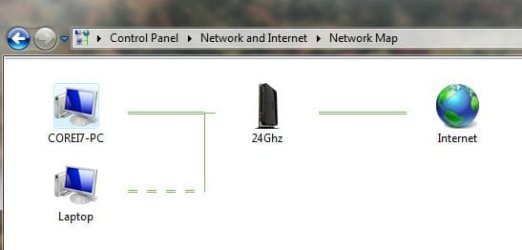
  • I can access my desktop files from the wireless laptop with no issues
  • I cannot access the laptop files from the desktop, unless I use a wired connection from the router to the laptop.
  • Since I can access the laptop when wired, I don't think it is a security or share setting problem?
When I look into the homegroup on my desktop, it shows 4 ghosted directories: Documents, Music, Pictures & Videos. If I click on any of these, I get a brief pause and then nothing else happens.

My router is a Netgear N600 WNDR3700v2. I recently updated the firmware, but this did not resolve the issue.

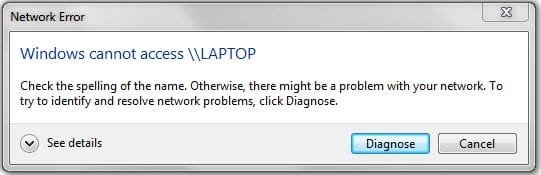
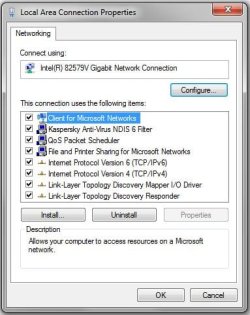
I've attached the Local Area Connection Properties, network map, error message and IPconfig screenshot for reference.

Thanks for your help.
 

Attachments
  • Network Map from PC.JPG
    Network Map from PC.JPG
    19.3 KB · Views: 3
  • Error Message.JPG
    Error Message.JPG
    22.1 KB · Views: 3
  • IPconfig.JPG
    IPconfig.JPG
    108.1 KB · Views: 5
  • Local Area Connection Properties.JPG
    Local Area Connection Properties.JPG
    40.9 KB · Views: 4

My Computer My Computer

Computer type
PC/Desktop
Computer Manufacturer/Model Number
Custom Build
OS
Win 7 Home Premium, 64-bit
CPU
Intel Core i7-3770 @ 3.40GHz
Memory
16Gb
Graphics Card(s)
None
Hard Drives
500Gb System
2Tb data
2Tb Backup
500Gb Storage/junk
Antivirus
Kaspersky Pure 2.0
Browser
Explorer, Chrome
Hello,

Instead of accessing thru \\laptop, have you tried the IP Address - \\IPAddress\SharedFolder?

Is your Wi-Fi adapter's driver up to date?
 

My Computer My Computer

Computer Manufacturer/Model Number
Lenovo Desktop/Samsung Laptop
OS
Win7 & Win8 64bit
CPU
Intel i5
Internet Speed
Charter-20 Mbps
Antivirus
Avast
Browser
FF, IE9 and Chrome
Turn off the Computer Browser service...then try it...
 

My Computer My Computer

Computer type
Laptop
Computer Manufacturer/Model Number
HP 17-ak0xx, dv7 3173nr
OS
Win7 Home Premium x64 W10Pro&Home
CPU
A12 9720p 4+8 TurionII M520
Motherboard
HP 3839
Memory
6GB 8GB
Graphics Card(s)
R7
Monitor(s) Displays
24" sa550
Screen Resolution
1600x900 1920x1080
Mouse
Logitechx2
Internet Speed
120Mb/s down 12up
Thanks for the replies 2xg and DMHolt57.

After thinking about this problem more and the fact that the laptop was likely blocking access by the desktop, I turned off the firewall on the laptop and everything worked fine...finally! I haven't looked into it more, but I'll need to find a way to keep the firewall protecting the laptop and yet allow access by the desktop. I'm sure this is common, I just haven't had the time to work on it yet.

Thanks again for your responses!

Vgrumbles
 

My Computer My Computer

Computer type
PC/Desktop
Computer Manufacturer/Model Number
Custom Build
OS
Win 7 Home Premium, 64-bit
CPU
Intel Core i7-3770 @ 3.40GHz
Memory
16Gb
Graphics Card(s)
None
Hard Drives
500Gb System
2Tb data
2Tb Backup
500Gb Storage/junk
Antivirus
Kaspersky Pure 2.0
Browser
Explorer, Chrome
No worries, glad all is well now. :)
 

My Computer My Computer

Computer Manufacturer/Model Number
Lenovo Desktop/Samsung Laptop
OS
Win7 & Win8 64bit
CPU
Intel i5
Internet Speed
Charter-20 Mbps
Antivirus
Avast
Browser
FF, IE9 and Chrome
Back
Top