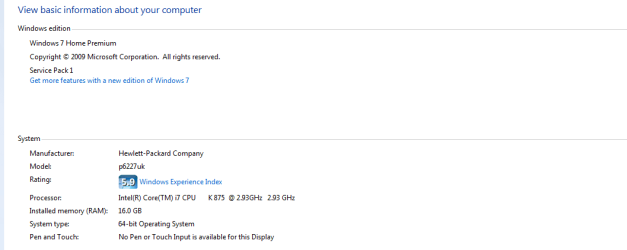
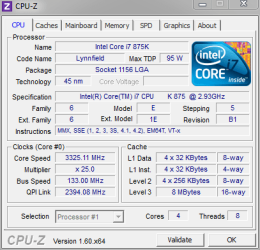
can someone help determine which intel processor i have?

stuartrozier

New member
Member
VIP
Local time
2:44 PM
Messages
113
Hello,
this is purely down to curiousity, but....

i was looking at intels website, comparing the processors, which ones are out their in the market, with a possibility of upgrading depending on my motherborad.

anyhow,
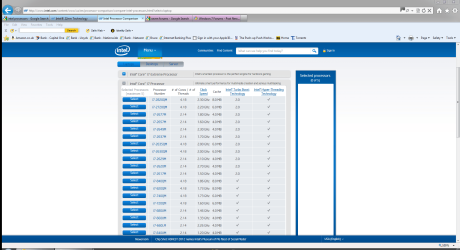
when looking on their website, i cant even find my processor i have already ?
its not on their list of processors?

i will give a screen cap of intels list,
and then a screen cap of my processor...

im obviously just missing something, or reading something wrong

many thanks in advance
stuart
Capture.PNG Capture1.PNG
 

My Computer

Computer Manufacturer/Model Number
HP
OS
Windows 7 Home Pre 64bit
CPU
i7 intel core 2.93GHZ
Motherboard
MSI
Memory
16.00GB
Graphics Card(s)
nVidia GT 220
Hi, here's the link to the processor.
Intel® Core)

Paul
 

My Computer

Computer type
PC/Desktop
Computer Manufacturer/Model Number
Dell XPS-8300
OS
Win 7 64 bit
CPU
Intell i7-2600 @3.4 GHz 4 Cores
Memory
16GB
If memory serves, the good news is that the I7-875k is the best available CPU for Socket 1156. I'm a bit surprised to see a "k" CPU in an HP box. The k suffix means that its multiplier is unlocked, whcih is a feature mainly of interest to overclockers.

That's also the bad news, if you want to upgrade.
 

My Computer

Computer Manufacturer/Model Number
homegrown
OS
Windows 7 Pro X64 SP1
CPU
Intel Core I7-3930k
Motherboard
Asus P9X79 Pro
Memory
16 GB Gskill DDR3-2133
Graphics Card(s)
eVGA GTX680
Sound Card
Creative X-Fi Titanium
Monitor(s) Displays
As PA246Q
Screen Resolution
1920 X 1200
Hard Drives
Corsair Force GT, 120 GB
WDC 1.5TB Caviar Black
PSU
PCP&C Silencer 750 Crossfire
Case
Silverstone FT02
Cooling
Noctua NH-D14
Keyboard
cheap Logitech USB
Mouse
Microsoft Intellimouse Explorer (old optical) USB
Internet Speed
6Mb cable
Other Info
Pioneer BDR-205
Samsung SH-203B
Monsoon 5.1 speakers
hello , thanks for your quick reply I do appreciate it.

the processor I've got at the moment I brought off of amazon, it was the only one compatible with the 1156 your right.
but I'm not sure what you mean about the 'k'... are you able to explain or link me to somewhere which describes what it means ?
is it something I've done wrong accidentally ? ...
why would having this means I can't upgrade ...
thankyou for your feedback an help once again :)
Stuart
 

My Computer

Computer Manufacturer/Model Number
HP
OS
Windows 7 Home Pre 64bit
CPU
i7 intel core 2.93GHZ
Motherboard
MSI
Memory
16.00GB
Graphics Card(s)
nVidia GT 220
this is my cpu specs if this comes in useful
stuart

Capture.PNG
 

My Computer

Computer Manufacturer/Model Number
HP
OS
Windows 7 Home Pre 64bit
CPU
i7 intel core 2.93GHZ
Motherboard
MSI
Memory
16.00GB
Graphics Card(s)
nVidia GT 220
but I'm not sure what you mean about the 'k'... are you able to explain or link me to somewhere which describes what it means ?

For Intel i-series processors (i3, i5, i7) there are special models that end with the letter 'K' like yours: i7-875k, i5-2500k, i7-2600k, et al. The letter 'K' denotes an unlocked chip, which means you can set your own clockspeed (within reason.)

Most modern processors derive their maximum speed from the concept of multipliers. Let's take your i7-875k processor: it uses a 22x multiplier on top of a 133Mhz bus. 133 x 22 = 2933Mhz or 2.93Ghz. Someone who bought an i7-860: it uses a 21x multiplier on the same 133Mhz bus. producing 133 x 21 = 2800Mhz or 2.8Ghz.

On normal processor models, you cannot raise the multiplier to make the processor go faster. However, for processors that end in the letter "K" or "X", you can raise the multiplier to make the processor faster.

Thus, you unknowingly bought a processor that allows the speed to be almost anything you want -- in multiples of 133Mhz. So, you could conceivably set the multiplier to 30 and have a 4Ghz processor ;) You must also understand that it isn't always that easy; making a processor go faster than it is meant to requires cooling and power that your HP system may not support.
 

My Computer

OS
Windows 7 Professional 64 EFI
CPU
Core i7-3930k C2 @ 4.5Ghz (125 strap x 36)
Motherboard
Intel DX79Si 4.30FW
Memory
8 x 4Gb Mushkin Redline @ 8-9-8-24 1T 1666Mhz
Graphics Card(s)
Sapphire 7970 OC Edition @ 1200/1525
Monitor(s) Displays
Dell U2711
Screen Resolution
2560x1440
Hard Drives
6 x OCZ Agility 3 240Gb SATA3 RAID0 via
Highpoint 2720SGL PCIE 2.0 8x SAS card
PSU
Kingwin Lazer 1KW 80+Platinum
Case
ThermalTake Armor+
Cooling
Zalman CNPS9900 Max
Back
Top