
Can`t find iso file in Windows 7

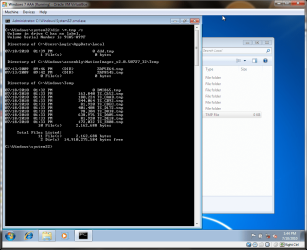
To make sure nothing would interfere or taint the test I created a virtual machine not five minutes ago to test it out. I added one ".tmp" file to a location that would experience a junction loop C:\Users\Logic\AppData\Local. There was no loop. Whice brings me to the conclusion as before.

Screenshot posted as proof of test.
 

Attachments
  • Capture.PNG
    Capture.PNG
    72.2 KB · Views: 16

My Computer My Computer

At a glance

Windows 10 Pro (x64)Intel Core i7-3930K (3.2GHz - 4.5GHz)4x Samsung 4GB PC3-12800 DDR3 (16GB 1600MHz)Nvidia Geforce GTX 690
Computer type
PC/Desktop
Computer Manufacturer/Model Number
Alienware Aurora ALX R4
OS
Windows 10 Pro (x64)
CPU
Intel Core i7-3930K (3.2GHz - 4.5GHz)
Motherboard
Alienware Aurora-R4 x79
Memory
4x Samsung 4GB PC3-12800 DDR3 (16GB 1600MHz)
Graphics Card(s)
Nvidia Geforce GTX 690
Sound Card
SteelSeries Siberia Elite
Monitor(s) Displays
Dell UltraSharp U3011
Screen Resolution
2560x1600
Hard Drives
Samsung 850 Pro 256 GB, Seagate 1TB Desktop Hybrid HDD, 2x Western Digital 4TB Green HDD
PSU
875W Some Dell PSU <.<
Case
Alienware Aurora ALX
Cooling
Custom Liquid Cooling (EK CPU & GPU blocks) dual EK 480RAD
Keyboard
Logitech G710+ Mechanical
Mouse
Logitech G700s
Internet Speed
Verizon Fios (50 mbps average)
Other Info
Server: Intel NUC D54250WYK: i5-4250U, 16GB, 256 GB mSATA, Windows Server 2012 R2
Logicearth---
Well its because you had the application save it to the root of the C: drive.
So in reality it is not in C:\Users\[username]\AppData\Local\VirtualStore

What you should have done is told the application to save it to your documents or desktop.
Thanks for your interest but it`s too technical for me, i`ll follow your comments above.:D
 

My Computer My Computer

At a glance

Windows 7
OS
Windows 7
logicearth, I see your results but I honestly don't remember changing any permissions. Can you tell me what yours are set to for C:\Documents and Settings? Maybe that will give me a clue.
 

My Computer My Computer

At a glance

Windows 10 Pro X64Intel Quad Core i7-4770 @ 3.4Ghz16.0GB PC3-12800 DDR3 SDRAM 1600 MHzIntel Integrated HD Graphics
Computer type
PC/Desktop
Computer Manufacturer/Model Number
Lenovo IdeaCenter 450
OS
Windows 10 Pro X64
CPU
Intel Quad Core i7-4770 @ 3.4Ghz
Memory
16.0GB PC3-12800 DDR3 SDRAM 1600 MHz
Graphics Card(s)
Intel Integrated HD Graphics
Sound Card
Realtek HD Audio
Monitor(s) Displays
HP 22" LCD
Screen Resolution
1680 x 1050
Hard Drives
250GB Samsung EVO SATA-3 SSD
2TB Seagate ST2000DM001 SATA-2
1.5TB Seagate ST3150041AS SATA
Keyboard
Dell USB
Mouse
Lenovo USB
Internet Speed
Cable via Road Runner 3MB Upload, 30MB Download
Antivirus
Windows Defender, MBAM Pro, MBAE
Browser
Seamonkey
Other Info
UEFI/GPT
PLDS DVD-RW DH16AERSH
I love saving everything to my desktop.... of course it's a folder (somewhere) but it's also right there in your face. Anything you save to "Desktop" will never get lost.
Till I learned that trick, many years ago now, I was always loosing things.:(

Then you can put it somewhere else, later, if you like.
I've had my browser set to save to "Desktop" like....Forever!
That way, I never loose anything.

Same thing when I use ImgBurn to make an ISO of a CD or DVD.....I always tell it to save the ISO to my desktop. It just makes life so much easier.:)

To keep my C drive from getting overloaded with misc. STUFF that I download, I've made an "Extra Stuff" folder on my D drive with a shortcut to it on my desktop.
When I'm done with something I've downloaded, like an install file or an ISO, I just drag and drop it on the 'Extra Stuff' icon on the desktop and VOILA, it's OFF of my C drive and in storage.
With just a little planning, keeping your C drive free of junk (files that you no longer need on your C drive) isn't all that hard.

Cheers!
:cool:
:DTo whom it may concern-I found the "iso" files. Hope it helps others. Windows 7>>Solution as follows>>> FOUND those hidden .iso files.>> go to computer/local disc C and then click on "compatibility files" at top on toolbar, in there are the HIDDEN .ISO files...Enjoy like i am. Cheers
 

My Computer My Computer

At a glance

Windows 7
OS
Windows 7
Back
Top