Can`t Login at Enable Integation Feature

mckids

New member
Local time
9:18 AM
Messages
21
Can`t Login at Enable Integation Feature

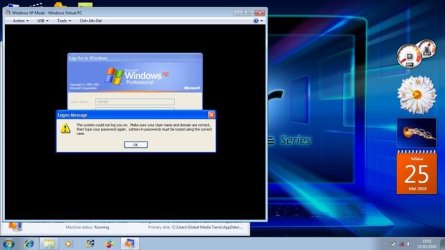
Help me for this problem.. this screen shot :

VIRTUAL PC 2.jpg
 

My Computer My Computer

At a glance

Windows 7 Home Basic
Computer Manufacturer/Model Number
Aspire ACER
OS
Windows 7 Home Basic
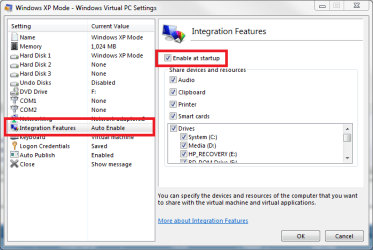
Did you set a password to XP Mode? When integration is enabled, you have to use a password; XP Mode can not log you in if the account has no password.

Fix: Open XP Mode settings, disable integration features, login with this no-password account, open XP Mode Control Panel > Users, add a password and re-enable integration features.

Kari

 

Attachments

  • VPC_AutoEnable_Integration.png
    VPC_AutoEnable_Integration.png
    19.9 KB · Views: 38

My Computer My Computer

At a glance

Windows 10 Pro x64 EN-GB1.6 GHz Intel Core i7-720QM Processor6 GBATI Mobility Radeon HD 5850 Graphics
Computer type
Laptop
Computer Manufacturer/Model Number
HP ENVY 17-1150eg
OS
Windows 10 Pro x64 EN-GB
CPU
1.6 GHz Intel Core i7-720QM Processor
Memory
6 GB
Graphics Card(s)
ATI Mobility Radeon HD 5850 Graphics
Sound Card
Beats sound system with integrated subwoofer
Monitor(s) Displays
17" laptop display, 22" LED and 32" Full HD TV through HDMI
Screen Resolution
1600*900 (1), 1920*1080 (2&3)
Hard Drives
Internal: 2 x 500 GB SATA Hard Disk Drive 7200 rpm
External: 2TB for backups, 3TB USB3 network drive for media
Cooling
As Envy runs a bit warm, I have it on a Cooler Master pad
Keyboard
Logitech diNovo Media Desktop Laser (bluetooth)
Mouse
Logitech Performance Mouse MX
Internet Speed
50/10 Mbps VDSL
Antivirus
Windows Defender 4.3.9431.0
Browser
Maxthon 3.5.2., IE11
Ok Kari....... i will try it ....
 

My Computer My Computer

At a glance

Windows 7 Home Basic
Computer Manufacturer/Model Number
Aspire ACER
OS
Windows 7 Home Basic
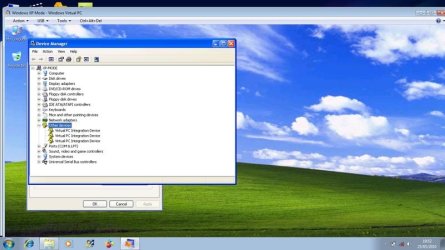
This screen shot on my XP Mode at Device Manager
Virtual PC Integration Device - Missing

Help me for this problem..

VIRTUAL PC.jpg
 

My Computer My Computer

At a glance

Windows 7 Home Basic
Computer Manufacturer/Model Number
Aspire ACER
OS
Windows 7 Home Basic

My Computer My Computer

At a glance

Windows 10 Pro x64 EN-GB1.6 GHz Intel Core i7-720QM Processor6 GBATI Mobility Radeon HD 5850 Graphics
Computer type
Laptop
Computer Manufacturer/Model Number
HP ENVY 17-1150eg
OS
Windows 10 Pro x64 EN-GB
CPU
1.6 GHz Intel Core i7-720QM Processor
Memory
6 GB
Graphics Card(s)
ATI Mobility Radeon HD 5850 Graphics
Sound Card
Beats sound system with integrated subwoofer
Monitor(s) Displays
17" laptop display, 22" LED and 32" Full HD TV through HDMI
Screen Resolution
1600*900 (1), 1920*1080 (2&3)
Hard Drives
Internal: 2 x 500 GB SATA Hard Disk Drive 7200 rpm
External: 2TB for backups, 3TB USB3 network drive for media
Cooling
As Envy runs a bit warm, I have it on a Cooler Master pad
Keyboard
Logitech diNovo Media Desktop Laser (bluetooth)
Mouse
Logitech Performance Mouse MX
Internet Speed
50/10 Mbps VDSL
Antivirus
Windows Defender 4.3.9431.0
Browser
Maxthon 3.5.2., IE11
I have similar problem with enable integration

Kari,
I have a similar problem with login and enable integration featues. To make a long story short, I installed Virtual PC and XP Mode but my drives weren't shared - I could not get to my host computer's files and My Documents folder was not on the XP mode desktop (Maybe inegration feature was not enabled I don't know). I thought it has something to do with the 2 computers needing the same name so I changed XP mode's computer name. Now I can not login when Enable Integration Featuers is on. I did set up a password when setting up XP mode inthe first place. I tried changing that password as you suggested above but that does not work. Any suggestions? Should I just unistall and start over? What will unistalling to do the software I installed in XP mode? I have Windows 7 64-bit OS. thanks
 

My Computer My Computer

At a glance

Windows 7 64-bit
OS
Windows 7 64-bit
Hello Kshill5, welcome to the Seven Forums.

First of all, you can not have two computers on the same network with same name. That's an easy way to difficult networking ;) Change the name of the XP Mode virtual machine to something different than your host.
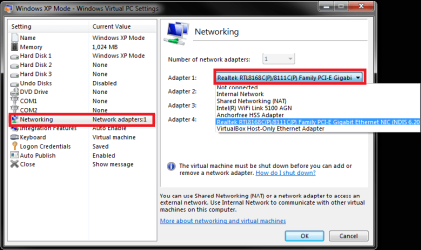
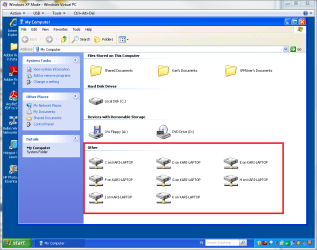
Secondly, the best way to access host shares and drives from XP Mode is to use host's NIC also in XP Mode. This can be changed from XP Mode settings > Network:

XPM_NIC.png

This allows XP Mode to see all the host's drives and present them directly in XP Mode's My Computer:

XPM_Host_Drives.png

Integration must be installed and enabled to allow this.

Kari
 

My Computer My Computer

At a glance

Windows 10 Pro x64 EN-GB1.6 GHz Intel Core i7-720QM Processor6 GBATI Mobility Radeon HD 5850 Graphics
Computer type
Laptop
Computer Manufacturer/Model Number
HP ENVY 17-1150eg
OS
Windows 10 Pro x64 EN-GB
CPU
1.6 GHz Intel Core i7-720QM Processor
Memory
6 GB
Graphics Card(s)
ATI Mobility Radeon HD 5850 Graphics
Sound Card
Beats sound system with integrated subwoofer
Monitor(s) Displays
17" laptop display, 22" LED and 32" Full HD TV through HDMI
Screen Resolution
1600*900 (1), 1920*1080 (2&3)
Hard Drives
Internal: 2 x 500 GB SATA Hard Disk Drive 7200 rpm
External: 2TB for backups, 3TB USB3 network drive for media
Cooling
As Envy runs a bit warm, I have it on a Cooler Master pad
Keyboard
Logitech diNovo Media Desktop Laser (bluetooth)
Mouse
Logitech Performance Mouse MX
Internet Speed
50/10 Mbps VDSL
Antivirus
Windows Defender 4.3.9431.0
Browser
Maxthon 3.5.2., IE11
Back
Top