Can;t use router program to change user names

Core7

New member
Member
VIP
Local time
8:39 AM
Messages
525
Location
South Africa
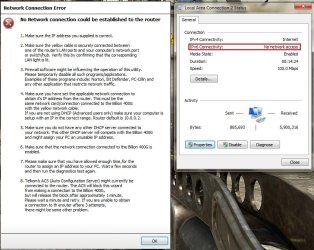
Hi there I have a Billion 400G and I have 3 user name's of different ISP's and I normally use the program that came with the router to change it but now it all of a sudden doesn't work!!!! please help me fix this.....see images...normally I would use 10.0.0.2 to log in to my router. Not sure if the IPv6 shouldn't have internet access cant remember how it was before.
 

Attachments

  • U2ntitled.jpg
    U2ntitled.jpg
    8.5 KB · Views: 66
  • Untitl2ed.jpg
    Untitl2ed.jpg
    96.7 KB · Views: 14

My Computer My Computer

Computer Manufacturer/Model Number
Gigabyte
OS
Window 7 Ultimate 32bit
CPU
Intel core 2 duo @ 2.40 Ghz
Motherboard
Gigabyte
Memory
Hynix 2X1GB
Graphics Card(s)
The Club 3D GTS250 256bit
Sound Card
laptech
Monitor(s) Displays
Acer
Screen Resolution
1440X900
Hard Drives
Seagate 350gig
Seagate 250gig
PSU
Coolermaster GX 650
Case
Acer
Cooling
2 80mm fans
Keyboard
Acer
Mouse
Logitech
Internet Speed
54kb/s
What's actually not working? It's a bit unclear. Is it that you can no longer log in to your router? Or that you CAN but some things no longer work? If so, what?
Please be clear about what you are trying to do... change your ISP name?
Why? What's changed prior to things going wrong?
Thanks
 

My Computer My Computer

Computer Manufacturer/Model Number
Custom build
OS
Windows 7 Pro 64 bit
CPU
Intel i5 760
Motherboard
ASUS P7P55D-E PRO
Memory
4GB DDR3 (2 x 2GB Corsair
Graphics Card(s)
Gigabyte GTX 460
Sound Card
Asus DX
Monitor(s) Displays
BENQ HDMI
Hard Drives
128GB SSD
+ Seagate 500GB SATA
PSU
Lian-Li Extreme 650W PSU
Case
Lian-Li PC60FNWX
Cooling
2 x chassis fans; Thermalright MUX-120 CPU cooler
Internet Speed
34Mb/sec
I switch between them often to use both
 

My Computer My Computer

Computer Manufacturer/Model Number
Gigabyte
OS
Window 7 Ultimate 32bit
CPU
Intel core 2 duo @ 2.40 Ghz
Motherboard
Gigabyte
Memory
Hynix 2X1GB
Graphics Card(s)
The Club 3D GTS250 256bit
Sound Card
laptech
Monitor(s) Displays
Acer
Screen Resolution
1440X900
Hard Drives
Seagate 350gig
Seagate 250gig
PSU
Coolermaster GX 650
Case
Acer
Cooling
2 80mm fans
Keyboard
Acer
Mouse
Logitech
Internet Speed
54kb/s
diagnostic

No internet via IPV6 is almost certainly irrelevant. You have IPV4 connectivity so all is OK there.
Go into Control Panel -> Network & Sharing. Post the screen from that window.
Open up a CMD window, ping <router IP address> & post that window
from CMD, type ipconfig /all then post that window
 

My Computer My Computer

Computer Manufacturer/Model Number
Custom build
OS
Windows 7 Pro 64 bit
CPU
Intel i5 760
Motherboard
ASUS P7P55D-E PRO
Memory
4GB DDR3 (2 x 2GB Corsair
Graphics Card(s)
Gigabyte GTX 460
Sound Card
Asus DX
Monitor(s) Displays
BENQ HDMI
Hard Drives
128GB SSD
+ Seagate 500GB SATA
PSU
Lian-Li Extreme 650W PSU
Case
Lian-Li PC60FNWX
Cooling
2 x chassis fans; Thermalright MUX-120 CPU cooler
Internet Speed
34Mb/sec
Back
Top