Can the Password Entry box be made default over Fingerprint login?

2 Bunny

Banned
Local time
1:44 PM
Messages
76
Hey there guys, its 2 Bunny again. I've got a new question for the community today:

On computers with Biometric Fingerprint scanners that are setup to log you in to Windows, I also have a password. In some situations it is easier for me to enter a password, and it will still let you login with your fingerprint on the password entry screen, so I was wondering if there was a way to make the login option go straight to the "enter your password" screen, as it would be more convenient either way.

Thanks.

- 2 Bunny
 

My Computer My Computer

At a glance

Windows 7 64BitIntel Pentium T2390 1.87Ghz (Dual Core)1.5GB DDR2 PC2-5300 (Soon to Upgrade)Intel GMA X3100
Computer type
Laptop
Computer Manufacturer/Model Number
Lenovo N200 0769-AUU
OS
Windows 7 64Bit
CPU
Intel Pentium T2390 1.87Ghz (Dual Core)
Motherboard
Lenovo IEL10
Memory
1.5GB DDR2 PC2-5300 (Soon to Upgrade)
Graphics Card(s)
Intel GMA X3100
Sound Card
Lenovo Motherboard Standard Built in (HD)
Monitor(s) Displays
Built in display (Usable Quality)
Screen Resolution
1280X800
Hard Drives
SEAGATE!
PSU
External Lenovo (20Volt, 65Watt)
Case
Lenovo stock case
Cooling
Generic Lenovo Cooler
Keyboard
Stock Standard Lenovo Keyboard (High quality)
Mouse
Built in high quality trackpad
Internet Speed
As fast as it goes
Antivirus
Avast! Free
Browser
Firefox (2006-2014), Pale Moon (2014-?)
To disable the fingerprint reader, try this:

Start> In search box type Device Manager and click enter> In Device Manager, locate your fingerprint reader> Right click it and Select Properties> Under the Driver Tab, click the Disable Button and confirm

See if that doesn't do it. A Guy
 

My Computer My Computer

At a glance

Windows 10 Home x64INTEL Core i5-750 Quad-Core 3.37GHzHyperX Fury Black Series 8GB (2 x 4GB) 1866MhzEVGA GeForce GTX 750 Superclocked 1GB 128-Bit...
Computer type
PC/Desktop
OS
Windows 10 Home x64
CPU
INTEL Core i5-750 Quad-Core 3.37GHz
Motherboard
ASUS P7P55D
Memory
HyperX Fury Black Series 8GB (2 x 4GB) 1866Mhz
Graphics Card(s)
EVGA GeForce GTX 750 Superclocked 1GB 128-Bit GDDR5
Monitor(s) Displays
LG 32MA68HY 32" IPS
Screen Resolution
1920 x 1080
Hard Drives
Samsung 840 Evo 120GB, SEAGATE 500GB Barracuda® 7200.12, SATA 3 Gb/s, 7200 RPM, 16MB cache
PSU
ANTEC TruePower New TP-550, 80 PLUS, 550W
Case
ANTEC Three Hundred Illusion
Cooling
COOLER MASTER Hyper 212 Plus, 4 x 120mm 1 x 140mm Noctua's
Internet Speed
85 + Mbps
Antivirus
Avast
Browser
Vivaldi
The login screen will show the last used method on the next login.
If you login once with the password, then in the next login it will show the password box.
If you swipe your finger on login, the next time it will show the biometric login icon.

I'm not sure if there is a way to show the password box all the time, other than disabling the fingerprint reader (which would defeat the purpose :))

Will check if it is possible and get back :)
 

My Computer My Computer

At a glance

Windows 7 Ultimate x64 (XP, 98SE, 95, 3.11, D...Intel Core 2 Duo Processor P8600 (2.40 GHz, 3...4GB 800 MHz DDR2 SDRAMATI Mobility FireGL V5700 with 256 MB
Computer type
Laptop
Computer Manufacturer/Model Number
HP EliteBook 8530w Mobile Workstation
OS
Windows 7 Ultimate x64 (XP, 98SE, 95, 3.11, DOS 7.10 on VM) + Ubuntu 10.04 LTS Lucid Lynx
CPU
Intel Core 2 Duo Processor P8600 (2.40 GHz, 3 MB L2 cache)
Motherboard
Mobile Intel PM45 Express Chipset ICH9M-Enhanced
Memory
4GB 800 MHz DDR2 SDRAM
Graphics Card(s)
ATI Mobility FireGL V5700 with 256 MB
Sound Card
SoundMAX Integrated Digital HD Audio
Monitor(s) Displays
15.4-inch WXGA anti-glare (1280 x 800 resolution)
Screen Resolution
1280 x 800
Hard Drives
500GB + 1TB
Mouse
Synaptics PS/2 Port Touchpad, USB Mouse
Internet Speed
4 Mbps
Antivirus
MSE
Browser
Firefox, Chrome, IE
Other Info
Authentec AES2810 Fingerprint Reader
ANALOG Reply

The login screen will show the last used method on the next login.
If you login once with the password, then in the next login it will show the password box.
If you swipe your finger on login, the next time it will show the biometric login icon.

I'm not sure if there is a way to show the password box all the time, other than disabling the fingerprint reader (which would defeat the purpose :))

Will check if it is possible and get back :)

All right. Thanks. :D

- 2 Bunny
 

My Computer My Computer

At a glance

Windows 7 64BitIntel Pentium T2390 1.87Ghz (Dual Core)1.5GB DDR2 PC2-5300 (Soon to Upgrade)Intel GMA X3100
Computer type
Laptop
Computer Manufacturer/Model Number
Lenovo N200 0769-AUU
OS
Windows 7 64Bit
CPU
Intel Pentium T2390 1.87Ghz (Dual Core)
Motherboard
Lenovo IEL10
Memory
1.5GB DDR2 PC2-5300 (Soon to Upgrade)
Graphics Card(s)
Intel GMA X3100
Sound Card
Lenovo Motherboard Standard Built in (HD)
Monitor(s) Displays
Built in display (Usable Quality)
Screen Resolution
1280X800
Hard Drives
SEAGATE!
PSU
External Lenovo (20Volt, 65Watt)
Case
Lenovo stock case
Cooling
Generic Lenovo Cooler
Keyboard
Stock Standard Lenovo Keyboard (High quality)
Mouse
Built in high quality trackpad
Internet Speed
As fast as it goes
Antivirus
Avast! Free
Browser
Firefox (2006-2014), Pale Moon (2014-?)
just unselect allow user to log on to Windows using their fingerprints
 

Attachments

  • Capture.PNG
    Capture.PNG
    25.9 KB · Views: 146

My Computer My Computer

At a glance

Windows 7 Ultimate x641.80 GHz Intel Core 2 Duo processor T71003 gig ddr2NVIDIA GeForce 8400M GS
Computer Manufacturer/Model Number
HP dv6519tx
OS
Windows 7 Ultimate x64
CPU
1.80 GHz Intel Core 2 Duo processor T7100
Memory
3 gig ddr2
Graphics Card(s)
NVIDIA GeForce 8400M GS
Sound Card
Realtek High Definition Audio
Monitor(s) Displays
15.4” WXGA High Definition BrightView Widescreen
Screen Resolution
1280 x 800
Hard Drives
Hitachi 320 GB (5400 rpm)
PSU
90 W AC Power Adapter
Cooling
Kitchen plate under the lappy
Keyboard
101 key compatible
Mouse
Touch Pad with On/Off button and dedicated vertical Scroll
Internet Speed
Three Wireless internet prepaid using E160G USB dongle
just unselect allow user to log on to Windows using their fingerprints

Hi Colin,
The OP wants to login using the fingerprint scanner also. He just doesn't want the fingerprint login icon to be shown. He wants the password input box to be shown always (the fingerprint scanner works even if the password box is shown), that way he can login using either the password or fingerprint.

The problem is that, the login screen shows the last used method only. So if you login using the fingerprint, the next time you login it will show the fingerprint icon and not the password box.
Biometric Logon.png
 

My Computer My Computer

At a glance

Windows 7 Ultimate x64 (XP, 98SE, 95, 3.11, D...Intel Core 2 Duo Processor P8600 (2.40 GHz, 3...4GB 800 MHz DDR2 SDRAMATI Mobility FireGL V5700 with 256 MB
Computer type
Laptop
Computer Manufacturer/Model Number
HP EliteBook 8530w Mobile Workstation
OS
Windows 7 Ultimate x64 (XP, 98SE, 95, 3.11, DOS 7.10 on VM) + Ubuntu 10.04 LTS Lucid Lynx
CPU
Intel Core 2 Duo Processor P8600 (2.40 GHz, 3 MB L2 cache)
Motherboard
Mobile Intel PM45 Express Chipset ICH9M-Enhanced
Memory
4GB 800 MHz DDR2 SDRAM
Graphics Card(s)
ATI Mobility FireGL V5700 with 256 MB
Sound Card
SoundMAX Integrated Digital HD Audio
Monitor(s) Displays
15.4-inch WXGA anti-glare (1280 x 800 resolution)
Screen Resolution
1280 x 800
Hard Drives
500GB + 1TB
Mouse
Synaptics PS/2 Port Touchpad, USB Mouse
Internet Speed
4 Mbps
Antivirus
MSE
Browser
Firefox, Chrome, IE
Other Info
Authentec AES2810 Fingerprint Reader
just unselect allow user to log on to Windows using their fingerprints

To disable the fingerprint reader, try this:

Start> In search box type Device Manager and click enter> In Device Manager, locate your fingerprint reader> Right click it and Select Properties> Under the Driver Tab, click the Disable Button and confirm

See if that doesn't do it. A Guy


great advice guys!
 

My Computer My Computer

At a glance

windows 7 professional & ultimate 64bit laptops2.27 boost to 2.53 & 2.53 boost to 2.804GBIntel® Graphics Media Accelerator HD
Computer Manufacturer/Model Number
Gateway/NV7923u & NV79C52u Laptops
OS
windows 7 professional & ultimate 64bit laptops
CPU
2.27 boost to 2.53 & 2.53 boost to 2.80
Motherboard
Mobile Intel® HM55 Express Chipset ???
Memory
4GB
Graphics Card(s)
Intel® Graphics Media Accelerator HD
Sound Card
realtek High-definition audio support
Monitor(s) Displays
17.3 " HD 1600 x 900
Hard Drives
hatachi Travelstar 5400 500GB & west digital 500GB
Internet Speed
35MB fios
REPLY TO COMEDIAN Reply

just unselect allow user to log on to Windows using their fingerprints

To disable the fingerprint reader, try this:

Start> In search box type Device Manager and click enter> In Device Manager, locate your fingerprint reader> Right click it and Select Properties> Under the Driver Tab, click the Disable Button and confirm

See if that doesn't do it. A Guy


great advice guys!

LOL! I guess it would've been great advice had we been trying to not log in with a fingerprint scanner.

Do they have you employed with the 7FPodcast? If not, they're lacking a great comedian. :)

- 2 Bunny
 

My Computer My Computer

At a glance

Windows 7 64BitIntel Pentium T2390 1.87Ghz (Dual Core)1.5GB DDR2 PC2-5300 (Soon to Upgrade)Intel GMA X3100
Computer type
Laptop
Computer Manufacturer/Model Number
Lenovo N200 0769-AUU
OS
Windows 7 64Bit
CPU
Intel Pentium T2390 1.87Ghz (Dual Core)
Motherboard
Lenovo IEL10
Memory
1.5GB DDR2 PC2-5300 (Soon to Upgrade)
Graphics Card(s)
Intel GMA X3100
Sound Card
Lenovo Motherboard Standard Built in (HD)
Monitor(s) Displays
Built in display (Usable Quality)
Screen Resolution
1280X800
Hard Drives
SEAGATE!
PSU
External Lenovo (20Volt, 65Watt)
Case
Lenovo stock case
Cooling
Generic Lenovo Cooler
Keyboard
Stock Standard Lenovo Keyboard (High quality)
Mouse
Built in high quality trackpad
Internet Speed
As fast as it goes
Antivirus
Avast! Free
Browser
Firefox (2006-2014), Pale Moon (2014-?)
I've looked and looked, not found, the solution to get that small fingerprint icon away from logon screen user pics. Using Digital Persona software.

It seems it's not possible. I know it's a very small issue, but that fingerprint symbol covering lower right fourth of user pic is really annoying. Disabling anything related to fingerprint reader disables the whole reader.

Kari
 

Attachments

  • Logon_screen_2.png
    Logon_screen_2.png
    303.7 KB · Views: 72

My Computer My Computer

At a glance

Windows 10 Pro x64 EN-GB1.6 GHz Intel Core i7-720QM Processor6 GBATI Mobility Radeon HD 5850 Graphics
Computer type
Laptop
Computer Manufacturer/Model Number
HP ENVY 17-1150eg
OS
Windows 10 Pro x64 EN-GB
CPU
1.6 GHz Intel Core i7-720QM Processor
Memory
6 GB
Graphics Card(s)
ATI Mobility Radeon HD 5850 Graphics
Sound Card
Beats sound system with integrated subwoofer
Monitor(s) Displays
17" laptop display, 22" LED and 32" Full HD TV through HDMI
Screen Resolution
1600*900 (1), 1920*1080 (2&3)
Hard Drives
Internal: 2 x 500 GB SATA Hard Disk Drive 7200 rpm
External: 2TB for backups, 3TB USB3 network drive for media
Cooling
As Envy runs a bit warm, I have it on a Cooler Master pad
Keyboard
Logitech diNovo Media Desktop Laser (bluetooth)
Mouse
Logitech Performance Mouse MX
Internet Speed
50/10 Mbps VDSL
Antivirus
Windows Defender 4.3.9431.0
Browser
Maxthon 3.5.2., IE11
Multiple Problems Reply

I've looked and looked, not found, the solution to get that small fingerprint icon away from logon screen user pics. Using Digital Persona software.

It seems it's not possible. I know it's a very small issue, but that fingerprint symbol covering lower right fourth of user pic is really annoying. Disabling anything related to fingerprint reader disables the whole reader.

Kari

Wow, yours is really messed up. Mine really bugs me too (its what I posted a thread about). I hope you figure out your fingerprint scanner woes too.

- 2 Bunny
 

My Computer My Computer

At a glance

Windows 7 64BitIntel Pentium T2390 1.87Ghz (Dual Core)1.5GB DDR2 PC2-5300 (Soon to Upgrade)Intel GMA X3100
Computer type
Laptop
Computer Manufacturer/Model Number
Lenovo N200 0769-AUU
OS
Windows 7 64Bit
CPU
Intel Pentium T2390 1.87Ghz (Dual Core)
Motherboard
Lenovo IEL10
Memory
1.5GB DDR2 PC2-5300 (Soon to Upgrade)
Graphics Card(s)
Intel GMA X3100
Sound Card
Lenovo Motherboard Standard Built in (HD)
Monitor(s) Displays
Built in display (Usable Quality)
Screen Resolution
1280X800
Hard Drives
SEAGATE!
PSU
External Lenovo (20Volt, 65Watt)
Case
Lenovo stock case
Cooling
Generic Lenovo Cooler
Keyboard
Stock Standard Lenovo Keyboard (High quality)
Mouse
Built in high quality trackpad
Internet Speed
As fast as it goes
Antivirus
Avast! Free
Browser
Firefox (2006-2014), Pale Moon (2014-?)
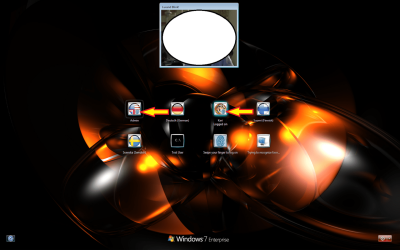
Not found anything. BTW, it's just the small fingerprint icons on two accounts I log in with fingerprint, marked with yellow arrows that buggers me. I use fingers from my right hand or facial recognition to log in to my standard account Kari, and left hand fingers to log in to Admin.

That bigger "messy" pic above the accounts is just a webcamera window for facial recogniction application, which I "censored" with a white bubble not to show the unshaven face of me taking that screenshot ;)
 

My Computer My Computer

At a glance

Windows 10 Pro x64 EN-GB1.6 GHz Intel Core i7-720QM Processor6 GBATI Mobility Radeon HD 5850 Graphics
Computer type
Laptop
Computer Manufacturer/Model Number
HP ENVY 17-1150eg
OS
Windows 10 Pro x64 EN-GB
CPU
1.6 GHz Intel Core i7-720QM Processor
Memory
6 GB
Graphics Card(s)
ATI Mobility Radeon HD 5850 Graphics
Sound Card
Beats sound system with integrated subwoofer
Monitor(s) Displays
17" laptop display, 22" LED and 32" Full HD TV through HDMI
Screen Resolution
1600*900 (1), 1920*1080 (2&3)
Hard Drives
Internal: 2 x 500 GB SATA Hard Disk Drive 7200 rpm
External: 2TB for backups, 3TB USB3 network drive for media
Cooling
As Envy runs a bit warm, I have it on a Cooler Master pad
Keyboard
Logitech diNovo Media Desktop Laser (bluetooth)
Mouse
Logitech Performance Mouse MX
Internet Speed
50/10 Mbps VDSL
Antivirus
Windows Defender 4.3.9431.0
Browser
Maxthon 3.5.2., IE11
Back
Top