Can we stop Explorer from jumping when expanding a directory?

Djard

New member
Local time
8:45 PM
Messages
7
Whe I expand a directory in Explorer the window automatically jumps, so that the directory I expanded appears at the bottom of the screen and all its subfolders are then out of view. Is there a way to stop this annoying behavior in Win 7 and have the directory stay fixed when expanded, like it did in Win XP?
 

My Computer My Computer

Computer Manufacturer/Model Number
Custom
OS
Windows Ultimate x64
CPU
Intel Pentium quad core i7 2.67GHz
Motherboard
Asus P6T
Memory
6 GB
Graphics Card(s)
ATI Radeon All-in-Wonder 512 MB
Sound Card
SoundMax 7.1 Integrated Digital HD
Monitor(s) Displays
Dual: Viewsonic LED 1080p and Samsung P2350
Hard Drives
WD Raptor WDC WD3000HLFS-01G6U0 ATA
Case
Antec
Cooling
14 fans, the largest is 8"
I'm not sure if you can do that in vanilla Win7, but there are options to modify various Explorer behaviour in the Classic Shell free software:

Welcome to Classic Shell
 

My Computer My Computer

Computer Manufacturer/Model Number
Self-built rig
OS
Win7 Pro x64
CPU
Koa i5-2550K
Memory
8 GB
Graphics Card(s)
Sapphire ATI 6870 1GB GDDR5
Sound Card
RealTek HD Audio / ATI HDMI Audio
Monitor(s) Displays
Samsung HDTV Monitor T23A350
Screen Resolution
1920 x 1080
Hard Drives
- SSD (C:)
- HDD (D:)
- BD-ROM (E:)
Keyboard
Logitech G110
Internet Speed
Unifi home (5mbps)
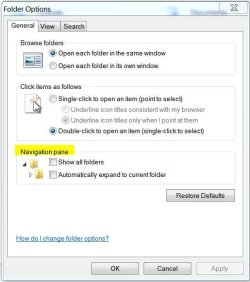
I'm not quite sure what you mean but see if Folder Options > General tab > Navigation shows what you want. Un-check both boxes.
 

Attachments

  • Folder Options-General.JPG
    Folder Options-General.JPG
    42.3 KB · Views: 32

My Computer My Computer

Computer type
PC/Desktop
Computer Manufacturer/Model Number
Built 2/11/2011
OS
Windows 7 Pro-x64
CPU
i7-2600 3.4GHz - 3.8GHz Turbo
Motherboard
Intel DH67BL-B3
Memory
8Gb - 2x4GB, Muskin 991770 PC3-1333
Graphics Card(s)
Integrated Intel HD 2000
Sound Card
Integrated Intel 10.1 HD, RealTek ALC892
Monitor(s) Displays
Asus LCD VH222H, Haier HL24XSL2a
Screen Resolution
1920x1080, 1920x1080
Hard Drives
Crucial SSD C300-128Gb,
Western Digital WD5002AALX - 500Gb,
Western Digital WD7501AALS - 750Gb
PSU
Seasonic 650W 80+ Gold Modular
Case
Rosewill Defender
Cooling
Stock CPU, Four 120mm case fans, PCH fan added
Keyboard
Logitech EX100 Y-RBH94 Wireless
Mouse
Logitech EX100 M-RCE95 Wireless
Internet Speed
3.0/1.5 Mbs
Antivirus
Microsoft Security Essentials
Browser
Microsoft Internet Explorer 11
Other Info
Antec Veris Premier-Multimedia IR Station,
Cyber Accoustics-3602 Speakers,
AFT XM-5U Card Reader,
Hauppauge TV-HVR-2250,
Sony LX300 USB Turntable
That seems to have done the trick. Thanks.
 

My Computer My Computer

Computer Manufacturer/Model Number
Custom
OS
Windows Ultimate x64
CPU
Intel Pentium quad core i7 2.67GHz
Motherboard
Asus P6T
Memory
6 GB
Graphics Card(s)
ATI Radeon All-in-Wonder 512 MB
Sound Card
SoundMax 7.1 Integrated Digital HD
Monitor(s) Displays
Dual: Viewsonic LED 1080p and Samsung P2350
Hard Drives
WD Raptor WDC WD3000HLFS-01G6U0 ATA
Case
Antec
Cooling
14 fans, the largest is 8"
You're welcome. And thank you for reporting back.
 

My Computer My Computer

Computer type
PC/Desktop
Computer Manufacturer/Model Number
Built 2/11/2011
OS
Windows 7 Pro-x64
CPU
i7-2600 3.4GHz - 3.8GHz Turbo
Motherboard
Intel DH67BL-B3
Memory
8Gb - 2x4GB, Muskin 991770 PC3-1333
Graphics Card(s)
Integrated Intel HD 2000
Sound Card
Integrated Intel 10.1 HD, RealTek ALC892
Monitor(s) Displays
Asus LCD VH222H, Haier HL24XSL2a
Screen Resolution
1920x1080, 1920x1080
Hard Drives
Crucial SSD C300-128Gb,
Western Digital WD5002AALX - 500Gb,
Western Digital WD7501AALS - 750Gb
PSU
Seasonic 650W 80+ Gold Modular
Case
Rosewill Defender
Cooling
Stock CPU, Four 120mm case fans, PCH fan added
Keyboard
Logitech EX100 Y-RBH94 Wireless
Mouse
Logitech EX100 M-RCE95 Wireless
Internet Speed
3.0/1.5 Mbs
Antivirus
Microsoft Security Essentials
Browser
Microsoft Internet Explorer 11
Other Info
Antec Veris Premier-Multimedia IR Station,
Cyber Accoustics-3602 Speakers,
AFT XM-5U Card Reader,
Hauppauge TV-HVR-2250,
Sony LX300 USB Turntable
File expansion annoyance in Win Explorer

I don't know if installation of the last (seemingly endless) Windows' updates causes the problem, but it's back. The steps I used before that seeemed to remedy the problem now fail. I see on the Internet that other folks are experiencing the same problem. I just wonder what the engineers at Microsoft find so desirable about having a directory jump out of sight when it is expanded. Maybe they just want to annoy us with sadistic behavior.
 

My Computer My Computer

Computer Manufacturer/Model Number
Custom
OS
Windows Ultimate x64
CPU
Intel Pentium quad core i7 2.67GHz
Motherboard
Asus P6T
Memory
6 GB
Graphics Card(s)
ATI Radeon All-in-Wonder 512 MB
Sound Card
SoundMax 7.1 Integrated Digital HD
Monitor(s) Displays
Dual: Viewsonic LED 1080p and Samsung P2350
Hard Drives
WD Raptor WDC WD3000HLFS-01G6U0 ATA
Case
Antec
Cooling
14 fans, the largest is 8"
Do you sign-on with the same user name? Did you delete any *.INI files? Install new software?

I've had mine set as above since installing W7 on this machine over a year ago. Never a problem and I stay up-to-date so it's not the updates doing it. ;)
 

My Computer My Computer

Computer type
PC/Desktop
Computer Manufacturer/Model Number
Built 2/11/2011
OS
Windows 7 Pro-x64
CPU
i7-2600 3.4GHz - 3.8GHz Turbo
Motherboard
Intel DH67BL-B3
Memory
8Gb - 2x4GB, Muskin 991770 PC3-1333
Graphics Card(s)
Integrated Intel HD 2000
Sound Card
Integrated Intel 10.1 HD, RealTek ALC892
Monitor(s) Displays
Asus LCD VH222H, Haier HL24XSL2a
Screen Resolution
1920x1080, 1920x1080
Hard Drives
Crucial SSD C300-128Gb,
Western Digital WD5002AALX - 500Gb,
Western Digital WD7501AALS - 750Gb
PSU
Seasonic 650W 80+ Gold Modular
Case
Rosewill Defender
Cooling
Stock CPU, Four 120mm case fans, PCH fan added
Keyboard
Logitech EX100 Y-RBH94 Wireless
Mouse
Logitech EX100 M-RCE95 Wireless
Internet Speed
3.0/1.5 Mbs
Antivirus
Microsoft Security Essentials
Browser
Microsoft Internet Explorer 11
Other Info
Antec Veris Premier-Multimedia IR Station,
Cyber Accoustics-3602 Speakers,
AFT XM-5U Card Reader,
Hauppauge TV-HVR-2250,
Sony LX300 USB Turntable
Well, you are correct. Not all PCs manifest this problem. I have five computers in my office and three at home. No question that Windows updates can destabilize a PC as all the advanced users in the circles in which I travel will attest (some programmers and website developers); besides, Microsoft has in the past released patches to fix updates.

No unstable people in my environment, so I don't have to login with a username and password. And I have not deleted or edited any ini files. Installing an app should not affect my file manager. Proof of the latter is evidenced by the fact that FreeCommander, a third party file manager, has remained free from the problem I describe. If someone developed a file manager with the ability to view a folder's contents in a separate pane, like Win Explorer does, I would not use Win Explorer at all. It looks like I will need to live with the problem and hope the engineering design in the next version of Windows will be more logical.
 

My Computer My Computer

Computer Manufacturer/Model Number
Custom
OS
Windows Ultimate x64
CPU
Intel Pentium quad core i7 2.67GHz
Motherboard
Asus P6T
Memory
6 GB
Graphics Card(s)
ATI Radeon All-in-Wonder 512 MB
Sound Card
SoundMax 7.1 Integrated Digital HD
Monitor(s) Displays
Dual: Viewsonic LED 1080p and Samsung P2350
Hard Drives
WD Raptor WDC WD3000HLFS-01G6U0 ATA
Case
Antec
Cooling
14 fans, the largest is 8"
Make sure you are reproducing the problem correctly.
1) Open a new Explorer window
2) Expand a few folders with the mouse until the scrollbar appears
3) Scroll down a bit (to allow the bug to manifest)
4) Select a folder without expanding it
5) Expand it

You will see that the tree will scroll up. Basically the bug shows up when you expand a folder for the first time and the folder is already selected.

I know of two solutions to the problem. a) Classic Shell, b) upgrade to Win8 (the bug is fixed there)
 

My Computer My Computer

Computer Manufacturer/Model Number
Me :) I build all my PCs
OS
Windows 7 Home 64, Vista Ultimate 64
Thanks. I'll wait for Win 8 to be released.
 

My Computer My Computer

Computer Manufacturer/Model Number
Custom
OS
Windows Ultimate x64
CPU
Intel Pentium quad core i7 2.67GHz
Motherboard
Asus P6T
Memory
6 GB
Graphics Card(s)
ATI Radeon All-in-Wonder 512 MB
Sound Card
SoundMax 7.1 Integrated Digital HD
Monitor(s) Displays
Dual: Viewsonic LED 1080p and Samsung P2350
Hard Drives
WD Raptor WDC WD3000HLFS-01G6U0 ATA
Case
Antec
Cooling
14 fans, the largest is 8"
I've tried all the "solutions" offered on the Net. So far, only this one works for me. Install Classic Shell. Go to Classic Explorer Settings. Under Navigation Pane, choose Windows Vista. The "+" in the Navigation Pane should turn to small triangle. No more auto-expanding folder trees.
 

My Computer My Computer

OS
64-bit Windows 7 Home Premium
Classic Shell also has another fix called "Fix folder scrolling" for Windows 7 Explorer's incorrect scrolling/jumping down of the Windows Explorer Navigation Pane. The bug was fixed by Microsoft in Windows 8/8.1.
 

My Computer My Computer

Computer type
PC/Desktop
OS
Windows 7 Ultimate
Back
Top