Can Win 7 Home Backup be Used for a HD Upgrade?

HenriK37

New member
Member
Local time
1:48 AM
Messages
83
I have a Dell Optiplex 755 currently running X86 Win 7 Home. Can I use Win 7 Home's backup capability to to upgrade this PC to a much larger replacement HD? The PC is presently backed up to a USB-connected external HD. The replacement HD is presently not installed. I also have a never used Win 7 Pro COA and license.

Although I have been around since the IBM PC2, I am now well into my 80s so need detailed, step by step, instructions on how best to proceed.

Thanks, in advance, for any and all advice, guidance, or what have you.
 

My Computer My Computer

At a glance

Win7 Pro x86/Win7 Pro x64/Win 10 Pro x64Intel Core 2 Duo E7200 2.53 gHz/Core 2 Duo E8...
Computer type
PC/Desktop
Computer Manufacturer/Model Number
Dell Optiplex 755/Optiplex 780/Latitude E6400/Precision T3500
OS
Win7 Pro x86/Win7 Pro x64/Win 10 Pro x64
CPU
Intel Core 2 Duo E7200 2.53 gHz/Core 2 Duo E8400 3.0 gHz/
Internet Speed
FiOS 100 mB
Antivirus
Bitdefender Total Security
Browser
SeaMonkey/Edge
There are 2 ways to do it.

1. Either by "cloning", which means copying to a larger disk.

This can be done with free versions of aomei partition assistant, or minitool partition wizard.

2. OR by making an image of the disk and then restoring the image to the larger disk.
 

My Computers My Computers

  • At a glance

    7 X64i5 84002x8gb 3200mhz
    Computer type
    PC/Desktop
    OS
    7 X64
    CPU
    i5 8400
    Motherboard
    gigabyte b365m ds3h
    Memory
    2x8gb 3200mhz
    Hard Drives
    various
    PSU
    pure power 11 400w cm
    Case
    Coolermaster
    Cooling
    cryorig m9i
  • At a glance

    7x64g54008gb ddr4 2400
    Computer type
    PC/Desktop
    OS
    7x64
    CPU
    g5400
    Motherboard
    ga b365m ds3h
    Memory
    8gb ddr4 2400
    PSU
    xfx pro 450w
Thank you for your response but please don't assume I know more than I do.

If I understand you correctly, I can use the Win7 Home 'backup' command to make an 'image' of the PC's existing internal HD to the external USB-connected HD I have have been using for partition backups. Correct? Then, I physically remove the existing internal HD and install the new, much larger, HD. Then, I 'restore' the 'image' file on the external USB-connected HD to the newly-installed internal HD. Correct?

What I don't understand is how do I get the PC to boot as the newly installed internal HD won't have anything on it?
 

My Computer My Computer

At a glance

Win7 Pro x86/Win7 Pro x64/Win 10 Pro x64Intel Core 2 Duo E7200 2.53 gHz/Core 2 Duo E8...
Computer type
PC/Desktop
Computer Manufacturer/Model Number
Dell Optiplex 755/Optiplex 780/Latitude E6400/Precision T3500
OS
Win7 Pro x86/Win7 Pro x64/Win 10 Pro x64
CPU
Intel Core 2 Duo E7200 2.53 gHz/Core 2 Duo E8400 3.0 gHz/
Internet Speed
FiOS 100 mB
Antivirus
Bitdefender Total Security
Browser
SeaMonkey/Edge
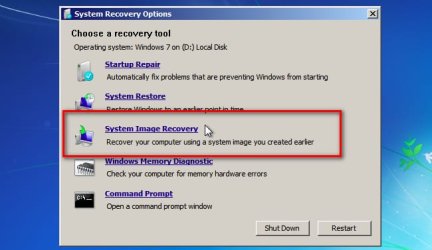
Te restore an image, you need to boot media from usb/cd/dvd that contains the windows "system recovery options".

Put the bootable recovery media in the usb slot, or dvd drive

turn on the pc

start tapping the one time boot menu key ( usually f12 but some machines are different)

A menu should pop up asking if you want to boot from dvd, or usb, or hard disk

select whichever your bootable recovery media is in

Then bios should boot up your recovery media

Running "system image recovery" should find the windows backup image

systemimagerecovery.jpg

If you haven't already, you can create a "repair disc" from your current system.

Or you can borrow mine
17514x86.iso
17514x64v24.iso
 
Last edited:

My Computers My Computers

  • At a glance

    7 X64i5 84002x8gb 3200mhz
    Computer type
    PC/Desktop
    OS
    7 X64
    CPU
    i5 8400
    Motherboard
    gigabyte b365m ds3h
    Memory
    2x8gb 3200mhz
    Hard Drives
    various
    PSU
    pure power 11 400w cm
    Case
    Coolermaster
    Cooling
    cryorig m9i
  • At a glance

    7x64g54008gb ddr4 2400
    Computer type
    PC/Desktop
    OS
    7x64
    CPU
    g5400
    Motherboard
    ga b365m ds3h
    Memory
    8gb ddr4 2400
    PSU
    xfx pro 450w
For windows system image, the recovery media needs to be the same bit version that you used to create the image.

So if you created the image from within win7 x86, use x86 recovery media.
17514x86.iso


If you created the image from within win7 x64, use x64 recovery media.
17514x64v24.iso
 

My Computers My Computers

  • At a glance

    7 X64i5 84002x8gb 3200mhz
    Computer type
    PC/Desktop
    OS
    7 X64
    CPU
    i5 8400
    Motherboard
    gigabyte b365m ds3h
    Memory
    2x8gb 3200mhz
    Hard Drives
    various
    PSU
    pure power 11 400w cm
    Case
    Coolermaster
    Cooling
    cryorig m9i
  • At a glance

    7x64g54008gb ddr4 2400
    Computer type
    PC/Desktop
    OS
    7x64
    CPU
    g5400
    Motherboard
    ga b365m ds3h
    Memory
    8gb ddr4 2400
    PSU
    xfx pro 450w
Another way is to attach the new larger hard disk inside the pc.

Then use something like aomei partition assistant to "clone" or "migrate" the original installation to the new hard disk.

or you could use diskgenius (free version) or minitool partition wizard, or many many more. This is a very common operation and lots of tools can do it.
 

My Computers My Computers

  • At a glance

    7 X64i5 84002x8gb 3200mhz
    Computer type
    PC/Desktop
    OS
    7 X64
    CPU
    i5 8400
    Motherboard
    gigabyte b365m ds3h
    Memory
    2x8gb 3200mhz
    Hard Drives
    various
    PSU
    pure power 11 400w cm
    Case
    Coolermaster
    Cooling
    cryorig m9i
  • At a glance

    7x64g54008gb ddr4 2400
    Computer type
    PC/Desktop
    OS
    7x64
    CPU
    g5400
    Motherboard
    ga b365m ds3h
    Memory
    8gb ddr4 2400
    PSU
    xfx pro 450w

My Computers My Computers

  • At a glance

    7 X64i5 84002x8gb 3200mhz
    Computer type
    PC/Desktop
    OS
    7 X64
    CPU
    i5 8400
    Motherboard
    gigabyte b365m ds3h
    Memory
    2x8gb 3200mhz
    Hard Drives
    various
    PSU
    pure power 11 400w cm
    Case
    Coolermaster
    Cooling
    cryorig m9i
  • At a glance

    7x64g54008gb ddr4 2400
    Computer type
    PC/Desktop
    OS
    7x64
    CPU
    g5400
    Motherboard
    ga b365m ds3h
    Memory
    8gb ddr4 2400
    PSU
    xfx pro 450w
Back
Top