
SparkyTech
New member
- Local time
- 5:09 AM
- Messages
- 3
Does anyone know how to hide the Desktop Icons showing up in Windows Explorer?
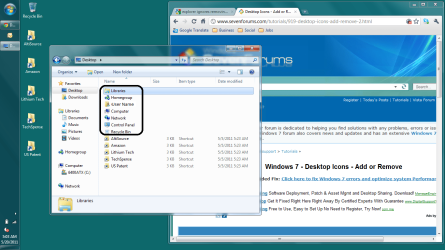
I'm not referring to hiding the Desktop Icons that are hidden with Control Panel\All Control Panel Items\Personalization, but the icons that appear when you select Desktop in Windows Explorer's Navigation Pane ... please see attached screenshot.
Thanks much !!!
I'm not referring to hiding the Desktop Icons that are hidden with Control Panel\All Control Panel Items\Personalization, but the icons that appear when you select Desktop in Windows Explorer's Navigation Pane ... please see attached screenshot.
Thanks much !!!
Attachments
My Computer
- OS
- Windows 7 x64 Professional


