Solved Can you add the "Navigation Pane" to a programs save dialogue window?

Wolygon

New member
Local time
12:37 PM
Messages
4
Location
Brisbane, Australia
Can you add the "Navigation Pane" to a programs save dialogue window?

Hey,

I searched for this but I admit I wasn't overly thorough. So I apologise in advance if this has already been answered.

In some programs (eg. Firefox) the save dialogue window has the Navigation pane on the left. Whereas other programs (eg. Foxit reader, acrobat reader) do not. I find this heavily inconvenient as I use the navigation pane extensively.

I actually went to switch to Acrobat from Foxit and found it also didn't have the navigation pane.

Heres what I mean:

Firefox save dialogue window:
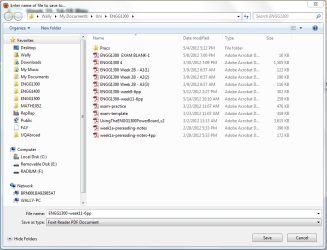
Firefox.PNG

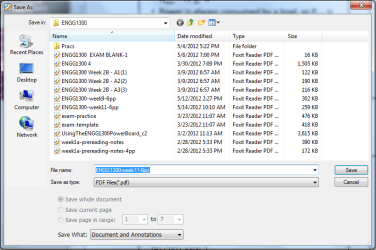
Foxit save dialogue window:

Foxit.PNG

So I was wondering if there is anyway to get the navigation pane in the foxit/other programs save dialogue window.

Thanks
Wally
 

My Computer My Computer

At a glance

Windows 7 Home Premium 64bitC2D e7400Corsair Dominators DDR2 1066 2x2GBATI HD4850 512MB
OS
Windows 7 Home Premium 64bit
CPU
C2D e7400
Motherboard
DFI LanParty X48-LT
Memory
Corsair Dominators DDR2 1066 2x2GB
Graphics Card(s)
ATI HD4850 512MB
Monitor(s) Displays
23" LG
Hard Drives
Seagate 7200.12 500GB
PSU
Antec 500W Earthwatts
Case
Thermaltake Armour+ MX
Cooling
Zalman CNPS10X
The program has to do some COM mumbo jumbo to use system libraries. Notice how these articles mention IFileDialog

Anything with an I stuck on the front of it means you have to mess with a bunch of COM stuff to use it. The 'I' being "Interface."

Windows 7 Libraries and the Common File Dialog

Developing with Common File Dialogs


Bacisally, if you're not getting paid big bucks, it's a lot of hassle for no gain.

(The short answer is you can't stick 'em on someone else's program from outside that I ever heard about.)
 

My Computer My Computer

At a glance

Windows 7 32 bitAMD 5200+ dual core2 GBNVidia GeForce 6150SE 128 MB
Computer Manufacturer/Model Number
HP Media Center
OS
Windows 7 32 bit
CPU
AMD 5200+ dual core
Memory
2 GB
Graphics Card(s)
NVidia GeForce 6150SE 128 MB
Monitor(s) Displays
CRT
Screen Resolution
1280x1024
Hard Drives
500 GB Sata internal :

SIIG USB 3.0 docking stations w/WD Caviar Black 6 Gb/s drives
Keyboard
PS/2
Mouse
PS/2 Wheel Mouse
Other Info
SIIG USB 3.0 PCIexpress card.
MilesAhead is right.

That is called "Windows XP style common File/Open dialog box". It works on Vista and 7, because it is hardcoded in application itself.

Pretty much the only thing you can do here is just customize these places on the right (Here is a tutorial).
Or turn it off.
 

My Computer My Computer

At a glance

Windows 8.1 ; Windows 7 x86 (Dec2008-Jan2013)
Computer type
PC/Desktop
OS
Windows 8.1 ; Windows 7 x86 (Dec2008-Jan2013)
Other Info
"The scale icon at the top right of a post or tutorial is how you can give rep to the member."
Hey guys, yeah I didn't think there would be a way.

Pretty much the only thing you can do here is just customize these places on the right (Here is a tutorial).
But this is totally what I was looking for, thank you so much. This 90% as good :). Works great.

Thanks so much guys, very happy.

Wally
 

My Computer My Computer

At a glance

Windows 7 Home Premium 64bitC2D e7400Corsair Dominators DDR2 1066 2x2GBATI HD4850 512MB
OS
Windows 7 Home Premium 64bit
CPU
C2D e7400
Motherboard
DFI LanParty X48-LT
Memory
Corsair Dominators DDR2 1066 2x2GB
Graphics Card(s)
ATI HD4850 512MB
Monitor(s) Displays
23" LG
Hard Drives
Seagate 7200.12 500GB
PSU
Antec 500W Earthwatts
Case
Thermaltake Armour+ MX
Cooling
Zalman CNPS10X

My Computer My Computer

At a glance

Windows 7 32 bitAMD 5200+ dual core2 GBNVidia GeForce 6150SE 128 MB
Computer Manufacturer/Model Number
HP Media Center
OS
Windows 7 32 bit
CPU
AMD 5200+ dual core
Memory
2 GB
Graphics Card(s)
NVidia GeForce 6150SE 128 MB
Monitor(s) Displays
CRT
Screen Resolution
1280x1024
Hard Drives
500 GB Sata internal :

SIIG USB 3.0 docking stations w/WD Caviar Black 6 Gb/s drives
Keyboard
PS/2
Mouse
PS/2 Wheel Mouse
Other Info
SIIG USB 3.0 PCIexpress card.
Hey,

Thats not the same thing as this changes the "navigation pane" instead of the "common places bar", but useful all the same. Definitely easier then doing it manually, I'll be using it.

Thanks
Wally

[EDIT]
And you don't need to log off and in again. Very nice :)
 

My Computer My Computer

At a glance

Windows 7 Home Premium 64bitC2D e7400Corsair Dominators DDR2 1066 2x2GBATI HD4850 512MB
OS
Windows 7 Home Premium 64bit
CPU
C2D e7400
Motherboard
DFI LanParty X48-LT
Memory
Corsair Dominators DDR2 1066 2x2GB
Graphics Card(s)
ATI HD4850 512MB
Monitor(s) Displays
23" LG
Hard Drives
Seagate 7200.12 500GB
PSU
Antec 500W Earthwatts
Case
Thermaltake Armour+ MX
Cooling
Zalman CNPS10X
Yeah, it's for the common dialogs Vista/W7 but related and nice to have. I was using a DLL that altered Explorer to have multiple tabs. But I found just by putting the Drives in the NavBar and right clicking, then hitting 'e' I could open a new window with the drive or folder. Eliminated the need at least for me, of tabbed explorer. When I want to do complex stuff like sync folders I use FreeCommander anyway.
 

My Computer My Computer

At a glance

Windows 7 32 bitAMD 5200+ dual core2 GBNVidia GeForce 6150SE 128 MB
Computer Manufacturer/Model Number
HP Media Center
OS
Windows 7 32 bit
CPU
AMD 5200+ dual core
Memory
2 GB
Graphics Card(s)
NVidia GeForce 6150SE 128 MB
Monitor(s) Displays
CRT
Screen Resolution
1280x1024
Hard Drives
500 GB Sata internal :

SIIG USB 3.0 docking stations w/WD Caviar Black 6 Gb/s drives
Keyboard
PS/2
Mouse
PS/2 Wheel Mouse
Other Info
SIIG USB 3.0 PCIexpress card.
Back
Top