Can you change where the Start Menu hovers

fuzzylojiq

New member
Local time
2:12 PM
Messages
6
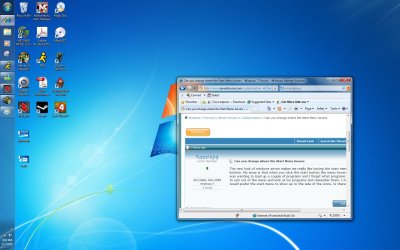
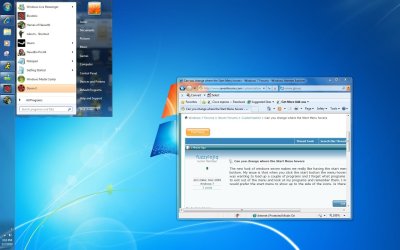
The new look of windows seven makes me really like having the start menu on the left side instead of the bottom. My issue is that when you click the start button the menu hovers over all my icons so that if I was wanting to load up a couple of programs and I forget what programs I have running currently I have to exit out of the menu and look at my programs and remember them. I mean it isn't a huge issue but I would prefer the start menu to show up to the side of the icons. Is there anyway to achieve this?
 

My Computer My Computer

At a glance

Wndows 7AMD Dual Core 3000+ Black EditionGSkill 4 GBNvidia 8800 GT
Computer Manufacturer/Model Number
Me
OS
Wndows 7
CPU
AMD Dual Core 3000+ Black Edition
Motherboard
Biostar TA770
Memory
GSkill 4 GB
Graphics Card(s)
Nvidia 8800 GT
Sound Card
Onboard
Monitor(s) Displays
22in LCD
Hard Drives
500GB Western Digital
PSU
Antec 500W
Case
Cooler Master
You could move your taskbar or move your icons. If you were talking about moving the start menu to a different place on the taskbar, I'm not sure that's possible.
 

My Computer My Computer

At a glance

Win 10 Pro x64Intel I5-2500K @3.3GHz16GB G.Skill Ripjaws X (4x4GB)EVGA GeForce 750 Ti SC 2GB
Computer type
PC/Desktop
Computer Manufacturer/Model Number
Self Built
OS
Win 10 Pro x64
CPU
Intel I5-2500K @3.3GHz
Motherboard
Asrock P67 Extreme4
Memory
16GB G.Skill Ripjaws X (4x4GB)
Graphics Card(s)
EVGA GeForce 750 Ti SC 2GB
Sound Card
ASUS Xonar DG 5.1 Channels 24-bit 96KHz PCI Interface Sound
Monitor(s) Displays
auria eq2367
Screen Resolution
1920 x 1080
Hard Drives
250GB Samsung 850 EVO SSD
1TB WD Blue
1TB Hitachi
PSU
SeaSonic X 650W 80 Plus Gold
Case
Corsair Obsidian 750D
Cooling
Corsair H60, Three 140mm case fans
Keyboard
Logitech Wireless Keyboard K520
Mouse
Logitech Wireless Mouse M310
Internet Speed
Wave Broadband ~ 100 dn 5 up
Antivirus
Windows Defender, Malwarebytes Premium
Browser
Edge, IE11, Chrome
Other Info
Laptop specs: HP g7-1365dx /
CPU: AMD A6-3420M APU with Radeon(tm) HD Graphics /
RAM: Crucial 8Gb (2x4Gb) /
SSD: Crucial M4-CT128M4SSD2 ATA Device/ FW 000F /
GFX: AMD Radeon HD 6520G /
OS: Windows 10 Pro x64
I don't believe the start menu can be moved. But I think I've seen customzations that make it transparent. Would that solve your problem?
 

My Computer My Computer

At a glance

Windows 7 Home 64, Vista Ultimate 64
Computer Manufacturer/Model Number
Me :) I build all my PCs
OS
Windows 7 Home 64, Vista Ultimate 64
I think the OP means that when the taskbar is vertical the start menu shows up on top of the taskbar, obscuring the taskbar buttons. He doesn't mean the icons on the desktop. I think.
 

My Computer My Computer

At a glance

Windows 7 Home 64, Vista Ultimate 64
Computer Manufacturer/Model Number
Me :) I build all my PCs
OS
Windows 7 Home 64, Vista Ultimate 64
I think the OP means that when the taskbar is vertical the start menu shows up on top of the taskbar, obscuring the taskbar buttons. He doesn't mean the icons on the desktop. I think.

Good point, I don't have mine vertical but that does cover up the taskbar.
 

My Computer My Computer

At a glance

Win 10 Pro x64Intel I5-2500K @3.3GHz16GB G.Skill Ripjaws X (4x4GB)EVGA GeForce 750 Ti SC 2GB
Computer type
PC/Desktop
Computer Manufacturer/Model Number
Self Built
OS
Win 10 Pro x64
CPU
Intel I5-2500K @3.3GHz
Motherboard
Asrock P67 Extreme4
Memory
16GB G.Skill Ripjaws X (4x4GB)
Graphics Card(s)
EVGA GeForce 750 Ti SC 2GB
Sound Card
ASUS Xonar DG 5.1 Channels 24-bit 96KHz PCI Interface Sound
Monitor(s) Displays
auria eq2367
Screen Resolution
1920 x 1080
Hard Drives
250GB Samsung 850 EVO SSD
1TB WD Blue
1TB Hitachi
PSU
SeaSonic X 650W 80 Plus Gold
Case
Corsair Obsidian 750D
Cooling
Corsair H60, Three 140mm case fans
Keyboard
Logitech Wireless Keyboard K520
Mouse
Logitech Wireless Mouse M310
Internet Speed
Wave Broadband ~ 100 dn 5 up
Antivirus
Windows Defender, Malwarebytes Premium
Browser
Edge, IE11, Chrome
Other Info
Laptop specs: HP g7-1365dx /
CPU: AMD A6-3420M APU with Radeon(tm) HD Graphics /
RAM: Crucial 8Gb (2x4Gb) /
SSD: Crucial M4-CT128M4SSD2 ATA Device/ FW 000F /
GFX: AMD Radeon HD 6520G /
OS: Windows 10 Pro x64
try alternative solution,like rocket dock or something,you can put your shortcuts there+keeps your desktop clean...
 

My Computer My Computer

At a glance

Windows 7 Ultimate x32DualCore Intel Pentium E2200, 2218 MHz (11 x ...2 GB DDR2-800 DDR2 SDRAMnVIDIA GeForce 9500GT 1GB
Computer Manufacturer/Model Number
Micro-Star International/MS-7529
OS
Windows 7 Ultimate x32
CPU
DualCore Intel Pentium E2200, 2218 MHz (11 x 202)
Motherboard
MSI G31M3 V2 (MS-7529) (2 PCI, 1 PCI-E x16,2 DDR2 DIMM)
Memory
2 GB DDR2-800 DDR2 SDRAM
Graphics Card(s)
nVIDIA GeForce 9500GT 1GB
Sound Card
Realtek ALC888/1200 @ Intel 82801GB ICH7
Monitor(s) Displays
Samsung SyncMaster 2253BW (Digital) 22'' LCD
Screen Resolution
1680x1050
Hard Drives
SAMSUNG HD322IJ ATA Device (298 GB , IDE)
Here are pictures of what I want but don't know how
 

Attachments

  • like.jpg
    like.jpg
    146.1 KB · Views: 24
  • dontwant.jpg
    dontwant.jpg
    157 KB · Views: 20
  • want.jpg
    want.jpg
    142.2 KB · Views: 26

My Computer My Computer

At a glance

Wndows 7AMD Dual Core 3000+ Black EditionGSkill 4 GBNvidia 8800 GT
Computer Manufacturer/Model Number
Me
OS
Wndows 7
CPU
AMD Dual Core 3000+ Black Edition
Motherboard
Biostar TA770
Memory
GSkill 4 GB
Graphics Card(s)
Nvidia 8800 GT
Sound Card
Onboard
Monitor(s) Displays
22in LCD
Hard Drives
500GB Western Digital
PSU
Antec 500W
Case
Cooler Master
If I wanted something like rocket dock I would of bought an apple...
 

My Computer My Computer

At a glance

Wndows 7AMD Dual Core 3000+ Black EditionGSkill 4 GBNvidia 8800 GT
Computer Manufacturer/Model Number
Me
OS
Wndows 7
CPU
AMD Dual Core 3000+ Black Edition
Motherboard
Biostar TA770
Memory
GSkill 4 GB
Graphics Card(s)
Nvidia 8800 GT
Sound Card
Onboard
Monitor(s) Displays
22in LCD
Hard Drives
500GB Western Digital
PSU
Antec 500W
Case
Cooler Master
I think the OP means that when the taskbar is vertical the start menu shows up on top of the taskbar, obscuring the taskbar buttons. He doesn't mean the icons on the desktop. I think.
Yes that is exactly what I mean.
 

My Computer My Computer

At a glance

Wndows 7AMD Dual Core 3000+ Black EditionGSkill 4 GBNvidia 8800 GT
Computer Manufacturer/Model Number
Me
OS
Wndows 7
CPU
AMD Dual Core 3000+ Black Edition
Motherboard
Biostar TA770
Memory
GSkill 4 GB
Graphics Card(s)
Nvidia 8800 GT
Sound Card
Onboard
Monitor(s) Displays
22in LCD
Hard Drives
500GB Western Digital
PSU
Antec 500W
Case
Cooler Master
as gentlemen above said man...
 

My Computer My Computer

At a glance

Windows 7 Ultimate x32DualCore Intel Pentium E2200, 2218 MHz (11 x ...2 GB DDR2-800 DDR2 SDRAMnVIDIA GeForce 9500GT 1GB
Computer Manufacturer/Model Number
Micro-Star International/MS-7529
OS
Windows 7 Ultimate x32
CPU
DualCore Intel Pentium E2200, 2218 MHz (11 x 202)
Motherboard
MSI G31M3 V2 (MS-7529) (2 PCI, 1 PCI-E x16,2 DDR2 DIMM)
Memory
2 GB DDR2-800 DDR2 SDRAM
Graphics Card(s)
nVIDIA GeForce 9500GT 1GB
Sound Card
Realtek ALC888/1200 @ Intel 82801GB ICH7
Monitor(s) Displays
Samsung SyncMaster 2253BW (Digital) 22'' LCD
Screen Resolution
1680x1050
Hard Drives
SAMSUNG HD322IJ ATA Device (298 GB , IDE)
Is your 3rd pic just to show how you want it? I'm guessing that's not how it is?
 

My Computer My Computer

At a glance

Win 10 Pro x64Intel I5-2500K @3.3GHz16GB G.Skill Ripjaws X (4x4GB)EVGA GeForce 750 Ti SC 2GB
Computer type
PC/Desktop
Computer Manufacturer/Model Number
Self Built
OS
Win 10 Pro x64
CPU
Intel I5-2500K @3.3GHz
Motherboard
Asrock P67 Extreme4
Memory
16GB G.Skill Ripjaws X (4x4GB)
Graphics Card(s)
EVGA GeForce 750 Ti SC 2GB
Sound Card
ASUS Xonar DG 5.1 Channels 24-bit 96KHz PCI Interface Sound
Monitor(s) Displays
auria eq2367
Screen Resolution
1920 x 1080
Hard Drives
250GB Samsung 850 EVO SSD
1TB WD Blue
1TB Hitachi
PSU
SeaSonic X 650W 80 Plus Gold
Case
Corsair Obsidian 750D
Cooling
Corsair H60, Three 140mm case fans
Keyboard
Logitech Wireless Keyboard K520
Mouse
Logitech Wireless Mouse M310
Internet Speed
Wave Broadband ~ 100 dn 5 up
Antivirus
Windows Defender, Malwarebytes Premium
Browser
Edge, IE11, Chrome
Other Info
Laptop specs: HP g7-1365dx /
CPU: AMD A6-3420M APU with Radeon(tm) HD Graphics /
RAM: Crucial 8Gb (2x4Gb) /
SSD: Crucial M4-CT128M4SSD2 ATA Device/ FW 000F /
GFX: AMD Radeon HD 6520G /
OS: Windows 10 Pro x64

My Computer My Computer

At a glance

Win 10 Pro x64Intel I5-2500K @3.3GHz16GB G.Skill Ripjaws X (4x4GB)EVGA GeForce 750 Ti SC 2GB
Computer type
PC/Desktop
Computer Manufacturer/Model Number
Self Built
OS
Win 10 Pro x64
CPU
Intel I5-2500K @3.3GHz
Motherboard
Asrock P67 Extreme4
Memory
16GB G.Skill Ripjaws X (4x4GB)
Graphics Card(s)
EVGA GeForce 750 Ti SC 2GB
Sound Card
ASUS Xonar DG 5.1 Channels 24-bit 96KHz PCI Interface Sound
Monitor(s) Displays
auria eq2367
Screen Resolution
1920 x 1080
Hard Drives
250GB Samsung 850 EVO SSD
1TB WD Blue
1TB Hitachi
PSU
SeaSonic X 650W 80 Plus Gold
Case
Corsair Obsidian 750D
Cooling
Corsair H60, Three 140mm case fans
Keyboard
Logitech Wireless Keyboard K520
Mouse
Logitech Wireless Mouse M310
Internet Speed
Wave Broadband ~ 100 dn 5 up
Antivirus
Windows Defender, Malwarebytes Premium
Browser
Edge, IE11, Chrome
Other Info
Laptop specs: HP g7-1365dx /
CPU: AMD A6-3420M APU with Radeon(tm) HD Graphics /
RAM: Crucial 8Gb (2x4Gb) /
SSD: Crucial M4-CT128M4SSD2 ATA Device/ FW 000F /
GFX: AMD Radeon HD 6520G /
OS: Windows 10 Pro x64
Back
Top