
You are using an out of date browser. It may not display this or other websites correctly.
You should upgrade or use an alternative browser.
You should upgrade or use an alternative browser.
Can you Display folder size?
- Thread starter Jama
- Start date


My Computer
- Computer type
- PC/Desktop
- Computer Manufacturer/Model Number
- Self Built
- OS
- Windows 7 Ultimate 64bit
- CPU
- AMD Phenom Quad core 9950 black edition
- Motherboard
- Gigabyte
- Memory
- 16Gb
- Graphics Card(s)
- 2x XFX Radeon 5850
- Sound Card
- PCI Express X-Fi Titanium / Logitech G35
- Monitor(s) Displays
- 2x HP 2410i
- Screen Resolution
- 1920x1080
- Hard Drives
- 2x 500Gb Seagate
1x 300Gb Seagate
1x 1Tb Seagate
2x 1Tb Hitatchi
- PSU
- Jean Tech Storm 700W
- Case
- Cooler Master COSMOS S
- Cooling
- Akasa Evo Blue Pro
- Keyboard
- Logitech G15
- Mouse
- Mad Catz M.M.O. 7
- Internet Speed
- 12mb
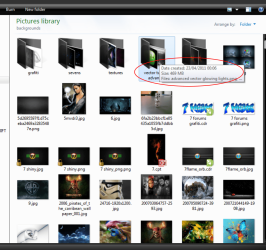
Thanks PooMan, but that's not exactly what I'm looking for. I'd like to see the size of all folders at the same time in order to compare their size or know exactly how much disk space is stored in each forlder faster.
I'm also using different display... View menu --> Details which might exlain better what I'm trying to say
I'm also using different display... View menu --> Details which might exlain better what I'm trying to say
My Computer
- OS
- Windows 7 Ultimate x64

That is only possible for files, not for folders (in Tiles or Content).
My Computer
- Computer Manufacturer/Model Number
- HP, Dell, Gateway, Toshiba - 4 laptops and 2 desktops
- OS
- Vista, Windows7, Mint Mate, Zorin, Windows 8
- CPU
- from 1.6GHz Duo to i7
- Monitor(s) Displays
- 2x HP w2207
- Hard Drives
- 5x HDD, 7x SSD, 12x Externals
- Keyboard
- with trackball - no mices
- Mouse
- Trackball mice
- Internet Speed
- DSL 6000

My Computer
- Computer type
- PC/Desktop
- Computer Manufacturer/Model Number
- Dell Inspiron 530
- OS
- Windows 7 Professional SP1 64-bit
- CPU
- Intel Core 2 Duo Processor E8300 @ 2.83GHz
- Motherboard
- Dell Inc. 0RY007 (Socket 775)
- Memory
- 4.00 GB Dual-Channel DDR2 @ 332MHz (5-5-5-15)
- Graphics Card(s)
- Intel(R) G33/G31 Express Chipset Family
- Sound Card
- Integrated 7.1 Channel Audio
- Monitor(s) Displays
- Acer G245HQL 23.6" LED(1920x1080@60Hz)
- Screen Resolution
- 1920 x 1080
- Hard Drives
- Disk 0 HITACHI 1TB OS Installed - Disk 1 HITACHI 1TB For Backups
- Keyboard
- Dell USB Keyboard
- Mouse
- Dell Optical USB Mouse
- Internet Speed
- DSL 10 meg
- Antivirus
- Symantec(SEP)
- Browser
- Pale Moon

- Local time
- 4:43 PM
- Messages
- 5,063
Thanks PooMan, but that's not exactly what I'm looking for. I'd like to see the size of all folders at the same time in order to compare their size or know exactly how much disk space is stored in each forlder faster.
I'm also using different display... View menu --> Details which might exlain better what I'm trying to say
FreeCommander can show folder sizes. It has a button to toggle on and off since calculating the sizes takes time. There's a Button looks like a yellow folder with KB inside it that toggles the folder size display for the active pane. It's free and you can download it here:
FreeCommander - freeware file manager
Does not yet have a native 64 bit version. But that's on the way.
My Computer
- Computer Manufacturer/Model Number
- HP Media Center
- OS
- Windows 7 32 bit
- CPU
- AMD 5200+ dual core
- Memory
- 2 GB
- Graphics Card(s)
- NVidia GeForce 6150SE 128 MB
- Monitor(s) Displays
- CRT
- Screen Resolution
- 1280x1024
- Hard Drives
- 500 GB Sata internal :
SIIG USB 3.0 docking stations w/WD Caviar Black 6 Gb/s drives
- Keyboard
- PS/2
- Mouse
- PS/2 Wheel Mouse
- Other Info
- SIIG USB 3.0 PCIexpress card.