Can You Install Retail Windows 7 and use OEM serial #

ASo I used my retail copy of home premium to format and install windows on the laptop and entered the serial number that came with windows home premium that was already installed on the laptop.


In this post, you say "I ..........entered the serial number that came with windows home premium that was already installed on the laptop."

In post 4 you said: "I now see the 25 number/letter combination for the CD key".

Clarify this: are these 2 numbers the same and did that number in fact come from a sticker on the Toshiba to which you are trying to install Windows?
 

My Computer My Computer

At a glance

Windows 7 Home Premium SP1, 64-bitIntel Skylake i5-6600K, not overclocked8 GB HyperX DDR4-2666 (2 x 4 GB)none; graphics are integrated on CPU
Computer type
PC/Desktop
Computer Manufacturer/Model Number
Ignatz Special; 4 speed manual gearbox; factory air conditioning; one of one
OS
Windows 7 Home Premium SP1, 64-bit
CPU
Intel Skylake i5-6600K, not overclocked
Motherboard
AsRock Z170M Extreme 4, micro ATX
Memory
8 GB HyperX DDR4-2666 (2 x 4 GB)
Graphics Card(s)
none; graphics are integrated on CPU
Sound Card
onboard: Realtek ALC1150; external: USB Behringer UF0-202
Monitor(s) Displays
Dell S2340M 23 inch IPS
Screen Resolution
1600 x 900
Hard Drives
System: Crucial MX100 series SSD, 128 GB;
Data: Samsung Spinpoint 103SJ, 1 TB;
Backup: WD Caviar Green WD30EZRX-00D8PB0, 3 TB
PSU
Rosewill SilentNight 500 watt fanless, semi-modular
Case
Antec Solo II
Cooling
Noctua NH-U12S; Noctua F12 intake, Noctua S12A exhaust
Keyboard
Microsoft 200 6JH-00001 USB
Mouse
Dell or Microsoft optical wired; USB
Antivirus
Microsoft Security Essentials and Malwarebytes Premium
Browser
Pale Moon
Other Info
All fans PWM; speeds at idle: CPU circa 500 rpm; intake circa 600 rpm; exhaust circa 600 rpm; CPU temps 27 idle and 47 C load in a warm room (27 C/81 F) when running Intel Extreme Tuning Utility stress test.
Sorry if I have not been clear. The only two numbers that I have are a product ID# and the CD key (serial #). These two are quite different, the product ID is 5 digits followed by -OEM-7digits-5digits. The CD key a 25 digit number/letter combination. It was this 25 digits combination that I entered while trying to activate. Was this not correct?

There are no number's on the back of this laptop other than model and laptop serial #. I checked under the battery and there is nothing there either. Perhaps something else is missing.
 

My Computer My Computer

At a glance

Windows 7 Home Premiumi7 9206 GB DDR3Geforce GTX 260
Computer Manufacturer/Model Number
Custom
OS
Windows 7 Home Premium
CPU
i7 920
Motherboard
Asus P6T Deluxe
Memory
6 GB DDR3
Graphics Card(s)
Geforce GTX 260
Monitor(s) Displays
Dell 2410
Screen Resolution
1920x1200
Hard Drives
1 TB Western Digital Caviar Black
PSU
Corsair 850w
Case
Cooler Master 922 HAF
Keyboard
Logitech Wave
Mouse
Logitech G500
Product ID number is irrelevant.

The 25 character "serial number" you refer to is presumably a Product Key, not a serial number.

You haven't said so explicitly, but I assume that the answer to the question I asked in post 21 is that the numbers are the same, but that the number came from YOUR retail upgrade disk and NOT from anywhere on the Toshiba.

If that is so, I wouldn't expect success since that Product Key is presumably in use on your own PC and cannot be reused.

But the question is----why doesn't the Toshiba have a 25 character Product Key on a sticker? I thought manufacturers such as Toshiba, Dell, HP, etc were required to include this sticker. It's not to be confused with the other Product Key that is hidden and used to automatically reactivate a recovery installation--as opposed to a clean install such as you are doing.

Did you ask Toshiba why no sticker?
 

My Computer My Computer

At a glance

Windows 7 Home Premium SP1, 64-bitIntel Skylake i5-6600K, not overclocked8 GB HyperX DDR4-2666 (2 x 4 GB)none; graphics are integrated on CPU
Computer type
PC/Desktop
Computer Manufacturer/Model Number
Ignatz Special; 4 speed manual gearbox; factory air conditioning; one of one
OS
Windows 7 Home Premium SP1, 64-bit
CPU
Intel Skylake i5-6600K, not overclocked
Motherboard
AsRock Z170M Extreme 4, micro ATX
Memory
8 GB HyperX DDR4-2666 (2 x 4 GB)
Graphics Card(s)
none; graphics are integrated on CPU
Sound Card
onboard: Realtek ALC1150; external: USB Behringer UF0-202
Monitor(s) Displays
Dell S2340M 23 inch IPS
Screen Resolution
1600 x 900
Hard Drives
System: Crucial MX100 series SSD, 128 GB;
Data: Samsung Spinpoint 103SJ, 1 TB;
Backup: WD Caviar Green WD30EZRX-00D8PB0, 3 TB
PSU
Rosewill SilentNight 500 watt fanless, semi-modular
Case
Antec Solo II
Cooling
Noctua NH-U12S; Noctua F12 intake, Noctua S12A exhaust
Keyboard
Microsoft 200 6JH-00001 USB
Mouse
Dell or Microsoft optical wired; USB
Antivirus
Microsoft Security Essentials and Malwarebytes Premium
Browser
Pale Moon
Other Info
All fans PWM; speeds at idle: CPU circa 500 rpm; intake circa 600 rpm; exhaust circa 600 rpm; CPU temps 27 idle and 47 C load in a warm room (27 C/81 F) when running Intel Extreme Tuning Utility stress test.
ignatzatsonic . No I did not use the product key that is in use for my PC to try and activate the laptop. I got the laptop product key from the laptop itself by running magical jelly bean key finder before I reformatted it. It was this product key that I tried to use to activate. I hope that is clearer.

No I did not ask Toshiba why there was no sticker but your right I should have. I suppose it could have peeled off in the last 2 years. If it had been under the battery I would have to think it would still be there. I've only had the laptop back with me for about 5 days. I will be shipping it back to my daughter later this week. When I call her I will ask if she remembers any other sort of sticker ever being on the back, but I doubt she would take much notice of it.
 

My Computer My Computer

At a glance

Windows 7 Home Premiumi7 9206 GB DDR3Geforce GTX 260
Computer Manufacturer/Model Number
Custom
OS
Windows 7 Home Premium
CPU
i7 920
Motherboard
Asus P6T Deluxe
Memory
6 GB DDR3
Graphics Card(s)
Geforce GTX 260
Monitor(s) Displays
Dell 2410
Screen Resolution
1920x1200
Hard Drives
1 TB Western Digital Caviar Black
PSU
Corsair 850w
Case
Cooler Master 922 HAF
Keyboard
Logitech Wave
Mouse
Logitech G500
The answer to your question is YES you can use your OEM key on the bottom of the laptop with your retail disc. Retail discs and oem discs are exactly the same thing, the only difference is the key.

DON`T WASTE YOUR RETAIL KEY IF YOU HAVE AN OEM KEY !!!

And most certainly you should have a COA sticker on the bottom of the pc.

Did you purchase it new ?
 

My Computer My Computer

At a glance

Windows 10 Pro x64Intel Core i7 6700KGSkill TridentZ RGB 16GB 3600 16-16-16-36EVGA GTX 980 Ti SC x2
Computer type
PC/Desktop
Computer Manufacturer/Model Number
Skylake Special #666
OS
Windows 10 Pro x64
CPU
Intel Core i7 6700K
Motherboard
Asus Sabertooth Z170 Mark 1
Memory
GSkill TridentZ RGB 16GB 3600 16-16-16-36
Graphics Card(s)
EVGA GTX 980 Ti SC x2
Sound Card
Realtek High Definition
Monitor(s) Displays
AOC G2460PG
Screen Resolution
1920 x 1080 144Hz
Hard Drives
Samsung 860 Pro 256GB, Seagate Barracuda 4TB x2
PSU
EVGA 1000 P2, EVGA White Custom Braided Cables
Case
Corsair Vengeance C70 Gunmetal Black
Cooling
Corsair H100i v2, Corsair ML120 x2, Thermal Grizzly Kryonaut
Keyboard
Logitech G910 Orion Spectrum
Mouse
Logitech G700s
Internet Speed
Verizon Fios Quantum Gateway 75/75
Antivirus
Windows Defender, Malwarebytes Free 3.8.3
Browser
Chrome
Other Info
Corsair SP120 x4, LG Blu-ray Drive, Durabrand HT-395 100 Watt Dolby Digital Amp, Corsair H2100 Wireless 7.1 Headset
Yes it was purchased new. Believe me I am not arguing that there should be and may have been a COA sticker on the bottom of this laptop. But as I look at it now there is none to be found. Now that I think of it, my daughter did buy an extra battery for this laptop as the first one didn't hold a charge long enough. Maybe the sticker was attached to the other battery.
 

My Computer My Computer

At a glance

Windows 7 Home Premiumi7 9206 GB DDR3Geforce GTX 260
Computer Manufacturer/Model Number
Custom
OS
Windows 7 Home Premium
CPU
i7 920
Motherboard
Asus P6T Deluxe
Memory
6 GB DDR3
Graphics Card(s)
Geforce GTX 260
Monitor(s) Displays
Dell 2410
Screen Resolution
1920x1200
Hard Drives
1 TB Western Digital Caviar Black
PSU
Corsair 850w
Case
Cooler Master 922 HAF
Keyboard
Logitech Wave
Mouse
Logitech G500
Normally, I'd say the key that Magic Jelly Bean found would correspond to the key that should have been on that sticker.

If that is true, I can't understand why MS would say it is blocked or invalid.

But---maybe Magic Jelly Bean can be inaccurate?

Or maybe the installation on the Toshiba at the time you ran Magic Jelly Bean is not the original installation?
 

My Computer My Computer

At a glance

Windows 7 Home Premium SP1, 64-bitIntel Skylake i5-6600K, not overclocked8 GB HyperX DDR4-2666 (2 x 4 GB)none; graphics are integrated on CPU
Computer type
PC/Desktop
Computer Manufacturer/Model Number
Ignatz Special; 4 speed manual gearbox; factory air conditioning; one of one
OS
Windows 7 Home Premium SP1, 64-bit
CPU
Intel Skylake i5-6600K, not overclocked
Motherboard
AsRock Z170M Extreme 4, micro ATX
Memory
8 GB HyperX DDR4-2666 (2 x 4 GB)
Graphics Card(s)
none; graphics are integrated on CPU
Sound Card
onboard: Realtek ALC1150; external: USB Behringer UF0-202
Monitor(s) Displays
Dell S2340M 23 inch IPS
Screen Resolution
1600 x 900
Hard Drives
System: Crucial MX100 series SSD, 128 GB;
Data: Samsung Spinpoint 103SJ, 1 TB;
Backup: WD Caviar Green WD30EZRX-00D8PB0, 3 TB
PSU
Rosewill SilentNight 500 watt fanless, semi-modular
Case
Antec Solo II
Cooling
Noctua NH-U12S; Noctua F12 intake, Noctua S12A exhaust
Keyboard
Microsoft 200 6JH-00001 USB
Mouse
Dell or Microsoft optical wired; USB
Antivirus
Microsoft Security Essentials and Malwarebytes Premium
Browser
Pale Moon
Other Info
All fans PWM; speeds at idle: CPU circa 500 rpm; intake circa 600 rpm; exhaust circa 600 rpm; CPU temps 27 idle and 47 C load in a warm room (27 C/81 F) when running Intel Extreme Tuning Utility stress test.
Yes it was purchased new. Believe me I am not arguing that there should be and may have been a COA sticker on the bottom of this laptop. But as I look at it now there is none to be found. Now that I think of it, my daughter did buy an extra battery for this laptop as the first one didn't hold a charge long enough. Maybe the sticker was attached to the other battery.

The COA is inside the Battery compartment. Most manufacturers don't put it on the outside of notebooks anymore because it is to easy to steal it when on the outside. So most all now place it inside the battery compartment. Take the battery out and you will find it.
 

My Computer My Computer

At a glance

7 x64
OS
7 x64

My Computer My Computer

At a glance

Windows 7 Home Premium 32-Bit - Build 7600 SP1Intel Core i3-2120 3.30GhzKingston 4 GB DDR3 1333 mhzAMD Radeon HD6670
Computer type
PC/Desktop
Computer Manufacturer/Model Number
Custom Build
OS
Windows 7 Home Premium 32-Bit - Build 7600 SP1
CPU
Intel Core i3-2120 3.30Ghz
Motherboard
Asus P8Z68-V LX Intel Z68 Socket H2 ATX
Memory
Kingston 4 GB DDR3 1333 mhz
Graphics Card(s)
AMD Radeon HD6670
Sound Card
Sound Blaster Audigy SE 24-Bit
Monitor(s) Displays
Asus VE228
Screen Resolution
1440 X 900
Hard Drives
OCZ Vertex 3 120 GB Sata 3 SSD ==
Kingston SH103/S3 120 G Hyper X 120 GB SSD ==
Western Digital 500 GB Caviar Green 7200 RPM ==
PSU
Corsair CX600M == 600 Watt
Case
NZXT Apollo - Silver with Clear Side Panel
Cooling
Three 120 mm Fans
Keyboard
Microsoft Natural 4000
Mouse
Microsoft Custom Optical 3000
Internet Speed
AT&T Fiber Optic Wireless Network
Antivirus
Microsoft Security Essentials
Browser
Chrome
Other Info
120 mm Blue LED Fan -- Three Blue LED Lazer Light Sticks

My Computer My Computer

At a glance

Windows 7x64 Home Premium SP1Intel i7 2600kG.Skill Ripjaws (DDR3-1600) 2x4GBNvidia GeForce GTS 450; Intel HD Graphics 300...
Computer type
PC/Desktop
Computer Manufacturer/Model Number
Own build
OS
Windows 7x64 Home Premium SP1
CPU
Intel i7 2600k
Motherboard
ASUS P8Z68 Deluxe
Memory
G.Skill Ripjaws (DDR3-1600) 2x4GB
Graphics Card(s)
Nvidia GeForce GTS 450; Intel HD Graphics 3000(GT2+)
Monitor(s) Displays
Dell Ultrasharp IPS panel U2311H, Samsung SyncMaster P2350
Screen Resolution
1920x1080
Hard Drives
Samsung 850 Pro SSD 256GB, Samsung SSD 840 120GB, Seagates 1TB Barracuda ST31000528AS x2
PSU
Seasonic M12II 520W
Case
Lian Li Lancool PC-K60
Cooling
Case: 1x120mm, 3x140mm CPU: Hyper 212+
Keyboard
Logitech MK520 (wireless)
Mouse
Logitech MK520
Internet Speed
6-7 Mbps
Antivirus
Norton Security Premium, Malwarebytes on 2 (MSE on 3rd PC)
Browser
FireFox
Other Info
Audio: Logitech Z523 2.1
Toshiba would never sell preinstalled Windows 7 without a COA sticker with Product Key on it. It should most definitely be on the bottom of the laptop. If you bought this PC from a shop, I would contact them to ask where the COA sticker is because they cannot legally sell preinstalled Win7 without the sticker which proves it's Genuine and paid for to MS.

The Key you audited from the HD is not the same as the key on the COA sticker, but is an OEM-SLP key used to offline mass-activate the PC at the factory. There is a way to back up the SLP activation file to reinstall it after a Clean Reinstall but it is not supported by these forums due to piracy concerns, though you can research it on your own.

So your options here are to contact the shop to find out where the sticker is, contact Toshiba Support to ask the same and see if they will replace the sticker or at least send you the Factory Recovery Disks for your model which will self-activate. You can then Clean Up Factory Bloatware which is the next best thing to a Clean Reinstall - Factory OEM Windows 7.

If this is not resolved satisfactorily by your shop and/or Toshiba, I would personally call MS Customer Service to report that you were sold preinstalled Win7 without a COA sticker. If you have the Product ID they can trace the OS license to possibly replace your key which they often do if a user sold non-Genuine Win7 cooperates by reporting it.

Your COA sticker Product Key can only be used on that one PC so it would not be stolen or retained by an intermediary for any gain.
 
Last edited:
I think the digital life article I posted explains what you need to know. However, It is possible for someone to remove and retain a COA sticker if you bought the PC second hand.
 

My Computer My Computer

At a glance

Windows 7x64 Home Premium SP1Intel i7 2600kG.Skill Ripjaws (DDR3-1600) 2x4GBNvidia GeForce GTS 450; Intel HD Graphics 300...
Computer type
PC/Desktop
Computer Manufacturer/Model Number
Own build
OS
Windows 7x64 Home Premium SP1
CPU
Intel i7 2600k
Motherboard
ASUS P8Z68 Deluxe
Memory
G.Skill Ripjaws (DDR3-1600) 2x4GB
Graphics Card(s)
Nvidia GeForce GTS 450; Intel HD Graphics 3000(GT2+)
Monitor(s) Displays
Dell Ultrasharp IPS panel U2311H, Samsung SyncMaster P2350
Screen Resolution
1920x1080
Hard Drives
Samsung 850 Pro SSD 256GB, Samsung SSD 840 120GB, Seagates 1TB Barracuda ST31000528AS x2
PSU
Seasonic M12II 520W
Case
Lian Li Lancool PC-K60
Cooling
Case: 1x120mm, 3x140mm CPU: Hyper 212+
Keyboard
Logitech MK520 (wireless)
Mouse
Logitech MK520
Internet Speed
6-7 Mbps
Antivirus
Norton Security Premium, Malwarebytes on 2 (MSE on 3rd PC)
Browser
FireFox
Other Info
Audio: Logitech Z523 2.1
Yes it was purchased new. Believe me I am not arguing that there should be and may have been a COA sticker on the bottom of this laptop. But as I look at it now there is none to be found. Now that I think of it, my daughter did buy an extra battery for this laptop as the first one didn't hold a charge long enough. Maybe the sticker was attached to the other battery.

No, The sticker is NEVER attached to the battery.

It may be under it, in the housing, as suggested, but I`d love to see a pic of this.
 

My Computer My Computer

At a glance

Windows 10 Pro x64Intel Core i7 6700KGSkill TridentZ RGB 16GB 3600 16-16-16-36EVGA GTX 980 Ti SC x2
Computer type
PC/Desktop
Computer Manufacturer/Model Number
Skylake Special #666
OS
Windows 10 Pro x64
CPU
Intel Core i7 6700K
Motherboard
Asus Sabertooth Z170 Mark 1
Memory
GSkill TridentZ RGB 16GB 3600 16-16-16-36
Graphics Card(s)
EVGA GTX 980 Ti SC x2
Sound Card
Realtek High Definition
Monitor(s) Displays
AOC G2460PG
Screen Resolution
1920 x 1080 144Hz
Hard Drives
Samsung 860 Pro 256GB, Seagate Barracuda 4TB x2
PSU
EVGA 1000 P2, EVGA White Custom Braided Cables
Case
Corsair Vengeance C70 Gunmetal Black
Cooling
Corsair H100i v2, Corsair ML120 x2, Thermal Grizzly Kryonaut
Keyboard
Logitech G910 Orion Spectrum
Mouse
Logitech G700s
Internet Speed
Verizon Fios Quantum Gateway 75/75
Antivirus
Windows Defender, Malwarebytes Free 3.8.3
Browser
Chrome
Other Info
Corsair SP120 x4, LG Blu-ray Drive, Durabrand HT-395 100 Watt Dolby Digital Amp, Corsair H2100 Wireless 7.1 Headset
Greg`s advice is spot on !! :p


999 Posts OMG Flip it over !!!

Is there a way to keep it at 999 ??? :party:
 

My Computer My Computer

At a glance

Windows 10 Pro x64Intel Core i7 6700KGSkill TridentZ RGB 16GB 3600 16-16-16-36EVGA GTX 980 Ti SC x2
Computer type
PC/Desktop
Computer Manufacturer/Model Number
Skylake Special #666
OS
Windows 10 Pro x64
CPU
Intel Core i7 6700K
Motherboard
Asus Sabertooth Z170 Mark 1
Memory
GSkill TridentZ RGB 16GB 3600 16-16-16-36
Graphics Card(s)
EVGA GTX 980 Ti SC x2
Sound Card
Realtek High Definition
Monitor(s) Displays
AOC G2460PG
Screen Resolution
1920 x 1080 144Hz
Hard Drives
Samsung 860 Pro 256GB, Seagate Barracuda 4TB x2
PSU
EVGA 1000 P2, EVGA White Custom Braided Cables
Case
Corsair Vengeance C70 Gunmetal Black
Cooling
Corsair H100i v2, Corsair ML120 x2, Thermal Grizzly Kryonaut
Keyboard
Logitech G910 Orion Spectrum
Mouse
Logitech G700s
Internet Speed
Verizon Fios Quantum Gateway 75/75
Antivirus
Windows Defender, Malwarebytes Free 3.8.3
Browser
Chrome
Other Info
Corsair SP120 x4, LG Blu-ray Drive, Durabrand HT-395 100 Watt Dolby Digital Amp, Corsair H2100 Wireless 7.1 Headset
Have just dropped on the last post so if you haven't got the activation code any chance of running SIW? that will find the licence code or Speccy will.

http://www.piriform.com/speccy

http://siw.en.softonic.com/

By the by if you want to put in a new opto drive thats simple just go to

Disassemble, repair, take apart, upgrade, clean Toshiba laptop or notebook yourself. pick out the model it's usually just a screw accessed from below the drive then just slips out - put the new one in and replace the screw.
 

My Computer My Computer

At a glance

Desk1 7 Home Prem / Desk2 10 Pro / Main lap A...Desk1 i5 3750K / Laptop i7 GTX 860M / Desk2 i...Desk1 8GB (1866) / Desk2 16GB (1333) / Laptop...Desk 1& 2NVidia GTX 650 & Laptops on board Intel
Computer type
PC/Desktop
Computer Manufacturer/Model Number
Own build (new) Desk1 / Asus ROG Win 7 / Desk2 1st build
OS
Desk1 7 Home Prem / Desk2 10 Pro / Main lap Asus ROG 10 Pro 2 laptop Toshiba 7 Pro Asus P2520 7 & 10
CPU
Desk1 i5 3750K / Laptop i7 GTX 860M / Desk2 i5 2500
Motherboard
Desk1 Asus P877-V / Desk2 Gigabyte H67 UD3H / Laptop ?
Memory
Desk1 8GB (1866) / Desk2 16GB (1333) / Laptop 8Gb DDR3
Graphics Card(s)
Desk 1& 2NVidia GTX 650 & Laptops on board Intel
Sound Card
Desk 1 & 2 -XONAR DG Realtek High Def audio Laptop
Monitor(s) Displays
Desk 1 Benq HD 2450 / Desk2 Philips 24" / Laptop 17.5"
Screen Resolution
1920x1080 D1 & D2 & Laptop 1
Hard Drives
Desk1 Samsung 120GB 830 SSD
Asus ROG 256GB 850 Pro SSD
Desk2 Samsung 840 256 SSD
Toshiba 120GB EVO
PSU
Desk 1 Corsair HX 1050/ Laptop ? / Desk 2 Corsair HX 650
Case
Desk 1 Cooler HAF XM ? Toshiba laptop / Desk2 Coolermaster
Cooling
Fans on all Desk1 -2 Desk2 - all Coolermasters 5 Laptop ?
Keyboard
Desk 1 MS Sidewinder X6 Desk 2 MS Sidewinder X 4
Mouse
Desk 1&2 - Gigabyte MS 900 gamer - laptop - Logitec wireless
Internet Speed
ADSL2+
Other Info
One other Desktop (tester) and spare Toshba laptop both with SSD's
Running Kaspersky 2016 ISS on all machines config'd identically
Logitec audio stereo systems on each machine (x3)
Canon MG5250MFC
Router/modem TP-Link running WPA2SK
Greg I totally agree there should be and probably was a COA sticker on this laptop when I purchased it. I'm only saying that there doesn't seem to be any COA now. The laptop is running fine and is activated after using the reinstallation disks I made on the first day of purchase. I just didn't want to use them to avoid bloat being reinstalled along with windows. After using PC decrapifier to uninstall a bunch of things I'm happy with the way it's running.

I was unaware until you and some others pointed out that OEM computers were activated while off line. It makes sense but I wrongly assumed they activated once they were connected to the internet. :o

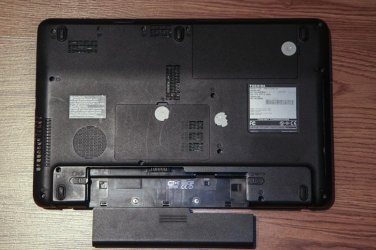
ADDRAM I'm guessing you wanted to see a pic of the back of the laptop so here it is. As you can see there is no COA on the back. Please note that while I purchased this laptop for my daughter just over 2 years ago I really haven't seen it since. I can't specifically say I made note of if a COA was attached. I assume yes, but where it has gone I really can't say. Looking at the back carefully it does look like there may have been a sticker attached to the back at sometime. When I asked my daughter about it she says she didn't really notice if it was there or not.

At any rate, I'm sending it back to her tomorrow so I'm done with it.

Thank you to all for your comments and assistance.
 

Attachments

  • IMG_3940_2.jpg
    IMG_3940_2.jpg
    89.3 KB · Views: 41

My Computer My Computer

At a glance

Windows 7 Home Premiumi7 9206 GB DDR3Geforce GTX 260
Computer Manufacturer/Model Number
Custom
OS
Windows 7 Home Premium
CPU
i7 920
Motherboard
Asus P6T Deluxe
Memory
6 GB DDR3
Graphics Card(s)
Geforce GTX 260
Monitor(s) Displays
Dell 2410
Screen Resolution
1920x1200
Hard Drives
1 TB Western Digital Caviar Black
PSU
Corsair 850w
Case
Cooler Master 922 HAF
Keyboard
Logitech Wave
Mouse
Logitech G500
There are other steps here to correctly Clean Up Factory Bloatware which also requires testing System files to see if the corrupting crapware has damaged any. You must have missed where I posted it earlier.
 
As long as the factory reinstall has been cleaned up to the point where he is happy with it - that's fine.
 

My Computers My Computers

  • At a glance

    7 X64i5 84002x8gb 3200mhz
    Computer type
    PC/Desktop
    OS
    7 X64
    CPU
    i5 8400
    Motherboard
    gigabyte b365m ds3h
    Memory
    2x8gb 3200mhz
    Hard Drives
    various
    PSU
    pure power 11 400w cm
    Case
    Coolermaster
    Cooling
    cryorig m9i
  • At a glance

    7x64g54008gb ddr4 2400
    Computer type
    PC/Desktop
    OS
    7x64
    CPU
    g5400
    Motherboard
    ga b365m ds3h
    Memory
    8gb ddr4 2400
    PSU
    xfx pro 450w
Greg I totally agree there should be and probably was a COA sticker on this laptop when I purchased it. I'm only saying that there doesn't seem to be any COA now. The laptop is running fine and is activated after using the reinstallation disks I made on the first day of purchase. I just didn't want to use them to avoid bloat being reinstalled along with windows. After using PC decrapifier to uninstall a bunch of things I'm happy with the way it's running.

I was unaware until you and some others pointed out that OEM computers were activated while off line. It makes sense but I wrongly assumed they activated once they were connected to the internet. :o

ADDRAM I'm guessing you wanted to see a pic of the back of the laptop so here it is. As you can see there is no COA on the back. Please note that while I purchased this laptop for my daughter just over 2 years ago I really haven't seen it since. I can't specifically say I made note of if a COA was attached. I assume yes, but where it has gone I really can't say. Looking at the back carefully it does look like there may have been a sticker attached to the back at sometime. When I asked my daughter about it she says she didn't really notice if it was there or not.

At any rate, I'm sending it back to her tomorrow so I'm done with it.

Thank you to all for your comments and assistance.
So what I don't get is why didn't you look with Speccy for the COA? It would have given you that and you could have just clean installed with the ISO surely?

That would have left you with no bloat apart from some things that Toshiba have "built in" but not enough to worry about.:confused:
 

My Computer My Computer

At a glance

Desk1 7 Home Prem / Desk2 10 Pro / Main lap A...Desk1 i5 3750K / Laptop i7 GTX 860M / Desk2 i...Desk1 8GB (1866) / Desk2 16GB (1333) / Laptop...Desk 1& 2NVidia GTX 650 & Laptops on board Intel
Computer type
PC/Desktop
Computer Manufacturer/Model Number
Own build (new) Desk1 / Asus ROG Win 7 / Desk2 1st build
OS
Desk1 7 Home Prem / Desk2 10 Pro / Main lap Asus ROG 10 Pro 2 laptop Toshiba 7 Pro Asus P2520 7 & 10
CPU
Desk1 i5 3750K / Laptop i7 GTX 860M / Desk2 i5 2500
Motherboard
Desk1 Asus P877-V / Desk2 Gigabyte H67 UD3H / Laptop ?
Memory
Desk1 8GB (1866) / Desk2 16GB (1333) / Laptop 8Gb DDR3
Graphics Card(s)
Desk 1& 2NVidia GTX 650 & Laptops on board Intel
Sound Card
Desk 1 & 2 -XONAR DG Realtek High Def audio Laptop
Monitor(s) Displays
Desk 1 Benq HD 2450 / Desk2 Philips 24" / Laptop 17.5"
Screen Resolution
1920x1080 D1 & D2 & Laptop 1
Hard Drives
Desk1 Samsung 120GB 830 SSD
Asus ROG 256GB 850 Pro SSD
Desk2 Samsung 840 256 SSD
Toshiba 120GB EVO
PSU
Desk 1 Corsair HX 1050/ Laptop ? / Desk 2 Corsair HX 650
Case
Desk 1 Cooler HAF XM ? Toshiba laptop / Desk2 Coolermaster
Cooling
Fans on all Desk1 -2 Desk2 - all Coolermasters 5 Laptop ?
Keyboard
Desk 1 MS Sidewinder X6 Desk 2 MS Sidewinder X 4
Mouse
Desk 1&2 - Gigabyte MS 900 gamer - laptop - Logitec wireless
Internet Speed
ADSL2+
Other Info
One other Desktop (tester) and spare Toshba laptop both with SSD's
Running Kaspersky 2016 ISS on all machines config'd identically
Logitec audio stereo systems on each machine (x3)
Canon MG5250MFC
Router/modem TP-Link running WPA2SK
So what I don't get is why didn't you look with Speccy for the COA? It would have given you that and you could have just clean installed with the ISO surely?

That would have left you with no bloat apart from some things that Toshiba have "built in" but not enough to worry about.:confused:

See post 4.

The original poster used Magic Jelly Bean to find the Product Key.

That key apparently did not work.

Like you, I'm a bit confused too and don't know why that key did not work. He describes it a 25 character key. I can only assume that key was NOT an OEM key.

I guess it's unknown if the laptop ever had an actual COA sticker--it should have.
 

My Computer My Computer

At a glance

Windows 7 Home Premium SP1, 64-bitIntel Skylake i5-6600K, not overclocked8 GB HyperX DDR4-2666 (2 x 4 GB)none; graphics are integrated on CPU
Computer type
PC/Desktop
Computer Manufacturer/Model Number
Ignatz Special; 4 speed manual gearbox; factory air conditioning; one of one
OS
Windows 7 Home Premium SP1, 64-bit
CPU
Intel Skylake i5-6600K, not overclocked
Motherboard
AsRock Z170M Extreme 4, micro ATX
Memory
8 GB HyperX DDR4-2666 (2 x 4 GB)
Graphics Card(s)
none; graphics are integrated on CPU
Sound Card
onboard: Realtek ALC1150; external: USB Behringer UF0-202
Monitor(s) Displays
Dell S2340M 23 inch IPS
Screen Resolution
1600 x 900
Hard Drives
System: Crucial MX100 series SSD, 128 GB;
Data: Samsung Spinpoint 103SJ, 1 TB;
Backup: WD Caviar Green WD30EZRX-00D8PB0, 3 TB
PSU
Rosewill SilentNight 500 watt fanless, semi-modular
Case
Antec Solo II
Cooling
Noctua NH-U12S; Noctua F12 intake, Noctua S12A exhaust
Keyboard
Microsoft 200 6JH-00001 USB
Mouse
Dell or Microsoft optical wired; USB
Antivirus
Microsoft Security Essentials and Malwarebytes Premium
Browser
Pale Moon
Other Info
All fans PWM; speeds at idle: CPU circa 500 rpm; intake circa 600 rpm; exhaust circa 600 rpm; CPU temps 27 idle and 47 C load in a warm room (27 C/81 F) when running Intel Extreme Tuning Utility stress test.
Back
Top