
Can you map your Desktop to another drive?

ddix1026

New member
Member
Local time
3:53 AM
Messages
43
Location
NJ
A friend of mine is wondering if he could map his desktop items to a secondary drive. The reason is that he wants to get a SSD for his operating system drive when he builds his new desktop, but since he does a lot of video editing and other fairly large-file things, he typically keeps them on the desktop until they are completed, and he was wondering if you could re-map the desktop to a secondary drive so he doesnt run out of room quickly.

Is this possible? I have never heard of it, nor would I need to do it, but I thought I would give it a whirl in here and see if anyone HAS done it, or if you even CAN do it.

My thought is no, since the Desktop is tied directly to the operating system and the user account, but I wanted to be sure..

Cheers
 

My Computer My Computer

At a glance

Windows 7 Home Premium x64AMD Phenom II X4 955 Black EditionKingston 4GB DDR3 1333PNY GeForce 210 1GB DDR2 PCIe 2.0
Computer Manufacturer/Model Number
Self Built
OS
Windows 7 Home Premium x64
CPU
AMD Phenom II X4 955 Black Edition
Motherboard
ASUS M4A79XTD EVO
Memory
Kingston 4GB DDR3 1333
Graphics Card(s)
PNY GeForce 210 1GB DDR2 PCIe 2.0
Sound Card
Integrated Audio
Monitor(s) Displays
LG W2286L HDMI LED monitor
Screen Resolution
1680 x 1050
Hard Drives
500GB WD 7200rpm SATA (OS)
500GB WD 7200rpm SATA
250GB Seagate 7200rpm SATA
PSU
Rosewill RG700-S12 700W
Case
Rosewill Blackbone ATX Mid Tower
Cooling
COOLER MASTER Hyper N520, 3 case fans (front, back, side)
Keyboard
Basic
Mouse
Basic
Internet Speed
Cable
Other Info
Laptop - Toshiba Satellite P755, Intel i3 2.1GHz, 640GB HDD, 6GB RAM, Intel HD Video, 1366x768 Resolution, Windows 7 Home Premium x64
Your thought is correct, although it is possible Microsoft says this is only suited to a test environment.

ProfilesDirectory

Your desktop is part of your profile including your Documents, videos, Downloads etc and they are not designed to be moved. My solution would be to mount the new volume so you have more space, this would enable the drive to be under the same drive letter and also appear that your Primary partition is extended.

Edit: please excuse, this reply is talking about the complete user profile, not single user docs.
 
Last edited:

My Computer My Computer

At a glance

7 ultimate x64Intel core i7 2600KVengeance™ — 16GB Triple Channel DDR3 PC16000GeForce GTX 560 Ti
Computer Manufacturer/Model Number
CustomBuild001
OS
7 ultimate x64
CPU
Intel core i7 2600K
Motherboard
ASUS P8Z68-V PRO
Memory
Vengeance™ — 16GB Triple Channel DDR3 PC16000
Graphics Card(s)
GeForce GTX 560 Ti
Monitor(s) Displays
HannsG 22" widescreen (HDMI)
Screen Resolution
1680x1050
Hard Drives
Samsung 1TB x2(RAID1) Deskstar 160G, Buffalo ExHD 500GB
PSU
Corsair 850HX
Case
Antec Three Hundred Gaming Tower Case
Cooling
CPU Freezer 7 Pro Rev. 2...ANTEC 3phase cooling, 2 intake.
Keyboard
microsoft intellitype 6000 v3.0
Mouse
microsoft sidewinder
Internet Speed
50Mb
Other Info
64GB SSD in pipeline for Intel Smart Response Technology.

My Computer My Computer

At a glance

W 7 64-bit UltimateIntel Q9550 Yorkfield8GB Dominator 8500C5DATI : XFX 5870
Computer Manufacturer/Model Number
* BFK Customs *
OS
W 7 64-bit Ultimate
CPU
Intel Q9550 Yorkfield
Motherboard
ASUS P5Q Pro
Memory
8GB Dominator 8500C5D
Graphics Card(s)
ATI : XFX 5870
Sound Card
Realtek HD Audio 7-1
Monitor(s) Displays
1x 47" LCD HDMI & 3x 26" LCD HDMI
Screen Resolution
1920x1080P & 1920x1200
Hard Drives
1x 80GB Intel X25-M G2 SSD : 1x 500GB & 1x 640GB WD Caviar Black(s)
PSU
Corsair 620HX
Case
Cooler Master RC-690
Cooling
Tuniq Tower 120, 2x 140mm and 3x 120mm case fans
Keyboard
Microsoft 500
Mouse
Razer Diamondback 3G
Internet Speed
14 Mb/s
Other Info
1x Koutech 3Gb/s SATA HDD Hot Swap Rack
Your thought is correct, although it is possible Microsoft says this is only suited to a test environment.

ProfilesDirectory

Your desktop is part of your profile including your Documents, videos, Downloads etc and they are not designed to be moved. My solution would be to mount the new volume so you have more space, this would enable the drive to be under the same drive letter and also appear that your Primary partition is extended.

Sorry but the Documents(My Documents)/Video/Music and whatnot folders most certainly can be moved to another partition or physical drive. In fact it is quit easy to do right from the Properties of the Document and other folders and it is design that way. No special trickery needed. It is built into the OS.

Now as far as the Desktop I'm not sure it can or should be done.

Best is to tell your friend to instead of placing those files on the desktop place a shortcut to them on the desktop. That way he still has ready access to them but only uses a few KBs of space on the C boot drive.

Not sure why so many people end up placing all kinds of stuff on there desktop. Other then Program shortcuts.
 

My Computer My Computer

At a glance

Windows 7 Pro x64i5 76016GBNvidia GTS450
Computer Manufacturer/Model Number
Built be Me
OS
Windows 7 Pro x64
CPU
i5 760
Motherboard
Asus P7P55D-E Pro
Memory
16GB
Graphics Card(s)
Nvidia GTS450
Sound Card
On board
Monitor(s) Displays
Dell 2007WFP Dell 1800FP
Screen Resolution
1680x1050 1280x1024
Hard Drives
Seagate 250GB & 750GB
WD 1TB
PSU
Antec 750
Case
In Win
Cooling
Cooler Master Hyper 212+
Keyboard
IBM
Mouse
MS
You used the word "map", not sure if you had something specific in mind, but the Desktop can be moved to another location.
click Start>username> right click on Desktop click Properties
Go to the Location tab
Click Move

looks like Shootist beat me to the punch
I do this commonly on every computer I set up, so there is no issue with this.
 

My Computer My Computer

At a glance

Windows 7 Professional x64
OS
Windows 7 Professional x64
well, he would move the files off his desktop once he is finished with them, its just a temporary thing. he was concerned with using up a lot of the main SSD hard drive space while he is in the process of working on them (home videos, etc. take up a lot of space while you work on them, at least his do). Once he completes what he's working on, he puts them onto a different internal SATA HDD..

i know that other folders (or libraries) can be moved/mapped elsewhere (I have done that myself), and I have no real need to re-map the desktop to a different drive, but he was just inquiring.. I dont personally think its a good idea to try it because if something goes wrong, you could screw lots of stuff up with your account, but I figured I would throw it out there..
 

My Computer My Computer

At a glance

Windows 7 Home Premium x64AMD Phenom II X4 955 Black EditionKingston 4GB DDR3 1333PNY GeForce 210 1GB DDR2 PCIe 2.0
Computer Manufacturer/Model Number
Self Built
OS
Windows 7 Home Premium x64
CPU
AMD Phenom II X4 955 Black Edition
Motherboard
ASUS M4A79XTD EVO
Memory
Kingston 4GB DDR3 1333
Graphics Card(s)
PNY GeForce 210 1GB DDR2 PCIe 2.0
Sound Card
Integrated Audio
Monitor(s) Displays
LG W2286L HDMI LED monitor
Screen Resolution
1680 x 1050
Hard Drives
500GB WD 7200rpm SATA (OS)
500GB WD 7200rpm SATA
250GB Seagate 7200rpm SATA
PSU
Rosewill RG700-S12 700W
Case
Rosewill Blackbone ATX Mid Tower
Cooling
COOLER MASTER Hyper N520, 3 case fans (front, back, side)
Keyboard
Basic
Mouse
Basic
Internet Speed
Cable
Other Info
Laptop - Toshiba Satellite P755, Intel i3 2.1GHz, 640GB HDD, 6GB RAM, Intel HD Video, 1366x768 Resolution, Windows 7 Home Premium x64
Shootist/Vincenzo - i actually am not using 7 here at work, so I can't tell if what you are suggesting is what he is looking for. I will take a look at that when i get home on my desktop (with 7) and see if that's what he means...
 

My Computer My Computer

At a glance

Windows 7 Home Premium x64AMD Phenom II X4 955 Black EditionKingston 4GB DDR3 1333PNY GeForce 210 1GB DDR2 PCIe 2.0
Computer Manufacturer/Model Number
Self Built
OS
Windows 7 Home Premium x64
CPU
AMD Phenom II X4 955 Black Edition
Motherboard
ASUS M4A79XTD EVO
Memory
Kingston 4GB DDR3 1333
Graphics Card(s)
PNY GeForce 210 1GB DDR2 PCIe 2.0
Sound Card
Integrated Audio
Monitor(s) Displays
LG W2286L HDMI LED monitor
Screen Resolution
1680 x 1050
Hard Drives
500GB WD 7200rpm SATA (OS)
500GB WD 7200rpm SATA
250GB Seagate 7200rpm SATA
PSU
Rosewill RG700-S12 700W
Case
Rosewill Blackbone ATX Mid Tower
Cooling
COOLER MASTER Hyper N520, 3 case fans (front, back, side)
Keyboard
Basic
Mouse
Basic
Internet Speed
Cable
Other Info
Laptop - Toshiba Satellite P755, Intel i3 2.1GHz, 640GB HDD, 6GB RAM, Intel HD Video, 1366x768 Resolution, Windows 7 Home Premium x64
Why not make this easy and store in-process work on the other drive and crate a link to it on the Desktop. That way it's easy to access active work but does not use space on the boot drive.
 

My Computer My Computer

At a glance

Windows 10 Pro X64Intel Quad Core i7-4770 @ 3.4Ghz16.0GB PC3-12800 DDR3 SDRAM 1600 MHzIntel Integrated HD Graphics
Computer type
PC/Desktop
Computer Manufacturer/Model Number
Lenovo IdeaCenter 450
OS
Windows 10 Pro X64
CPU
Intel Quad Core i7-4770 @ 3.4Ghz
Memory
16.0GB PC3-12800 DDR3 SDRAM 1600 MHz
Graphics Card(s)
Intel Integrated HD Graphics
Sound Card
Realtek HD Audio
Monitor(s) Displays
HP 22" LCD
Screen Resolution
1680 x 1050
Hard Drives
250GB Samsung EVO SATA-3 SSD
2TB Seagate ST2000DM001 SATA-2
1.5TB Seagate ST3150041AS SATA
Keyboard
Dell USB
Mouse
Lenovo USB
Internet Speed
Cable via Road Runner 3MB Upload, 30MB Download
Antivirus
Windows Defender, MBAM Pro, MBAE
Browser
Seamonkey
Other Info
UEFI/GPT
PLDS DVD-RW DH16AERSH
that would be too easy Ztrucker.. (I don't know why)..

However, in fact, Vincenzo and Shootist seem to be correct, you can move the location of the Desktop folder.. I will let him know that (he is in the process of building his new Win 7 machine now) and he can do with that info what he will.

Cheers
 

My Computer My Computer

At a glance

Windows 7 Home Premium x64AMD Phenom II X4 955 Black EditionKingston 4GB DDR3 1333PNY GeForce 210 1GB DDR2 PCIe 2.0
Computer Manufacturer/Model Number
Self Built
OS
Windows 7 Home Premium x64
CPU
AMD Phenom II X4 955 Black Edition
Motherboard
ASUS M4A79XTD EVO
Memory
Kingston 4GB DDR3 1333
Graphics Card(s)
PNY GeForce 210 1GB DDR2 PCIe 2.0
Sound Card
Integrated Audio
Monitor(s) Displays
LG W2286L HDMI LED monitor
Screen Resolution
1680 x 1050
Hard Drives
500GB WD 7200rpm SATA (OS)
500GB WD 7200rpm SATA
250GB Seagate 7200rpm SATA
PSU
Rosewill RG700-S12 700W
Case
Rosewill Blackbone ATX Mid Tower
Cooling
COOLER MASTER Hyper N520, 3 case fans (front, back, side)
Keyboard
Basic
Mouse
Basic
Internet Speed
Cable
Other Info
Laptop - Toshiba Satellite P755, Intel i3 2.1GHz, 640GB HDD, 6GB RAM, Intel HD Video, 1366x768 Resolution, Windows 7 Home Premium x64
Actually if I was ready to reinstall the OS I would move the whole USER and ProgramData folders to another drive.
I already have the My Docs, Music, whatever folders on another drive and email storage and internet cache on other drives.
 

My Computer My Computer

At a glance

Windows 7 Pro x64i5 76016GBNvidia GTS450
Computer Manufacturer/Model Number
Built be Me
OS
Windows 7 Pro x64
CPU
i5 760
Motherboard
Asus P7P55D-E Pro
Memory
16GB
Graphics Card(s)
Nvidia GTS450
Sound Card
On board
Monitor(s) Displays
Dell 2007WFP Dell 1800FP
Screen Resolution
1680x1050 1280x1024
Hard Drives
Seagate 250GB & 750GB
WD 1TB
PSU
Antec 750
Case
In Win
Cooling
Cooler Master Hyper 212+
Keyboard
IBM
Mouse
MS
Actually if I was ready to reinstall the OS I would move the whole USER and ProgramData folders to another drive.
I already have the My Docs, Music, whatever folders on another drive and email storage and internet cache on other drives.


Hello mate, have you had look at the tutorial by Kari I posted above?
 

My Computer My Computer

At a glance

W 7 64-bit UltimateIntel Q9550 Yorkfield8GB Dominator 8500C5DATI : XFX 5870
Computer Manufacturer/Model Number
* BFK Customs *
OS
W 7 64-bit Ultimate
CPU
Intel Q9550 Yorkfield
Motherboard
ASUS P5Q Pro
Memory
8GB Dominator 8500C5D
Graphics Card(s)
ATI : XFX 5870
Sound Card
Realtek HD Audio 7-1
Monitor(s) Displays
1x 47" LCD HDMI & 3x 26" LCD HDMI
Screen Resolution
1920x1080P & 1920x1200
Hard Drives
1x 80GB Intel X25-M G2 SSD : 1x 500GB & 1x 640GB WD Caviar Black(s)
PSU
Corsair 620HX
Case
Cooler Master RC-690
Cooling
Tuniq Tower 120, 2x 140mm and 3x 120mm case fans
Keyboard
Microsoft 500
Mouse
Razer Diamondback 3G
Internet Speed
14 Mb/s
Other Info
1x Koutech 3Gb/s SATA HDD Hot Swap Rack
Actually if I was ready to reinstall the OS I would move the whole USER and ProgramData folders to another drive.
I already have the My Docs, Music, whatever folders on another drive and email storage and internet cache on other drives.


Hello mate, have you had look at the tutorial by Kari I posted above?

Yes but didn't see anyway to move them now. Did I miss something? I just browsed through it.
 

My Computer My Computer

At a glance

Windows 7 Pro x64i5 76016GBNvidia GTS450
Computer Manufacturer/Model Number
Built be Me
OS
Windows 7 Pro x64
CPU
i5 760
Motherboard
Asus P7P55D-E Pro
Memory
16GB
Graphics Card(s)
Nvidia GTS450
Sound Card
On board
Monitor(s) Displays
Dell 2007WFP Dell 1800FP
Screen Resolution
1680x1050 1280x1024
Hard Drives
Seagate 250GB & 750GB
WD 1TB
PSU
Antec 750
Case
In Win
Cooling
Cooler Master Hyper 212+
Keyboard
IBM
Mouse
MS
Actually if I was ready to reinstall the OS I would move the whole USER and ProgramData folders to another drive.
I already have the My Docs, Music, whatever folders on another drive and email storage and internet cache on other drives.


Hello mate, have you had look at the tutorial by Kari I posted above?

Yes but didn't see anyway to move them now. Did I miss something? I just browsed through it.


Naw, that's just for use during an install but once it's been setup it can be re-done for subsequent installs very easily.
 

My Computer My Computer

At a glance

W 7 64-bit UltimateIntel Q9550 Yorkfield8GB Dominator 8500C5DATI : XFX 5870
Computer Manufacturer/Model Number
* BFK Customs *
OS
W 7 64-bit Ultimate
CPU
Intel Q9550 Yorkfield
Motherboard
ASUS P5Q Pro
Memory
8GB Dominator 8500C5D
Graphics Card(s)
ATI : XFX 5870
Sound Card
Realtek HD Audio 7-1
Monitor(s) Displays
1x 47" LCD HDMI & 3x 26" LCD HDMI
Screen Resolution
1920x1080P & 1920x1200
Hard Drives
1x 80GB Intel X25-M G2 SSD : 1x 500GB & 1x 640GB WD Caviar Black(s)
PSU
Corsair 620HX
Case
Cooler Master RC-690
Cooling
Tuniq Tower 120, 2x 140mm and 3x 120mm case fans
Keyboard
Microsoft 500
Mouse
Razer Diamondback 3G
Internet Speed
14 Mb/s
Other Info
1x Koutech 3Gb/s SATA HDD Hot Swap Rack
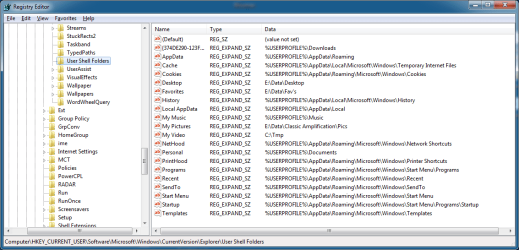
You can change various "special" folders here:

HKEY_CURRENT_USER\Software\Microsoft\Windows\CurrentVersion\Explorer\User Shell Folders\Desktop
HKEY_CURRENT_USER\Software\Microsoft\Windows\CurrentVersion\Explorer\Shell Folders\Desktop

in the attached pic you can see I've relocated my "Desktop" to my E: drive which helps me save time when I have to re-image the boot-drive.
 

Attachments

  • SpecialFoldersLocations.png
    SpecialFoldersLocations.png
    27.8 KB · Views: 178

My Computer My Computer

At a glance

Windows 7 Home Premium
OS
Windows 7 Home Premium

My Computer My Computer

At a glance

W 7 64-bit UltimateIntel Q9550 Yorkfield8GB Dominator 8500C5DATI : XFX 5870
Computer Manufacturer/Model Number
* BFK Customs *
OS
W 7 64-bit Ultimate
CPU
Intel Q9550 Yorkfield
Motherboard
ASUS P5Q Pro
Memory
8GB Dominator 8500C5D
Graphics Card(s)
ATI : XFX 5870
Sound Card
Realtek HD Audio 7-1
Monitor(s) Displays
1x 47" LCD HDMI & 3x 26" LCD HDMI
Screen Resolution
1920x1080P & 1920x1200
Hard Drives
1x 80GB Intel X25-M G2 SSD : 1x 500GB & 1x 640GB WD Caviar Black(s)
PSU
Corsair 620HX
Case
Cooler Master RC-690
Cooling
Tuniq Tower 120, 2x 140mm and 3x 120mm case fans
Keyboard
Microsoft 500
Mouse
Razer Diamondback 3G
Internet Speed
14 Mb/s
Other Info
1x Koutech 3Gb/s SATA HDD Hot Swap Rack
Back
Top