Can you restore an image to a "smaller" partition?

TVeblen

Building Stuff
Guru
Gold Member
VIP
Local time
1:29 AM
Messages
6,239
Location
In The Woods
Can you restore an drive image that was taken of 30GB of actual data originally on a 235GB partition to a resized partition of 100GB?

I think I know the answer, but I've got that nagging doubt going on. I've restored many images of drives that have not changed in size, but never as mentioned above.

I set up a laptop for someone last summer and when done took a "fresh" disk image of the C: drive and System Reserved partitions. At that time the C: drive was 235GB. The used space was only 30GB.

I just installed SP1 for the same laptop, and also re-sized the C: drive to 100GB. I took a new disk image, of course, after this.

But now I'm wondering: what would happen if I attempted to install that original image?

Using Acronis TI Home 11.
 

My Computer My Computer

At a glance

Windows 7 64 Bit Home Premium SP1i7-3820GSkill F3-14900CL9Q - 16GBEVGA GeForce GTX660 - Driver 352.86
Computer type
PC/Desktop
Computer Manufacturer/Model Number
Home Built - Jan 2013
OS
Windows 7 64 Bit Home Premium SP1
CPU
i7-3820
Motherboard
Asus P9X79-PRO - Bios 4608
Memory
GSkill F3-14900CL9Q - 16GB
Graphics Card(s)
EVGA GeForce GTX660 - Driver 352.86
Sound Card
On board Realtek ALC898
Monitor(s) Displays
Acer S271HL
Screen Resolution
1920 x 1080
Hard Drives
#1- Samsung 840 Pro Series
#2- Western Digital WD1002FAEX Sata3 Black
#3- Western Digital WD1002FAEX Sata3 Black
PSU
Corsair CMPSU-850TX-V2 - 850 watt (by Seasonic)
Case
Corsair Obsidian 550D
Cooling
Standard 3 120mm case fans, Cooler Master Hyper 212 EVO
Keyboard
MS KC-0405
Mouse
Intellimouse 5-button
Internet Speed
56 Mbits/Sec (on a good day)
Antivirus
Avast & Malwarebytes
Browser
Firefox
Other Info
Asus DVD - DRW-24B1ST 24X
Yes you can do that with Acronis TI Home 2011.
 

My Computer My Computer

At a glance

Windows 10 Pro x64, Windows 8.1 Pro x64, Wind...INTEL i9-7920X LGA 206664 GB (4 X 16 GB) G-Skill V Series DDR4 3200 ...EVGA GTX 1060 SC 3 GB
Computer type
PC/Desktop
Computer Manufacturer/Model Number
Custom Built
OS
Windows 10 Pro x64, Windows 8.1 Pro x64, Windows 7 Ultimate x64 SP1,
CPU
INTEL i9-7920X LGA 2066
Motherboard
Gigabyte X299-WU8 F3
Memory
64 GB (4 X 16 GB) G-Skill V Series DDR4 3200 Quad Channel
Graphics Card(s)
EVGA GTX 1060 SC 3 GB
Sound Card
Realtek Onboard ALC1220
Monitor(s) Displays
2 x Samsung S27E310
Screen Resolution
1920x1080
Hard Drives
Samsung 2 x 970 EVO Plus 500 GB NVMe
1 x 6TB WD 6003FZBX SATA
1 x 6TB WD 60EFRX SATA
12 x 3TB WD 30EFRX SATA
PSU
Seasonic X-1050
Case
Thermaltake Armor+
Cooling
Corsair H80i V2 Liquid AOI Cooler
Keyboard
Logitech G510s
Mouse
Logitech MX Master 2S
Internet Speed
200 Mb/s
Antivirus
ESET NOD32 13.1
Browser
EDGE (Dev, Canary, Beta), Chrome
Other Info
ASUS RT-AC68U router
Malwarebytes 4.0.4
If you have done it, does it go without a peep, or do you get any warnings or messages? Just curious.
 

My Computer My Computer

At a glance

Windows 7 64 Bit Home Premium SP1i7-3820GSkill F3-14900CL9Q - 16GBEVGA GeForce GTX660 - Driver 352.86
Computer type
PC/Desktop
Computer Manufacturer/Model Number
Home Built - Jan 2013
OS
Windows 7 64 Bit Home Premium SP1
CPU
i7-3820
Motherboard
Asus P9X79-PRO - Bios 4608
Memory
GSkill F3-14900CL9Q - 16GB
Graphics Card(s)
EVGA GeForce GTX660 - Driver 352.86
Sound Card
On board Realtek ALC898
Monitor(s) Displays
Acer S271HL
Screen Resolution
1920 x 1080
Hard Drives
#1- Samsung 840 Pro Series
#2- Western Digital WD1002FAEX Sata3 Black
#3- Western Digital WD1002FAEX Sata3 Black
PSU
Corsair CMPSU-850TX-V2 - 850 watt (by Seasonic)
Case
Corsair Obsidian 550D
Cooling
Standard 3 120mm case fans, Cooler Master Hyper 212 EVO
Keyboard
MS KC-0405
Mouse
Intellimouse 5-button
Internet Speed
56 Mbits/Sec (on a good day)
Antivirus
Avast & Malwarebytes
Browser
Firefox
Other Info
Asus DVD - DRW-24B1ST 24X
Whenever I have restored a system image, a image of the boot drive along with the MBR (Master Boot Record), which you have to do if you want the PC to boot to the OS. Acronis, all version as far as I know, deletes any existing partitions and recreates the paritions as they were when the image was made.
With Win 7 when restoring you need to restore the System Reserve partition, the main partition (the one that has the OS install on it) and the MBR and any other partition on that physical drive. In other words the whole drive. That is if you want the OS to boot.

I'm going to do a test and post back in about 20 minutes.
 

My Computer My Computer

At a glance

Windows 7 Pro x64i5 76016GBNvidia GTS450
Computer Manufacturer/Model Number
Built be Me
OS
Windows 7 Pro x64
CPU
i5 760
Motherboard
Asus P7P55D-E Pro
Memory
16GB
Graphics Card(s)
Nvidia GTS450
Sound Card
On board
Monitor(s) Displays
Dell 2007WFP Dell 1800FP
Screen Resolution
1680x1050 1280x1024
Hard Drives
Seagate 250GB & 750GB
WD 1TB
PSU
Antec 750
Case
In Win
Cooling
Cooler Master Hyper 212+
Keyboard
IBM
Mouse
MS
Just finished my test.

Connected another drive to my system. Booted from a Mustang PE boot USB stick with Acronis TI 2011 home with plus pack and Disk Director 11 on it.
My main system drive is a 250GB HDD with 3 partitions. 100MB Sys Reserve, 82GB BOOT C drive and a 149GB D partitions. the drive I connected is als the same with the same partitions on it.
I deleted the C partition and then made a new volume of 60GBs, 22GBs smaller then my normal C partition. Made another volume of the remaining 22GBs left over from resizing the C partition.
Close Disk Director and opened Ti 2011. Selected restore whole disk and partitions. When asked what to restore, it gives you the option to select the partitions and the MBR from the list of partitions in the image, I selected the 82GB C drive partition and the MBR. I had left the 100MB sys reserve and my D drive intact on the drive when in Disk director.
It then asks where do you want to restore the select items. I selected the new 60GB partition and for the MBR the ROOT of the drive.
Click OK and the image loaded.
When it was done I rebooted to a black screen with Windows Failed to start. Insert system disk to recover.

So as I stated above when restore the system you must restore the whole drive. All partitions and MBR.
Now you can restore the system drive to a smaller physical hard drive. What TI will do if you present system drive is all one partition with the smaller sys reserve partition is just create the sys reserve partition, 100MB, then use the rest of the drive as the other BOOT, OS, Pagefile partition.
And if you have another partitoin on the boot/system physical disk what TI will do is create the sys reserve, at the same size as on the image, the C boot partition of the same size as on the image then the rest of the drive as the other partition. That is if the new drive is smaller. If the new drive is bigger you will end up with Unallocated space at the end of the drive.

I hope all this is clear.
 

My Computer My Computer

At a glance

Windows 7 Pro x64i5 76016GBNvidia GTS450
Computer Manufacturer/Model Number
Built be Me
OS
Windows 7 Pro x64
CPU
i5 760
Motherboard
Asus P7P55D-E Pro
Memory
16GB
Graphics Card(s)
Nvidia GTS450
Sound Card
On board
Monitor(s) Displays
Dell 2007WFP Dell 1800FP
Screen Resolution
1680x1050 1280x1024
Hard Drives
Seagate 250GB & 750GB
WD 1TB
PSU
Antec 750
Case
In Win
Cooling
Cooler Master Hyper 212+
Keyboard
IBM
Mouse
MS
Wow. What great information (and what a lot of work!) Thank you very much for that.

And yes, I get the picture now, very clearly.

One other curiosity, maybe you know this (or maybe you answered this already):

If the hard drive has one 100MB SR partition, one 100GB system partition (C:, Boot (MBR), Page File, Yada-Yada), and one user files partition (D:, Extended)

And no partition sizing has changed.

And you restore the image of C: only (not the SR partition too), would the box boot?

Or do you have to restore both every time?
 

My Computer My Computer

At a glance

Windows 7 64 Bit Home Premium SP1i7-3820GSkill F3-14900CL9Q - 16GBEVGA GeForce GTX660 - Driver 352.86
Computer type
PC/Desktop
Computer Manufacturer/Model Number
Home Built - Jan 2013
OS
Windows 7 64 Bit Home Premium SP1
CPU
i7-3820
Motherboard
Asus P9X79-PRO - Bios 4608
Memory
GSkill F3-14900CL9Q - 16GB
Graphics Card(s)
EVGA GeForce GTX660 - Driver 352.86
Sound Card
On board Realtek ALC898
Monitor(s) Displays
Acer S271HL
Screen Resolution
1920 x 1080
Hard Drives
#1- Samsung 840 Pro Series
#2- Western Digital WD1002FAEX Sata3 Black
#3- Western Digital WD1002FAEX Sata3 Black
PSU
Corsair CMPSU-850TX-V2 - 850 watt (by Seasonic)
Case
Corsair Obsidian 550D
Cooling
Standard 3 120mm case fans, Cooler Master Hyper 212 EVO
Keyboard
MS KC-0405
Mouse
Intellimouse 5-button
Internet Speed
56 Mbits/Sec (on a good day)
Antivirus
Avast & Malwarebytes
Browser
Firefox
Other Info
Asus DVD - DRW-24B1ST 24X
You can restore only the C: partition.
 

My Computer My Computer

At a glance

Windows 10 Pro x64, Windows 8.1 Pro x64, Wind...INTEL i9-7920X LGA 206664 GB (4 X 16 GB) G-Skill V Series DDR4 3200 ...EVGA GTX 1060 SC 3 GB
Computer type
PC/Desktop
Computer Manufacturer/Model Number
Custom Built
OS
Windows 10 Pro x64, Windows 8.1 Pro x64, Windows 7 Ultimate x64 SP1,
CPU
INTEL i9-7920X LGA 2066
Motherboard
Gigabyte X299-WU8 F3
Memory
64 GB (4 X 16 GB) G-Skill V Series DDR4 3200 Quad Channel
Graphics Card(s)
EVGA GTX 1060 SC 3 GB
Sound Card
Realtek Onboard ALC1220
Monitor(s) Displays
2 x Samsung S27E310
Screen Resolution
1920x1080
Hard Drives
Samsung 2 x 970 EVO Plus 500 GB NVMe
1 x 6TB WD 6003FZBX SATA
1 x 6TB WD 60EFRX SATA
12 x 3TB WD 30EFRX SATA
PSU
Seasonic X-1050
Case
Thermaltake Armor+
Cooling
Corsair H80i V2 Liquid AOI Cooler
Keyboard
Logitech G510s
Mouse
Logitech MX Master 2S
Internet Speed
200 Mb/s
Antivirus
ESET NOD32 13.1
Browser
EDGE (Dev, Canary, Beta), Chrome
Other Info
ASUS RT-AC68U router
Malwarebytes 4.0.4
If there is a System Reserved partition and that is the system volume where the "System" boot files are stored and that is not added and consequently restored, no the 'new' image will not boot.
 

My Computer My Computer

At a glance

W 7 64-bit UltimateIntel Q9550 Yorkfield8GB Dominator 8500C5DATI : XFX 5870
Computer Manufacturer/Model Number
* BFK Customs *
OS
W 7 64-bit Ultimate
CPU
Intel Q9550 Yorkfield
Motherboard
ASUS P5Q Pro
Memory
8GB Dominator 8500C5D
Graphics Card(s)
ATI : XFX 5870
Sound Card
Realtek HD Audio 7-1
Monitor(s) Displays
1x 47" LCD HDMI & 3x 26" LCD HDMI
Screen Resolution
1920x1080P & 1920x1200
Hard Drives
1x 80GB Intel X25-M G2 SSD : 1x 500GB & 1x 640GB WD Caviar Black(s)
PSU
Corsair 620HX
Case
Cooler Master RC-690
Cooling
Tuniq Tower 120, 2x 140mm and 3x 120mm case fans
Keyboard
Microsoft 500
Mouse
Razer Diamondback 3G
Internet Speed
14 Mb/s
Other Info
1x Koutech 3Gb/s SATA HDD Hot Swap Rack
Thanks Bare Foot.

So whether imaging or restoring the rule is always: Both.
 

My Computer My Computer

At a glance

Windows 7 64 Bit Home Premium SP1i7-3820GSkill F3-14900CL9Q - 16GBEVGA GeForce GTX660 - Driver 352.86
Computer type
PC/Desktop
Computer Manufacturer/Model Number
Home Built - Jan 2013
OS
Windows 7 64 Bit Home Premium SP1
CPU
i7-3820
Motherboard
Asus P9X79-PRO - Bios 4608
Memory
GSkill F3-14900CL9Q - 16GB
Graphics Card(s)
EVGA GeForce GTX660 - Driver 352.86
Sound Card
On board Realtek ALC898
Monitor(s) Displays
Acer S271HL
Screen Resolution
1920 x 1080
Hard Drives
#1- Samsung 840 Pro Series
#2- Western Digital WD1002FAEX Sata3 Black
#3- Western Digital WD1002FAEX Sata3 Black
PSU
Corsair CMPSU-850TX-V2 - 850 watt (by Seasonic)
Case
Corsair Obsidian 550D
Cooling
Standard 3 120mm case fans, Cooler Master Hyper 212 EVO
Keyboard
MS KC-0405
Mouse
Intellimouse 5-button
Internet Speed
56 Mbits/Sec (on a good day)
Antivirus
Avast & Malwarebytes
Browser
Firefox
Other Info
Asus DVD - DRW-24B1ST 24X
Thanks Bare Foot.

So whether imaging or restoring the rule is always: Both.


You're welcome; correct, whatever partition has the "System" flag when viewed in Windows disk management must be included and restored.
 

My Computer My Computer

At a glance

W 7 64-bit UltimateIntel Q9550 Yorkfield8GB Dominator 8500C5DATI : XFX 5870
Computer Manufacturer/Model Number
* BFK Customs *
OS
W 7 64-bit Ultimate
CPU
Intel Q9550 Yorkfield
Motherboard
ASUS P5Q Pro
Memory
8GB Dominator 8500C5D
Graphics Card(s)
ATI : XFX 5870
Sound Card
Realtek HD Audio 7-1
Monitor(s) Displays
1x 47" LCD HDMI & 3x 26" LCD HDMI
Screen Resolution
1920x1080P & 1920x1200
Hard Drives
1x 80GB Intel X25-M G2 SSD : 1x 500GB & 1x 640GB WD Caviar Black(s)
PSU
Corsair 620HX
Case
Cooler Master RC-690
Cooling
Tuniq Tower 120, 2x 140mm and 3x 120mm case fans
Keyboard
Microsoft 500
Mouse
Razer Diamondback 3G
Internet Speed
14 Mb/s
Other Info
1x Koutech 3Gb/s SATA HDD Hot Swap Rack
If there is a System Reserved partition and that is the system volume where the "System" boot files are stored and that is not added and consequently restored, no the 'new' image will not boot.

In my test I use a drive that has a backup Win 7 OS on it which is the exact same image that I am running right now and that I used for my test. So the sys reserve partition is the same.
 

My Computer My Computer

At a glance

Windows 7 Pro x64i5 76016GBNvidia GTS450
Computer Manufacturer/Model Number
Built be Me
OS
Windows 7 Pro x64
CPU
i5 760
Motherboard
Asus P7P55D-E Pro
Memory
16GB
Graphics Card(s)
Nvidia GTS450
Sound Card
On board
Monitor(s) Displays
Dell 2007WFP Dell 1800FP
Screen Resolution
1680x1050 1280x1024
Hard Drives
Seagate 250GB & 750GB
WD 1TB
PSU
Antec 750
Case
In Win
Cooling
Cooler Master Hyper 212+
Keyboard
IBM
Mouse
MS
Wow. What great information (and what a lot of work!) Thank you very much for that.

And yes, I get the picture now, very clearly.

One other curiosity, maybe you know this (or maybe you answered this already):

If the hard drive has one 100MB SR partition, one 100GB system partition (C:, Boot (MBR), Page File, Yada-Yada), and one user files partition (D:, Extended)

And no partition sizing has changed.

And you restore the image of C: only (not the SR partition too), would the box boot?

Or do you have to restore both every time?

In all my working with computer over the last 18+ years and using backup programs for most of that time the only way I've found to get a system back up and running is to restore the complete drive.
Doing just parts of it never worked for me, and I've tried. Just like I did in my test.

Just looked up MBR to refresh my memory.
The MBR holds the partition table, along with other things. So if you try to load the OS on a smaller or larger partition the current MBR store in the disk image is not the same because the partitions are different. Now that may not matter for other drives in the system but for the OS it is very important.
 

My Computer My Computer

At a glance

Windows 7 Pro x64i5 76016GBNvidia GTS450
Computer Manufacturer/Model Number
Built be Me
OS
Windows 7 Pro x64
CPU
i5 760
Motherboard
Asus P7P55D-E Pro
Memory
16GB
Graphics Card(s)
Nvidia GTS450
Sound Card
On board
Monitor(s) Displays
Dell 2007WFP Dell 1800FP
Screen Resolution
1680x1050 1280x1024
Hard Drives
Seagate 250GB & 750GB
WD 1TB
PSU
Antec 750
Case
In Win
Cooling
Cooler Master Hyper 212+
Keyboard
IBM
Mouse
MS
I've got some XP boxes that I have restored just the C: drive on many times without issue - leaving all the user files drives/partitions as is (or "as was"). Never a problem.

But W7 is a different animal and amazingly I've never needed to do a restore on any box I babysit. I keep making these images with no experience on restoring them. Scary!
 

My Computer My Computer

At a glance

Windows 7 64 Bit Home Premium SP1i7-3820GSkill F3-14900CL9Q - 16GBEVGA GeForce GTX660 - Driver 352.86
Computer type
PC/Desktop
Computer Manufacturer/Model Number
Home Built - Jan 2013
OS
Windows 7 64 Bit Home Premium SP1
CPU
i7-3820
Motherboard
Asus P9X79-PRO - Bios 4608
Memory
GSkill F3-14900CL9Q - 16GB
Graphics Card(s)
EVGA GeForce GTX660 - Driver 352.86
Sound Card
On board Realtek ALC898
Monitor(s) Displays
Acer S271HL
Screen Resolution
1920 x 1080
Hard Drives
#1- Samsung 840 Pro Series
#2- Western Digital WD1002FAEX Sata3 Black
#3- Western Digital WD1002FAEX Sata3 Black
PSU
Corsair CMPSU-850TX-V2 - 850 watt (by Seasonic)
Case
Corsair Obsidian 550D
Cooling
Standard 3 120mm case fans, Cooler Master Hyper 212 EVO
Keyboard
MS KC-0405
Mouse
Intellimouse 5-button
Internet Speed
56 Mbits/Sec (on a good day)
Antivirus
Avast & Malwarebytes
Browser
Firefox
Other Info
Asus DVD - DRW-24B1ST 24X
I am not sure what imaging program you use. I use free Macrium. But I highly recommend to go thru the whole cycle including restore on a small test partition into which you copy a bit of data. Then take an image, delete a few files from the test partition, roll the image back in and check whether the deleted files are back to make sure it worked.

There are a lot of things you learn in the process that you do not want to face in an emergency. Especially in Win7 where you are faced with the 100MB active system partition the process is a bit more complicated - although I never restore the 100MB partition nor the MBR if I restore to the partition from where the image was taken. That is, of course, different if you change the partition parameters.
 

My Computer My Computer

At a glance

Vista, Windows7, Mint Mate, Zorin, Windows 8from 1.6GHz Duo to i7
Computer Manufacturer/Model Number
HP, Dell, Gateway, Toshiba - 4 laptops and 2 desktops
OS
Vista, Windows7, Mint Mate, Zorin, Windows 8
CPU
from 1.6GHz Duo to i7
Monitor(s) Displays
2x HP w2207
Hard Drives
5x HDD, 7x SSD, 12x Externals
Keyboard
with trackball - no mices
Mouse
Trackball mice
Internet Speed
DSL 6000
Good info. The picture is becoming clearer.

I've been using Acronis True Image Home 11.

I always image and restore using the bootable CD (linux bootloader) and never had a hiccup restoring trashed XP machines.
 

My Computer My Computer

At a glance

Windows 7 64 Bit Home Premium SP1i7-3820GSkill F3-14900CL9Q - 16GBEVGA GeForce GTX660 - Driver 352.86
Computer type
PC/Desktop
Computer Manufacturer/Model Number
Home Built - Jan 2013
OS
Windows 7 64 Bit Home Premium SP1
CPU
i7-3820
Motherboard
Asus P9X79-PRO - Bios 4608
Memory
GSkill F3-14900CL9Q - 16GB
Graphics Card(s)
EVGA GeForce GTX660 - Driver 352.86
Sound Card
On board Realtek ALC898
Monitor(s) Displays
Acer S271HL
Screen Resolution
1920 x 1080
Hard Drives
#1- Samsung 840 Pro Series
#2- Western Digital WD1002FAEX Sata3 Black
#3- Western Digital WD1002FAEX Sata3 Black
PSU
Corsair CMPSU-850TX-V2 - 850 watt (by Seasonic)
Case
Corsair Obsidian 550D
Cooling
Standard 3 120mm case fans, Cooler Master Hyper 212 EVO
Keyboard
MS KC-0405
Mouse
Intellimouse 5-button
Internet Speed
56 Mbits/Sec (on a good day)
Antivirus
Avast & Malwarebytes
Browser
Firefox
Other Info
Asus DVD - DRW-24B1ST 24X
Whenever I have restored a system image, a image of the boot drive along with the MBR (Master Boot Record), which you have to do if you want the PC to boot to the OS. Acronis, all version as far as I know, deletes any existing partitions and recreates the paritions as they were when the image was made.
With Win 7 when restoring you need to restore the System Reserve partition, the main partition (the one that has the OS install on it) and the MBR and any other partition on that physical drive. In other words the whole drive. That is if you want the OS to boot.

I'm going to do a test and post back in about 20 minutes.

Hi Shootist - sorry, more questions:

You mention the MBR as if it were a separate option (include in the image, or don't include). I've never seen that as an option in any of the images I've taken. What backup program do you use?

Keep in mind that when I take an image it is a "Full Backup" of the entire partition (drive). I do not do incremental backups of operating system images, only full.

The laptop in question has a System Reserved partition marked "System" and "Active" in Disk Management.
The C: drive partition is marked "Boot", "Page File", and "Crash Dump".

My assumption is that "Boot" means the MBR is on the C: drive, and imaging the entire C: drive would include MBR, so it should be a non issue?
 

My Computer My Computer

At a glance

Windows 7 64 Bit Home Premium SP1i7-3820GSkill F3-14900CL9Q - 16GBEVGA GeForce GTX660 - Driver 352.86
Computer type
PC/Desktop
Computer Manufacturer/Model Number
Home Built - Jan 2013
OS
Windows 7 64 Bit Home Premium SP1
CPU
i7-3820
Motherboard
Asus P9X79-PRO - Bios 4608
Memory
GSkill F3-14900CL9Q - 16GB
Graphics Card(s)
EVGA GeForce GTX660 - Driver 352.86
Sound Card
On board Realtek ALC898
Monitor(s) Displays
Acer S271HL
Screen Resolution
1920 x 1080
Hard Drives
#1- Samsung 840 Pro Series
#2- Western Digital WD1002FAEX Sata3 Black
#3- Western Digital WD1002FAEX Sata3 Black
PSU
Corsair CMPSU-850TX-V2 - 850 watt (by Seasonic)
Case
Corsair Obsidian 550D
Cooling
Standard 3 120mm case fans, Cooler Master Hyper 212 EVO
Keyboard
MS KC-0405
Mouse
Intellimouse 5-button
Internet Speed
56 Mbits/Sec (on a good day)
Antivirus
Avast & Malwarebytes
Browser
Firefox
Other Info
Asus DVD - DRW-24B1ST 24X
Hi Shootist - sorry, more questions:

You mention the MBR as if it were a separate option (include in the image, or don't include). I've never seen that as an option in any of the images I've taken. What backup program do you use?

Keep in mind that when I take an image it is a "Full Backup" of the entire partition (drive). I do not do incremental backups of operating system images, only full.

The laptop in question has a System Reserved partition marked "System" and "Active" in Disk Management.
The C: drive partition is marked "Boot", "Page File", and "Crash Dump".

My assumption is that "Boot" means the MBR is on the C: drive, and imaging the entire C: drive would include MBR, so it should be a non issue?

It's not a option when making a image. It is a option when restoring a image made of the system drive. It's that way in XP also using older TI versions.
Say you have your main drive, Disk 0, that has the OS on it and all that goes with that depending on what OS you are using. Along with that you have 2-X number of partitions on that physical drive (And with 7 you will more then likely have at least 2 partitions. One the 100MB sys reserve and another that holds the OS). For me I have 3 partitions on the drive that hold the OS. 1 the system Reserve, 2nd that hold all the OS files (and whatever) and the 3rd that has most of my programs (I do install some programs, like utilities, on the C partition) installed on it.
When I create a image it is of the whole main drive. When I restore a image it is of the whole main drive. If you don't the OS will not boot.
If I was to just create a image of the C (2nd) partition of that drive and then try to restore that image the OS will not boot.
If I create a image of the whole main drive and then try to restore just the C partition the OS will not boot.
Never tried just restoring the D partition from a image of the whole drive but I would think since you haven't touched the OS partition the OS would boot.
Now this not true for any other physical disk you have in the system. More then likely if you have a disk that had X number of partitions on it and no OS you could restore just one of those and have everything work.
For me I only make images of the main boot drive. No need to image any other physical disks or partitions on any physical disk as I have all my data backed up on multiple computers and on external drives.
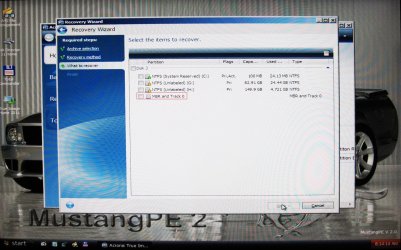
Here a picture of the TI 2011 restore window where you select what partitions to restore out of a image you created.

IMG_1051.JPG

When backing up the OS drive you need to create a image of the whole drive and when restoring you need to restore the whole drive. That is if you want the OS to boot.

Yes it is a non issue if you restore the whole drive.
 

My Computer My Computer

At a glance

Windows 7 Pro x64i5 76016GBNvidia GTS450
Computer Manufacturer/Model Number
Built be Me
OS
Windows 7 Pro x64
CPU
i5 760
Motherboard
Asus P7P55D-E Pro
Memory
16GB
Graphics Card(s)
Nvidia GTS450
Sound Card
On board
Monitor(s) Displays
Dell 2007WFP Dell 1800FP
Screen Resolution
1680x1050 1280x1024
Hard Drives
Seagate 250GB & 750GB
WD 1TB
PSU
Antec 750
Case
In Win
Cooling
Cooler Master Hyper 212+
Keyboard
IBM
Mouse
MS
Here's the basic descriptions ...


"System" = where the boot files for the entier system are stored (including dual/multi boot)

"Boot" = Simply indicates the OS that is running

"Active" = the flag that 'tells' WinRE where to (re)create the "System" boot files if a startup repair is done


The above is simplistic but accurate
 

My Computer My Computer

At a glance

W 7 64-bit UltimateIntel Q9550 Yorkfield8GB Dominator 8500C5DATI : XFX 5870
Computer Manufacturer/Model Number
* BFK Customs *
OS
W 7 64-bit Ultimate
CPU
Intel Q9550 Yorkfield
Motherboard
ASUS P5Q Pro
Memory
8GB Dominator 8500C5D
Graphics Card(s)
ATI : XFX 5870
Sound Card
Realtek HD Audio 7-1
Monitor(s) Displays
1x 47" LCD HDMI & 3x 26" LCD HDMI
Screen Resolution
1920x1080P & 1920x1200
Hard Drives
1x 80GB Intel X25-M G2 SSD : 1x 500GB & 1x 640GB WD Caviar Black(s)
PSU
Corsair 620HX
Case
Cooler Master RC-690
Cooling
Tuniq Tower 120, 2x 140mm and 3x 120mm case fans
Keyboard
Microsoft 500
Mouse
Razer Diamondback 3G
Internet Speed
14 Mb/s
Other Info
1x Koutech 3Gb/s SATA HDD Hot Swap Rack
Ah. Thank you guys.

"System" = Boot Files makes it all very clear now.

So glad I did not install that reserved partition on this system. So much simpler.
 

My Computer My Computer

At a glance

Windows 7 64 Bit Home Premium SP1i7-3820GSkill F3-14900CL9Q - 16GBEVGA GeForce GTX660 - Driver 352.86
Computer type
PC/Desktop
Computer Manufacturer/Model Number
Home Built - Jan 2013
OS
Windows 7 64 Bit Home Premium SP1
CPU
i7-3820
Motherboard
Asus P9X79-PRO - Bios 4608
Memory
GSkill F3-14900CL9Q - 16GB
Graphics Card(s)
EVGA GeForce GTX660 - Driver 352.86
Sound Card
On board Realtek ALC898
Monitor(s) Displays
Acer S271HL
Screen Resolution
1920 x 1080
Hard Drives
#1- Samsung 840 Pro Series
#2- Western Digital WD1002FAEX Sata3 Black
#3- Western Digital WD1002FAEX Sata3 Black
PSU
Corsair CMPSU-850TX-V2 - 850 watt (by Seasonic)
Case
Corsair Obsidian 550D
Cooling
Standard 3 120mm case fans, Cooler Master Hyper 212 EVO
Keyboard
MS KC-0405
Mouse
Intellimouse 5-button
Internet Speed
56 Mbits/Sec (on a good day)
Antivirus
Avast & Malwarebytes
Browser
Firefox
Other Info
Asus DVD - DRW-24B1ST 24X
Back
Top