
Solved Can you use the audio output and input jack at the same time?

MetalMan228

New member
Member
VIP
Local time
2:10 AM
Messages
265
Location
Lancaster PA
Hello everyone,

I want to know if you can run an audio output and input at the same time to record to my HDD with the built in Win7 SoundRecorder?

I have been trying to record (unsuccessfully) streaming Sirius internet radio using my JRivers MC v17, and while it will record, the resultant file will not play, either with MC or WMP. And the file size is always 4kb, no matter how long i record for.

So i found Audacity software which will let you do this:

Tutorial - Recording Computer Playback on Windows - Audacity Manual

(scroll down to the Loopback cable section)


But i want to know if you can do it with the installed SoundRecorder. Now I should say that i will be using the output from my Audioquest Dragonfly DAC, which is installed via a USB port, not the lime green output. I will unplug my powered Mackie monitors and hook up a small 3.5mm patch cable.

Any help would be appreciated!!:cool:
 

My Computer My Computer

At a glance

Windows 7 professional 64 bitAMD Athlon(tm) II X2 220 Processor3GBNVIDIA GeForce 6150SE nForce 430
Computer type
PC/Desktop
Computer Manufacturer/Model Number
HP 505B B2C02UT Business Desktop
OS
Windows 7 professional 64 bit
CPU
AMD Athlon(tm) II X2 220 Processor
Motherboard
PEGATRON (2A99)
Memory
3GB
Graphics Card(s)
NVIDIA GeForce 6150SE nForce 430
Sound Card
Realtek ALC662 High Definition Audio (OEM)
Monitor(s) Displays
OEM Dell CRT
Screen Resolution
N/A
Hard Drives
(1) NCQ Smart IV 500GB Hard Drive - 7,200RPM - SATA 3.0Gb/s

HP LightScribe CD/DVD burner
PSU
OEM HP 300 watt
Case
OEM
Cooling
OEM
Keyboard
wired Logitech K120
Mouse
wired M100 mouse
Internet Speed
G5 High Speed Internet
Antivirus
ZoneAlarm Extreme Security
Browser
FF36.04 IE11
Other Info
JRivers Media Center v17

AudioQuest dragonfly DAC V1.2

Mackie MR5 Studio Monitors
You have RealTek PC audio. Have the "Stereo Mix" set as the default recording device and you will be able to directly record streaming audio with Audacity. Nothing else is needed.

You can probably do it with all the extra equipment, but its not needed and can really get in the way for recording streaming internet audio.

I have Goldwave and use that for the same thing, but Audacity will record from the Stereo Mix so that's all you need.
 

My Computer My Computer

At a glance

Windows 10 64 bitIntel i7 6700K16GB Corsair DominatorIntel CPU Graphics
Computer type
PC/Desktop
Computer Manufacturer/Model Number
My Own Build
OS
Windows 10 64 bit
CPU
Intel i7 6700K
Motherboard
ASUS ROG Maximus VIII Hero
Memory
16GB Corsair Dominator
Graphics Card(s)
Intel CPU Graphics
Sound Card
RealTek
Monitor(s) Displays
27" Dell S2719dgf
Screen Resolution
2560X1440
Hard Drives
1 TB Samsung 850 EVO SSD for Win 10 Pro
500GB Samsung 850 EVO SSD for Win 10 Insider
2 TB drive for backup
PSU
EVGA Supernova 750G2
Case
BeQuiet Silent Base 600
Cooling
Deepcool Captain 120EX
Keyboard
Microsoft Wireless 2000
Mouse
Microsoft wireless
Internet Speed
100 MB/sec (Cable)
Antivirus
Microsoft Defender and Malwarebytes
Browser
Edge/Firefox
Other Info
Cakewalk (Sonar) by BandLab and Studio One 4.1 Pro recording studio software. MOTU 896Mk3 Hybrid recording interface, Frontier Tranzport wireless control unit, Behringer X-Touch Control Surface.
Five USB connected optical drives for CD Audio production using Nero BurningROM
Ok Fireberd,

I went to the audio icon in my system tray, right-clicked it, and went to “Recording Devices” to open up the proper settings pane.

Then i set it up as seen in screen shot. I disabled the WsAudio_Device leaving the RealTek soundcard as the only enabled recording device. I am not sure if i should have left the WsAudio enabled, so let me know.

I am going to download and install the Audacity and wait for you to reply if i have the recording mixer set correctly.

I am going to assume that i can listen to whats being recorded thru my Audioquest Dragonfly USB DAC during this process.
 

Attachments

  • SP32-20150214-162502.jpg
    SP32-20150214-162502.jpg
    101.9 KB · Views: 1

My Computer My Computer

At a glance

Windows 7 professional 64 bitAMD Athlon(tm) II X2 220 Processor3GBNVIDIA GeForce 6150SE nForce 430
Computer type
PC/Desktop
Computer Manufacturer/Model Number
HP 505B B2C02UT Business Desktop
OS
Windows 7 professional 64 bit
CPU
AMD Athlon(tm) II X2 220 Processor
Motherboard
PEGATRON (2A99)
Memory
3GB
Graphics Card(s)
NVIDIA GeForce 6150SE nForce 430
Sound Card
Realtek ALC662 High Definition Audio (OEM)
Monitor(s) Displays
OEM Dell CRT
Screen Resolution
N/A
Hard Drives
(1) NCQ Smart IV 500GB Hard Drive - 7,200RPM - SATA 3.0Gb/s

HP LightScribe CD/DVD burner
PSU
OEM HP 300 watt
Case
OEM
Cooling
OEM
Keyboard
wired Logitech K120
Mouse
wired M100 mouse
Internet Speed
G5 High Speed Internet
Antivirus
ZoneAlarm Extreme Security
Browser
FF36.04 IE11
Other Info
JRivers Media Center v17

AudioQuest dragonfly DAC V1.2

Mackie MR5 Studio Monitors
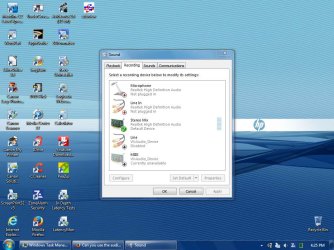
I installed Audacity and tried to record while playing the Sirius internet radio thru the browser and did record, and in .wav which is what i wanted to do, but the recording was blank.

I am not sure if it is due to having unchecked the WsAudio_Device,

Or if i had the recording device in the Audacity program selected, since you cant tell when you select it that it is actually selected.

Or if i had the recording volume down to much. Or some other issue...

This program will be a steep learning curve. I wonder if there is a preset set of parameters that when you click record that would at least get you recording and then you could fiddle with it and tweak it.

Kinda like your car wont start, but since you dont know what to look for as to why it wont start i have know idea why i recorded a blank file.
 

My Computer My Computer

At a glance

Windows 7 professional 64 bitAMD Athlon(tm) II X2 220 Processor3GBNVIDIA GeForce 6150SE nForce 430
Computer type
PC/Desktop
Computer Manufacturer/Model Number
HP 505B B2C02UT Business Desktop
OS
Windows 7 professional 64 bit
CPU
AMD Athlon(tm) II X2 220 Processor
Motherboard
PEGATRON (2A99)
Memory
3GB
Graphics Card(s)
NVIDIA GeForce 6150SE nForce 430
Sound Card
Realtek ALC662 High Definition Audio (OEM)
Monitor(s) Displays
OEM Dell CRT
Screen Resolution
N/A
Hard Drives
(1) NCQ Smart IV 500GB Hard Drive - 7,200RPM - SATA 3.0Gb/s

HP LightScribe CD/DVD burner
PSU
OEM HP 300 watt
Case
OEM
Cooling
OEM
Keyboard
wired Logitech K120
Mouse
wired M100 mouse
Internet Speed
G5 High Speed Internet
Antivirus
ZoneAlarm Extreme Security
Browser
FF36.04 IE11
Other Info
JRivers Media Center v17

AudioQuest dragonfly DAC V1.2

Mackie MR5 Studio Monitors
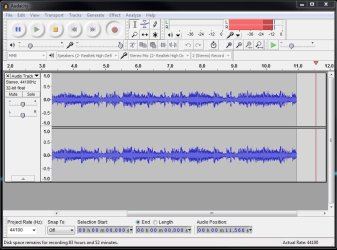
Audacity should look like this when you're recording

audacity.jpg

(maybe a bit more level)

then go File - export audio
 

My Computer My Computer

At a glance

Windows 7 Pro x64 sp1i7 4770K8GB Corsair Vengeance 1600MHzonboard
Computer type
PC/Desktop
Computer Manufacturer/Model Number
self build
OS
Windows 7 Pro x64 sp1
CPU
i7 4770K
Motherboard
MSI B85M-E45
Memory
8GB Corsair Vengeance 1600MHz
Graphics Card(s)
onboard
Monitor(s) Displays
LG 27MP35
Screen Resolution
1920-1080
Hard Drives
Seagate 2TB
PSU
Cooler Master GX 750
Case
Antec 300
Cooling
Seidon 120V
Internet Speed
60/18
Antivirus
MSE
Browser
Firefox
badcrc's screen shot is right on. Make sure Audacity is set as shown (stereo mix). The only thing you don't need 32 bit, 16 bit is perfectly fine as 16 bit 44.1Khz is CD audio standard. The only thing 32 bit will get you is double the size of files. Change recording in Preferences to 16 bit.

To get the track to record, go to "Tracks" the Add new Stereo Track. Not much different than a regular DAW recording program. e.g. I use Sonar and I have to add tracks before I can record.
 

My Computer My Computer

At a glance

Windows 10 64 bitIntel i7 6700K16GB Corsair DominatorIntel CPU Graphics
Computer type
PC/Desktop
Computer Manufacturer/Model Number
My Own Build
OS
Windows 10 64 bit
CPU
Intel i7 6700K
Motherboard
ASUS ROG Maximus VIII Hero
Memory
16GB Corsair Dominator
Graphics Card(s)
Intel CPU Graphics
Sound Card
RealTek
Monitor(s) Displays
27" Dell S2719dgf
Screen Resolution
2560X1440
Hard Drives
1 TB Samsung 850 EVO SSD for Win 10 Pro
500GB Samsung 850 EVO SSD for Win 10 Insider
2 TB drive for backup
PSU
EVGA Supernova 750G2
Case
BeQuiet Silent Base 600
Cooling
Deepcool Captain 120EX
Keyboard
Microsoft Wireless 2000
Mouse
Microsoft wireless
Internet Speed
100 MB/sec (Cable)
Antivirus
Microsoft Defender and Malwarebytes
Browser
Edge/Firefox
Other Info
Cakewalk (Sonar) by BandLab and Studio One 4.1 Pro recording studio software. MOTU 896Mk3 Hybrid recording interface, Frontier Tranzport wireless control unit, Behringer X-Touch Control Surface.
Five USB connected optical drives for CD Audio production using Nero BurningROM
Alright guys, I guess i need to noodle with it. Will report back!!

As always Fierberd, kicking butt on the audio side of things!!
 

My Computer My Computer

At a glance

Windows 7 professional 64 bitAMD Athlon(tm) II X2 220 Processor3GBNVIDIA GeForce 6150SE nForce 430
Computer type
PC/Desktop
Computer Manufacturer/Model Number
HP 505B B2C02UT Business Desktop
OS
Windows 7 professional 64 bit
CPU
AMD Athlon(tm) II X2 220 Processor
Motherboard
PEGATRON (2A99)
Memory
3GB
Graphics Card(s)
NVIDIA GeForce 6150SE nForce 430
Sound Card
Realtek ALC662 High Definition Audio (OEM)
Monitor(s) Displays
OEM Dell CRT
Screen Resolution
N/A
Hard Drives
(1) NCQ Smart IV 500GB Hard Drive - 7,200RPM - SATA 3.0Gb/s

HP LightScribe CD/DVD burner
PSU
OEM HP 300 watt
Case
OEM
Cooling
OEM
Keyboard
wired Logitech K120
Mouse
wired M100 mouse
Internet Speed
G5 High Speed Internet
Antivirus
ZoneAlarm Extreme Security
Browser
FF36.04 IE11
Other Info
JRivers Media Center v17

AudioQuest dragonfly DAC V1.2

Mackie MR5 Studio Monitors
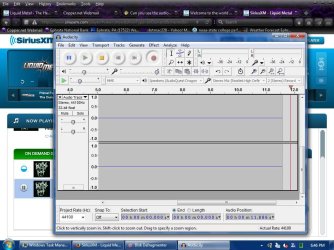
I had most settings the same, but was 32 bit, but for trials i left it as was and made adjustments so my Audacity more closely matched badcrc's screenshot, and there is still no sound on the file.

I went to tracks and I clicked add new tracks and then i clicked the recording device, (Realtek) and the section showing 44100 hz, 32 bit darkened a bit, so i think that was correct. When you click on something in Audacity there is no appearance change on a button to know if what you clicked on is what is what the setting you think you choose actually is.


What am i doing wrong? Please look at my prior posts for things i think may be not set correctly. This may be why there is low/absent signal.


The Sirius is playing fine on my PC, (you can see the player behind) but i am not sure Audacity is recording it. Possibly due to incorrect settings. I got Audacity ready, turned on the player, hit play, then clicked record on Audacity and saw there was no level to the recording.
 

Attachments

  • SP32-20150214-184700.jpg
    SP32-20150214-184700.jpg
    106.8 KB · Views: 0

My Computer My Computer

At a glance

Windows 7 professional 64 bitAMD Athlon(tm) II X2 220 Processor3GBNVIDIA GeForce 6150SE nForce 430
Computer type
PC/Desktop
Computer Manufacturer/Model Number
HP 505B B2C02UT Business Desktop
OS
Windows 7 professional 64 bit
CPU
AMD Athlon(tm) II X2 220 Processor
Motherboard
PEGATRON (2A99)
Memory
3GB
Graphics Card(s)
NVIDIA GeForce 6150SE nForce 430
Sound Card
Realtek ALC662 High Definition Audio (OEM)
Monitor(s) Displays
OEM Dell CRT
Screen Resolution
N/A
Hard Drives
(1) NCQ Smart IV 500GB Hard Drive - 7,200RPM - SATA 3.0Gb/s

HP LightScribe CD/DVD burner
PSU
OEM HP 300 watt
Case
OEM
Cooling
OEM
Keyboard
wired Logitech K120
Mouse
wired M100 mouse
Internet Speed
G5 High Speed Internet
Antivirus
ZoneAlarm Extreme Security
Browser
FF36.04 IE11
Other Info
JRivers Media Center v17

AudioQuest dragonfly DAC V1.2

Mackie MR5 Studio Monitors
I have another issue. I changed the bit to 16 and when i press record it jumps back to 32!! I tried to uncheck 32bit and then set 16 and did this a few times, but it always reverts back to 32 bit.
 

My Computer My Computer

At a glance

Windows 7 professional 64 bitAMD Athlon(tm) II X2 220 Processor3GBNVIDIA GeForce 6150SE nForce 430
Computer type
PC/Desktop
Computer Manufacturer/Model Number
HP 505B B2C02UT Business Desktop
OS
Windows 7 professional 64 bit
CPU
AMD Athlon(tm) II X2 220 Processor
Motherboard
PEGATRON (2A99)
Memory
3GB
Graphics Card(s)
NVIDIA GeForce 6150SE nForce 430
Sound Card
Realtek ALC662 High Definition Audio (OEM)
Monitor(s) Displays
OEM Dell CRT
Screen Resolution
N/A
Hard Drives
(1) NCQ Smart IV 500GB Hard Drive - 7,200RPM - SATA 3.0Gb/s

HP LightScribe CD/DVD burner
PSU
OEM HP 300 watt
Case
OEM
Cooling
OEM
Keyboard
wired Logitech K120
Mouse
wired M100 mouse
Internet Speed
G5 High Speed Internet
Antivirus
ZoneAlarm Extreme Security
Browser
FF36.04 IE11
Other Info
JRivers Media Center v17

AudioQuest dragonfly DAC V1.2

Mackie MR5 Studio Monitors
Unfortunately I have another issue. I tried recording using a CD as the source with my JRivers Media Center and Audacity gave me an error message and would not record. See screenshot

This time the bits stayed at 16.

See my earlier screenshots of recording devices for how they were set. I went in and enabled the WsAudio_Device but that did not work either. Now when i did that i had two recording devices enabled, and both were listed as default devices, but i am not sure how a PC can have two default devices.

Something is obviously not set correctly, or multiple things are awack, but this software is giving me zero results just like using JRivers to record streaming internet. It did record, but had no music on the files, they were blank. Are we all missing something here??
 

Attachments

  • SP32-20150214-200200.jpg
    SP32-20150214-200200.jpg
    103.2 KB · Views: 0

My Computer My Computer

At a glance

Windows 7 professional 64 bitAMD Athlon(tm) II X2 220 Processor3GBNVIDIA GeForce 6150SE nForce 430
Computer type
PC/Desktop
Computer Manufacturer/Model Number
HP 505B B2C02UT Business Desktop
OS
Windows 7 professional 64 bit
CPU
AMD Athlon(tm) II X2 220 Processor
Motherboard
PEGATRON (2A99)
Memory
3GB
Graphics Card(s)
NVIDIA GeForce 6150SE nForce 430
Sound Card
Realtek ALC662 High Definition Audio (OEM)
Monitor(s) Displays
OEM Dell CRT
Screen Resolution
N/A
Hard Drives
(1) NCQ Smart IV 500GB Hard Drive - 7,200RPM - SATA 3.0Gb/s

HP LightScribe CD/DVD burner
PSU
OEM HP 300 watt
Case
OEM
Cooling
OEM
Keyboard
wired Logitech K120
Mouse
wired M100 mouse
Internet Speed
G5 High Speed Internet
Antivirus
ZoneAlarm Extreme Security
Browser
FF36.04 IE11
Other Info
JRivers Media Center v17

AudioQuest dragonfly DAC V1.2

Mackie MR5 Studio Monitors
I was in error as i read that :


How do I import tracks from an audio CD?

Audacity cannot import tracks directly from an audio CD. You must use a separate program like CDex or iTunes® to extract (or "rip") CD tracks into a format that Audacity can read, like WAV or AIFF. Then you can import those WAV or AIFF files into Audacity.


I thought you could capture what ever was playing on your PC so i tried using a CD, but maybe you cannot do this
 

My Computer My Computer

At a glance

Windows 7 professional 64 bitAMD Athlon(tm) II X2 220 Processor3GBNVIDIA GeForce 6150SE nForce 430
Computer type
PC/Desktop
Computer Manufacturer/Model Number
HP 505B B2C02UT Business Desktop
OS
Windows 7 professional 64 bit
CPU
AMD Athlon(tm) II X2 220 Processor
Motherboard
PEGATRON (2A99)
Memory
3GB
Graphics Card(s)
NVIDIA GeForce 6150SE nForce 430
Sound Card
Realtek ALC662 High Definition Audio (OEM)
Monitor(s) Displays
OEM Dell CRT
Screen Resolution
N/A
Hard Drives
(1) NCQ Smart IV 500GB Hard Drive - 7,200RPM - SATA 3.0Gb/s

HP LightScribe CD/DVD burner
PSU
OEM HP 300 watt
Case
OEM
Cooling
OEM
Keyboard
wired Logitech K120
Mouse
wired M100 mouse
Internet Speed
G5 High Speed Internet
Antivirus
ZoneAlarm Extreme Security
Browser
FF36.04 IE11
Other Info
JRivers Media Center v17

AudioQuest dragonfly DAC V1.2

Mackie MR5 Studio Monitors
I installed Audacity and tried to record while playing the Sirius internet radio thru the browser and did record, and in .wav which is what i wanted to do, but the recording was blank.
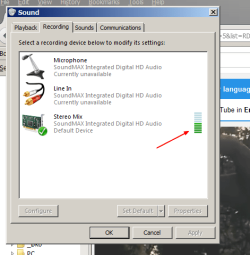
Hello, regarding recording from for example a browser, Audacitiy works out of the box if stereo mix gets a signal. First of all work to get some levels visible in the stereo mix bargraph, if there is nothing there then Audacity will also get nothing.

To give you an idea of the entertaining traps that can be involved, with the HP laptop in front of me, telephony modem + microphone + webcam must be enabled in bios (and drivers for all these installed), any of these disabled they all interact and somehow kill the stero mix signal in the process! Took me quite some time to figure that out :O)

About cd's, as mentioned there's a difference between rip and record. Audacity will record audio from CD\DVD while playing it, but can't rip anything.
 

Attachments

  • level.png
    level.png
    19.3 KB · Views: 8

My Computer My Computer

At a glance

W7, W8.1
Computer type
Laptop
Computer Manufacturer/Model Number
Dell \ Lenovo\ HP \ Toshiba
OS
W7, W8.1
Antivirus
MSE, Malwarebytes
Browser
FF
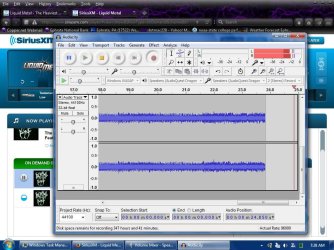
Success!!!:D:D:D

The reason for the empty recording was the first button in the toolbar was set to MME
When i set it to WASAPI it recorded perfect!!

Please see the first screen shot and let me know if the levels are good.
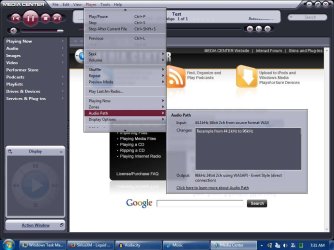
On the first shot showing it recording you can see the playback and recording volume levels have dropped from where I had set them before starting to record. In the last shot as i was exporting the file you can see the levels were where i initially had them. I may need to adjust them WHEN recording, please let me know.

I set the bit to 16, but it reverted to 32 bit floating, but when I played the file back thru JRivers the Audio Path shows it to be 16, so even though Audacity showed 32 bit, it appears to be recording in 16.

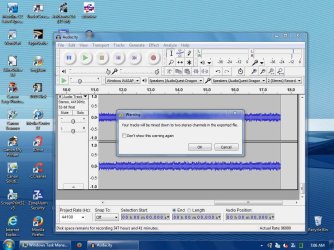
On the 3rd screen shot when I was exporting the file I got a dialog box stating that the tracks will be mixed down to stereo, but i did not set it for anything other than stereo.


Finally after all this work I can record my Sirius internet radio!! Now all i gotta do is convert my .wav to .cda and try burning to a CD and see if it will play correctly as a 44k 16bit disk on my main system.
 

Attachments

  • SP32-20150215-072854.jpg
    SP32-20150215-072854.jpg
    115.7 KB · Views: 1
  • SP32-20150215-073123.jpg
    SP32-20150215-073123.jpg
    77.3 KB · Views: 1
  • SP32-20150215-070604.jpg
    SP32-20150215-070604.jpg
    117.1 KB · Views: 1

My Computer My Computer

At a glance

Windows 7 professional 64 bitAMD Athlon(tm) II X2 220 Processor3GBNVIDIA GeForce 6150SE nForce 430
Computer type
PC/Desktop
Computer Manufacturer/Model Number
HP 505B B2C02UT Business Desktop
OS
Windows 7 professional 64 bit
CPU
AMD Athlon(tm) II X2 220 Processor
Motherboard
PEGATRON (2A99)
Memory
3GB
Graphics Card(s)
NVIDIA GeForce 6150SE nForce 430
Sound Card
Realtek ALC662 High Definition Audio (OEM)
Monitor(s) Displays
OEM Dell CRT
Screen Resolution
N/A
Hard Drives
(1) NCQ Smart IV 500GB Hard Drive - 7,200RPM - SATA 3.0Gb/s

HP LightScribe CD/DVD burner
PSU
OEM HP 300 watt
Case
OEM
Cooling
OEM
Keyboard
wired Logitech K120
Mouse
wired M100 mouse
Internet Speed
G5 High Speed Internet
Antivirus
ZoneAlarm Extreme Security
Browser
FF36.04 IE11
Other Info
JRivers Media Center v17

AudioQuest dragonfly DAC V1.2

Mackie MR5 Studio Monitors
If you have more level (without clipping - not hitting max) you get a better signal to noise ratio. Although my system is a bit different to yours, what I have to do is turn my external amp down and increase the pc volume to get more level. BTW when I made my earlier screenshot I didn't use 'new track', but simply hit record and used default settings. Anyhow now you've got some level in Audacity, you're almost there.
 

My Computer My Computer

At a glance

Windows 7 Pro x64 sp1i7 4770K8GB Corsair Vengeance 1600MHzonboard
Computer type
PC/Desktop
Computer Manufacturer/Model Number
self build
OS
Windows 7 Pro x64 sp1
CPU
i7 4770K
Motherboard
MSI B85M-E45
Memory
8GB Corsair Vengeance 1600MHz
Graphics Card(s)
onboard
Monitor(s) Displays
LG 27MP35
Screen Resolution
1920-1080
Hard Drives
Seagate 2TB
PSU
Cooler Master GX 750
Case
Antec 300
Cooling
Seidon 120V
Internet Speed
60/18
Antivirus
MSE
Browser
Firefox
First, to "rip" audio CD's to the PC as wav files (or MP3 files) you need a CD ripping program. I use the free "Audiograbber" program.

To burn a standard audio CD (from 16 bit 44Khz wav files), you don't need to convert anything. The CD burning program takes care of that. I use Nero BurningROM, but that is not a free program. Free CD burning programs such as the CDBurnerXP will do the job. Windows Media Player has burning capability but I've never used it. But, make sure you are creating a standard "audio" CD and not an MP3 CD.
 

My Computer My Computer

At a glance

Windows 10 64 bitIntel i7 6700K16GB Corsair DominatorIntel CPU Graphics
Computer type
PC/Desktop
Computer Manufacturer/Model Number
My Own Build
OS
Windows 10 64 bit
CPU
Intel i7 6700K
Motherboard
ASUS ROG Maximus VIII Hero
Memory
16GB Corsair Dominator
Graphics Card(s)
Intel CPU Graphics
Sound Card
RealTek
Monitor(s) Displays
27" Dell S2719dgf
Screen Resolution
2560X1440
Hard Drives
1 TB Samsung 850 EVO SSD for Win 10 Pro
500GB Samsung 850 EVO SSD for Win 10 Insider
2 TB drive for backup
PSU
EVGA Supernova 750G2
Case
BeQuiet Silent Base 600
Cooling
Deepcool Captain 120EX
Keyboard
Microsoft Wireless 2000
Mouse
Microsoft wireless
Internet Speed
100 MB/sec (Cable)
Antivirus
Microsoft Defender and Malwarebytes
Browser
Edge/Firefox
Other Info
Cakewalk (Sonar) by BandLab and Studio One 4.1 Pro recording studio software. MOTU 896Mk3 Hybrid recording interface, Frontier Tranzport wireless control unit, Behringer X-Touch Control Surface.
Five USB connected optical drives for CD Audio production using Nero BurningROM
Sorry about that Fireberd, I was just trying to find another source for Audacity to try and record. I am good with CD ripping/burning, I use my Jrivers. yes, mot MP3 CD.

Ok badcrc, I will mess with the volume and levels and try adjusting on the fly and see what happens to the indicators and how it effects the sound of the file if it goes up/down. Current recording levels is requiring about 1/2 of available volume during play back to get to normal listening levels, so i agree that i should bump up the recording level a tad.
 

My Computer My Computer

At a glance

Windows 7 professional 64 bitAMD Athlon(tm) II X2 220 Processor3GBNVIDIA GeForce 6150SE nForce 430
Computer type
PC/Desktop
Computer Manufacturer/Model Number
HP 505B B2C02UT Business Desktop
OS
Windows 7 professional 64 bit
CPU
AMD Athlon(tm) II X2 220 Processor
Motherboard
PEGATRON (2A99)
Memory
3GB
Graphics Card(s)
NVIDIA GeForce 6150SE nForce 430
Sound Card
Realtek ALC662 High Definition Audio (OEM)
Monitor(s) Displays
OEM Dell CRT
Screen Resolution
N/A
Hard Drives
(1) NCQ Smart IV 500GB Hard Drive - 7,200RPM - SATA 3.0Gb/s

HP LightScribe CD/DVD burner
PSU
OEM HP 300 watt
Case
OEM
Cooling
OEM
Keyboard
wired Logitech K120
Mouse
wired M100 mouse
Internet Speed
G5 High Speed Internet
Antivirus
ZoneAlarm Extreme Security
Browser
FF36.04 IE11
Other Info
JRivers Media Center v17

AudioQuest dragonfly DAC V1.2

Mackie MR5 Studio Monitors
Well, things seem well at hand now, Whew!!

I will mark this thread as solved.

Much thanks for the help fireberd and badcrc ;)

Your help was invaluable in attaining my goal here!!

Best PC forum on the planet :geek:.

Now I no longer have to miss my favorite Sirius programming :D!!
 

My Computer My Computer

At a glance

Windows 7 professional 64 bitAMD Athlon(tm) II X2 220 Processor3GBNVIDIA GeForce 6150SE nForce 430
Computer type
PC/Desktop
Computer Manufacturer/Model Number
HP 505B B2C02UT Business Desktop
OS
Windows 7 professional 64 bit
CPU
AMD Athlon(tm) II X2 220 Processor
Motherboard
PEGATRON (2A99)
Memory
3GB
Graphics Card(s)
NVIDIA GeForce 6150SE nForce 430
Sound Card
Realtek ALC662 High Definition Audio (OEM)
Monitor(s) Displays
OEM Dell CRT
Screen Resolution
N/A
Hard Drives
(1) NCQ Smart IV 500GB Hard Drive - 7,200RPM - SATA 3.0Gb/s

HP LightScribe CD/DVD burner
PSU
OEM HP 300 watt
Case
OEM
Cooling
OEM
Keyboard
wired Logitech K120
Mouse
wired M100 mouse
Internet Speed
G5 High Speed Internet
Antivirus
ZoneAlarm Extreme Security
Browser
FF36.04 IE11
Other Info
JRivers Media Center v17

AudioQuest dragonfly DAC V1.2

Mackie MR5 Studio Monitors
Back
Top