Hello i'm kinda a newbie to anything to do with external hard drives and/or Corruption.
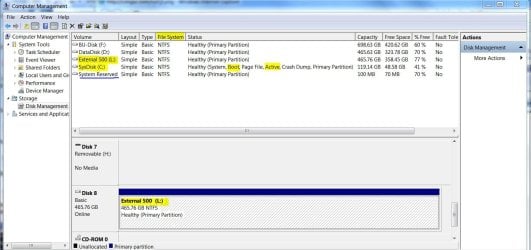
But my external hard drive recently has become unusable, When it's plugged it only shows "Local Disk ( G: )" on My computer, with no drive size/space left. (Image to explain, Yes i know My primary drive is full, but i have no external to backup on. Here)
Any interaction with it will cause windows explorer to crash, and forcing to restart windows explorer, looking around the web i see no real fix i feel like trying, as there's around 600GB of data on there i wish to keep.
So i thought it'd be best to get a hopeful fix specific to my problem just to make sure i don't mess-up and lose the data.
The Harddrive itself is a "Hitachi 1tb External Hard Drive", For what model i have no idea, but looks exactly like this image: Here
It's a Dual power-source external hard drive connected by USB 2.0.
the only real problem i had with the drive prior to this problem was i had a little notification when it was connected asking me to scan for errors, i was kinda worried about the possible corruption so i went ahead and left it to scan the 2 billion odd bytes from what i remember , took ages to do but the problem was still there, I saw no issue with any of the files on there after pressing the "continue without scanning" so i just thought it might have been a bug, as the drive seemed normal.
But then after a while this problem occurred and since hasn't been fixed, i can't seem to even format it as right-clicking the drive has the same outcome as double-clicking.
I'd like to thank anyone willing to take the time and help me out with this problem, and try to keep things simple if possible, don't know much about Hard drives.
But my external hard drive recently has become unusable, When it's plugged it only shows "Local Disk ( G: )" on My computer, with no drive size/space left. (Image to explain, Yes i know My primary drive is full, but i have no external to backup on. Here)
Any interaction with it will cause windows explorer to crash, and forcing to restart windows explorer, looking around the web i see no real fix i feel like trying, as there's around 600GB of data on there i wish to keep.
So i thought it'd be best to get a hopeful fix specific to my problem just to make sure i don't mess-up and lose the data.
The Harddrive itself is a "Hitachi 1tb External Hard Drive", For what model i have no idea, but looks exactly like this image: Here
It's a Dual power-source external hard drive connected by USB 2.0.
the only real problem i had with the drive prior to this problem was i had a little notification when it was connected asking me to scan for errors, i was kinda worried about the possible corruption so i went ahead and left it to scan the 2 billion odd bytes from what i remember , took ages to do but the problem was still there, I saw no issue with any of the files on there after pressing the "continue without scanning" so i just thought it might have been a bug, as the drive seemed normal.
But then after a while this problem occurred and since hasn't been fixed, i can't seem to even format it as right-clicking the drive has the same outcome as double-clicking.
I'd like to thank anyone willing to take the time and help me out with this problem, and try to keep things simple if possible, don't know much about Hard drives.
My Computer
At a glance
Windows 7 Ultimate 32-bit SP1 (Build 7601)Intel Core 2 Duo @ 2.10GHz4096Mb Installed - 3064 UsableMobile Intel(R) 965 Express Chipset Family
- Computer Manufacturer/Model Number
- HP Compaq 6710b
- OS
- Windows 7 Ultimate 32-bit SP1 (Build 7601)
- CPU
- Intel Core 2 Duo @ 2.10GHz
- Motherboard
- Hewlett-Packard 30C0 KBC Version 71.2E
- Memory
- 4096Mb Installed - 3064 Usable
- Graphics Card(s)
- Mobile Intel(R) 965 Express Chipset Family
- Sound Card
- SoundMAX Integrated Digital HD Audio
- Monitor(s) Displays
- Generic PnP Monitor (15.4"vis, January 2006)
- Screen Resolution
- 1280x800
- Hard Drives
- Hitachi HTS542580K9A300 [Hard drive] (80.03 GB)
- Internet Speed
- 25 Mbit Download - 2.8 Mbit upload