Hi Guys
I restored an image created with Macrium Reflect on my wife's computer (Custom build with Asus P8Z77-V LX mother board) and everything went fine until rebooting when i got to the "Please press DEL or F2 to enter UEFI BIOS settings" then everything stopped.
I have tried F2 DEL F8 F12 just about all the F combinations and nothing works, I have two SSD drives one with Win7 Pro and one with Win10 Pro (not connected at the same time) and neither of them will boot up.
I have tried changing the jumper pins from 1 and 2 to 2 and 3 for 10 sec to clear the RTC Ram in CMOS then returned then to 1 and 2 and tried rebooting...no change so i removed the battery and repeated the jumper pin swap then reinstalled the battery and still no change, cannot get passed press DEL or F2 to access the BIOS settings.
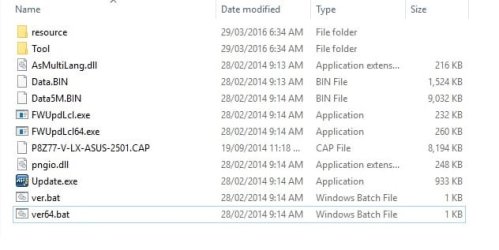
I even downloaded the latest BIOS and updater as shown and put them on a USB flash drive together and tried the Macrium Rescue disk, and still nothing happened and it will not open the BIOS maybe i got it all wrong ?
I was hoping someone here might know how to put it right, i am out of idea's and any help would be greatly appreciated.
System Specs
Intel Core i7 3770K Ivy Bridge 3.5GHz 8MB
Motherboard Asus P8Z77-V LX LGA1155 ATX Motherboard
Memory G.Skill 8GB Kit (2x4GB) DDR3 Ripjaws X C9 1600MHz
Samsung 840 Series 120GB 2.5" 7mm SSD SATA3 530/130 x2 = 1 Win7 and 1 Win10
Storage Drive Western Digital Caviar Black WD2002FAEX 3.5" 2TB 64MB 7200RPM
Graphics Card Leadtek Quadro 410 512MB/DVI/DP
Optical Drive LG CH12LS28 12x Black SATA Blu-Ray Combo Drive Retail Pack
Card Reader Shintaro 30 in 1 3.5"
Sound Card Integrated
Gigabyte GZ-X7 Black Mid Tower Case -
420W PSU Power Supply XFX Core Edition
Operating System Microsoft Windows 7 Professional OEM 64Bit
Anti Virus Trend Micro Maximum Security
Keyboard & Mouse Microsoft Wireless Desktop 2000
Monitor Asus VE247H 23.6" Full HD WS 2MS LED
Thanks Guys.
Attachments
USB Drive.jpg
25 KB
· Views: 65
My Computer
At a glance
Microsoft Windows 7 Professional 64-bitIntel Core i7 4770 Haswell @3.4GHzG.Skill 16GB Kit (2x8GB) DDR3 Ripjaws X C10 1...Leadtek Quadro 410 192-CUDA Core 512MB DDR3 DVI
Computer type
PC/Desktop
Computer Manufacturer/Model Number
Custom Build
OS
Microsoft Windows 7 Professional 64-bit
CPU
Intel Core i7 4770 Haswell @3.4GHz
Motherboard
ASUSTeK Z87-PRO LGA1150 ATX Motherboard
Memory
G.Skill 16GB Kit (2x8GB) DDR3 Ripjaws X C10 1600MHz
Graphics Card(s)
Leadtek Quadro 410 192-CUDA Core 512MB DDR3 DVI
Sound Card
Realtek® ALC1150 8-Channel High Definition Audio CODEC
Monitor(s) Displays
Asus MX239H 23" Full HD AH-IPS WS 5MS Frameless LED Monitor
Screen Resolution
1920 x 1080 x 32 bits (4294967296 color 50 Hz/75 Hz
Hard Drives
Samsung 840 Pro Series 2.5" 7mm 256GB SSD
Hitachi HDS722020ALA330 ATA Device 2TB
WDC WD2002FAEX-007BA0 ATA Device 2TB
PSU
XFX Core Edition 550W 80PLUS Bronze Power Supply
Case
Gigabyte GZ-X7 Black Mid Tower Case -
Cooling
Standard Fans in Case
Keyboard
Microsoft Wireless Desktop 2000
Mouse
Microsoft Wireless Desktop 2000
Internet Speed
Reasonable
Antivirus
Trend Micro Titanium Maximum Security
Browser
Firefox 95% - Exploror 5%
Other Info
On board Wi-Fi 802.11 a/b/g/n Qualcomm Atheros AR946x Wireless Ethernet 802.3 Network Adapter
Supports dual band frequency 2.4/5 GHz
cannot do that as my only usb keyboard has the old round purple connector and there is only 1 connection on the back of my tower for that type of plug, unless i can find another keyboard with a flat usb connector
Last edited:
My Computer
At a glance
Microsoft Windows 7 Professional 64-bitIntel Core i7 4770 Haswell @3.4GHzG.Skill 16GB Kit (2x8GB) DDR3 Ripjaws X C10 1...Leadtek Quadro 410 192-CUDA Core 512MB DDR3 DVI
Computer type
PC/Desktop
Computer Manufacturer/Model Number
Custom Build
OS
Microsoft Windows 7 Professional 64-bit
CPU
Intel Core i7 4770 Haswell @3.4GHz
Motherboard
ASUSTeK Z87-PRO LGA1150 ATX Motherboard
Memory
G.Skill 16GB Kit (2x8GB) DDR3 Ripjaws X C10 1600MHz
Graphics Card(s)
Leadtek Quadro 410 192-CUDA Core 512MB DDR3 DVI
Sound Card
Realtek® ALC1150 8-Channel High Definition Audio CODEC
Monitor(s) Displays
Asus MX239H 23" Full HD AH-IPS WS 5MS Frameless LED Monitor
Screen Resolution
1920 x 1080 x 32 bits (4294967296 color 50 Hz/75 Hz
Hard Drives
Samsung 840 Pro Series 2.5" 7mm 256GB SSD
Hitachi HDS722020ALA330 ATA Device 2TB
WDC WD2002FAEX-007BA0 ATA Device 2TB
PSU
XFX Core Edition 550W 80PLUS Bronze Power Supply
Case
Gigabyte GZ-X7 Black Mid Tower Case -
Cooling
Standard Fans in Case
Keyboard
Microsoft Wireless Desktop 2000
Mouse
Microsoft Wireless Desktop 2000
Internet Speed
Reasonable
Antivirus
Trend Micro Titanium Maximum Security
Browser
Firefox 95% - Exploror 5%
Other Info
On board Wi-Fi 802.11 a/b/g/n Qualcomm Atheros AR946x Wireless Ethernet 802.3 Network Adapter
Supports dual band frequency 2.4/5 GHz
I just found a store in town that has an adapter to convert the old round purple plug to the flat style usb plug so i better get one and try that.....thanks mate worth a try
My Computer
At a glance
Microsoft Windows 7 Professional 64-bitIntel Core i7 4770 Haswell @3.4GHzG.Skill 16GB Kit (2x8GB) DDR3 Ripjaws X C10 1...Leadtek Quadro 410 192-CUDA Core 512MB DDR3 DVI
Computer type
PC/Desktop
Computer Manufacturer/Model Number
Custom Build
OS
Microsoft Windows 7 Professional 64-bit
CPU
Intel Core i7 4770 Haswell @3.4GHz
Motherboard
ASUSTeK Z87-PRO LGA1150 ATX Motherboard
Memory
G.Skill 16GB Kit (2x8GB) DDR3 Ripjaws X C10 1600MHz
Graphics Card(s)
Leadtek Quadro 410 192-CUDA Core 512MB DDR3 DVI
Sound Card
Realtek® ALC1150 8-Channel High Definition Audio CODEC
Monitor(s) Displays
Asus MX239H 23" Full HD AH-IPS WS 5MS Frameless LED Monitor
Screen Resolution
1920 x 1080 x 32 bits (4294967296 color 50 Hz/75 Hz
Hard Drives
Samsung 840 Pro Series 2.5" 7mm 256GB SSD
Hitachi HDS722020ALA330 ATA Device 2TB
WDC WD2002FAEX-007BA0 ATA Device 2TB
PSU
XFX Core Edition 550W 80PLUS Bronze Power Supply
Case
Gigabyte GZ-X7 Black Mid Tower Case -
Cooling
Standard Fans in Case
Keyboard
Microsoft Wireless Desktop 2000
Mouse
Microsoft Wireless Desktop 2000
Internet Speed
Reasonable
Antivirus
Trend Micro Titanium Maximum Security
Browser
Firefox 95% - Exploror 5%
Other Info
On board Wi-Fi 802.11 a/b/g/n Qualcomm Atheros AR946x Wireless Ethernet 802.3 Network Adapter
Supports dual band frequency 2.4/5 GHz
Hi,
Where was the system image located exactly ?
Was it on a totally separate external drive or on the same drive as the os the were restoring ?
I kind of doubt it's the sp/2 keyboard connection but who knows
I do however get goose bumps when I see Trend Micro :shock:
Kind of why I asked where the system image was stored :/
My Computer
At a glance
Win-7-Pro64bit 7-H-Prem-64biti7-5930K 2nd i9-9940x both water blocked VRM'...Trident-z 3200C14 2nd Trident-z 3600C16EVGA 1080ti ftw3 2nd Titan Xp both water blocked
Computer type
PC/Desktop
Computer Manufacturer/Model Number
Custom assembled by me :}
OS
Win-7-Pro64bit 7-H-Prem-64bit
CPU
i7-5930K 2nd i9-9940x both water blocked VRM's too
2nd ASUS X299 Apex/Intel i9-9940x with Custom water loop/7H-Prem-x64/Corsair 450D case/Ram Trident-z 3600C16 4x8gb / Samsung970Evo plus 500gb SSD/Dual ssd EZ swap evo/PSU EVGA SuperNova 1200w-P2 80+Platinum/GPU Titan Xp /8-ML-140 on push-pull on 2-280GTX rads
Microsoft Security Essentials and Malwarebytes Premium
Browser
Pale Moon
Other Info
All fans PWM; speeds at idle: CPU circa 500 rpm; intake circa 600 rpm; exhaust circa 600 rpm; CPU temps 27 idle and 47 C load in a warm room (27 C/81 F) when running Intel Extreme Tuning Utility stress test.
The system image was stored internally on another HDD and i have restored plenty of images, every time my grandson comes over i do an image backup before he gets his hands on it and when he leaves i restore it back to what it was.
My Computer
At a glance
Microsoft Windows 7 Professional 64-bitIntel Core i7 4770 Haswell @3.4GHzG.Skill 16GB Kit (2x8GB) DDR3 Ripjaws X C10 1...Leadtek Quadro 410 192-CUDA Core 512MB DDR3 DVI
Computer type
PC/Desktop
Computer Manufacturer/Model Number
Custom Build
OS
Microsoft Windows 7 Professional 64-bit
CPU
Intel Core i7 4770 Haswell @3.4GHz
Motherboard
ASUSTeK Z87-PRO LGA1150 ATX Motherboard
Memory
G.Skill 16GB Kit (2x8GB) DDR3 Ripjaws X C10 1600MHz
Graphics Card(s)
Leadtek Quadro 410 192-CUDA Core 512MB DDR3 DVI
Sound Card
Realtek® ALC1150 8-Channel High Definition Audio CODEC
Monitor(s) Displays
Asus MX239H 23" Full HD AH-IPS WS 5MS Frameless LED Monitor
Screen Resolution
1920 x 1080 x 32 bits (4294967296 color 50 Hz/75 Hz
Hard Drives
Samsung 840 Pro Series 2.5" 7mm 256GB SSD
Hitachi HDS722020ALA330 ATA Device 2TB
WDC WD2002FAEX-007BA0 ATA Device 2TB
PSU
XFX Core Edition 550W 80PLUS Bronze Power Supply
Case
Gigabyte GZ-X7 Black Mid Tower Case -
Cooling
Standard Fans in Case
Keyboard
Microsoft Wireless Desktop 2000
Mouse
Microsoft Wireless Desktop 2000
Internet Speed
Reasonable
Antivirus
Trend Micro Titanium Maximum Security
Browser
Firefox 95% - Exploror 5%
Other Info
On board Wi-Fi 802.11 a/b/g/n Qualcomm Atheros AR946x Wireless Ethernet 802.3 Network Adapter
Supports dual band frequency 2.4/5 GHz
Yes it has worked fine for a couple of years and all i ever did was press F2 on start up
My Computer
At a glance
Microsoft Windows 7 Professional 64-bitIntel Core i7 4770 Haswell @3.4GHzG.Skill 16GB Kit (2x8GB) DDR3 Ripjaws X C10 1...Leadtek Quadro 410 192-CUDA Core 512MB DDR3 DVI
Computer type
PC/Desktop
Computer Manufacturer/Model Number
Custom Build
OS
Microsoft Windows 7 Professional 64-bit
CPU
Intel Core i7 4770 Haswell @3.4GHz
Motherboard
ASUSTeK Z87-PRO LGA1150 ATX Motherboard
Memory
G.Skill 16GB Kit (2x8GB) DDR3 Ripjaws X C10 1600MHz
Graphics Card(s)
Leadtek Quadro 410 192-CUDA Core 512MB DDR3 DVI
Sound Card
Realtek® ALC1150 8-Channel High Definition Audio CODEC
Monitor(s) Displays
Asus MX239H 23" Full HD AH-IPS WS 5MS Frameless LED Monitor
Screen Resolution
1920 x 1080 x 32 bits (4294967296 color 50 Hz/75 Hz
Hard Drives
Samsung 840 Pro Series 2.5" 7mm 256GB SSD
Hitachi HDS722020ALA330 ATA Device 2TB
WDC WD2002FAEX-007BA0 ATA Device 2TB
PSU
XFX Core Edition 550W 80PLUS Bronze Power Supply
Case
Gigabyte GZ-X7 Black Mid Tower Case -
Cooling
Standard Fans in Case
Keyboard
Microsoft Wireless Desktop 2000
Mouse
Microsoft Wireless Desktop 2000
Internet Speed
Reasonable
Antivirus
Trend Micro Titanium Maximum Security
Browser
Firefox 95% - Exploror 5%
Other Info
On board Wi-Fi 802.11 a/b/g/n Qualcomm Atheros AR946x Wireless Ethernet 802.3 Network Adapter
Supports dual band frequency 2.4/5 GHz
Hi,
Do you boot to the Reflect WinPE recovery cd or flash media to restore the images or from inside the os ?
I'd try from boot personally that is well before anything can interrupt the restore process
I agree tapping which ever key as soon as you press the power button is the norm as far as I've ever noticed F2/ Delete/ F8/.. which ever action you want :/
My Computer
At a glance
Win-7-Pro64bit 7-H-Prem-64biti7-5930K 2nd i9-9940x both water blocked VRM'...Trident-z 3200C14 2nd Trident-z 3600C16EVGA 1080ti ftw3 2nd Titan Xp both water blocked
Computer type
PC/Desktop
Computer Manufacturer/Model Number
Custom assembled by me :}
OS
Win-7-Pro64bit 7-H-Prem-64bit
CPU
i7-5930K 2nd i9-9940x both water blocked VRM's too
2nd ASUS X299 Apex/Intel i9-9940x with Custom water loop/7H-Prem-x64/Corsair 450D case/Ram Trident-z 3600C16 4x8gb / Samsung970Evo plus 500gb SSD/Dual ssd EZ swap evo/PSU EVGA SuperNova 1200w-P2 80+Platinum/GPU Titan Xp /8-ML-140 on push-pull on 2-280GTX rads
I have a rescue disk created with Reflect WinPE recovery cd and and it wont boot from that and i downloaded a new updater exe and the latest bios from Asus and unzipped onto a usb flash drive and it wont boot from that either, it appears it wont boot from anything for some reason?
My Computer
At a glance
Microsoft Windows 7 Professional 64-bitIntel Core i7 4770 Haswell @3.4GHzG.Skill 16GB Kit (2x8GB) DDR3 Ripjaws X C10 1...Leadtek Quadro 410 192-CUDA Core 512MB DDR3 DVI
Computer type
PC/Desktop
Computer Manufacturer/Model Number
Custom Build
OS
Microsoft Windows 7 Professional 64-bit
CPU
Intel Core i7 4770 Haswell @3.4GHz
Motherboard
ASUSTeK Z87-PRO LGA1150 ATX Motherboard
Memory
G.Skill 16GB Kit (2x8GB) DDR3 Ripjaws X C10 1600MHz
Graphics Card(s)
Leadtek Quadro 410 192-CUDA Core 512MB DDR3 DVI
Sound Card
Realtek® ALC1150 8-Channel High Definition Audio CODEC
Monitor(s) Displays
Asus MX239H 23" Full HD AH-IPS WS 5MS Frameless LED Monitor
Screen Resolution
1920 x 1080 x 32 bits (4294967296 color 50 Hz/75 Hz
Hard Drives
Samsung 840 Pro Series 2.5" 7mm 256GB SSD
Hitachi HDS722020ALA330 ATA Device 2TB
WDC WD2002FAEX-007BA0 ATA Device 2TB
PSU
XFX Core Edition 550W 80PLUS Bronze Power Supply
Case
Gigabyte GZ-X7 Black Mid Tower Case -
Cooling
Standard Fans in Case
Keyboard
Microsoft Wireless Desktop 2000
Mouse
Microsoft Wireless Desktop 2000
Internet Speed
Reasonable
Antivirus
Trend Micro Titanium Maximum Security
Browser
Firefox 95% - Exploror 5%
Other Info
On board Wi-Fi 802.11 a/b/g/n Qualcomm Atheros AR946x Wireless Ethernet 802.3 Network Adapter
Supports dual band frequency 2.4/5 GHz
Hi,
Try unplugging the machine and or removing the battery if it's a laptop
Then hold the power button down for at least 1 minute (power drain) method
Then let it sit for a few more minutes
Power back up and try tapping the F2 key continuously.
My Computer
At a glance
Win-7-Pro64bit 7-H-Prem-64biti7-5930K 2nd i9-9940x both water blocked VRM'...Trident-z 3200C14 2nd Trident-z 3600C16EVGA 1080ti ftw3 2nd Titan Xp both water blocked
Computer type
PC/Desktop
Computer Manufacturer/Model Number
Custom assembled by me :}
OS
Win-7-Pro64bit 7-H-Prem-64bit
CPU
i7-5930K 2nd i9-9940x both water blocked VRM's too
2nd ASUS X299 Apex/Intel i9-9940x with Custom water loop/7H-Prem-x64/Corsair 450D case/Ram Trident-z 3600C16 4x8gb / Samsung970Evo plus 500gb SSD/Dual ssd EZ swap evo/PSU EVGA SuperNova 1200w-P2 80+Platinum/GPU Titan Xp /8-ML-140 on push-pull on 2-280GTX rads
Sound familiar? We see a pattern with ASUS motherboards and use of Macrium. It appears that the BIOS does a device scan then basically locks up when it sees the SSD (mine is a Crucial BX200 240GB). Really weird as it was OK when I first attached it. What SSD are you using?
I hope we can find an answer but I am not feeling too optimistic.
My Asus board, you enter BIOS with the Delete key and startup options with the F8 key. Try tapping the Delete key rapidly as soon as you hear the post beep, before the Asus logo.
Hi,
Yea I haven't had any issues with Macrium and an asus board.
Using an Samsung sdd though
The op on the other hand is using a hdd I believe :/
My Computer
At a glance
Win-7-Pro64bit 7-H-Prem-64biti7-5930K 2nd i9-9940x both water blocked VRM'...Trident-z 3200C14 2nd Trident-z 3600C16EVGA 1080ti ftw3 2nd Titan Xp both water blocked
Computer type
PC/Desktop
Computer Manufacturer/Model Number
Custom assembled by me :}
OS
Win-7-Pro64bit 7-H-Prem-64bit
CPU
i7-5930K 2nd i9-9940x both water blocked VRM's too
2nd ASUS X299 Apex/Intel i9-9940x with Custom water loop/7H-Prem-x64/Corsair 450D case/Ram Trident-z 3600C16 4x8gb / Samsung970Evo plus 500gb SSD/Dual ssd EZ swap evo/PSU EVGA SuperNova 1200w-P2 80+Platinum/GPU Titan Xp /8-ML-140 on push-pull on 2-280GTX rads
Hi,
What don't use Reflect for cloning :/
Not at all sure why you wouldn't just restore a system image to the ssd
My Computer
At a glance
Win-7-Pro64bit 7-H-Prem-64biti7-5930K 2nd i9-9940x both water blocked VRM'...Trident-z 3200C14 2nd Trident-z 3600C16EVGA 1080ti ftw3 2nd Titan Xp both water blocked
Computer type
PC/Desktop
Computer Manufacturer/Model Number
Custom assembled by me :}
OS
Win-7-Pro64bit 7-H-Prem-64bit
CPU
i7-5930K 2nd i9-9940x both water blocked VRM's too
2nd ASUS X299 Apex/Intel i9-9940x with Custom water loop/7H-Prem-x64/Corsair 450D case/Ram Trident-z 3600C16 4x8gb / Samsung970Evo plus 500gb SSD/Dual ssd EZ swap evo/PSU EVGA SuperNova 1200w-P2 80+Platinum/GPU Titan Xp /8-ML-140 on push-pull on 2-280GTX rads
Hi,
System images at least with reflect also uses the trim operation it even states it's using trim to not include deleted items...
My Computer
At a glance
Win-7-Pro64bit 7-H-Prem-64biti7-5930K 2nd i9-9940x both water blocked VRM'...Trident-z 3200C14 2nd Trident-z 3600C16EVGA 1080ti ftw3 2nd Titan Xp both water blocked
Computer type
PC/Desktop
Computer Manufacturer/Model Number
Custom assembled by me :}
OS
Win-7-Pro64bit 7-H-Prem-64bit
CPU
i7-5930K 2nd i9-9940x both water blocked VRM's too
2nd ASUS X299 Apex/Intel i9-9940x with Custom water loop/7H-Prem-x64/Corsair 450D case/Ram Trident-z 3600C16 4x8gb / Samsung970Evo plus 500gb SSD/Dual ssd EZ swap evo/PSU EVGA SuperNova 1200w-P2 80+Platinum/GPU Titan Xp /8-ML-140 on push-pull on 2-280GTX rads
I just got another Samsung 500 GB SSD last night and cloned my Windows 10 to it using Macrium. It booted the first time. What I did notice was when I booted into the new drive, the partition letter was removed from the old drive. So, I booted into the old drive and the partition letter was removed from the new drive.
Things may have changed now, but I recall reading an article about UEFI when it first came out. It said you cannot clone a hard drive in UEFI systems. A clone makes an exact duplicate. All hard drives have a unique drive Identification assigned by Windows. UEFI will not allow you to have 2 drives with the same ID. I am not saying this is the problem, but rather basically offering it as a possibility. The way the drives acted after I cloned the new drives was quite unusual. They do not do that in an MBR system.
That is interesting
Any reason you didn't restore a system image to it instead of cloning ?
My Computer
At a glance
Win-7-Pro64bit 7-H-Prem-64biti7-5930K 2nd i9-9940x both water blocked VRM'...Trident-z 3200C14 2nd Trident-z 3600C16EVGA 1080ti ftw3 2nd Titan Xp both water blocked
Computer type
PC/Desktop
Computer Manufacturer/Model Number
Custom assembled by me :}
OS
Win-7-Pro64bit 7-H-Prem-64bit
CPU
i7-5930K 2nd i9-9940x both water blocked VRM's too
2nd ASUS X299 Apex/Intel i9-9940x with Custom water loop/7H-Prem-x64/Corsair 450D case/Ram Trident-z 3600C16 4x8gb / Samsung970Evo plus 500gb SSD/Dual ssd EZ swap evo/PSU EVGA SuperNova 1200w-P2 80+Platinum/GPU Titan Xp /8-ML-140 on push-pull on 2-280GTX rads