
Cannot access files on USB flash drive

llama37

New member
Local time
10:23 PM
Messages
12
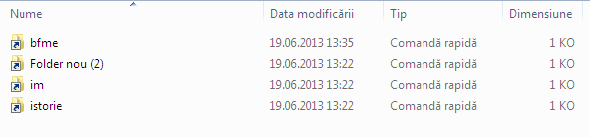
I just reinstalled my OS and inserted the flash drive. It installed properly, but after I checked it the files looked like in the screenshot I attached and I can't open them. I don't want to format it because I have a lot of important files on it. I'm not sure but I think it has something to do with Virtualbox which I installed before inserting the flash drive but overall, I really don't have a clue about what's happening with it so can someone please help me?
 

Attachments
  • F?r? titlu2.png
    F?r? titlu2.png
    2.7 KB · Views: 15

My Computer

OS
Windows 7 Ultimate 32bit
I think that's just the shortcut file.
 

My Computer

Computer type
PC/Desktop
Computer Manufacturer/Model Number
Custom Build
OS
Windows 7 Ultimate 64-bit SP1
CPU
Intel(R) Core(TM) i3-2120 CPU @ 3.30GHz
Motherboard
ECS H61H2-M17
Memory
8.00GB Dual-Channel DDR3 @ 665MHz (9-9-9-24)
Graphics Card(s)
NVIDIA GTX 750ti 2GB
Sound Card
NVIDIA Virtual Audio Device
Monitor(s) Displays
Generic Non-PnP Monitor
Screen Resolution
1366x768
Hard Drives
2 TB SSHD
PSU
700watts
Case
X-Strike
Cooling
What's this?
Keyboard
TTesport Poseidon Z RGB (Brown edition)
Mouse
Cougar 700m
Internet Speed
300 kBps (shitty country)
Antivirus
Microsoft Security Essential
Browser
Google Chrome
Other Info
Road to Monster PC <3
I just reinstalled my OS and inserted the flash drive. It installed properly, but after I checked it the files looked like in the screenshot I attached and I can't open them. I don't want to format it because I have a lot of important files on it. I'm not sure but I think it has something to do with Virtualbox which I installed before inserting the flash drive but overall, I really don't have a clue about what's happening with it so can someone please help me?

What the screenshot you have shows us is that those are not the files but shortcuts to where the files used to be. You cannot open them because they are no longer where they were before the reinstall. Looks to me that the backup of those files was done incorrectly and now they are gone.
If you haven't been using the computer much since the reinstall there might be some saving grace by using a recovery software such as Recuva or Easus.
 

My Computer

Computer type
PC/Desktop
Computer Manufacturer/Model Number
Custom Build MPCBS AMII
OS
Windows 7 Professional x64
CPU
AMD Athlon II x4 3.00 GHz
Motherboard
MSI GF615M-p33
Memory
16GB Kingston DDR3
Graphics Card(s)
Nvidia 8600 (dual DVI out for 2 monitors)
Sound Card
Onboard
Monitor(s) Displays
Acer H233H 23", ASUS 23"
Screen Resolution
1366 x 768
Hard Drives
(2) WD Blue 1 TB 3 partitions, (1) Seagate 7200 500GB with 2 partitions for useless and frequently deleted data Looking forward do an ssd for os soon.
PSU
Corsair 1100Watt
Case
Apevia HAF
Cooling
HAF AMD High Profile Heat sink and fan
Keyboard
wireless Logitech
Mouse
wireless Logitech
Internet Speed
16 mbps
Antivirus
eSet, AVG, Clam and Clamwin (depends on machine)
Browser
Firefox
Other Info
(9) Win 7 machines all x64 (POS Updated to Windows 7 pro YEA), (4) Linux machines x64 and x86 including a v3000 compaq lappy brought back to life with Mint 9 used to scan drives, (1) Linux Machine dual boot XP Pro (for testing and destroying), (1) Win 7 pro x64/Win 8.1 Lenovo Laptop Dual Boot.
But how can they be shortcuts when they were actual folders with files in them before this? That's what I really don't understand. I'll try using those softwares and I'll let you know if they worked or not.
 

My Computer

OS
Windows 7 Ultimate 32bit
But how can they be shortcuts when they were actual folders with files in them before this? That's what I really don't understand.

The only thing I can tell you is that those are showing as shortcuts and you can tell by the arrow. Without physically looking at the flash drive and trying it on our systems we are never going to be able to tell if they are indeed folders or shortcuts. If those are actual folders then I suggest either open the flash drive on another PC and see if it still shows the same or open the flash drive after booting from a Linux Live CD. That will determine if they are indeed files or shortcuts. How were they placed on the drive? Were they copy and pasted or drag and dropped? I find that with drag and dropped files that if the file and/or folder size is larger than the drive that they are dragged to then windows will place a shortcut instead.
 

My Computer

Computer type
PC/Desktop
Computer Manufacturer/Model Number
Custom Build MPCBS AMII
OS
Windows 7 Professional x64
CPU
AMD Athlon II x4 3.00 GHz
Motherboard
MSI GF615M-p33
Memory
16GB Kingston DDR3
Graphics Card(s)
Nvidia 8600 (dual DVI out for 2 monitors)
Sound Card
Onboard
Monitor(s) Displays
Acer H233H 23", ASUS 23"
Screen Resolution
1366 x 768
Hard Drives
(2) WD Blue 1 TB 3 partitions, (1) Seagate 7200 500GB with 2 partitions for useless and frequently deleted data Looking forward do an ssd for os soon.
PSU
Corsair 1100Watt
Case
Apevia HAF
Cooling
HAF AMD High Profile Heat sink and fan
Keyboard
wireless Logitech
Mouse
wireless Logitech
Internet Speed
16 mbps
Antivirus
eSet, AVG, Clam and Clamwin (depends on machine)
Browser
Firefox
Other Info
(9) Win 7 machines all x64 (POS Updated to Windows 7 pro YEA), (4) Linux machines x64 and x86 including a v3000 compaq lappy brought back to life with Mint 9 used to scan drives, (1) Linux Machine dual boot XP Pro (for testing and destroying), (1) Win 7 pro x64/Win 8.1 Lenovo Laptop Dual Boot.
From what I remember, they were copied and pasted. Some may have been dragged and dropped
 

My Computer

OS
Windows 7 Ultimate 32bit
Oh I just remembered. Except for those folders I also had a ppt file which was working
 

My Computer

OS
Windows 7 Ultimate 32bit
Put the usb stick in another pc.... same problem?
 

My Computer

Computer type
Laptop
Computer Manufacturer/Model Number
ACER ASPIRE 5742G
OS
Microsoft Windows 7 Home Premium 64-bits 7601 Multiprocessor Free Service Pack 1
CPU
Intel(R) Core(TM) i3 CPU M 370 @ 2.40GHz
Motherboard
Acer Aspire 5742G
Memory
4,00 GB
Graphics Card(s)
ATI Mobility Radeon HD 5400 Series
Sound Card
(1) AMD High Definition Audio Device (2) Realtek High Defi
Screen Resolution
1366 x 768 x 32 bits (4294967296 colors) @ 60 Hz
Hard Drives
WDC WD5000BEVT-22ZAT0
But how can they be shortcuts when they were actual folders with files in them before this? That's what I really don't understand. I'll try using those softwares and I'll let you know if they worked or not.

When opening shortcuts the folder will open to the redirected place as if it was the folder itself. The only time it would not open is if the location was unavailable which appears to be the case based upon evidence you have provided.
 

My Computer

Computer type
PC/Desktop
Computer Manufacturer/Model Number
Custom Built
OS
Windows 7 Professional x64 SP1 ; Windows Server 2012 R2 Standard
CPU
Intel Core i5 2400 @ 3.10GHz
Motherboard
Foxconn H67MP-S/-V/H67MP
Memory
8.0GB DDR3 @ 665MHz (2GBx4)
Graphics Card(s)
AMD Radeon HD 6870
Sound Card
Realtek High Definition Audio
Monitor(s) Displays
AOC 2243W & SMB1930NW
Screen Resolution
1440x900 & 1920x1080
Hard Drives
977GB Seagate ST31000524AS ATA Drive (SATA)
250GB WD iSCSI attached Drive
PSU
750W Gaming PSU
Case
Novatech Night
Cooling
Fan
Keyboard
Dell Standard PS/2 Keyboard
Mouse
R.A.T 07 Gaming Mouse
Internet Speed
Download: 10 Mbps Ping: 30ms Upload: 0.81 Mbps
Browser
Google Chrome
Other Info
Optiarc DVD RW AD-5260S ATA Device
Back
Top