OK. We'll see if diskpart can see it. Press the start button, and type in the search box cmd, in the entry that comes up, right click it and select run as administrator. You will get a command prompt window. type diskpart and press enter. it will take about 10 seconds and the command window will respond diskpart. Type list disk and press enter. It will show all drives connected to your computer. On the left side, each drive is numbered and it will show the size of the drive. Your SSD should be listed as disk 0. I don't know how many drives you have in your computer, but assuming only 2 your hard drive will be disk1. You can tell by the size.
Be sure to select the correct drive. Assuming it sees it and is disk 1, type select disk 1 (or whatever number it is.) Be sure you have selected the right one. It will say disk 1 is the selected disk, you will type clean all and press enter. It will take several hours, it is writing zeroes to every sector on the drive, there will be nothing left. It will look like nothing is happening, just a blinking cursor until it finishes it will say diskpart cleaned the selected drive. This isn't necessary, but I do it just to make sure, type select disk 1 again (or the correct number) when it says the selected disk is disk 1 type create partition primary and press enter. It will say that the partition is created, type list partition. It will list partition 1 which is all we created. type
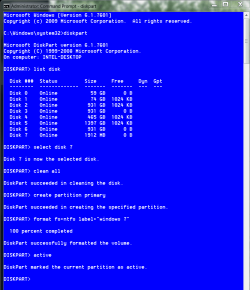
format fs=ntfs quick and press enter. It will take only a few minutes to tell you it is formatted. Then type assign. That will assign it a drive letter. type exit and press enter, type exit and press enter again. the window will close and your drive should show up in computer completely clean. As an example, I formatted a USB drive. You will do the exact same except probably a different drive number, forget the label part in the format line and do not put active. Where I put active, you put assign. This is what it should look like.
If you have any questions, don't hesitate to ask.

